Other Parts Discussed in Thread: Z-STACK, CC2530
This is regarding the simulating the condition of ZigBee collision with WiFi traffic. I have a set-up with BeagleBoneBlack connected to SmartRF05EB using serial interface. Using the ZNP binary on CC2530 connected to SmartRF05EB and Z-stack Linux gateway (z-stack_linux_gateway_arm_binaries/servers). Another SmartRF05EB with CC2530 is loaded with Light or temperature sensor application.
My first test was to simulate the ZigBee packet errors when there is WiFi traffic. I have been struggling for some two weeks and hence I am approaching for your help.
START_APPLICATION FROM ZIGBEE GATEWAY AS PER CODE:
The following are the steps that I have followed and the issue with the sample application (this is start_application under /home/root/z-stack_linux_gateway_arm_binaries/servers):-
-
I am using a WiFi module on a panel (from another project for the time being) to simulate WiFi traffic in close proximity with ZigBee. WiFi is on channel 11 and ZigBee is on Channel 24. Hence both of them are overlapping. There are two antennas from WiFi panel which I am keeping next to ZigBee whip antenna for traffic overlap.
-
I have my laptop WiFi unit and the WiFi panel enrolled to a WiFi router. Running the IPerf client on WiFi panel and IPerf Server on my laptop. Streaming data as follows:
Client: ./iperf_imx6 -c 192.168.1.108 -p 12000 -i 2 -t 60 -w1m
Server: iperf-2.0.5-2-win32>iperf -s -p 12000 -w1m
-
From ZigBee I am using one smartRF05EB with Light and another smartRF05EB (connected to BBB over serial) with ZNP. Short address of light is 0x9078, PAN-ID:- 9725, ZED, Channel number is 24.
-
Test case 1:- No WiFi traffic only Light On. Using the menu in the start_application running on BBB connected to ZNP, I can switch on the Light. I can also see 4 packets between ZNP and ZED along with ACKs in the TI Sniffer (attached). This works fine. Please see 04Dec2015_LightOn_Works_NoWiFi.png.
-
Test case 2:- No WiFi traffic only Light Off. Using the menu in the start_application running on BBB connected to ZNP, I can switch off the Light. I can also see 4 packets between ZNP and ZED along with ACKs in the TI Sniffer (attached). This works fine. Please see 04Dec2015_LightOff_Works_NoWiFi.png
-
Test case 3:- WiFi Traffic and Light On; but struck!!!!. Now for a couple of times On/off toggling worked and then it got struck. Atleast it is proven that with WiFI traffic ZigBee packets suffer collision issues. What I mean by struck is that there is no change in status of light (even no commands are sent over the air). In the start_application log (04Dec2015_LightOff_Failure_WiFIStreaming.png, 04Dec2015_LightOn_Failure_WiFIStreaming.png), I see that there is a pending attribute read and also aging_engine has kicked in and the aging timer is killed. I am able to see that the SmartRF05EB Light is still enrolled into the ZNP as the short address, PAN-ID are intact. After WiFi traffic streaming was stopped, even the On/Off light command did not work. Looks like there is no recovery for the start_application and I could not proceed further, Is there any configuration settings that will solve this problem? Or any code changes that will help to drop packets if they cannot be serviced and move forward to the next trigger to send On/Off Light command? Please help.
-
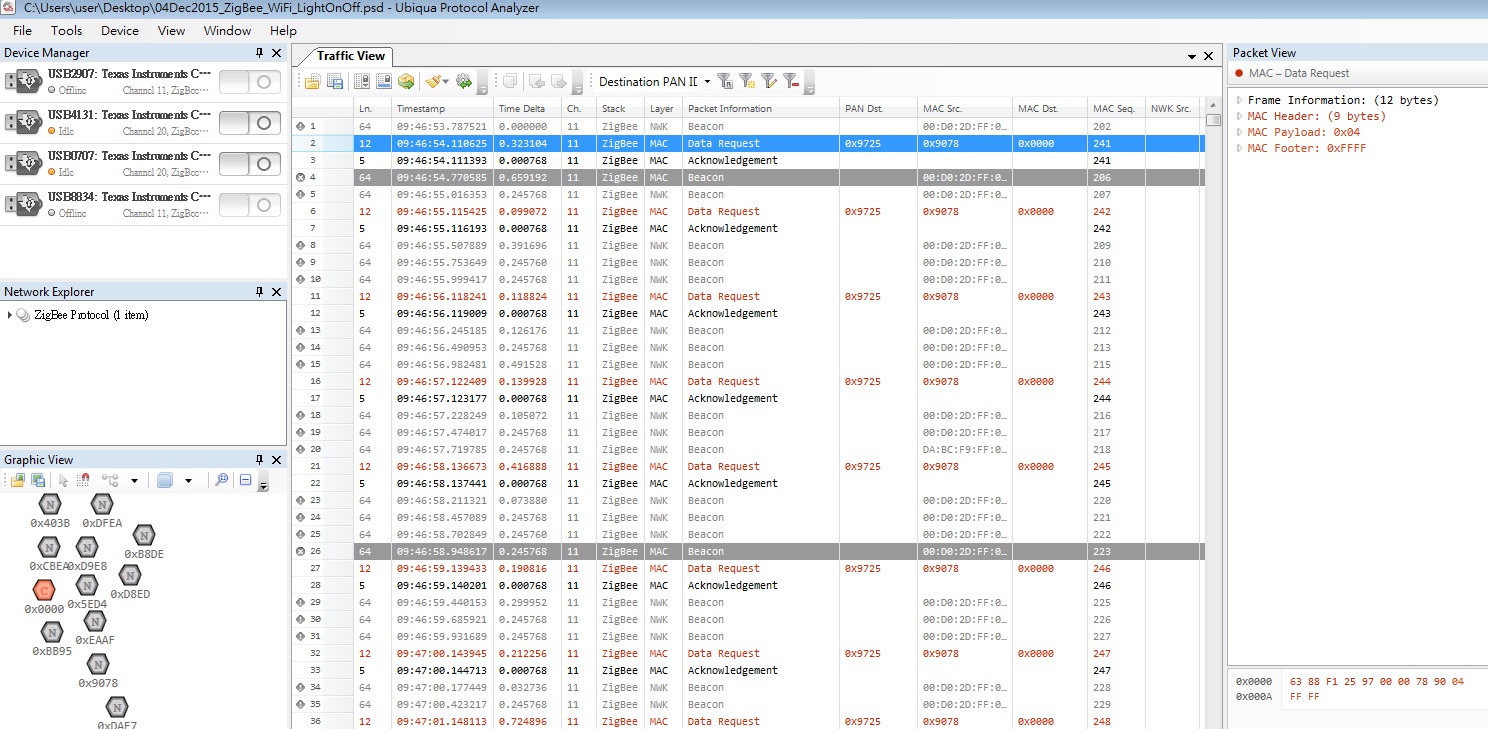
I have also captured the over the air traffic using TI sniffer for all the above test cases. Please see attached 04Dec2015_ZigBee_WiFi_LightOnOff.psd.
PER TEST CODE FROM TI:
Since the ZigBee Gateway code was not working, just to see if ZigBee packet collision can be see with WiFi traffic simultaneously, I just used the PER code at:
C:\Texas Instruments\CC2530DK\source\apps\per_test
But the problem is that even with and without WiFI traffic I did not see any PER difference. PER Transmitter close to the WiFi traffic and PER Receiver separated by a distance of 8 feet. On monitoring the over the air traffic, I understood that there is no ACK from the Receiver (which would have corrupted because of increase in noise floor on Transmitter and have increased the PER). Also I was wondering if the PER transmitter performs CSMA/CA before transmission as in that case, there would have been some packets not transmitted at all? Even I felt this PER code was not useful for WiFi-ZigBee coexistence test. The following are the PER results:
-
W/o WiFi traffic: PER:- 27/1000, 36/1000, 49/1000, 69/1000, 66/1000, 57/1000.
-
With WiFI traffic: PER:- 37/1000, 38/1000, 49/1000
Regards
Sandeep Suresh