This thread has been locked.

If you have a related question, please click the "Ask a related question" button in the top right corner. The newly created question will be automatically linked to this question.

CC2531: ZSTACK 3.0 USB dongle ZNP not working.

Part Number: CC2531

Hi,

I am trying to run ZNP on a CC2531 USB dongle without success.

What I have done so far is:

1. Loaded CC2531SB.hex to the dongle.

2. Compiled znp CC2531-ProdSBL.

3. Run sim2bin on the CC2531.sim file that came out from the step above, creating CC2531.bin

4. Used SerialBootTool to upload CC2531.bin

All above steps worked fine.

The problem is that after that I can connect to the serial port only during the first minute, while the dongle is still running the bootloader. After the first minute I can still see the serial port on the devices manger, but I cannot connect to it. It seems like there is something wrong with the znp app or that it is not starting.

Any ideas to help me?

Thanks,

Rodrigo F

  • I have digged a little bit and made it work.

    I ran the debug version and observed that the program could not move from HalLedSet in hal_led.c. So disabled hal_led and it worked.

    I did the same to the PRODSBL version and it also worked.

    Rodrigo F.
  • Hi Rodrigo,

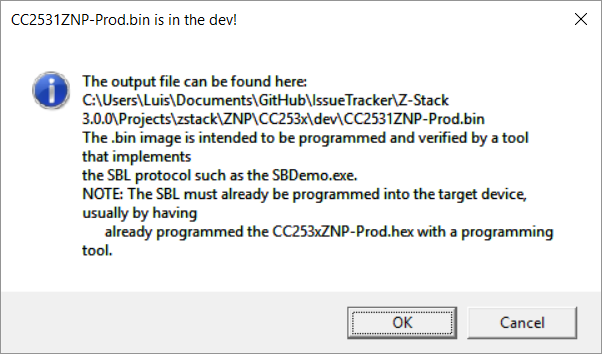
    In step 2, when you compile CC2531-ProdSBL target, you will get the following message:

    ...in which tells that the post build actions has created the binary file, so no need to run sim2bin, just take that one and load it directly with the SerialBootTool, it has working out of the box for me. If it does not work for you, either the sim2bin is doing something wrong with the binary, you have different hardware or something else is happening.

    Hope this helps!