This thread has been locked.

If you have a related question, please click the "Ask a related question" button in the top right corner. The newly created question will be automatically linked to this question.

RTOS/CC2650: CC2650 on custom board doesn't enter application

Part Number: CC2650
Other Parts Discussed in Thread: Z-STACK

Tool/software: TI-RTOS

Hello,

I am currently developing a custom PCB design with the CC2650F128 (5x5 package) and have now built the first prototype.

I am using the XDS110 Debug Probe and cJTAG.

When I connect the debugger to the board everything seems to be working fine: 

- Flash Programmer 2 identifies the MCU as CC2650 and I can program and erase the flash memory

- I can programm the flash memory using IAR Workbench

- Voltage levels are fine too: VDDS: 3.3V; VDDR: 1.8V; DCOUPL: ~ 1,3V

The problem now is, that I flashed the simple "empty" project (C:\ti\tirtos_simplelink_2_11_01_09\tirtos_simplelink_2_11_01_09_examples\IAR\CC2650DK\empty) and adapted it to my board configuration just in order test my design, but the application doesn't even seem to start. When I download the application using IAR Workbench (8.11) everything seems to work fine, but when starting the debug mode I get the following error:

Fatal error: Failed to stop execution: (Error -2062 @ 0x0)

Unable to halt device. Reset the device, and retry the operation. If error persists, confirm configuration, power-cycle the board, and/or try more reliable JTAG settings (e.g lower TCLK).

I flashed the exact same code (just modified the LED Pin) on to the CC2650 SensorTag STK and there it works perfectly fine..

Does anybody have an advice what might be the problem? As reading and writing memory works fine, I suppose there's a problem with the CPU. Do I maybe have to modify the ccfg - page?

Cheers, 
Felix

  • Hi,

    Are you only using TI-RTOS with your application? If so, I'd recommend upgrading to the latest (2.21.00.06):

    software-dl.ti.com/.../

    If you are using Z-Stack Home 1.2.2a (which uses TI-RTOS 2.11.01.09), have you tried running any of the sample applications on your board?
  • Hi Jason,
    you're right, I am using Z-Stack Home 1.2.2a and I have tried running the SampleDoorLock and the SampleSwitch application on my custom board. I deactivated the LCD drivers and set CC26XX_MODULE_5X5 as I'm using the RHB Package.

    But I still get the same behaviour...Here's what I did (using the XDS110 debug probe):
    1. Build and Download Z-Stack Core End Device to CC2650
    2. Download and Debug the Application (SampleDoorLock/SampleSwitch)

    Flashing seems to be working fine, but when IAR has finished loading the debug mode, the "Run" - Button is not active and I can only click on the break button. Then after 30 seconds or so (after having clicked the break button) I get the error message I described in the original post. (Error -2062 @ 0x0)

    Regards,
    Felix
  • Any idea what could cause this kind of behaviour? Could that kind of behaviour be caused if the 32,768kHz crystal is broken but is set to be used in the ccfg?
  • Hmm. Have you set the compile flag MODULE_CC26XX_5X5 in both the ZStackCore and Application projects within your workspace?

    As for the osc, you could try using the internal oscillator temporarily to see if it makes a difference:

    (in ccfg.c)

    //**************************************************
    // SCLK LF option
    //**************************************************
    // #define SET_CCFG_MODE_CONF_SCLK_LF_OPTION 0x0 // Low frequency clock derived from High Frequency XOSC
    // #define SET_CCFG_MODE_CONF_SCLK_LF_OPTION 0x1 // TBD: Digital input from AON (selects XOSC_LF as source and XOSC_LF_DIG_BYPASS=1)
    // #define SET_CCFG_MODE_CONF_SCLK_LF_OPTION 0x2 // Low frequency XOSC
    #define SET_CCFG_MODE_CONF_SCLK_LF_OPTION 0x3 // Low frequency RCOSC

  • Yes, I've set the compile flag and I've tried using the internal osc...

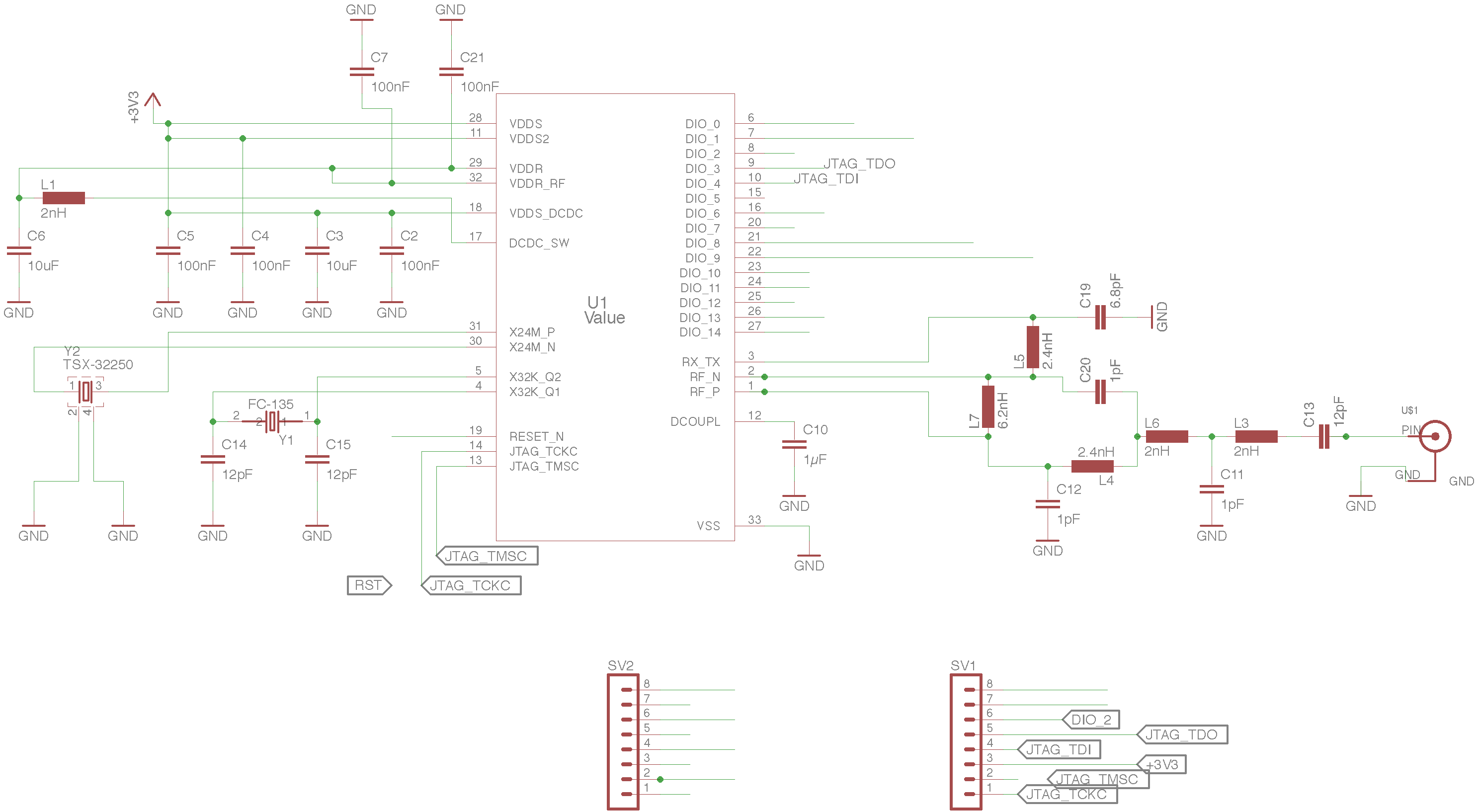
    That's the schematic, which should be more or less the reference design in the cc2650 data sheet. As I wanted to build a prototype first, I've two rows of pin headers on which I connect voltage, Reset (pull up and capacitor on breadboard), etc... Do you see an obvious fault, I'm missing? Otherwise I'll try with a second board..maybe the MCU got damaged somehow.. :/