


Other Parts Discussed in Thread: CC2538-CC2592EMK, Z-STACK
rt Number: CC2538-CC2592EMK
Hi, I'm cross compiling ZStack Linux to a mips little endian, I managed to successfully cross compile all the servers including the demo application. I can see all the servers starting correctly (NPI Server, ZStack Server for ZNP, Network Manager Server, Gateway Server, OTA Upgrade Server).
I have modified the source files so that I keep all the configuration files under /etc/zstack and the binaries under /usr/bin as opposed to everything in the same folder as with the Precompiled examples for the BBB. So I made the following changes to these files:
nwkmgrdatabase.h
#define gszNwkMgrDb_DeviceInfo_c "/etc/zstack/DbDeviceInfo.csv"
#define gszNwkMgrDb_Endpoints_c "/etc/zstack/DbEndpoints.csv"
zcl_otaserver_lnx.c
char OTASERVER_DB[MAX_SUPPORTED_FILE_NAME_LENGTH] = {"/etc/zstack/DbUpgradeList.csv"};
char OTASERVER_CTXT_INFO[MAX_SUPPORTED_FILE_NAME_LENGTH] = {"/etc/zstack/DbUpgradeCtxt.csv"};
serverep.c
char gszConfigTlgPath[MAX_CONFIG_STRING_LEN] = "/etc/zstack/";
So I placed all the following configuration files under /etc/zstack and run dos2unix on all of them as I've noticed ZStack fails to read the NPI_Gateway.cfg configuration due to CRLF.
All the files have 644 permission.
NPI_Gateway.cfg
config.ini
nwkmgr_config.ini
gateway_config.ini
gateway_config.tlg
sample_app_ota.cfg
and edited zigbeeHAgw as follows:
....
export NPI_NAME=NPI_lnx_mipsel_server
export NPI_CONFIG=NPI_Gateway.cfg
export NPI_CMD="/usr/bin/$NPI_NAME /etc/zstack/$NPI_CONFIG debugAll -v 0x0000010E"

export ZLSZNP_NAME=ZLSZNP_mipsel
export ZLSZNP_CONFIG=config.ini
export ZLSZNP_CMD="/usr/bin/$ZLSZNP_NAME 127.0.0.1:2533 /etc/zstack/$ZLSZNP_CONFIG -v 0x0000460E"
export GATEWAY_NAME=GATEWAY_SRVR_mipsel
export GATEWAY_SERVER_CMD="/usr/bin/$GATEWAY_NAME 127.0.0.1:2536 127.0.0.1:2540 -v 0x0000460E"

export NWKMGR_NAME=NWKMGR_SRVR_mipsel
export NWKMGR_CONFIG=nwkmgr_config.ini
export NWKMGR_CMD="/usr/bin/$NWKMGR_NAME 127.0.0.1:2536 /etc/zstack/$NWKMGR_CONFIG -v 0x0000460E"


export OTA_SERVER_NAME=OTA_SRVR_mipsel
export OTA_SERVER_CMD="/usr/bin/$OTA_SERVER_NAME 127.0.0.1:2536 127.0.0.1:2540 -v 0x0000460E"
....
When running the sample application and I allow join with `P` I can see the device (Coordinator) appearing in Ubiqua. Although when an End Device joins the network, the sample application doesn't display
the new device that has joined even though I can clearly see the debug from my ED (and Ubiqua) showing that the join succeeded.
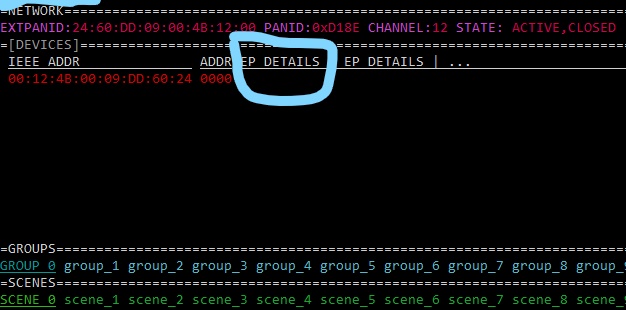
Also the sample app does not always show the endpoint number and the supported cluster i.e. 02 0007(HA) under EP and DETAILS columns for the coordinator, I don't have this problem on BBB or x86.
Beside that I can see the csv files being created under /etc/zstack so I don't think that's the issue unless the demo app is expecting to read some file from its current directory.
I attached a screenshot showing the problem:
Any suggestion would be very much appreciated.
Thanks,
John

