This thread has been locked.

If you have a related question, please click the "Ask a related question" button in the top right corner. The newly created question will be automatically linked to this question.

CC2530: Z-Stack 3.0.1 - ZCL Read/Report

Part Number: CC2530

1. I want to send read, report and send commands from a ZED with a manufacturer specific profile/cluster but apparently it's not supported ( so how do I go about doing that? Currently nothing is getting sent out at all  when I use zcl_SendRead / zcl_SendReportCmd  although 0x00 status is returned

2. is using zcl_SendCommand/ zcl_SendRead/ zcl_SendReportCmd better than directly calling AF_Datarequest? 

3. in zcl_SendCommand there is a parameter "manuCode", can you explain what that means? I'm guessing it's the msp ID

4. in the sampleapps there is a test endpoint descriptor but it doesn't have a simple descriptor. why not use the simple descriptor already defined in zcl_xxx_data.c if they're for the same endpoint?  
 

  • Can you show me how you call zcl_SendRead in your application?
  • static ZStatus_t App_OnJoinNetworkRequests( void )
    {
      ZStatus_t astatus = App_SendAnnounce(); // send report
    
      uint16 attrid[] = 
      {
        0x0008,
        0x0009,
        0x000a
      };
     
    
      zclReadCmd_t *readCmd = zcl_mem_alloc( sizeof ( zclReadCmd_t )  + sizeof( uint16 ) * 3 );
      if ( readCmd != NULL )
      {
        readCmd->numAttr = 3; // Atrribute ID
    
        for ( size_t i = 0; i < 3; i++ )
        {
          readCmd->attrID[i] = attrid[i];
        }
      }
    
      ZStatus_t status;
      status = zcl_SendRead( MYAPP_ENDPOINT, &IdentifyDstAddr, MY_CLUSTER_ID, readCmd,
                         ZCL_FRAME_CLIENT_SERVER_DIR, FALSE, 0); // have also used bdb_getZCLFrameCounter() for last argument. No difference
    
    
      zcl_mem_free(readCmd);
      
        return ( status );
    }

  • What is inside your IdentifyDstAddr?
  • IdentifyDstAddr.addrMode = (afAddrMode_t)Addr16Bit;
    IdentifyDstAddr.endPoint = 0;
    IdentifyDstAddr.addr.shortAddr = 0xFFFC;

  • You cannot use 0 as endpoint and short address 0xFFFC means broadcast. Do you mean to broadcast?
  • Ah there were two addresses I guess I got them mixed up. ill fix them and get back to you.

    what I actually meant to do exactly was:
    1. unicast read (the function above)
    2. unicast report
    3. broadcast report
  • You should use correct endpoint no matter you use unicast or broadcast.
  • I changed the short address to 0x0 and the endpoint to 0x5 (im allowed to send to any endpoint for this application).
    I still don't get anything
  • What is status code after you call zcl_SendRead in this test?

  • I get 0x2 which is :

    #define INVALIDPARAMETER 0x02
    I stepped through and it fails here:
    // Validate broadcasting
      if ( ( dstAddr->addrMode == afAddr16Bit     ) ||
           ( dstAddr->addrMode == afAddrBroadcast )    )
      {
        // Check for valid broadcast values
        if( ADDR_NOT_BCAST != NLME_IsAddressBroadcast( dstAddr->addr.shortAddr )  )
        {
          // Force mode to broadcast
          dstAddr->addrMode = afAddrBroadcast;
        }
        else
        {
          // Address is not a valid broadcast type
          if ( dstAddr->addrMode == afAddrBroadcast )
          {
            return afStatus_INVALID_PARAMETER;
          }
        }
      }

    I think it fails here

  • Hi Ben Abs,

    You also need to register you new endpoint. Take a look to afRegister() function, you will need to declare a endPointDesc_t structure for your new endpoint.

    Regards,

  • If you try unicast instead of broadcast, does it work?
  • I didn't declare a new endpoint for my app. only the destination endpoint has changed.
    but regardless, the endpoint is already registered in the init function unless I'm misunderstanding you

  • I'm not able to confirm at the moment and I won't have access to the kit for the weekend but during my testing, sending it to unicast didn't make any difference although I can't confirm that.
  • I suggest you to test unicast first.
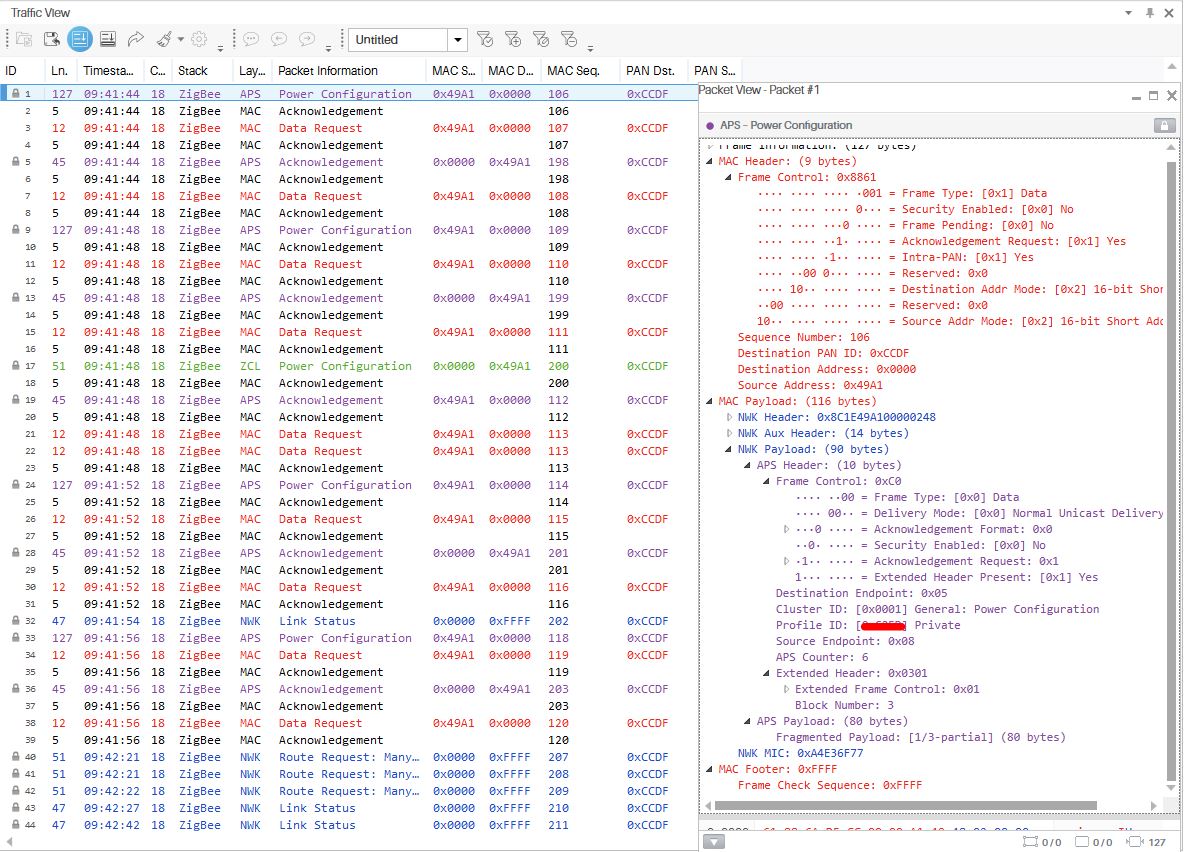
  • I tested unicast to ZC which works now but I tried the same thing with sending a report using zcl_SendReportCmd() which doesn't work.
    status returns ZSuccess.

    I'm trying report to these 2 addresses 

    DstAddr1.addrMode = (afAddrMode_t)Addr16Bit;
    DstAddr1.endPoint = 0x5;
    DstAddr1.addr.shortAddr = 0x0000;
    
    
    DstAddr2.addrMode = (afAddrMode_t)AddrBroadcast;
    DstAddr2.endPoint = 0x5;
    DstAddr2.addr.shortAddr = 0xFFFC;

    but the image is only for DstAddr1

    It says the payload is fragmented but I never get payload 2/3 or 3/3

  • Try to use "DstAddr2.addr.shortAddr = 0xFFFF;" instead of "DstAddr2.addr.shortAddr = 0xFFFC;" when doing broadcast.
  • sending with broadcast returns 0x02 from here:

        if (len > afDataReqMTU( &mtu ) )
        {
          if (apsfSendFragmented)
          {
            stat = (*apsfSendFragmented)( &req );
          }
        }


    EDIT: I have 15 attributes to report and I've just tested with 3 attributes and it works fine. testing with 7 attributes showed 1/2 payloads but never sent payload 2/2 so I think its the fragmentation

  • how do I fix fragmented payloads not sending
  • What is data length you sent?
  • msgLen was 0x00C5 (197)
  • Try to send message with length less than 80 bytes. If you need to send 197 bytes, I suggest you to break it into three parts and send them separately.
  • Hi Ben Abs,

    Please share the function you are using and the buffer that you are trying to send.

    Regards,

  • static void zcl_SendAnnounce( void )
      ZStatus_t status;
      size_t j = 0;
      zclReportCmd_t *reportCmd = zcl_mem_alloc( sizeof ( zclReportCmd_t ) + (sizeof( zclReport_t ) * NUM_MAX_IN_REPORT));
      if ( reportCmd != NULL )
      {
        //write NUM_MAX_IN_REPORT attributes, send and overwrite with next NUM_MAX_IN_REPORT attributes
        reportCmd->numAttr = NUM_MAX_IN_REPORT; // Atrribute ID
        for ( size_t i = 0; i < NUM_ATTRIBUTES ; i++ )
        {
          reportCmd->attrList[j] = attributes[i];
          //ready to send
          if ( j == (NUM_MAX_IN_REPORT-1) ) 
          {
            status = zcl_SendReportCmd( ENDPOINT, &zclAnnounceDstAddr, ZCL_CLUSTER_ID, reportCmd,
                         ZCL_FRAME_CLIENT_SERVER_DIR, FALSE, bdb_getZCLFrameCounter());
          }
          j = (j+1)%NUM_MAX_IN_REPORT;
        }
      }
      
      zcl_mem_free(reportCmd);
    }
    
    
    uint8 App_DeviceType = 0x03;
    uint8 App_FirmwareVersion[10] = { '1','.','0','.','0'};
    uint8 App_flashVersion = 0xFF;
    uint16 App_BootCount = 0x00;
    uint8 App_ProductString[30] = { 'p','r','o','d','u','c','t','_','s','t','r','i','n','g','-','B','E','N'};                        
    uint8 App_Mesh;


    I noticed that for some reason, in the packets received the productString and firmwareVersion are joined together under the firmwareVersion attribute id.
    so I get something like :

    PACKET 0xfirmwareVersionID:
    data type = 0x42
    length = 49
    data = ".0.0              .product_string-BEN"

    and apparently the datalength for the productString is 107 and the firmwareVersion is  53 .


  • You shouldn't call zcl_SendReportCmd in a for-loop.
  • is there a reason why?
    how do you suggest I send it? call it three times in a row?
  • If you call zcl_SendReportCmd in a for-loop, the sending buffer will be fulfilled. You should send multiple zcl_SendReportCmd using timer event.
  • The real issue is the product string attribute is too large ~100 even though I've set the variable to be anywhere from [2] to [49]. which means I can't send it in one zcl_SendReportCmd without using fragmentation. But I only see 1 partial payload regardless of how many partial packets there are.
    so I never get partial packet 2/2 or 2/3 or 3/3 etc
  • fragmentation only support up to 2 fragments so It should be OK to send up to about 160 bytes in single zcl_SendReportCmd .
  • when the message is fragmented, the application doesn't send the second part of the message.
    also two different attributes are getting reported as one as I stated above. this happens even if I only report one of those two attributes.
    how long do I need to wait between calls to sendreportcmd?

  • I would suggest to have 100ms between ZCL send report.

  • Hi Ben Abs,

    First of all I need to know which is the result that you want to get by sending this message so share an example of the string that you need to get as a result. The first problem with your function as YK says is that you cannot send messages with a for loop because if you send all the messages as fast as you can to the stack the network layer can be busy with other stuff and then trow away some of your messages. Other issue in your function is that you shouldn't use zcl_SendReportCmd() to send this messages because this function serializes the data internally for all the attributes in zclReportCmd_t.

    I don't get this part of your code but it looks like you are filling reportCmd->attrList[j] = attributes[i]. This ends with zcl_SendReportCmd() sending reportCmd variable NUM_ATTRIBUTES times with the complete list of attributes each time. I'm not sure if this is you want to get so please clarify.

    My recommendation is to use zcl_SendCommand() to send the frames and send just one attribute at time specially if you are sending strings of unknown length to avoid the requirement of fragmentation.

    Regards,  

  • Jose Maria Alvarez said:

    Hi Ben Abs,

    First of all I need to know which is the result that you want to get by sending this message so share an example of the string that you need to get as a result. The first problem with your function as YK says is that you cannot send messages with a for loop because if you send all the messages as fast as you can to the stack the network layer can be busy with other stuff and then trow away some of your messages. Other issue in your function is that you shouldn't use zcl_SendReportCmd() to send this messages because this function serializes the data internally for all the attributes in zclReportCmd_t.

    I have been able to get the string sent properly with a fixed length. I wasn't including the length in the string which I assumed caused some problems. i.e. I was sending

    uint8 App_ProductString[30] = { 'p','r','o','d','u','c','t','_','s','t','r','i','n','g','-','B','E','N'};    

    instead of 

    uint8 App_ProductString[30] = { '\x12','p','r','o','d','u','c','t','_','s','t','r','i','n','g','-','B','E','N'};    


    also why is it an issue to have the data serialised ?

    Jose Maria Alvarez said:

    I don't get this part of your code but it looks like you are filling reportCmd->attrList[j] = attributes[i]. This ends with zcl_SendReportCmd() sending reportCmd variable NUM_ATTRIBUTES times with the complete list of attributes each time. I'm not sure if this is you want to get so please clarify.

    My recommendation is to use zcl_SendCommand() to send the frames and send just one attribute at time specially if you are sending strings of unknown length to avoid the requirement of fragmentation.

    the code is meant to send a report of NUM_MAX_IN_REPORT attributes NUM_ATTRIBUTES/NUM_MAX_IN_REPORT times.

    it's not very good but it was what I needed to break the attribute reports up into smaller chunks for now.
    I'm now trying to use a timer of 100ms to separate the calls to zcl_SendReportCmd() like YK suggested but I haven't been able to find a way yet.

    sending all the attributes separately, wouldn't that clog the network up? 

  • You can refer to sunmaysky.blogspot.com/.../how-to-create-periodic-event-for.html to create a periodic event for sending report.
  • a periodic event looks like it'd be good repeatedly sending the same attributes.

    but I don't need to do that for now I was able to send all the mandatory attributes in one packet (it only used to fail because I wasn't formatting my messages properly)

    Thanks for all your help.

  • It's good to know you figure out where the problem is.