This thread has been locked.

If you have a related question, please click the "Ask a related question" button in the top right corner. The newly created question will be automatically linked to this question.

CC2538: Communication between Zigbee Coordinator and Router

Part Number: CC2538
Other Parts Discussed in Thread: Z-STACK,

Hello,

I have set CC2538 devices one for Coordinator and one for Router as per below link by using Z-Tool.

https://sunmaysky.blogspot.com/2017/02/use-ztool-z-stack-30-znp-to-set-up.html?m=1. I have flashed Z-stack 3.0 into CC2538 devices. But when I send APP_CNF_BDB_COMMISSIONING (Commisioning Mode is

(0x02 ) Network Steering) command from coordinator side for router join network. But Router is not able to join the network. I have shared below screen shot.
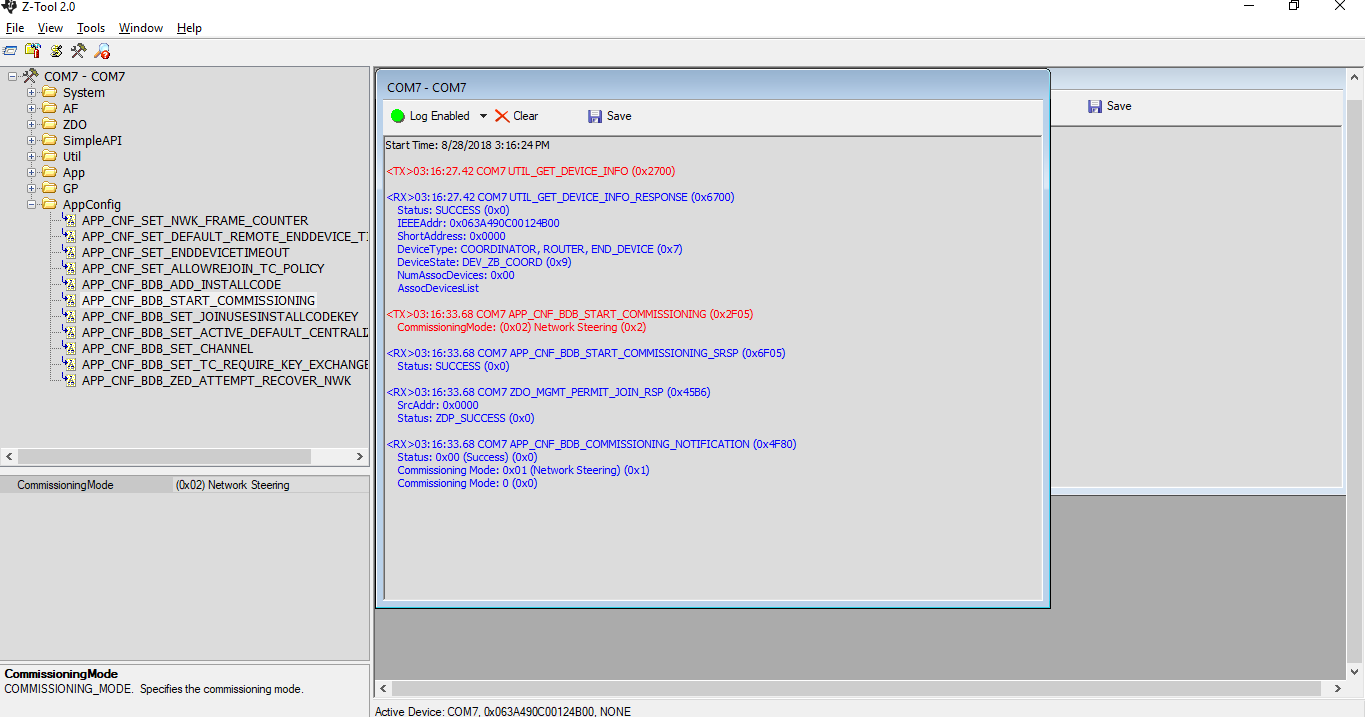
How i do the router is join to the network successfully.

Thanks and Regards,

Amar.

  • I suggest you to use sniffer to check what happens over the air.
  • Hello Amar,

    Make sure that both devices are attempting to communicate through the same channel, otherwise we will require sniffer logs as mentioned by YK.  What behavior are you observing from the router which makes it clear that joining in unsuccessful?

    Regards,
    Ryan

  • Hi YK Chen,

    Thanks for your response. I am new to zigbee environment.

    Can you please tell about sniffer. I just followed as you provided the link  and to set up coordinator and router.

    When I start the APP_CNF_BDB_START_COMMISSIONING at Router Side got the response like this

    <RX>11:45:58.28 COM6 UTIL_GET_DEVICE_INFO_RESPONSE (0x6700)
        Status: SUCCESS (0x0)
        IEEEAddr: 0x063A3F5400124B00
        ShortAddress: 0x0000
        DeviceType: COORDINATOR, ROUTER, END_DEVICE (0x7)
        DeviceState: DEV_ROUTER (0x7)
        NumAssocDevices: 0x00
        AssocDevicesList
    
    <TX>11:49:29.24 COM6 APP_CNF_BDB_START_COMMISSIONING (0x2F05)
        CommissioningMode: (0x02) Network Steering (0x2)
    
    <RX>11:49:29.26 COM6 APP_CNF_BDB_START_COMMISSIONING_SRSP (0x6F05)
        Status: SUCCESS (0x0)
    
    <RX>11:49:29.26 COM6 APP_CNF_BDB_COMMISSIONING_NOTIFICATION (0x4F80)
        Status: 0x00 (Success) (0x0)
        Commissioning Mode: 0x01 (Network Steering) (0x1)
        Commissioning Mode: 0 (0x0)
    

    But doc says router response

    10:44:26.46 COM99 APP_CNF_BDB_START_COMMISSIONING (0x2F05) --> Start commissioning using network steering as parameter to make device to start scan Zigbee network to join
        CommissioningMode: (0x02) Network Steering (0x2)
    
    10:44:26.46 COM99 APP_CNF_BDB_START_COMMISSIONING_SRSP (0x6F05)
        Status: SUCCESS (0x0)
    
    10:44:26.56 COM99 APP_CNF_BDB_COMMISSIONING_NOTIFICATION (0x4F80)
        Status: 1 (0x1)
        Commissioning Mode: 0x01 (Network Steering) (0x1)
        Commissioning Mode: 0 (0x0)
    
    10:44:26.8 COM99 ZDO_STATE_CHANGE_IND (0x45C0)
        State: INVALID_PARAMETER (0x2)
    
    10:44:27.11 COM99 ZDO_STATE_CHANGE_IND (0x45C0)
        State: INVALID_PARAMETER (0x2)
    
    10:44:27.37 COM99 ZDO_STATE_CHANGE_IND (0x45C0)
        State: 3 (0x3)
    
    10:44:27.88 COM99 ZDO_STATE_CHANGE_IND (0x45C0)
        State: 5 (0x5)
    
    10:44:28.24 COM99 ZDO_STATE_CHANGE_IND (0x45C0)
        State: 7 (0x7)
    10:44:28.9 COM99 APP_CNF_BDB_COMMISSIONING_NOTIFICATION (0x4F80)
        Status: 0x00 (Success) (0x0) --> Router joins coordinator successfully
        Commissioning Mode: 0x01 (Network Steering) (0x1)
        Commissioning Mode: 0 (0x0)

    Doc says On Ztool of coordinator, you should see ZDO_END_DEVICE_ANNCE_IND pops when router joins coordinator.

    10:44:28.84 COM1 ZDO_END_DEVICE_ANNCE_IND (0x45C1)
        SrcAddr: 0x4EE6
        NwkAddr: 0x4EE6
        IEEEAddr: 0x00124B0000E50127
        Capabilities: 0x8E

    I didn't get above response at coordinator side. Did made any mistake in devices configuration.

    Best Regards,

    Amar.

  • You can use Ubiqua as a sniffer to sniff the Zigbee packets Over The Air (Download: ). You would require a CC2351 USB dongle or any other hardware flashed with the Sniffer firmware. Complete list of capture devices is available at:

    The sniffer firmware will be available in the Installation folder of SmartRFTools which you can download from: It should be in the default path of C:\Program Files (x86)\Texas Instruments\SmartRF Tools\Packet Sniffer \bin\general\firmware or \SmartRF Packet Sniffer 2\sniffer_fw

  • You will only receive the ZDO_END_DEVICE_ANNCE_IND if you define MT_ZDO_CB_FUNC (default configuration of znp.cfg), everything else appears correct. You could debug to see if MT_ZdoHandleExceptions enters MT_ZdoEndDevAnnceCB. Are you using the SmartRF06EB and CC2538EMK? I would recommend using the ZC Light and ZR Switch examples with LCD or LED feedback to evaluate Z-Stack 3.0.

    Regards,
    Ryan