This thread has been locked.

If you have a related question, please click the "Ask a related question" button in the top right corner. The newly created question will be automatically linked to this question.

CC2652R: Sensor Controller drawing unexpected current after shutdown

Hi,

Im having a problem with the current consumption of CC2652 Sensor controller after it has finished its processing task, 

The general idea is for the CC2652 to:

- sleep for x mins,

- wake up,

- configure and start the sensor

- Sensor controller task runs to completion

- Sensor controller is powered down to save current until the next time it is needed.

I seem to be able to power up and run the sensor controller correctly and i am able to start and restart the sensor controller task effectively.

However when we analyse the current consumption of the device we see that the current draw rises when we turn on the sensor controller, but it does not drop back down after we try and close the Sensor controller.
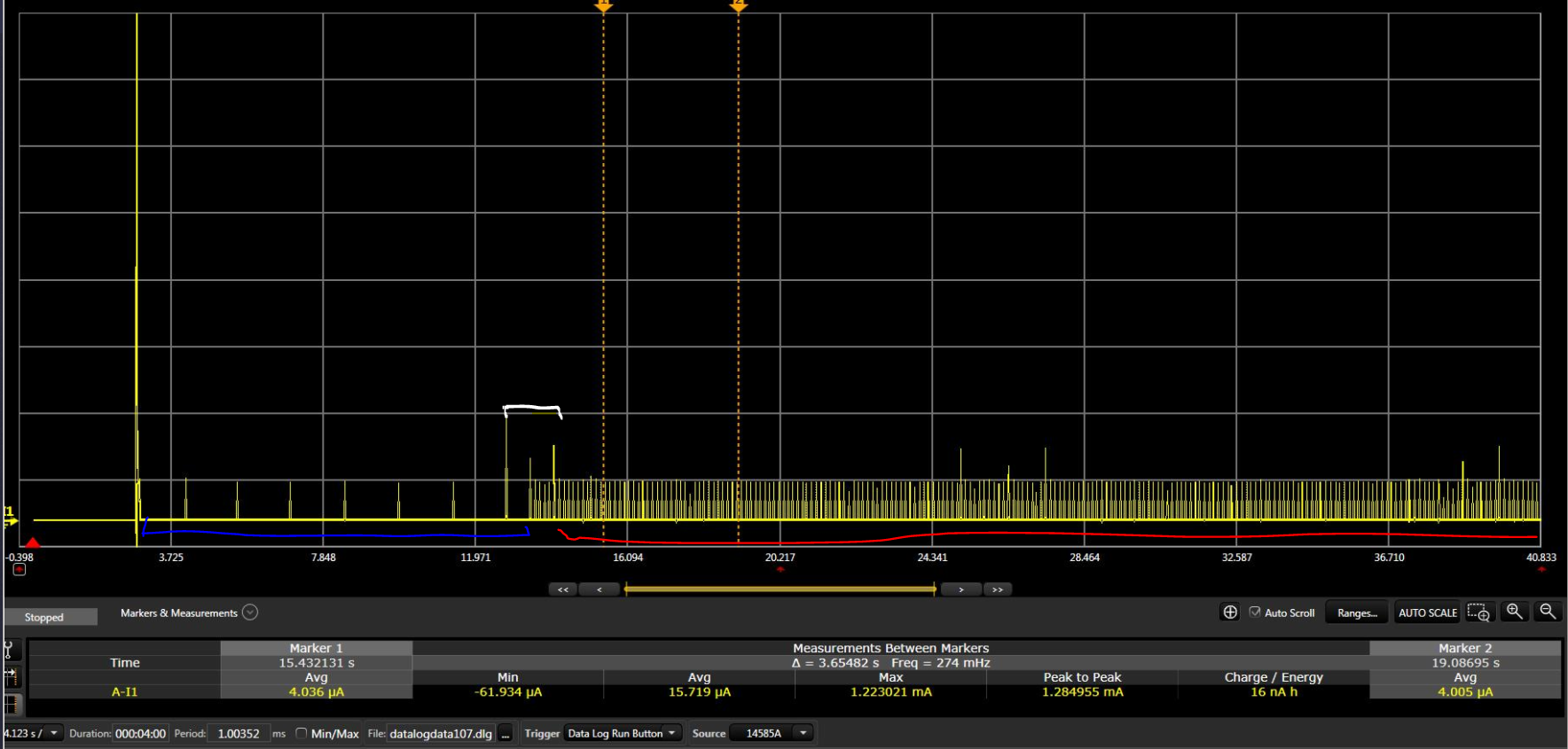
The Blue line represents the device sleeping,

the white line represents the SC being powered up and running the task and trying to shutdown

The redline represents that the SC continues to draw current forever

We are resetting the task structure and stopping the task like below..

/* Stop the Sensor Controller task */
scifResetTaskStructs( BV( SCIF_TASK_ID), 0 );
scifStopTasksNbl(BV(SCIF_TASK_ID));

Is there something else that we are missing that would allow us to completely power down the SC?

Any help would be appreciated :)

  • One thought is that you have done something in the init code in the sensor controller code that should have been turned off in the termination code.

    The current plot looks a bit strange. Is it possible to zoom in some just after the white zone to see a bit more on how the current plot looks in detail?

    Do you have a minimum project that you can share (ideally both CCS and SCS code) that could run on a launchpad?
  • Hi,
    I will try to get this pulled together,
    In the meantime, i assume it is possible to get the SC to completely shutdown after a task has been completed?
    Is this something that needs to be done in the Termination code of the SC or does this need to be done by the main core or both...
    Is there an example of what API's need to be called to completely shutdown the SC, I can try them and see if it works.
    I dont have anything in the SC controller Termination code, but i can add any recommendations you can think off?

    I was hoping this would have worked, these API's are called by the main core after the SC has completed its task.
    Am i missing anything else?

    scifResetTaskStructs( BV( SCIF_TASK_ID), 0 );
    scifStopTasksNbl(BV(SCIF_TASK_ID));

    Thanks
  • The scifStopTasksNbl should be all that is required for shutting down the SC. But what we thought about is if the SCE code opens up something that is not closed down in the termination code. Without knowing anything about your code it's unfortunately not possible to be more specific.
  • Any progress/ feedback on this one?
  • The LED PWM example uses timer2 and this example have this:

    // Disable the Timer 2 clock
    timer2SetClockSource(TIMER2_CLOCKSRC_NONE);
    timer2WaitForClockSource();

    in the termination code. Could you try this/ check this example as a reference?