This thread has been locked.

If you have a related question, please click the "Ask a related question" button in the top right corner. The newly created question will be automatically linked to this question.

Compiler/CC2530: Sending received data from Xiaomi to UART

Part Number: CC2530
Other Parts Discussed in Thread: Z-STACK

Tool/software: TI C/C++ Compiler

Hello, 

I have CC2530 flashed with SampleLight ( Zstack 1.2.2 ) as coordinator, and also xiaomi temperature sensor & switch connected to the coordinator, 

i was able to enable the UART 0 , and send some text and numbers by using the HalUARTWrite command, 

i need some guidance how to send to UART the received data of temperature and switch, i don't know which parameters the data is being kept. i tried to send the data in ZCL.c  ( zcl_ProcessMessageMSG ) but i got error message that HalWrite is not defined,

i need to know if there is any standard way to handle the incomming messages and send them to UART.

appreciate the support

  • I suggest you to enable ZTOOL_P1 and MT_XXX related defines to use UART and MT command to do this.
  • ZTOOLP1 & MT_XXX are already defined in compile flag list.

    can you please clarify just a little bit more ? a starting point , or an example that i can start with, 


    SECURE=1
    TC_LINKKEY_JOIN
    NV_INIT
    xNV_RESTORE
    xHOLD_AUTO_START
    ZTOOL_P1
    MT_TASK
    MT_APP_FUNC
    MT_SYS_FUNC
    MT_ZDO_FUNC
    LCD_SUPPORTED=DEBUG
    MULTICAST_ENABLED=FALSE
    ZCL_READ
    ZCL_WRITE
    ZCL_REPORT
    ZCL_EZMODE
    ZCL_BASIC
    ZCL_IDENTIFY
    ZCL_ON_OFF
    ZCL_SCENES
    ZCL_GROUPS
    xZCL_LEVEL_CTRL
    ZCL_DIAGNOSTIC
    FEATURE_SYSTEM_STATS
    HAL_UART=TRUE

  • If it is already enable, you should see AF_INCOMING_MSG when receiving data. You can refer to Z-Stack HA 1.2 Monitor and Test API.pdf in Z-Stack Home 1.2.2a document folder.
  • what about in case if i want to send these values to another micro controller, will this still be possible ?
    i mean send them by serial ? without the need to have a ztool
  • Yes, it’s possible. If your host system follows MT command format, I see no problem on this.
  • Hello Sarmad,

    You can still use Z-Tool to validate the foundation of your project, specifically UART communication and MT protocol, then switch to a different MCU/processor when this evaluation is complete

    Regards,
    Ryan
  • Thanks YK Chen for the support.
    Thanks Ryan, that's the plan,

    but i still have some difficulties to get these data,
    I was successfully able to communicate with coordinator via the MT Command line and these two end device are already connected.

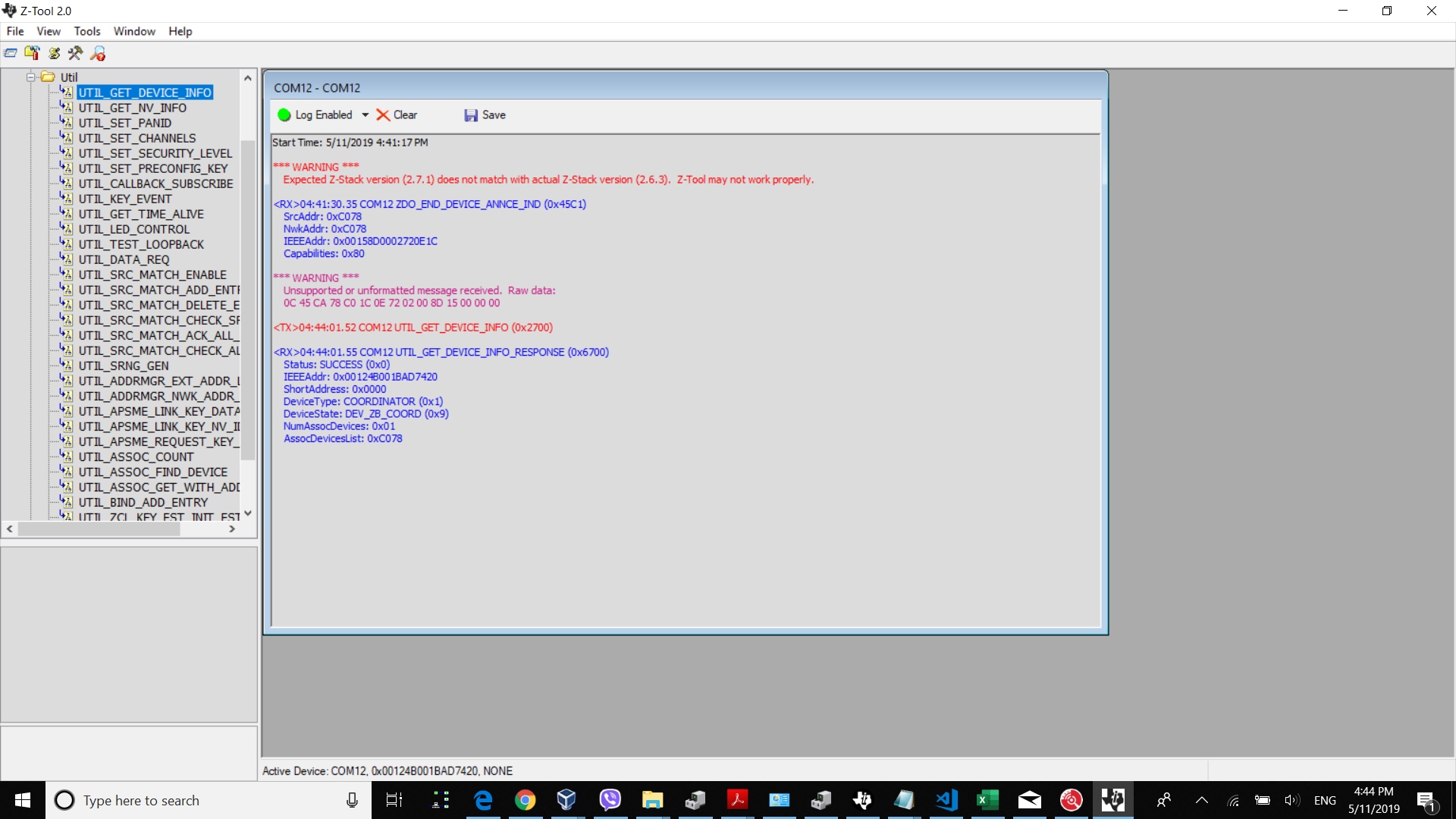
    <TX>12:27:09.3 COM11 UTIL_GET_DEVICE_INFO (0x2700)

    <RX>12:27:09.3 COM11 UTIL_GET_DEVICE_INFO_RESPONSE (0x6700)
    Status: SUCCESS (0x0)
    IEEEAddr: 0x00124B0018ED2475
    ShortAddress: 0x0000
    DeviceType: COORDINATOR (0x1)
    DeviceState: DEV_ZB_COORD (0x9)
    NumAssocDevices: 0x02
    AssocDevicesList: 0x4697, 0xE9F5


    how can i received the data from end devices in ztool ? is there any particular command to received the data dynamically in ztool once they arrived in coordinator ?
    until now i couldn't get any further than being have these devices connected.

    Could you please support ?

    i have Aqura Temperature and humidity sensor & Xiaomi Switch connected.

  • When a message arrived in coordinator it should pop <RX>... unsolicited.
  • I'm not getting any other message in ztool.

    when i debug the application, i set some number of break points in the app and here is the following
    when i click on the switch button on the End Device ( Aqura Switch ),
    in the coordinator ( CC2530 ) , the ( zclSampleLight_event_loop ) invoked and ( zclSampleLight_processIncomingMsg ) is being executed,
    and no any data received in MT ( Ztool ) , i want to receive the switch data or command or the sensor temperature readings.

  • make sure you define MT_AF_CB_FUNC in your SampleLight.
  • i have already defined all the MT symbols, including the MT_AF_CB_FUNC

    MT_TASK
    MT_APP_FUNC
    MT_SYS_FUNC
    MT_ZDO_FUNC
    MT_ZDO_MGMT
    MT_ZDO_CB_FUNC
    MT_APP_CNF_FUNC
    MT_AF_FUNC
    MT_AF_CB_FUNC
    MT_DEBUG_FUNC
    MT_NWK_FUNC
    MT_NWK_CB_FUNC
    MT_UTIL_FUNC
  • I recommend starting with TI Z-Stack 1.2.2a CC2530 SampleSwitch and SampleTemperatureSensor ZED projects. Evaluate the operation and interaction of those devices with the CC2530 ZC connected to Z-Tool via UART before moving on to 3rd-party devices. This would at least confirm whether you have the correct endpoints/clusters bound and communicating with one another. I would further recommend that you start evaluating OTA packets through sniffer software: e2e.ti.com/.../699648

    Regards,
    Ryan
  • for the sake of clarity, i'm not getting the data because the endpoints/clusters are not yet bounded,

    ok, i will test the ZC with the SamleSwitch , i believe i should get data in ztool.

  • I suggest you to use sniffer to check if your data is sent over the air first.
  • Hello, 

    i have flashed the CC2530 with SampleThermostat ZC and define all the MT functions also, i choose it because it already has the Temperature cluster defined and configured.  so it should work with 3rd party devices or at least i think. like the Aquara temperature sensor, i knew it because when i debbuged the message i found it uses the 0x0402 cluster ID as the SampleTemperatureSensor 

    I have not received any RX data in ztool, you may refer to below snapshot.

    also i took sniffer logs from smartRf packet sniffer and also from Ubiqua.

    the ZED sending the data and ZC sends back acknowledgement packet, 

    5543.Sniffer packets.psd

  • referencing to the following post : e2e.ti.com/.../548578
    and perform the AF_REGISTER, CMD, I was finally able to get data in MT Function upon clicking on Aqura Switch.

    just one last question before marked as solution provided.

    Does the received data have standard zigbee pattern ? or does each device have it owns ?
    Data: .0.U.!.. (0x18, 0x30, 0x0A, 0x55, 0x00, 0x21, 0x01, 0x00)


    <TX>12:19:38.84 COM12 AF_REGISTER (0x2400)
    EndPoint: 0x01
    AppProfID: 0x0104
    AppDeviceId: 0x0000
    AppDevVer: 0x00
    LatencyReq: NO_LATENCY_REQS (0x0)
    AppNumInClusters: 0x01
    AppInClusterList: 0x0012
    AppNumOutClusters: 0x01
    AppOutClusterList: 0x0012

    <RX>12:19:38.87 COM12 AF_REGISTER_SRSP (0x6400)
    Status: afStatus_SUCCESS (0x0)

    <RX>12:19:47.02 COM12 AF_INCOMING_MSG (0x4481)
    GroupID: 0x0000
    ClusterID: 0x0012
    SrcAddr: 0x09D1
    SrcEndpoint: 0x01
    DstEndpoint: 0x01
    WasBroadcast: 0x00
    LinkQuality: 0xA8
    SecurityUse: 0x00
    Timestamp: 0x00126D34
    TransSeqNumber: 0x00
    Len: 0x08
    Data: .0.U.!.. (0x18, 0x30, 0x0A, 0x55, 0x00, 0x21, 0x01, 0x00)

    <RX>12:19:53.39 COM12 AF_INCOMING_MSG (0x4481)
    GroupID: 0x0000
    ClusterID: 0x0012
    SrcAddr: 0x09D1
    SrcEndpoint: 0x01
    DstEndpoint: 0x01
    WasBroadcast: 0x00
    LinkQuality: 0xA0
    SecurityUse: 0x00
    Timestamp: 0x0012BAE0
    TransSeqNumber: 0x00
    Len: 0x08
    Data: .1.U.!.. (0x18, 0x31, 0x0A, 0x55, 0x00, 0x21, 0x01, 0x00)
  • It should has standard pattern which is described in ZCL spec. You can read ZCL spec at www.zigbee.org/.../07-5123-06-zigbee-cluster-library-specification.pdf