This thread has been locked.

If you have a related question, please click the "Ask a related question" button in the top right corner. The newly created question will be automatically linked to this question.

CCS/LAUNCHXL-CC26X2R1: Send message and know clusters

Part Number: LAUNCHXL-CC26X2R1

Tool/software: Code Composer Studio

Hi, I am using the MT interface to develop an application, I use SDK 3.3 and the examples zc_sw and zc_light, I can create the network, but I don't know how to communicate the devices, how can I send messages between the devices? How do I know which are the clusters to read / write information? How can I turn on / off the light through the clusters or some command?

Thank you.
Regards, Jose.

  • Hi,

    Have you already referred to these documents?
    - http://dev.ti.com/tirex/explore/node?node=AEEJ0Z3BgvagEoglvx9r1g__pTTHBmu__LATEST
    - http://dev.ti.com/tirex/content/simplelink_cc13x2_26x2_sdk_3_40_00_02/docs/zigbee/html/zigbee/mt_interface.html

    Other helpful resources are our Zigbee SimpleLink Academies: http://dev.ti.com/tirex/explore/node?node=AGJ1w770NgmECHXAzhAYMw__pTTHBmu__LATEST

    On the host side, you would need to have knowledge of the clusters supported by other devices in the network. This could be attained by using ZDO_SIMPLE_DESC_REQ (the response would contain which clusters are supported by the endpoint).
    Then you can use AF_DATA_REQ to send specific commands (for example, to send a ZCL Discover Attributes Request: https://e2e.ti.com/support/wireless-connectivity/zigbee-and-thread/f/158/p/866874/3210332#3210332).

    A good understanding of ZCL (Zigbee Cluster Library) is also necessary.


    Regards,
    Toby

  • Hi Jose,

    Basically you need to use AF_DATA_REQUEST to send ZCL information.  So after filling out the required AF data parameters (DstAddr, [Dest/Src]Endpoint, [Cluster/Trans]ID, options, radius) you will need to form a ZCL packet using the data field.  For example, to send a On/Off command my data array might look like {0x01, 0x08, 0x01} for a Frame Control of 1, Transaction Sequence Number of 8, and Command ID of 1 (On).  You will need to closely refer to the ZCL Specification to further understand how the packets should be structured, I also recommend referencing sniffer logs of existing communication examples.

    Regards,
    Ryan

  • Yes, he read most of the documentation. I have already activated the MT interface and the network created, I have also read the ZCL documentation, but I still don't know how to use the AF_DATA_REQUEST command, I don't get an answer from the end-device, I would like to have an example, or know how I can send / receive own messages and for example turn on / off the led as with the APP_MENU, I executed the command ZDO_SIMPLE_DESC_REQ and the following appears to me 

    <TX>10:16:10.99 COM6 ZDO_SIMPLE_DESC_REQ (0x2504)
    DstAddr: 0x73E4
    NWKAddrOfInterest: 0x73E4
    Endpoint: 0x08

    <RX>10:16:11 COM6 ZDO_SIMPLE_DESC_REQ_SRSP (0x6504)
    Status: afStatus_SUCCESS (0x0)

    <RX>10:16:12.63 COM6 ZDO_SIMPLE_DESC_RSP (0x4584)
    SrcAddr: 0x73E4
    Status: ZDP_SUCCESS (0x0)
    NwkAddr: 0x73E4
    Len: 0x14
    Endpoint: 0x08
    ProfileID: 0x0104
    DeviceID: 0x0101
    DeviceVersion: 1 (0x1)
    NumInClusters: 0x06
    InClusterList: 0x0000, 0x0003, 0x0004, 0x0005, 0x0006, 0x0008
    NumOutClusters: 0x00
    OutClusterList

  • Thanks Ryan for your help, I understand what you are telling me, I would like to have some reference on how the packages are formed as you mentioned, I have read ZCL specification, but I cannot find clear examples to interact with the zc_sw/zc_light application, where could I see examples of frames for different applications)? Thanks.

  • I tried to execute the following command, but I don't see any change in the led of the end-device, I understand that the cluster for on/off is 0x0006, I don't know what I'm doing wrong

    <TX>10:28:33.43 COM6 AF_DATA_REQUEST (0x2401)

    DstAddr: 0x73E4
    DestEndpoint: 0x01
    SrcEndpoint: 0x08
    ClusterID: 0x0006
    TransID: 0x00
    Options: 0x00
    Radius: 0x00
    Len: 0x03
    Data: ... (0x01, 0x08, 0x01)

    <RX>10:28:33.43 COM6 AF_DATA_REQUEST_SRSP (0x6401)
    Status: afStatus_SUCCESS (0x0)

  • Shouldn't your DestEndpoint be 0x08 in accordance with your Simple Descriptor Response?  I also recommend that your Radius be greater than 0.  You should be providing sniffer logs to better understand what is happening over-the-air.

    Regards,
    Ryan

  • I also think it should be DestEndpoint = 0x08, but there is an error placing it as a parameter, this appears to me

    <TX>10:28:19.48 COM6 AF_DATA_REQUEST (0x2401)
    DstAddr: 0x73E4
    DestEndpoint: 0x08
    SrcEndpoint: 0x01
    ClusterID: 0x0006
    TransID: 0x00
    Options: 0x00
    Radius: 0x00
    Len: 0x03
    Data: ... (0x01, 0x08, 0x01)

    <RX>10:28:19.49 COM6 AF_DATA_REQUEST_SRSP (0x6401)
    Status: afStatus_INVALID_PARAMETER (0x2)

  • But why are you now using a ScrEndpoint of 0x01 instead of 0x08?  Which endpoints are registered on your MT-enabled device?

    Regards,
    Ryan

  • Should I use 0x08 in DstAdrr and SrcAddr? I only have one device registered, an end-device with zed_light, execute the following commands but I don't get any response, What's wrong with the frame?

    <TX>11:08:06.08 COM6 UTIL_GET_DEVICE_INFO (0x2700)

    <RX>11:08:06.09 COM6 UTIL_GET_DEVICE_INFO_RESPONSE (0x6700)
    Status: SUCCESS (0x0)
    IEEEAddr: 0x00124B001CA1641D
    ShortAddress: 0x0000
    DeviceType: COORDINATOR (0x1)
    DeviceState: DEV_ZB_COORD (0x9)
    NumAssocDevices: 0x01
    AssocDevicesList: 0x73E4

    <TX>11:08:08.63 COM6 UTIL_GET_NV_INFO (0x2701)

    <RX>11:08:08.64 COM6 UTIL_GET_NV_INFO_RESPONSE (0x6701)
    Status: SUCCESS (0x0)
    IEEEAddress: 0x00124B001CA1641D
    ScanChannels: NONE (0x0)
    PanID: 0xFF07
    SecurityLevel: 0xF8
    PreConfigKey: .?(.._..qxK....Y (0x00, 0x3F, 0x28, 0xFF, 0xED, 0x5F, 0xBE, 0x80, 0x71, 0x78, 0x4B, 0x83, 0xA6, 0x84, 0x09, 0x59)

    <TX>11:08:14.93 COM6 AF_DATA_REQUEST (0x2401)
    DstAddr: 0x73E4
    DestEndpoint: 0x08
    SrcEndpoint: 0x08
    ClusterID: 0x0006
    TransID: 0x00
    Options: 0x00
    Radius: 0x07
    Len: 0x03
    Data: ... (0x01, 0x08, 0x01)

    <RX>11:08:14.93 COM6 AF_DATA_REQUEST_SRSP (0x6401)
    Status: afStatus_SUCCESS (0x0)

  • How often is the ZED polling?  Try using a TransID greater than 0 but I doubt this will make a difference.  I can only provide further assistance with a sniffer log.

    Regards,
    Ryan

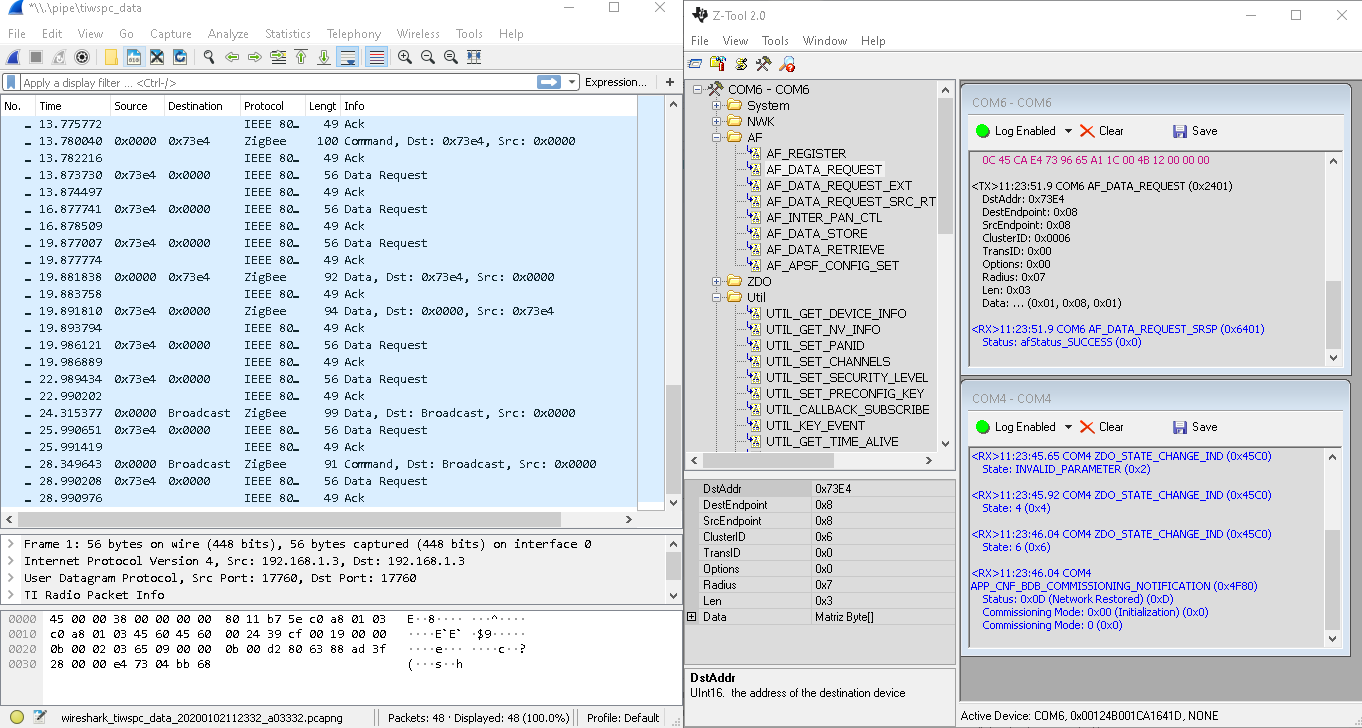
  • I'm not sure how to know about polling of ZED, this happens when I execute the command

  • Each "Data Request" is a ZED poll which appears to be every three seconds, this is acceptable.  I am interested in the packet from the ZC at 19.881838 and the ZED response at 19.891810.  Please provide the sniffer file, not a screenshot.

    Regards,
    Ryan

  • Ok, I understand, I attached the link of the sniffer file, I could not upload it here, with which other command of AF_DATA_REQUEST could check that some message arrives

  • The packets are encrypted, I need the NWK keys or a sniffer log including the ZED joining process.  We are basically attempting to determine whether the ZED returns a success or fail default response.

    Regards,
    Ryan

  • The key of Wireshark is 5a6967426565416c6c69616e63653039, Is it the key you need? Or how can I send you the sniffer log?

  • That's the Trust Center Link Key, I need the Network Key.  I can access and open the sniffer log, I'm just not able to read the encrypted packets.  Chances are you cannot decrypt them either without the device joining procedure.

    Regards,
    Ryan

  • how can i know this key?

  • Join a device to the network with the sniffer turned on so that it can pick up the ZC transport key packet.

    Regards,
    Ryan

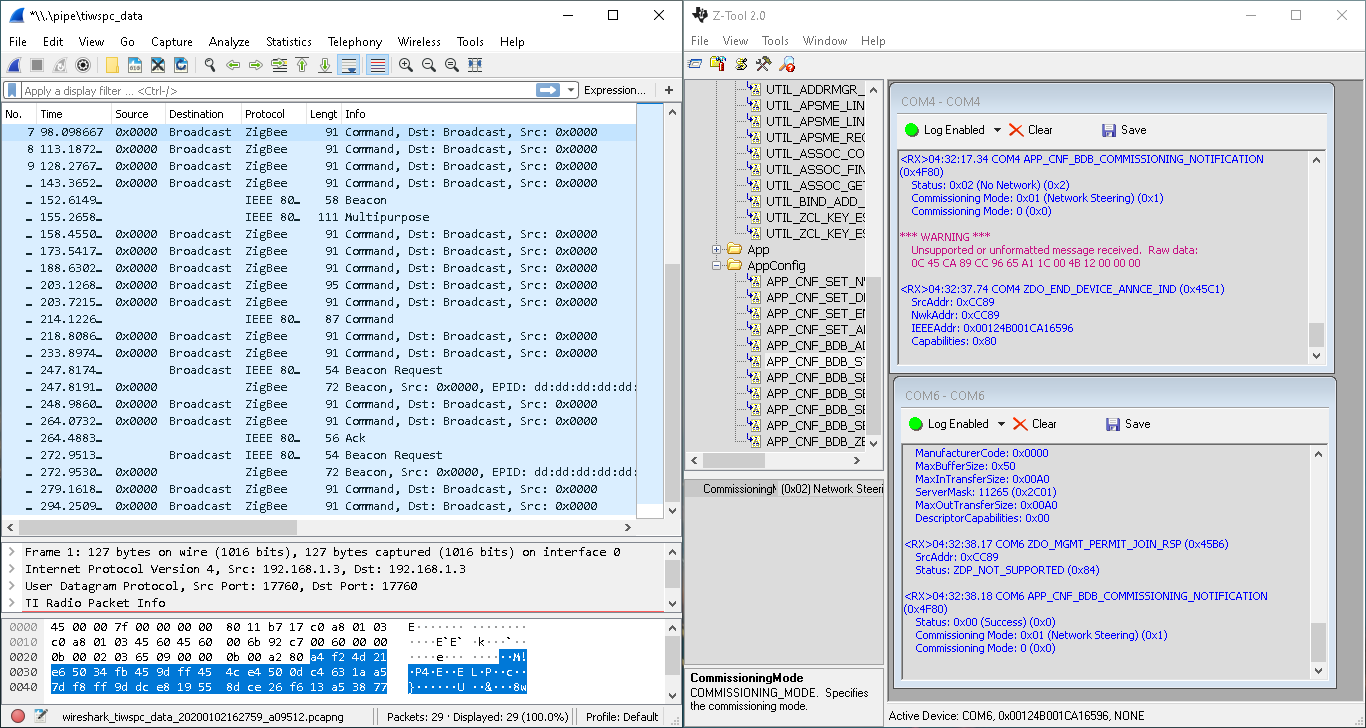
  • I already did it, but I don't know exactly what is the package where the device comes in, this appears to me

  • Can you attach sniffer log instead of screenshot?

  • I'm not seeing a join inside the 29 packets provided in the last sniffer log, just beacon requests/responses and link status messages.  This does not provide any assistance with the issue.

    If you cannot provide a decrypted sniffer log then perhaps you can debug the ZED for the incoming ZCL message since we know that the packet makes it to the end node given that a response is returned.

    Regards,
    Ryan

  • Hi Jose,

    Can you provide any updates on this matter or can the thread be closed?

    Regards,
    Ryan

  • Hi Ryam, finally I could not send/receive data, although I tried to verify the commands with the sniffer, I read the documentation of ZCL and MT interface, but I cannot understand how I should send the payload with AF_DATA_REQUEST, I have not found the version ZCL Revision 7, although I don't think the matter changes.

  • Since I have gotten a similar application to work with my own setup, I can only further assist if you provide more debug information.  This includes a full system description, Z-Tool commands with parameters included, sniffer logs, and device debugging investigation results.

    Regards,
    Ryan

  • I already managed to send data with AF_DATA_REQUEST, the error was indeed the frames that were poorly constructed, now I understand a little more the operation of the clusters, my application consists of a coordinator as a central node that will process data of multiple end-devices, the coordinator has it configured with the ZNP and it works fine, but I have some doubts about sending data.

    1. Is necessary for the coordinator to have the same clusters as the end-device for receiving information?
    2. Is necessary to do F&B to report attributes from some end-device?
    3. I need to send some data periodically from the end-device, that is, for example (temperature, on/off state), I have tried with zstack_report_cmdEx and with AfDataRequest, the messages travel through the air, but do not reach on ZNP, Is there an example of sending data periodically different from zed/zer_light reporting?

    Thanks

  • 1. No, it will still cause a zstackmsg_CmdIDs_AF_INCOMING_MSG_IND
    2. That or creating a manual bind as this is required for BDB attribute reporting
    3. BDB reporting is enabled by default in the thermostat/tempsensor example applications or you could create a timer for periodic AfDataRequests

    Regards,
    Ryan

  • How to i create a timer for periodic AfDataRequests? is there any example to guide me?

  • I recommend you refer to the example projects, start from zclSample[application]_initializeClocks

    Regards,
    Ryan

  • This is the example I use, how can I add my function that sends data? I created a function that sends the data with afrequest(), how could it add it to a clock?

    static void zclSampleLight_initializeClocks(void){

    #if ZG_BUILD_ENDDEVICE_TYPE
    // Initialize the timers needed for this application
    EndDeviceRejoinClkHandle = Timer_construct(
    &EndDeviceRejoinClkStruct,
    zclSampleLight_processEndDeviceRejoinTimeoutCallback,
    SAMPLEAPP_END_DEVICE_REJOIN_DELAY,
    0, false, 0);
    #endif
    #ifdef ZCL_LEVEL_CTRL
    LevelControlClkHandle = Timer_construct(
    &LevelControlClkStruct,
    zclSampleLight_processLevelControlTimeoutCallback,
    100,
    0, false, 0);
    #endif

  • You can refer to how it uses Timer_construct to register zclSampleLight_processEndDeviceRejoinTimeoutCallback and use Timer_start to start the timer. When timer is up, zclSampleLight_processEndDeviceRejoinTimeoutCallback will be triggered and send SAMPLEAPP_END_DEVICE_REJOIN_EVT to be processed in zclSampleLight_process_loop. You can do periodic event accordingly.

  • Should I build something like this? Should the function send the data be called in zclSampleLight_processEndDeviceRejoinTimeoutCallback? 

    #if ZG_BUILD_ENDDEVICE_TYPE
    // Initialize the timers needed for this application
    EndDeviceRejoinClkHandle = Timer_construct(
    &EndDeviceRejoinClkStruct,
    zclSampleLight_processEndDeviceRejoinTimeoutCallback,
    SAMPLEAPP_END_DEVICE_REJOIN_EVT ,
    0, false, 0);
    #endif

    .....

    The timer would start like this?

     Timer_start(&EndDeviceRejoinClkStruct);

    Thanks.

  • You should send SAMPLEAPP_END_DEVICE_REJOIN_EVT similar event from zclSampleLight_processEndDeviceRejoinTimeoutCallback  to be processed in zclSampleLight_process_loop.

  • Can you help me build the event? that is, I should create a new event something like

    #define SEND_DATA_EVT 0x0004

    My function that sends data is as follows


    static void data_send_AF (void)
    {
         zstack_getZCLFrameCounterRsp_t pRsp;
         Zstackapi_getZCLFrameCounterReq (appServiceTaskId, & pRsp);
         zstack_afDataReq_t pReq;
         pReq.dstAddr.addrMode = zstack_AFAddrMode_SHORT;
         pReq.dstAddr.addr.shortAddr = 0;
         pReq.dstAddr.endpoint = 8;
         pReq.pRelayList = NULL;
         pReq.n_relayList = 0;
         pReq.srcEndpoint = SAMPLELIGHT_ENDPOINT;
         pReq.clusterID = 0x0006;
         pReq.transID = & (pRsp.zclFrameCounter);
         pReq.radius = AF_DEFAULT_RADIUS;
         pReq.n_payload = 0x6;
         pReq.pPayload = ownData;
         Zstackapi_AfDataReq (appServiceTaskId, & pReq);
    }

    How can I add this function to zclSampleLight_processEndDeviceRejoinTimeoutCallback and schedule the time it should run?

  • YK was not suggesting that you directly use/replace zclSampleLight_processEndDeviceRejoinTimeoutCallback and SAMPLEAPP_END_DEVICE_REJOIN_EVT.  You can use 0x0100 as a new event and you should set up your own timer callback accordingly, using the ones already in place as an example.

    Regards,
    Ryan

  • Ok, I understand, i haved created the code as follow but the data only is sent one time each time that i press the button and not periodicly, where this error?

    #define SAMPLEAPP_SEND_DATA_EVT 0x0100

    #define SEND_DATA_TIME  5000

    SendDataClkHandle = Timer_construct(
    &SendDataClkStruct,
    zclSampleLight_sendDataTimeoutCallback,
    SEND_DATA_TIME,
    0, false, 0);

    static void zclSampleLight_sendDataTimeoutCallback(UArg a0)
    {
    (void)a0; // Parameter is not usedappServiceTaskEvents |= SAMPLEAPP_SEND_DATA_EVT;

    Semaphore_post(appSemHandle);

    }

    In process loop...

    if ( appServiceTaskEvents & SAMPLEAPP_SEND_DATA_EVT )
    {
    zclSampleLight_SendDataAF();

    appServiceTaskEvents &= ~SAMPLEAPP_SEND_DATA_EVT;

    }

    For active timer...

    static void zclSampleLight_ActiveTimer(void){

    Timer_setTimeout( SendDataClkHandle, SEND_DATA_TIME);
    Timer_start(&SendDataClkStruct);

    }

    and for init the timer

    if(_btn == CONFIG_BTN_RIGHT)
    {
    //zclSampleLight_SendDataAF();
    zclSampleLight_ActiveTimer();
    }

  • I think you need to call zclSampleLight_ActiveTimer again in your SAMPLEAPP_SEND_DATA_EVT to make the event happen periodically.

  • Hi YK,

    Another option is that they construct the timer with a valid clock period.

    Regards,
    Ryan

  • Running Active TImer as YK said in the event, I got it sent data periodically, thanks for your support