This thread has been locked.

If you have a related question, please click the "Ask a related question" button in the top right corner. The newly created question will be automatically linked to this question.

cc2530 loosing firmware

Other Parts Discussed in Thread: Z-STACK, TIMAC, CC2530, CC-DEBUGGER, FLASH-PROGRAMMER, CCSTUDIO, CC2530EM, CC2520, MSP430F5438A

Hi,

after a few days my devices (Simple temperature measurement device based upon the home automation example) are not operating anymore. I can't reset the device with a sequence programmed into the firmware or do anything else with it. Only after reprogramming it starts working again for a few days.

For me it looks like the device lost its firmware. I am using Z-Stack 2.4.0.

Has anybody experienced such a behaviour before?

Thanks,

Felix

  • No.

    Are you sure you did not accidentally erased the device?
    How did you discover the FW was lost?  

    LPRF Rocks the World

  • I am 100% sure that the device wasn't erased accidentially.

    The device isn't doing anything it should do after a few days of operation. It doesn't communicate with the network it was connected to and doesn't respond to a pressed button.

    Is a function erasing the device built into the z-Stack?

    Thanks,

    Felix

  • Felix:

    We have an OSAL API with memory managment that can be used to erase section of the flash. This is utilized by Z-Stack.
    The API document can be found here:  C:\Texas Instruments\ZStack-CC2530-2.4.0-1.4.0\Documents\OSAL API.pdf

    Do you know what has been erased?
    Is this on your Hardware or on our Evaluation Boards?

    It can be useful to read the readMe.txt that comes with our stacks for every new release:

    From readme file of our TIMAC 1.3.1 release

     - The non-volatile memory driver (OSAL_Nv.c) has been upgraded to close
       vulnerability to corruption of NV memory if a device reset occured during
       compaction to a "clean" NV page. Device reset can occur by cycling power,
       voltage drops below brown-out threshold, or program assert. [3267]

    LPRF Rocks the World    

  • Hi LPRF,

    this has also come in offline.   We can take this offline and work on it.

    Cheers,
    Lisa 

  • He is using the SRF05BB.
    What about the battery voltage?
    We have a check for stable voltage early in the code of main(...). See below,

      // Make sure supply voltage is high enough to run
      zmain_vdd_check();

    LPRF Rocks the World

  • This isn't something we've encountered before on our 400 node large network test system. We've had nodes running continuously for weeks. Does the device start running again if you power cycle it, or are you saying it seems like it's not actually executing valid code?

  • Hi,

    You look quite familiar with the TI CC2530 stuff... so, can you please go through my question and help me?


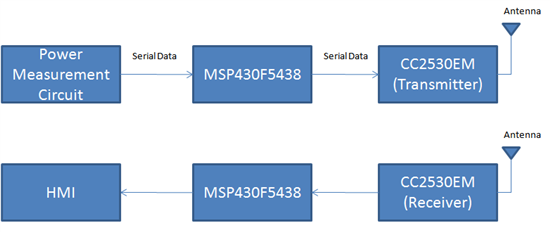
    We are designing a Home Area Network/Energy Management System. For the Wireless Network, we are planning to use TI's CC2530 Development Kit. We already have the the kit with us. We also have the MSP430F5438 Board.

    You can see the overall application block diagram here:


    We are having trouble in understanding the interface between the MSP430 and CC2530EM. We went over the pdf document http://focus.ti.com/lit/wp/slyy022/slyy022.pdf. But, we could not relate it exactly to our application. Also, I am not too sure about whether we use the SmartRF05EB in this circuit or not. 

    So, kindly explain how we can use the components that we currently have to build a wireless communication network.

    Many documents mention CC Debugger. However, we do not have it with us. Will we need to buy one?

    Thank You for your time,

    Devashish Deshpande (806-543-0487)

  • Hi Devashish,

    Here are a few initial comments.   

    First of all, you are correct in that I see from the note you reference that you are looking at running the ZNP (Zigbee Network Processor).  So let me deal with the three main topics.

    1 - Interface

    The interface between the MSP430 and CC2530 chip running the ZNP can be either SPI or UART based.  The interface is documented in two places.  In the Z-Stack Documents\CC2530 folder (as below for a typical installation).   It is also documented further in the ZAP (Zigbee Application Processor) documentation folder.   The ZAP examples would be good for you to look at and can be downloaded from the Z-Stack page.   These examples are probably exactly what you are looking for!  It is called ZAP on the Z-Stack product page.

    C:\Texas Instruments\ZStack-CC2530-2.4.0-1.4.0\Documents\CC2530

    C:\Texas Instruments\ZAP-MSP430-1.0.3\Documents

    http://focus.ti.com/docs/toolsw/folders/print/z-stack.html

    2 - Programming the CC2530 with the ZNP software

    In order to make this work, the CC2530 needs to be running the ZNP.   This means the CC2530 must be programmed.   The SmartRF05EB can be used for this, however the other option is to get a battery board, CC Debugger and use the hex file provided with Z-Stack/ZAP to flash the CC2530 with a free flash programming tool.  See the links below

    http://focus.ti.com/docs/toolsw/folders/print/cc-debugger.html

    http://focus.ti.com/docs/toolsw/folders/print/soc-bb.html

    http://focus.ti.com/docs/toolsw/folders/print/flash-programmer.html


    3 - Programming your application on the MSP430 Experimenter Board

    For this the supported compilers are IAR (www.iar.com) and Code Composer Studio (http://focus.ti.com/docs/toolsw/folders/print/ccstudio.html).  The ZAP examples come ONLY for IAR however so I would recommend IAR use.

    You will also need our FET tool.  (Third party tools also exist)

    http://focus.ti.com/docs/toolsw/folders/print/msp-fet430uif.html


    I hope this helps!   I would start by downloading and reading the documention from the ZAP examples and have a look at them.

    Cheers,

    Lisa


  • Devashish,

    You might also consider using the EXP430 5438 experimenter's board (http://focus.ti.com/docs/toolsw/folders/print/msp-exp430f5438.html), and use the CC2520EM as the radio interface. As you may know we also support this configuration where the entire stack and MAC run on the 543x devices. This might be easier for you since you already have a 5438 in the architecture. By the way, this experimenter board when combined with the CC2530EM will also support the ZNP interface that Lisa mentioned.

    Regards,

    -- "Double O"

  • Hi Lisa,

    Thank you so much for your prompt and detailed response. Your reply definitely helped me a LOT.

    I went over the examples and have a much clearer idea about how all this works.

    What I understood from the documents was that I do not need to write a program CC2530EM by myself. Instead, I just need to burn CC2530 using a hex file (C:\Texas Instruments\ZAP-MSP430-1.0.3\Projects\zstack\ZAP\ZNP-HexFiles\CC2530ZNP-Pro.hex). I think that will solve my purpose of establishing the wireless network between the two ends. Is that right?

    So, I have downloaded the CC2530ZNP-Pro.hex file in my CC2530EM using the Flash Programmer. However, I do not know what should be my next step.

    Now, I think, I should program the MSP430 and also, find a way of communication between my MSP 430 and CC2530. Is that what I need to find? If yes, can you tell me how and where I can find it? If not, please tell me what do I need to do instead.

    I really appreciate your help and thank you very much for your time.

    Thanks,

    Devashish

  • Hi Devashish,

    No problem at all.   That is what we are here for. 

    Yes, if you loaded the hex file that is a first and important step.

    There are two places the interface between the MSP and ZNP is documented.

    In the Z-Stack documentation itself (here on a typical installation)

    C:\Texas Instruments\ZStack-CC2530-2.4.0-1.4.0\Documents\CC2530

    In the ZAP documentation (Zigbee Application Processor ).  Found here on a typical installation

    C:\Texas Instruments\ZAP-MSP430-1.0.3\Documents

    I hope this helps further.

    Cheers,
    Lisa 

  • Devashish:

    I recommend you download our CC2530ZNP Mini kit code: http://www.ti.com/litv/zip/swrc211a.
    This sample code includes SPI communcation examples on how to communicate with the CC2530ZNP using an MSP430 too.
    Take a look at our WIki Tutorial for the examples: http://processors.wiki.ti.com/index.php/Tutorial_on_the_Examples

    Take a look at the sections using the SPI or using the UART.
    This examples are easier to start with then ZAP to establish basic communications for your hardware.

    Enjoy,
    LPRF Rocks the World 

  • Hi Devashish,

            how to transmit and receive simple data between (interface) two msp430f5438a + cc2520.

    if you have any source code examples regarding this please mail me naresh.ceeri@gmail.com


    Thanks & Regards