This thread has been locked.

If you have a related question, please click the "Ask a related question" button in the top right corner. The newly created question will be automatically linked to this question.

Simple helloworld DSP app - help required

Guru 10685 points
Other Parts Discussed in Thread: SYSBIOS

I'm on the latest version of CCS 4.x and trying to get a simple DSP app to run on my C68A816x DDR2 Integra to say "Hello world". It's proven to be far from simple; here's where I am so far:

0) Create a new CCS project with appropriate C6000 and C674x processor selections and load the SYS/BIOS "Hello Example" project template.

1) Launch target configuration.

2) Connect to ARM Cortex A8.

3) Load ti816x_ddr.gel file.

4) Run "Netra external memories" GEL script.

5) Run "CPUs bringup->C674x" GEL script.

6) Connect to DSP.

7) Run "Target->Debug Active Project".

8) Fail.

So in stage 8 I was expecting "Hello world" to appear in the console but nothing did. I am using both printf and system_printf in the DSP code.

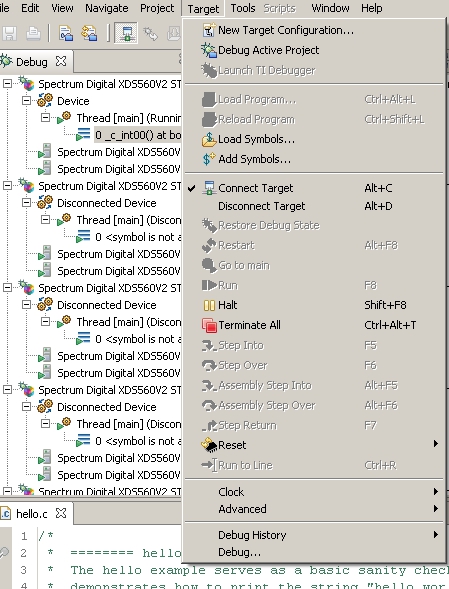
Here is a screenshot of stage 8.


Anyone have any suggestions how to run this simple helloworld program on the DSP only?

Thanks,

Ralph

  • Ralph said:
    7) Run "Target->Debug Active Project".

    This option is used from the C/C++ Perspective to start a debug session, something you already did with step #1. 'Debug Active Project' actually does several steps at once:

    1. Build the active project
    2. launch a debug session for a target configuration in your project or whatever configuration associated with the project
    3. connect to the target
    4. load the *.out file generated from the active project to the first CPU detected (probably the A8 in your case)
    5. run to 'main'

    In your scenario, at step 7, you should instead manually load the program ('Target->Load Program') and then execute ('Target->Run'). Note that you need to be in the Debug perspective.

    ki


  • Hi, thanks for your quick reply.

    I can do "Target->Load program" and I select the .out file that I just built, but I then have no option "Target->run" or similar. Does this mean there is something wrong with my binary?


    Ralph

  • The option is greyed out because the target is already running.

    Do you have a main in the application you loaded for the A8 (I think that is the A8 you have selected).

  • Hi, yes I have a main. You can see it in the screenshot that I first posted; the main is in the "hello.c" file.

    When I do "Load Program" I am doing that with the DSP (i.e. C674x) target selected. The only thing I did to this target in the Debug window was to right click->connect after the appropriate ARM startup gel script commands were run.

    The application is a SYS/BIOS one (it's from CCS's SYSBIOS example programs) so I assumed it had to run on its own on the DSP without any communication with the ARM. I used evmC6A816x as my target platform when creating the project as that is exactly what EVM I have.

    I noticed that the DSP seemed to be running at "boot.c" whatever that means. That seems strange to me given that the file name is "hello.c".

    Ralph

  • Ralph said:
    Hi, yes I have a main. You can see it in the screenshot that I first posted; the main is in the "hello.c" file.

    That first screenshot has the DSP in context. In the last screenshot, you have the debug context for the Cortex A8 (assuming that the ordering of the cores in your Debug view did not change). I can't tell for sure because the menus are partially blocking the view.

    Make sure the DSP is in context and try to load and run the program there. What is context? See:

    http://processors.wiki.ti.com/index.php/Multi-Core_Debug_with_CCS#Debug_Context

    Thanks

    ki


  • Hello,

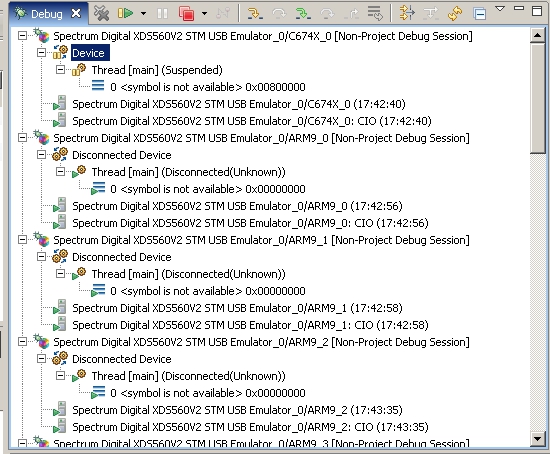
    bizarrely the order of the cores sometimes changes when I connect to them. Here is a screenshot of what it looks like immediately after I've connected to the C674x:


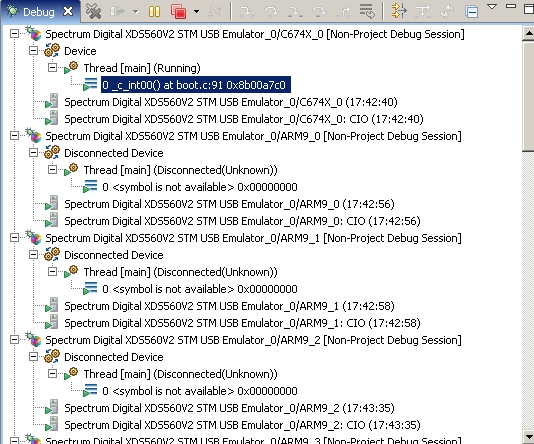
    And here is a screenshot of the same view after I have done "Target->load program" while the DSP is in context:


    Would the fact that it already says "Thread main (suspended)" in the first screenshot be anything to do with the problem? It suggests that a "main" function has already been loaded by the DSP. Perhaps that "main" is the "main" of DSPBIOS?

    I am meant to be loading the "Debug" and not the "Release" version of the .out file am I not?

    Ralph

  • Ralph said:
    Would the fact that it already says "Thread main (suspended)" in the first screenshot be anything to do with the problem? It suggests that a "main" function has already been loaded by the DSP. Perhaps that "main" is the "main" of DSPBIOS?

    No, that is correct. When you connect to the DSP, it should say "Thread [main] (Suspended)". That is normal. It means the main/primary thread is indeed halted and NOT anything related to the 'main' function. 

    Once you load the program, it should go to the entry point, which is _c_int00. That is why your second screenshot shot shows that. So the program loaded successfully and the PC is at the entry point. Because CCS default behavior (which you can disable) is to then auto-run to the start of the 'main' function after a successful load, that is why it says "Thread [main] (Running)". Except it should quickly get to the start of 'main' and then halt again. But there is some problem with the program or some board initialization issue I think because your program never makes it to 'main'. I was able to create a BIOS6 hello example and run to main without issue. I also just used the GEL file for the A8 to bring up the C674x and then initialize memory. Could you attach your project here (including the *.out file you are using)? I'd like to try running it in my environment.

    Thanks

    ki


  • Hi, thanks again for your reply.

    I attach my project, created using "export" in CCS 4.2.3.I added 3 lines to the end of the project's .cfg file in order to persuade the system_printf command to display text in the console - I only mention this in case you think it matters.

    I include the .gel file in the zip file as well. It's the standard one in the EZSDK modified as per the comments in the file to work with DDR2. The .out file in the "Debug" folder is the one I've been using.

    Thanks,

    Ralph

    3302.Desktop.zip

  • Hi Ralph,

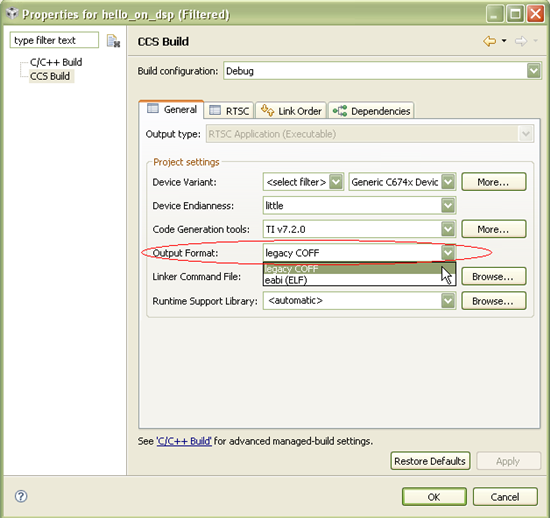
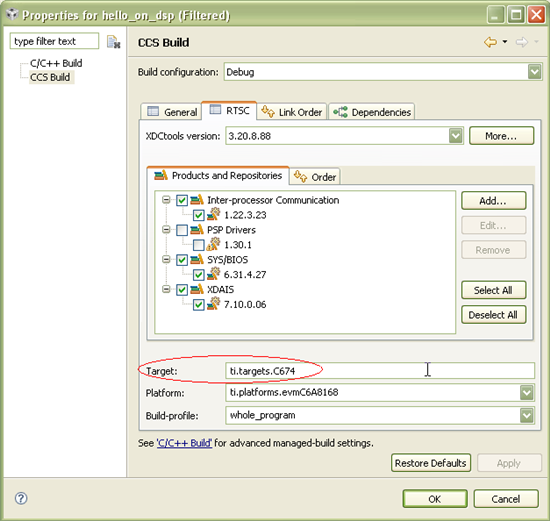
    Thank you for attaching the test case. It helps us tremendously when we are able to get a reproducible test case. I am able to reproduce the issue. As suspected, it loads fine, but is unable to get to main. When compared to my working hello example, the only real difference I noticed was that you are building ELF output while mine is the default COFF. So when I change the output to COFF in both the General output format and RTSC target and rebuild and try again, I get run to main! Odd that building for ELF is causing this issue. I will investigate this further.

    The changes I made:

    right-click on your project and select 'Build Properties...'

    Select 'CCS Build' in the left pane.

    In the 'General' tab, change the 'Output Format' to 'legacy COFF'

    In the 'RTSC' tab, change the 'Target; field to 'ti.targets.C674'

    thanks

    ki


  • The bug tracking number for this issue is: SDSCM00040197

    Thanks

    ki

  • Okay, you have found the source of my problem. Do I get a prize for discovering all these issues? :-)


    Seriously though, I have been using ELF as it is the current and recommended file format for the DSP. I can't understand why only the "legacy" (which to me means "deprecated" or "out of date") COFF format is supported especially in CCS 4.2.3 which is meant to be stable. In another thread I have discovered that ELF isn't supported by GenAlg either in CCS 4. I don't think this is acceptable but what can I do about it except raise it on this forum?

    For reference, here are the particular two posts by Chris Ring that talk about ELF being the only supported format for binaries on the DSP used with the Integra EZSDK:

    http://e2e.ti.com/support/dsp/integra_dsparm/f/625/p/90400/314558.aspx#314558

    http://e2e.ti.com/support/dsp/integra_dsparm/f/625/p/108504/383898.aspx#383898


    There is some cruel irony in the second post given that GenAlg only supports COFF and GenServer (according to that post) only supports ELF!!!!


    Thanks for narrowing down the issue and letting me temporarily regain my sanity. At least I can get on with some debugging now, even if it's with an out of date binary format.

    Ralph

  • Ralph said:
    Okay, you have found the source of my problem. Do I get a prize for discovering all these issues? :-)

    Yes! You get 100 points on the forum!

    Ralph said:
    In another thread I have discovered that ELF isn't supported by GenAlg either in CCS 4. I don't think this is acceptable but what can I do about it except raise it on this forum?

    It is better to raise the issue in the appropriate forum (GelAlg comes from a different group than the CCS folks). I believe a moderator already moved the thread to the appropriate forum.

    Ralph said:
    Seriously though, I have been using ELF as it is the current and recommended file format for the DSP. I can't understand why only the "legacy" (which to me means "deprecated" or "out of date") COFF format is supported especially in CCS 4.2.3 which is meant to be stable.

    COFF is still a fully supported format in CCSv4. However, people developing various software packages for newer boards are gravitating towards ELF, so the "support" depends on the people creating these packages. The tool should support both formats.

    But definitely there is some issue with ELF output running on the DSP of 816x. It seems target specific since the same ELF executable runs on simulator. We hope to resolve this soon. Sorry for the pain.

    ki

  • Ralph,

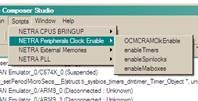
    Did you ever try initializing your timers using the enableTimers() script (as shown in the screenshot below) before running your ELF executable on the TI816x DSP?  SYS/BIOS on the TI816x DSP by default uses Timer #3 which needs power/clock initialization before it can be used by BIOS. 

    I've attached my own .gel file (remove the .txt extension) in case your copy doesn't include this routine.  I've customized this script to perform all required initialization for the DSP (and the M3's) upon connecting to the A8.   Please try out the following steps and let me know if you still have an issue with the ELF executable:

    1) Load attached .gel

    2) Connect to the A8

    3) Connect to the DSP

    4) Load & run ELF executable

    Regards,

    Shreyas

    5282.ti816x_ddr.gel.txt


  • No I didn't initialise any timers as my GEL script as obtained from the latest EZSDK did not include any functionailty for that; the closest I have is "NETRA Peripherals Clock Enable->OCMCRAMClockEnable". Your GEL worked perfectly. Thanks a lot!!!

    I can now run ELF files on the DSP. I'd still like to ask, why does COFF work without the initialisation and ELF not?


    Ralph

  • I'd still like to ask, why does COFF work without the initialisation and ELF not?

    That's a good question--I don't know the answer to this. However, both the ELF & COFF executables didn't work for me without the timer initialization.

    Regards,

    Shreyas