This thread has been locked.

If you have a related question, please click the "Ask a related question" button in the top right corner. The newly created question will be automatically linked to this question.

hex2000 says "section XYZ falls in unconfigured memory"

Other Parts Discussed in Thread: TMS320F28335

Hello,

I am running hex2000 to generate a raw binary image from a .out file. It gives me strange warnings like this:

  warning: section DummyApp.out(.text) at 0600008h falls in unconfigured memory (skipped)

  warning: section DummyApp.out(ramfuncs) at 0609e8ah falls in unconfigured memory (skipped)

  etc...

I had a look at DummyApp.map, and the .text section starts at 0x300004 and its length it 0x4f41, so well within the flash. The ramfuncs section starts at 0x304f45, again well within the flash.

I am using a TMS320F28335. The command line I use is:

  cd \path\to\DummyApp\Debug

  \path\to\hex2000.exe \path\to\mkhex.cmd

The content of mkhex.cmd can be found at this end of this post.

It seems that hex2000 multiplies the addresses of the .out file by 2 (0x300004 x 2 = 0x600008, 0x304f45 x 2 = 0x609e8a, etc.)

What's going on?

Also, I tried with "-datawidth 8" in the script below. I get the right addresses, but the image is half the size it should be and only the lowest 8 bits of each word is copied. For example, if I debug with CCS, I see at address 0x300000: 0070 4F1D FFFF FFFF 761B FFF0. In the .bin, the first bytes are: 701D FFFF 1BF0.

Many thanks for your help!


Content of mkhex.cmd:

DummyApp.out    /* input = executable object file */
-b              /* binary */
-image          /* total flash image */
-memwidth 8
-datawidth 16
-map DummyAppRaw.map
-fill 0xffff

ROMS
{
    FLASH: origin=0x300000, length=0x40000, romwidth=16, files={DummyApp.bin}
}

  • When you use binary output mode (-b), the -memwidth defaults to 8, and cannot be changed.  (So you may as well remove the -memwidth option).  With the memory width set to 8, the addresses and lengths of the ROMS directive are now specified in terms of 8-bit bytes, and not 16-bit words.  Thus, you need to double both the origin and length values.

    Further simplication ... You don't need the -datawidth or romwidth specifications.

    Thanks and regards,

    -George

  • hi,

    Thanks, It works propely from command line(dos).
    D:\ti\ccsv5\tools\compiler\c2000\bin\hex2000.exe C:\ViewStore\mkhex.cmd
    Translating to TI-TXT format...
       "PiccoloApp.out"   ==> .text
       "PiccoloApp.out"   ==> .econst
       "PiccoloApp.out"   ==> .cinit
       "PiccoloApp.out"   ==> ramfuncs
       "PiccoloApp.out"   ==> .switch
       "PiccoloApp.out"   ==> .pinit
       "PiccoloApp.out"   ==> .ti_catalog_c2800_init_begin

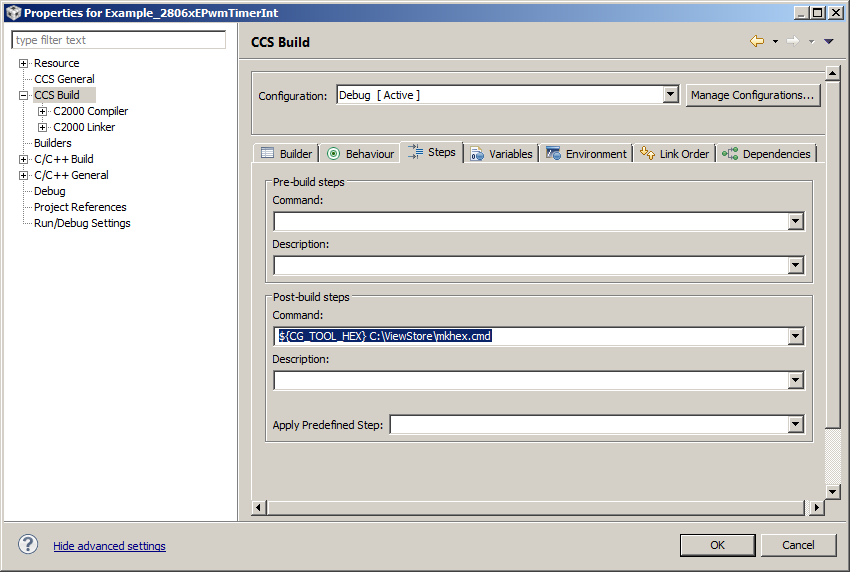
    But I can not run it from postBuild command (ccs).get the following error:

     'Create flash image: TI-TXT'
    " mkhex.cmd"
    '" mkhex.cmd"' is not recognized as an internal or external command,
    operable program or batch file.

    my command is : "${CG_TOOL_HEX} C:\ViewStore\mkhex.cmd".

  • Sabina,

    That command looks like it should work. What does CCS spit out in the build console when it starts the post-buil step? Can you double-check that CG_TOOL_HEX is pointing correctly to hex2000 at the correct path? The variable will be in the CCS Build->Variables tab when you check the box "Show system variables".


  • Hi,

    I get the following:

    D:/ti/ccsv5/utils/bin/gmake --no-print-directory post-build
    'Create flash image: TI-TXT'
    "D:/ti/ccsv5/tools/compiler/c2000/bin/hex2000.exe C:/ViewStore/mkhex.cmd"
    The filename, directory name, or volume label syntax is incorrect.
    gmake[1]: [post-build] Error 1 (ignored)

    the same command (D:/ti/ccsv5/tools/compiler/c2000/bin/hex2000.exe C:/ViewStore/mkhex.cmd)  from DOS windows and DEBUG directory works properly

    Thanks, Sabina


  • If you are enclosing the command within quotes in the post-build step text box, then please remove the quotes and try again.

  • Thanks a lot!  it work now.

    Does exist any utility that allow to download the program to Piccolo 28069 from PC (via RS23s for example?), special driver on the device (piccolo) that know read data and write it to the flash without CCS running?

    Thanks, Sabina

  • Sabina Greenberg101872 said:
    Does exist any utility that allow to download the program to Piccolo 28069 from PC (via RS23s for example?),

    Sabina,

    This programmer can do so:  http://www.codeskin.com/programmer

    Cheers

    Lori

  • Hi,

    I've downloaded C2Prog and created .hex file for programming. But I can not find Secondary Bootloader (SBL) and instruction how to load it. Could you send me a link to it?

    Thanks, Sabina

  • Sabina,

    I think this question will be better answered in the C2000 device forum. Could you please repost there as a new thread?

  • Hello,

    The above suggestions worked.

    However, I now wanted to add a little section to store a version number at a fixed location in the DSP flash. I created a memory area for that effect, and a section that goes into that memory area. Here is an excerpt from the linker command file:

    MEMORY
    {
        ...
        PAGE 1 : APPVER(R)      : origin = 0x32FFFF, length = 1
        ...
    }
    
    
    SECTIONS
    {
        ...
        appver      : > APPVER,     PAGE = 1
        ...
    }


    Then I added a little "version.c" source file which contains just this:

    #pragma DATA_SECTION(GApplicationVersion, "appver")
    const unsigned short GApplicationVersion = 12;

    It compiles and links without problems, but hex2000 complains that:

    warning: section Application.out(appver) at 065fffeh falls in unconfigured memory (skipped)

    I call hex2000 with the following command file:

    Application.out /* input = executable object file */
    -b                  /* binary */
    -image              /* total flash image */
    -memwidth 8         /* can't be changed; ROMS address & length are in octets */
    -map ApplicationRaw.map
    -fill 0xffff

    ROMS
    {
        FLASH: origin=0x600000, length=0x60000, romwidth=16, files={Application.bin}
    }

    As far as I can see, the "appver" section falls within the flash image range. More exactly, it is the last word of it.

    I tried to move "appver" to the beginning of the flash image range at 0x300004, but hex2000 gives me the same warning at 0600008h address.

    What's going on? How can I fix that?

    Many thanks for your help!

  • Investigator said:

    It compiles and links without problems, but hex2000 complains that:

    warning: section Application.out(appver) at 065fffeh falls in unconfigured memory (skipped)

    It looks like you may be hitting a known bug with converting to binary format. Please see this related thread where a similar issue is discussed. Unfortunately the only workaround seems to be to either use a different hex format or use hex2000 to generate a different hex format and then try converting that hex to bin.

  • AartiG said:

    It looks like you may be hitting a known bug with converting to binary format. Please see this related thread where a similar issue is discussed. Unfortunately the only workaround seems to be to either use a different hex format or use hex2000 to generate a different hex format and then try converting that hex to bin.

    Brilliant!

    In the meanwhile, I find another workaround: declare both memory areas in PAGE 0. This is dodgy because the "appver" and "bootver" data sections are stored on page 0, which is normally for code... But that works...

    Also, I can't use the CODE_SECTION() pragma on global variables: the compiler gives me a warning that CODE_SECTION can't be used for variables. And eventually, it does not work when I run the software (the DSP flash area which should hold the application version number just has 0xFFFF).

    Best regards

  • Try DATA_SECTION

  • Dear Archeologist,

    Archaeologist said:

    Try DATA_SECTION

    I don't understand your post. What do you mean?

    Best regards,

      Fabrice

  • Since variables are not code, the CODE_SECTION doesn't apply;  variables are data, and there is an analogous DATA_SECTION pragma.

  • pf said:

    Since variables are not code, the CODE_SECTION doesn't apply;  variables are data, and there is an analogous DATA_SECTION pragma.

    In my previous post, I clearly explained that it is what I did.

    It would be more useful if someone could explain how to get hex2000 to output the right section in the output binary file as a DATA section instead of a CODE section. Or is it the bug mentioned by AartiG?

    Best regards

  • In re-reading the thread of messages, I see that both Archie and I misunderstood you:  when you said that CODE_SECTION didn't work on global variables, you weren't reporting that as a problem, you were mentioning it as a deficiency or obstacle to your workaround.

    But does it work to put both sections at page 0, as you mentioned, and use DATA_SECTION to put your global into one of those sections?

    Aside from that, yes, it does sound like you're encountering the bug mentioned by Aarti.

  • Hi pf,

    pf said:

    In re-reading the thread of messages, I see that both Archie and I misunderstood you:  when you said that CODE_SECTION didn't work on global variables, you weren't reporting that as a problem, you were mentioning it as a deficiency or obstacle to your workaround.

    Yes, you neatly summarized it.

    pf said:

    But does it work to put both sections at page 0, as you mentioned, and use DATA_SECTION to put your global into one of those sections?

    Aside from that, yes, it does sound like you're encountering the bug mentioned by Aarti.

    Yes, that workaround appears to work. It looks like the sections I added are then properly flashed where they should.

    Regards