Hi all,
I monitored the communication between eZ430-Chronos and Control Center Software (CC) and found some information about the protocol.
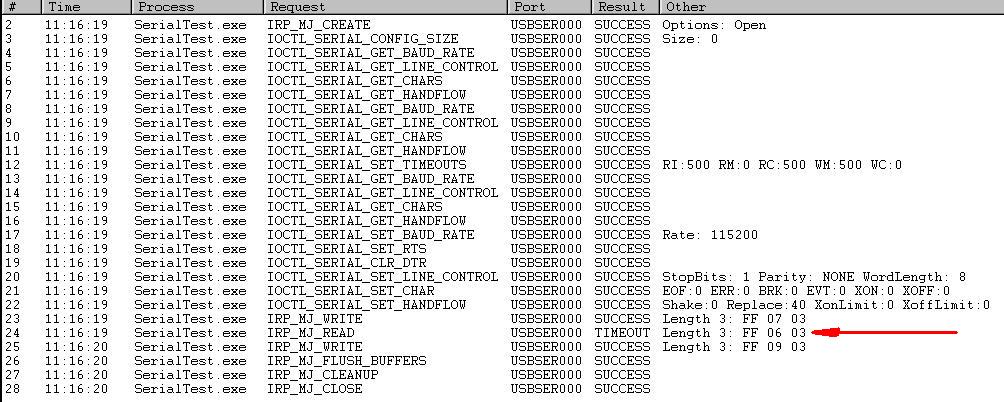
Firstly CC opens the port corresponding to "TI CC1111 Low-Power RF to USB CDC Serial Port" using the settings 115200,1,N,8. I think CC firstly search for COM ports matching some criteria and opens it.
After that it continuously send ping requests in the background even when he reads any acc data in order to know that AP is working and not disconnected.
When you push the button "Start Access Point" it sends a request to let AP know that. After that it begins polling the AP for valid acc data.
While we are waiting for TI to release some documentation or source code it may be useful for impatient guys.
Packet format:
PC-to-Ap: 2 byte command + 1 byte packet length + n byte packet load
AP-to-PC: 2 byte command + 1 byte packet length + n byte packet load
Some commands:
Background polling----------------------------------------------------------------------PC to AP : ff 20 07 00 00 00 00 Response : ff 06 07 xx xx xx xxxx xx xx xx: 4 byte watch address
Start Access Point:----------------------------------------------------------------------PC to AP : ff 07 03Response: ff 06 03
Command before each Request Acc. data (functionality not known):----------------------------------------------------------------------PC to AP: ff 00 04 00Response : ff 06 04 03It may be returning the state of the watch or AP
Request Acc. data:----------------------------------------------------------------------PC to AP: ff 08 07 00 00 00 00Response: ff 06 07 tt xx yy zztt: data type (ff: no data, 01: valid acc data)xx, yy, zz : acc data
Acc Reading sequence:
1. Open the port using the settings 115200,1,N,8.
2. Send background ping requests (Optional)packet : ff 20 07 00 00 00 00
3. Send "Start Access Point" command packet: ff 07 03
4. Send the acc data request command packet : ff 08 07 00 00 00 00
5. if you want to get new acc data go to step 4
I found another command:
Stop Access Point----------------------------------------------------------------------PC to AP : ff 09 03
I found it after I wrote my code though. Oh well.
Actually, before the turn off access point can be issued, the same "command" that turns the access point on:
ff 07 03
must be issued.
So to turn the access point off you would send:
ff 07 03 ff 09 03
to the access point from the PC.
Hi Guys,Thank you so much for the information. I'm trying to communicate with the watch following your communication protocol to read ACC data but no result. I wrote a toy Matlab code but no way, maybe it's because the tx rate 115200 is so high..This is the code, any help will be very welcome..
clear all, clcpingrequest_CMD = 'ff200700000000';startAP_CMD = 'ff0703';getACCdata_CMD = 'ff080700000000';stopAP_CMD = 'ff0703ff0903';n_samples = 5000;data =zeros(n_samples,3);instrfinds = serial('COM16','BaudRate',115200,'DataBits',8);fopen(s);fwrite(s, pingrequest_CMD);pause(0.2);fwrite(s, startAP_CMD);pause(0.2);fwrite(s, getACCdata_CMD); try for i=1:n_samples frame = fread(s,8); if frame(4) == 01 data(i,1)=frame(3); %Acc_x data(i,2)=frame(2); %Acc_y data(i,3)=frame(1); %Acc_z else error('Parsing frame'); end end catch fclose(s); delete(s); rethrow(lasterror);endfwrite(s, stopAP_CMD);fclose(s);
Thanks in advance,
Jesus Mora
Hi, do you get any response from the serial port at all, for example a valid response from the 'access point' command?
Andy
Hi Andy,
No men, I don't receive anything, the timeout expires always before at all. For sure I'm not doing the things well....
I would like TI publish at least the communication protocol.
Hi Jesus,
I'm not very familiar with MATLAB, but it seems like you aren't sending the data to the serial port as a bytestring. If you can somehow convert the data into a bytestring your code will (probably) work.
Thanks,
Sean
Hi uguryildiz,
That was nice post I managed to get the data bytes for three axes. Thank you.
But I still wonder -the data I get is byte data max FF whereas the data displayed by control center is +/-1000. Perhaps it is G*100 representation. How do I get to convert the data to G values - any ideas?
Hi Ganesh,
I was just wondering, the data you're capturing is actually the acceleration data or the tilt data? Please let me know.
Thanks!
Venkatesh.
Good question - I am right now only capturing the tilt values.
If these values are FF at max already then how to obtain acceleration data. Usually there are extrapolation methods using the calibration values which gives the G values. I wish TI gives away the codes to read the data from watch.
Has anybody tried codes to obtain other data from the watch such as the altitude and time? The data center is still a mystery, probably the code for data center shoud've been included for practical applications.
Regards
Ganesh,
I have one other question...Can we connect two Chronos to the same computer and still get the Tilt data..If so please let me know.
Luke.
Hi Venk,
Yes, one can connect two chronos to the same computer and get the Tilt Data. Just that each chronos will need to be sync'd to the CC1111 receivers appropriately.
Good Luck.
Ganesh
Can you explain more about that Please!
One other thing, I believe you have a code for capturing Telt data...So, at this point, the program imports data into CSV file automatically when we start running it..Is it also possible to import that data into XML file along with CSV file at the same time? If so how can we do it?
Also, I am just wondering how can we Sync'd each chronos to the CC1111 receivers..Can you please explain the process?
Thank you so much for all your help Ganesh!Luke.
Venkatesh/Luke,
When you are connecting more that one Chronos, you need to take care of sequence of starting which might be important especially if you are dealing with tilt.
Let us say you have two chronos A & B are connected to convey data from Joe and Harry respectively. If you start access point on A and then Harry turns on his chronos you have Harry's data on A which is mis-match. You need to take care that way.