This thread has been locked.

If you have a related question, please click the "Ask a related question" button in the top right corner. The newly created question will be automatically linked to this question.

Determining code size and memory usage after building a project with Code Composer Essentials


The compiled code size can be checked by examining the map file generated by the project.

To generate map file, go to:

  1. Project Properties ->
  2. C/C++ Build ->
  3. Linker ->
  4. Linker Ouput ->
  5. Produce listing of input and output sections in <file> (--map_file)
  6. Specify the path and file name for the map file.

The code size of the project will be the length of the .text section in the map file (this is the code section which goes in flash memory).

Note: The map file tells where all the sections (such as .text, .bss, .const etc) are placed into target memory. The placement follows the specification described in the linker command file. In general, uninitialized global and static variables are placed into .bss sections, these should be allocated into RAM. Code goes into .text sections which would normally be allocated to FLASH.  Constants are placed into .const sections which are also allocated into FLASH.

For more details on link map files, please refer to the MSP430 Assembly Language Tools Users Guide, Chapter 7, (http://www.ti.com/litv/pdf/slau131b).


  • Hi,

     Below is the the .text section in the map file of a project  called MSP-EXP430F5438 User Experience.

    .text      0    00005f7a    000047e2 

    But after a Build I am getting below error 

    "error: output file "MSP-EXP430F5438HAL.out" exceeds code size limit"

    Where exactly can I find the code size of my project?

    Thankyou. 


  • Hi Chakra,

    you're getting that error because you're using the free CCE v3 Core Edition which is limited to 16KB of code.  (0x000047e2 = ~18KB)

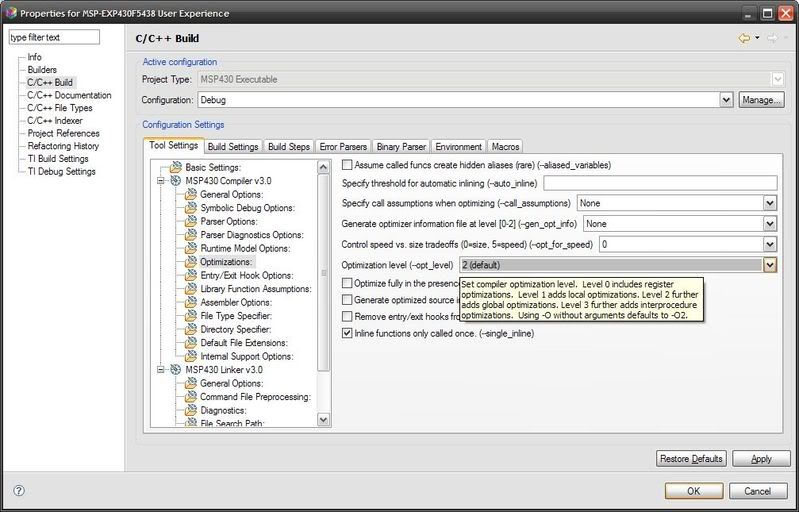
    By default, no compiler optimizations are used but if you increase the optimization to Level 2, it should compile fine.

    You'll find the optimization settings at C/C++ Build > MSP430 Compiler 3.0 > Optimizations.


    CCE Optimizations

  • I found some quirks with the optimization pull downs:

    --opt_for_speed:  None, 0, 1, 2, 3, 4(default), 5

    --opt_level: None, 0, 1, 2 (default), 3

    I would expect that if I started a new project, the optimization settings would be initialized to their default levels (4 and 2), but they both start at zero.  Also, having a "None" selection and a "0" selection is confusing.  Is there some reason for this?


  • I can't comment on the reason for having a "None" selection option, but reviewing the MSP430 Optimizing C/C++ Compiler v3.1 User's Guide (SLAU132) indicates if the --opt_for_speed is not actually specified on the command line, then a value of 1 is used.  If the option is specified with no argument, then a value of 4 is used.  I would surmise, if NONE is used, then the --opt_for_speed is not actually used on the command line for the compiler.  This can be found by the Project Properties -> C/C++ Build -> Tool Settings -> MSP430 Compiler v3.1 menu.


**Attention** This is a public forum