This thread has been locked.

If you have a related question, please click the "Ask a related question" button in the top right corner. The newly created question will be automatically linked to this question.

Strange Initialization FaultISR - only 1st connection

Other Parts Discussed in Thread: UNIFLASH

Sometimes, when I try to load or debug my TIVA based project, I find that the program get a FaultISR interrupt if I connect the Tiva board for the first time!! (Every time I try to debug for a second time everything works ok).

The NVIC_Fault_Stat register is in 0x00010000 as shown below, which means Undefined Instruction Usage Fault:

My stack pointers are:

20007ef8 __STACK_END
00000578 __STACK_SIZE
20007d80 __STACK_TOP

And the MSP register is inside this area 0x20007EC0 (but close to STACK_END):
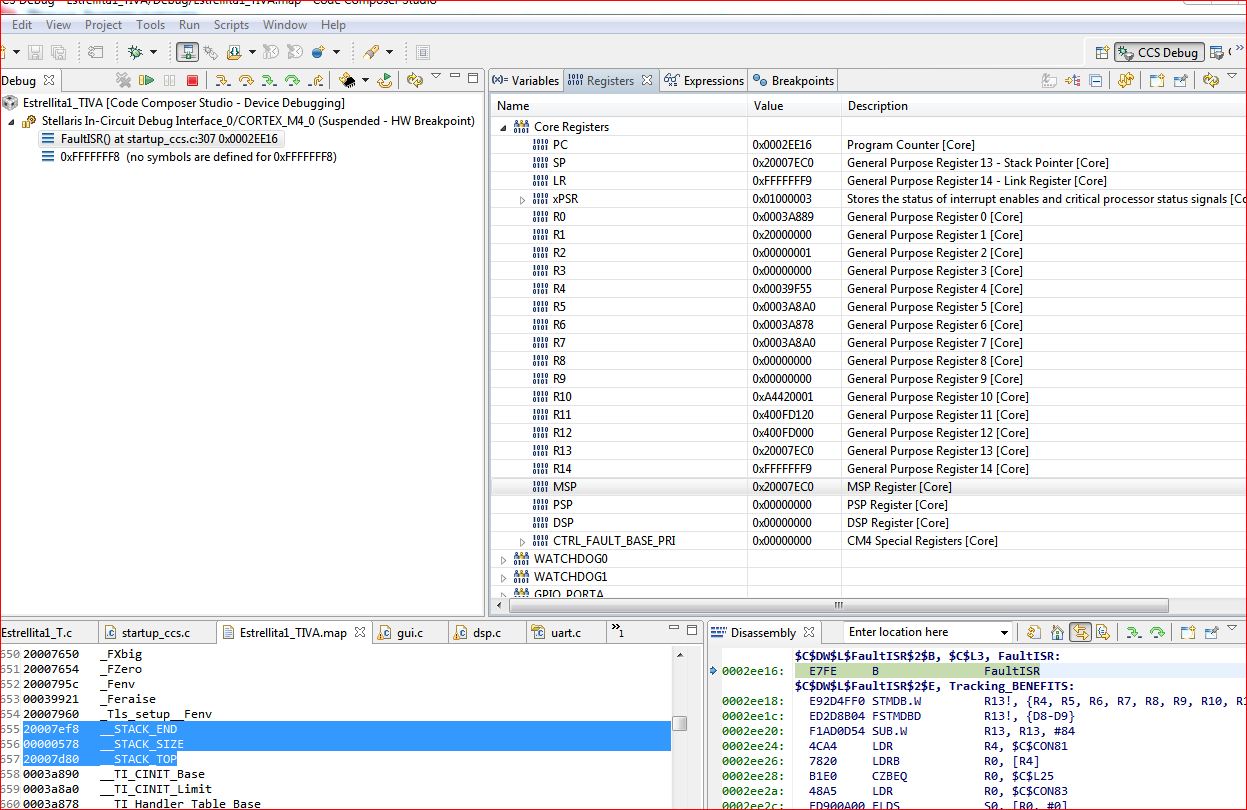
On the other hand the NVIC_FAULT_ADDR is 0xE000EDF8, Checking the Memory Model  I found that this Address is in the Private Peripheral Bus at Cortex-M4f Peripherals but doesn't match any register.
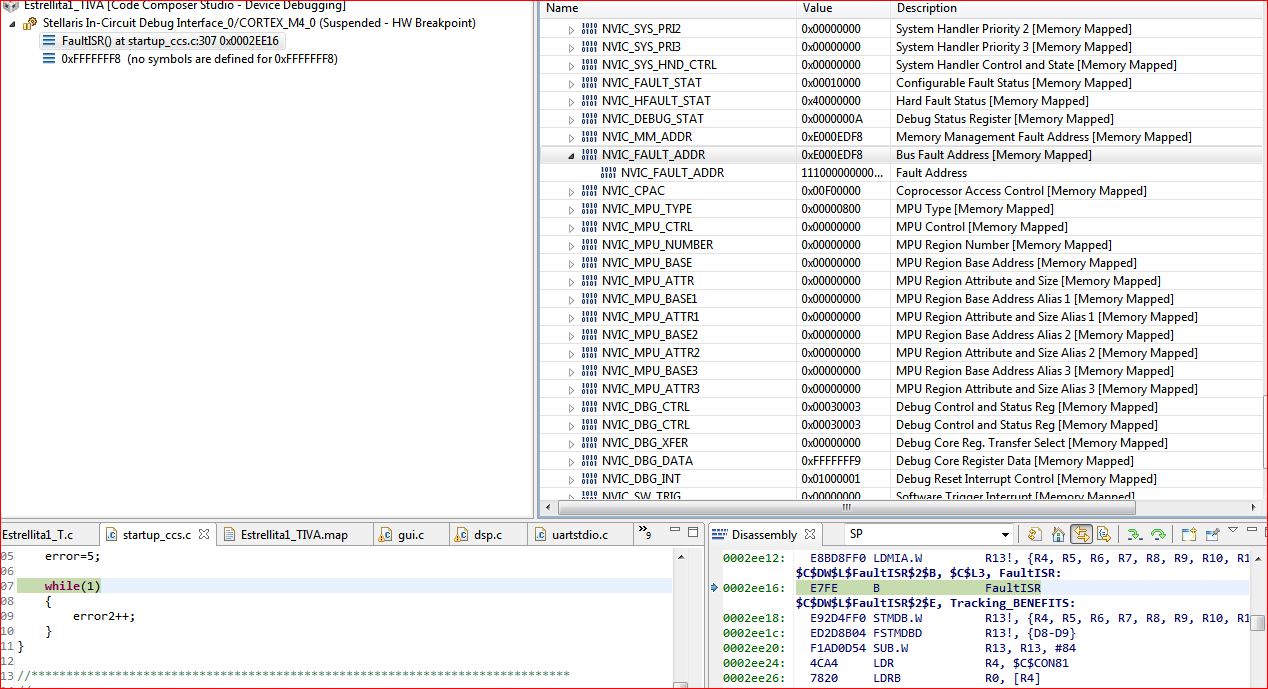
It only happens in the first connection of the board via USB to the PC, but it kind of bothers me not knowing why and not having it under control. 

Can you give some ideas on this?

Thank you

  • Might this be a symptom of incomplete/incorrect MCU Reset - from power-up?  Easy test - employ manual reset post power-up and before launch of IDE.

    If correct - this is an unwelcome byproduct of USB-only powered connections/connectors...

  • cb1- said:

    Might this be a symptom of incomplete/incorrect MCU Reset - from power-up?  Easy test - employ manual reset post power-up and before launch of IDE.

    If correct - this is an unwelcome byproduct of USB-only powered connections/connectors...

    Hace tried to reste from debugger with no luck.

    Tomorrow I will try with another board and "button" reset, quite late here by now.

  • PAk SY said:
    Have tried to reset from debugger with no luck.

    That was not my suggestion - opens further issues.

    A hard/full reset is required - best done manually... (and prior to IDE attach)

  • cb1- said:

    That was not my suggestion - opens further issues.

    A hard/full reset is required - best done manually... (and prior to IDE attach)

    Have tried hard/full reset as well (pressing the button and switching to Debug/device switch) with no luck....FaultISR with same NVIC_FAULT_STAT and NVIC_FAULT_ADDR.

    Have tried with different boards (both a Tiva Launchpad and a Stellaris Launchpad) with no luck.

    I think is something with TIVAware, since when I load the same code in Stellaris, everything loads OK at first time.

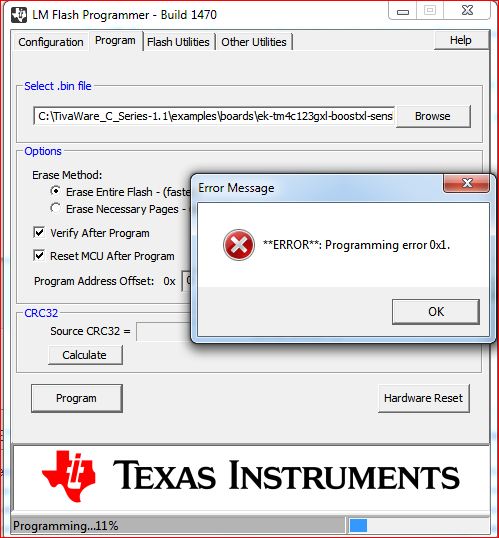
    Another thing is that I have now many errors when I try to program the flash via LM Flash Programmer.

  • We'll that full/proper Reset's "failure to resolve" is not good.  (has worked our shop & @ clients - but not your board)  Cannot recall seeing such issue here/other ARM fora... 

    Your finding & report of "success" w/StellarisWare may be critical.  Suggest that you repeat that test - perhaps 5-10x - so that the "error condition" has the best chance to reveal.  And - to be of maximum value - test should be done under the exact conditions as employed during failure under rebrand.  (same PC, same cable etc.)  Kindly try/report.

    Dawns that another test may aid our understanding.  (assumes that IDE correctly attaches on all subsequent attempts)  Suggest that you program that identical application into your board - once completed remove power.  Then shut-down the IDE so that it has no impact - and repower your board.  Should this be a power on Reset issue - we'd expect the application to suffer upon power-up - at least upon some percentage of such power-ups.

    Moving to your "new" Flash Programmer issue - does not a newer version exist?  (recall 15xx - but do not use)  Vendor's Dave W. here (w/in past few days) commented that Flash Programmer avail on web was "not" latest/greatest.

    I recall that a proposed "work-around" was the substitution of the best "match" past LX4F device (Stellaris) in place of rebrand.  Again - you may wish to try/report.

    Update: 09:30 - Dawns that the suggested hard Reset should reach ICDI device as well.  (believe that's an MCU - your board)  Find & monitor that ICDI MCU's reset pin - I would bet that SW change does not fully/properly manage...  And - you are welcome....

  • Ok, I found some time of regular pattern:

    In Tiva, from the connection on the Launchpad I get this results:

    Not working - Working - Not Working - Working - Not Working ......

    In Stellaris:

    Working - Working - Working - Working - ...

    This is leading me on something on the out file generated.

    Answering yor previous questions:

    cb1- said:

    We'll that full/proper Reset's "failure to resolve" is not good.  (has worked our shop & @ clients - but not your board)  Cannot recall seeing such issue here/other ARM fora... 

    Your finding & report of "success" w/StellarisWare may be critical.  Suggest that you repeat that test - perhaps 5-10x - so that the "error condition" has the best chance to reveal.  And - to be of maximum value - test should be done under the exact conditions as employed during failure under rebrand.  (same PC, same cable etc.)  Kindly try/report.

    Tested under the same conditions Stellarisware never fails, Tiva fails.

    cb1- said:
    Dawns that another test may aid our understanding.  (assumes that IDE correctly attaches on all subsequent attempts)  Suggest that you program that identical application into your board - once completed remove power.  Then shut-down the IDE so that it has no impact - and repower your board.  Should this be a power on Reset issue - we'd expect the application to suffer upon power-up - at least upon some percentage of such power-ups.

    Try that with no effect on the result.

    cb1- said:

    Moving to your "new" Flash Programmer issue - does not a newer version exist?  (recall 15xx - but do not use)  Vendor's Dave W. here (w/in past few days) commented that Flash Programmer avail on web was "not" latest/greatest.

    I recall that a proposed "work-around" was the substitution of the best "match" past LX4F device (Stellaris) in place of rebrand. 

    I have asked Dave for the new version in the same forum post.

    cb1- said:
    Update: 09:30 - Dawns that the suggested hard Reset should reach ICDI device as well.  (believe that's an MCU - your board)  Find & monitor that ICDI MCU's reset pin - I would bet that SW change does not fully/properly manage...  And - you are welcome....

    Do you mean by this that I may upgrade the ICDI driver? No hard feelings, but for a non native speaker, your English is hard to understand sometimes. More in a technical forum like this.

    Thank you for your time and help cb1- , I appreciate it.


    UPDATE:

    I have found the same issue if I try to Load Program directly, inside the CCS Debug view, it fails one every two times!!

    If I load and Verify Program I get this output on the console (forgot to verify one time on error):

    One of these points, in my Map memory is:

    00039378 00000048 rtsv7M4_T_le_v4SPD16_eabi.lib : boot.obj (.text)
    000393c0 00000048 : fd_toi_t2.obj (.text)

  • And the plot thickens...   Surely cavalry (vendor) will arrive tomorrow - realize our (non-vendor) tech group works w/multiple ARM MCUs - many vendors - use M3, M4 & M0 - thus have zero interest/experience in/with CCS.

    What happens when you load a simple, vendor supplied project?  (should have asked far sooner)  Does this fail - then work - then fail scenario persist?   (you must use a "pure" vendor supplied program here - ideally this enables vendor staff to test & confirm (or refute) your findings...)

    Regarding the 2nd MCU on your board (serves as ICDI) - this failure after "power-up" often is caused by imperfect MCU (or other critical components)  Reset.   I suspect that your Reset button on your board may route only to the Target MCU - not the ICDI MCU as well.   The fact that the 2nd time around "clears" the fault suggests that this reset may have occurred.   My goal was to start your download with "known good" Resets - across your board - so that you're always starting from valid conditions.  

    You've not commented upon the "exactness" of cables & PC when contrasting StellarisWare to the rebrand.  The better the quality of the info you provide - the better your chance of a cure...  My efforts have aimed toward that goal...

  • cb1_mobile said:

    And the plot thickens...   Surely cavalry (vendor) will arrive tomorrow - realize our (non-vendor) tech group works w/multiple ARM MCUs - many vendors - use M3, M4 & M0 - thus have zero interest/experience in/with CCS.

    Couldn't agree more with you!! A tool is a tool, a hammer is a hammer, and you shouldn't know how to make one to use it.


    cb1_mobile said:


    What happens when you load a simple, vendor supplied project?  (should have asked far sooner)  Does this fail - then work - then fail scenario persist?   (you must use a "pure" vendor supplied program here - ideally this enables vendor staff to test & confirm (or refute) your findings...)

    Regarding the 2nd MCU on your board (serves as ICDI) - this failure after "power-up" often is caused by imperfect MCU (or other critical components)  Reset.   I suspect that your Reset button on your board may route only to the Target MCU - not the ICDI MCU as well.   The fact that the 2nd time around "clears" the fault suggests that this reset may have occurred.   My goal was to start your download with "known good" Resets - across your board - so that you're always starting from valid conditions.  

    You've not commented upon the "exactness" of cables & PC when contrasting StellarisWare to the rebrand.  The better the quality of the info you provide - the better your chance of a cure...  My efforts have aimed toward that goal...


    Now I understand about the second MCU. Thanks.


    Tomorrow first thing will try with vendor project, but didn't remember to have such an issue.

    About the setup, forgot to to write it before... I used Stellarisware in the same board, with the same cable on the same USB port.

  • PAk SY said:
    I used Stellarisware in the same board, with the same cable on the same USB port. 

    Even a native English speaker would be proud to have authored that sentence - precisely detailed - your echo of "same" dissolves any/all objections.  (works wonders in a courtroom.)

    Follow thru w/your "vendor project" test/report - that well rested "crue" should be, "lighting 'em up" tomorrow...

  • cb1- said:

    [

    Follow thru w/your "vendor project" test/report - that well rested "crue" should be, "lighting 'em up" tomorrow...

    The "Vendor projects" work as expected, even after compiling.

  • PAk SY said:
    "Vendor projects" work as expected, even after compiling.

    One hopes that, "work as expected" includes release from: "fail - work - fail" scenario you've noted.

    If that's the case - points strongly at your code and/or some IDE set-up irregularity.  Usual troubleshooting method is to gradually reduce your code - seeking to find that code section which yields your issue. 

    If yours is instead IDE issue - best I've got is systematic comparison - each/every setting "vendor project" versus your own.   Again - vendor's MCU restricted IDE, "not for us" - can offer only general methods as described.

    Do wish you well...

  • cb1_mobile said:

    "Vendor projects" work as expected, even after compiling.

    One hopes that, "work as expected" includes release from: "fail - work - fail" scenario you've noted.

    If that's the case - points strongly at your code and/or some IDE set-up irregularity.  Usual troubleshooting method is to gradually reduce your code - seeking to find that code section which yields your issue. 

    If yours is instead IDE issue - best I've got is systematic comparison - each/every setting "vendor project" versus your own.   Again - vendor's MCU restricted IDE, "not for us" - can offer only general methods as described.

    Do wish you well...

    [/quote]

    Ok, found the cause, not the solution.

    I ran  another test and to avoid any issue with the IDE settings, I took the airmouse example provided with the sensorhub and replaced the source files with mines.

    The behaviour was exactly the same, so IDE was descarted.

    Then I thought what I have changed lastly, and the answer is I updated the cfft function call of DSP CMSIS from version 2.1 to a new one only present in v3.2 with the app note that  Jordan Wills    passed me in this thread:

    http://e2e.ti.com/support/microcontrollers/tiva_arm/f/908/t/261081.aspx?pi267197=3


    which is almost the same like this one:

    http://www.keil.com/pack/doc/arm/cmsis/cmsis/documentation/dsp/html/arm_fft_bin_example_f32_8c-example.html

    explained here:

    http://www.keil.com/pack/doc/arm/cmsis/cmsis/documentation/dsp/html/group___frequency_bin.html


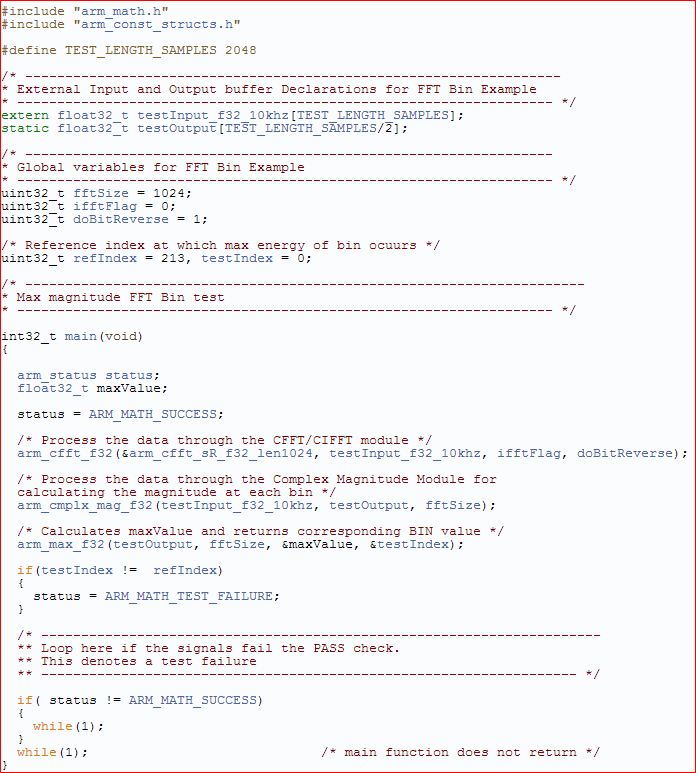
    In this function there is an include to "arm_const_structs.h", which instances &arm_cfft_sR_f32_len1024 and  allows to make a direct call to:

    /* Process the data through the CFFT/CIFFT module */

    Well, i I don't call to this new arm_cfft_f32 function and keep calling my old deprecated arm_cfft_radix4_f32(&fftStructure, g_fFFTResult) the out file loads without errors everytime under Tivaware.

    If I change the call to the new arm_cfft_f32, I get the now famous "one every two loads"

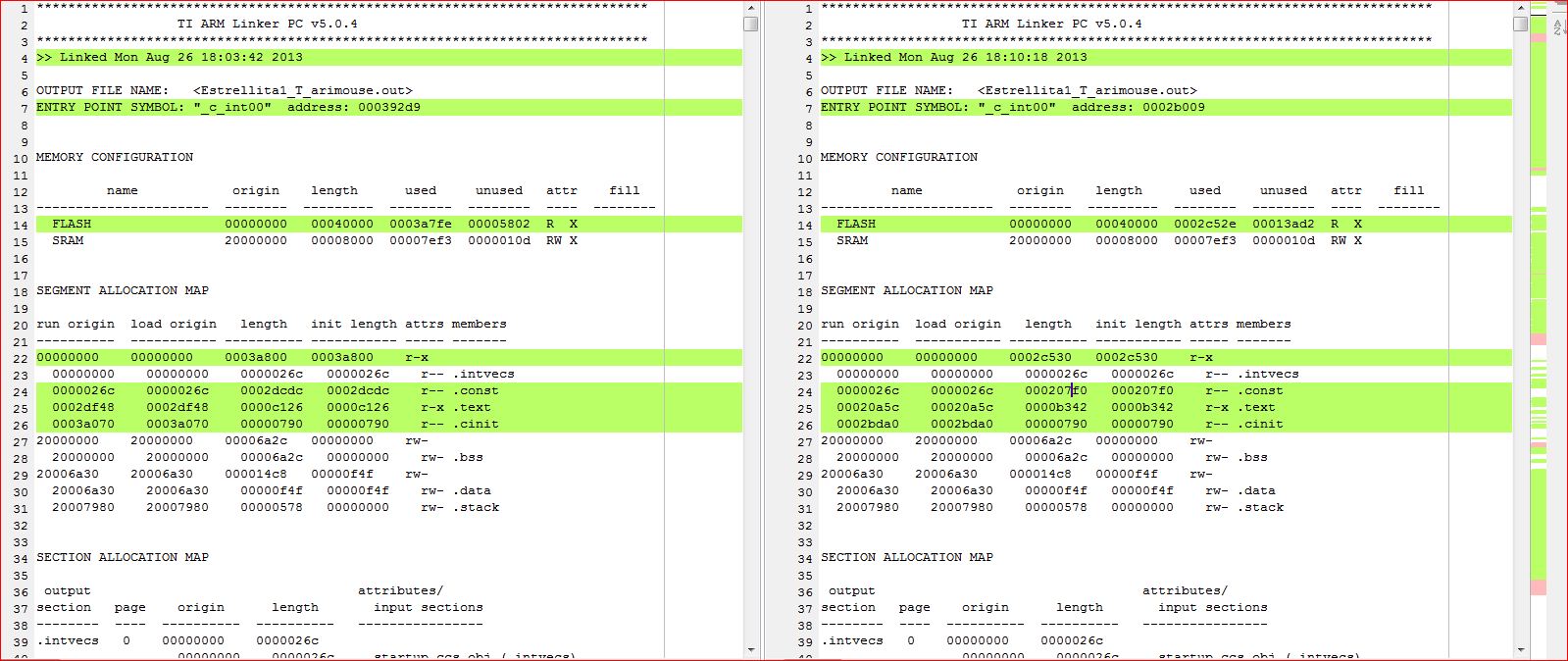
    So I decided to take a look to the two generated map files and made a comparison (with [left] and without [right] arm_cfft_f32 call) and found this:


    As I pointed Jordan in the other thread, this new CMSIS version is more flash demanding than the old one.

    Is there any minimum requirement of flash amount to boot?

    Regarding the LM Flash programmer, as Petrei suggested me in this thread:

    http://e2e.ti.com/support/microcontrollers/tiva_arm/f/908/t/284498.aspx

    with the Uniflash utility, there are no problems.

  • cb1_mobile said:

    "Vendor projects" work as expected, even after compiling.

    One hopes that, "work as expected" includes release from: "fail - work - fail" scenario you've noted.

    If that's the case - points strongly at your code and/or some IDE set-up irregularity.  Usual troubleshooting method is to gradually reduce your code - seeking to find that code section which yields your issue. 

    If yours is instead IDE issue - best I've got is systematic comparison - each/every setting "vendor project" versus your own.   Again - vendor's MCU restricted IDE, "not for us" - can offer only general methods as described.

    Do wish you well...

    [/quote]

    Ok, found the cause, not the solution.

    I ran  another test and to avoid any issue with the IDE settings, I took the airmouse example provided with the sensorhub and replaced the source files with my files.

    The behaviour was exactly the same, so IDE was descarted.

    Then I thought what I have changed lastly, and the answer is I updated the cfft function call of DSP CMSIS from version 2.1 to a new one only present in v3.2 with the app note that  Jordan Wills    passed me in this thread:

    http://e2e.ti.com/support/microcontrollers/tiva_arm/f/908/t/261081.aspx?pi267197=3

    which is almost the same like this one:


    In this program there is an include to "arm_const_structs.h", which instances &arm_cfft_sR_f32_len1024 and  allows to make a direct call to:

    /* Process the data through the CFFT/CIFFT module */

    Well, if I remove the call to this new arm_cfft_f32 function and keep calling my old deprecated arm_cfft_radix4_f32(&fftStructure, g_fFFTResult) the out file loads without errors everytime under Tivaware.

    If I change the call to the new arm_cfft_f32, I get the now famous "one every two loads"

    So I decided to take a look to the two generated map files and made a comparison (with [left] and without [right] arm_cfft_f32 call) and found this:


    As I pointed Jordan in the other thread, this new CMSIS version is more flash demanding than the old one.


    Is there any minimum requirement of flash amount to boot? Could this be an issue with bootloader?


    Regarding the LM Flash programmer, as Petrei suggested me in this thread:

    http://e2e.ti.com/support/microcontrollers/tiva_arm/f/908/t/284498.aspx

    with the Uniflash utility, there are no problems.

    UPDATE:

    I am now sure it is a flash memory issue, I tested by resizing a big const data array (which is the screen background), and everything works at first sight!!

    Still problems with LM Flash programmer, but working with uniflash.

  • Good for you - much critical progress - even in the absence of officials...  Your logical thought process - and some guidance toward "divide/conquer" troubleshooting process - appears to have isolated your issue.

    New issues you present are outside this post's domain - don't you think?   And likely beyond my ability to assist.  Can state that so long as there is adequate room w/in flash for your bootloader & application - and that your application starts in a well defined flash location - both outside of and known by the bootloader - you should be ok.  Devil in the details - as always...

    Suggest you launch new post - focused on your new discoveries - rather than force new readers through our earlier probings.   Good luck...

  • cb1_mobile said:

    Good for you - much critical progress - even in the absence of officials...  

    As usual.....
    cb1_mobile said:

    New issues you present are outside this post's domain - don't you think?   And likely beyond my ability to assist.  Can state that so long as there is adequate room w/in flash for your bootloader & application - and that your application starts in a well defined flash location - both outside of and known by the bootloader - you should be ok.  Devil in the details - as always...

    Suggest you launch new post - focused on your new discoveries - rather than force new readers through our earlier probing

    Thread launched: