This thread has been locked.

If you have a related question, please click the "Ask a related question" button in the top right corner. The newly created question will be automatically linked to this question.

PCM6260-Q1: porting problem

Part Number: PCM6260-Q1
Other Parts Discussed in Thread: INA121

Hi

Customers encountered new problems when using pcm6260. Two of them were related to channel gain adjustment and automatic gain controller.

1. Situation 1: When I fix CH1_CFG2 Register (Digital volume) = 241d = 20dB and only adjust CH1_CFG1 Register (channel gain), start from 0 and adjust upward. When it exceeds 7dB, channel 1 cannot receive sound.

2. In the second case, CH*_CFG2 Register (Digital volume)=241d=20dB is still fixed, and Channel * automatic gain controller (AGC) setting is used instead, enable When the 1khz sound is not provided, very loud noise will be received, or when the 1khz signal is deliberately interrupted for a short period of time, the unrecognizable noise will be obvious.

P.S. tdm-32b-hw0_0_ch1_0x3d_6db_*db.png is to adjust channel gain tdm-32b-hw0_0_ch_1_adc.png Five screenshots of AGC enabled, from ch1 to ch5. tdm-32b-hw0_1_ch_123_adc.png and tdm-32b-hw0_1_ch_12345_adc.png are the cases where AGC is enabled on the channel together.

  • Hi Gareth,

    Can you reattach the png files in a ppt, I can't see them. 

    But the customer is essentially not seeing a digital volume gain greater than 7dB in the playback path and there is high noise when the agc is enabled, correct?

    Regards,

  • Hi Daveon

    Sorry, missing image file

  • Hi Gareth,

    I've deleted the earlier comments by accident and can't retrieve them. Here are my older suggestions for your reference when addressing this issue.

    *******

    Looking at the schematic, here are my comments:

    • We recommend a 2.2uF cap at BSTOUT instead of 10uF
    • We recommend a 1uF cap at VREF instead of 10uF
    • Unused analog inputs we recommend AC coupling to GND so noise is not coupled into the other inputs.
    • I do not see the micbias connected to the INxP pins
    • SDOUT pin is not bidirectional, a signal from SAIx_TXD could interfere with the output.

    *******

    In regards to the analog front end, following the mic and amplifier the signal must be 5Vrms in single-ended configuration or less and not exceed the maximum ratings outlined in the datasheet.

    *******

    In your last update, you mentioned the output was only showing on 2 of the 6 channels?

    My troubleshooting questions are as follows:

    • Can you confirm the SDOUT is in TDM mode and ASI output is set for 6 channels with correct slots?
    • Also can you confirm clock signals and provide your updated register dump?

    Regards,

  • Hi Daveon

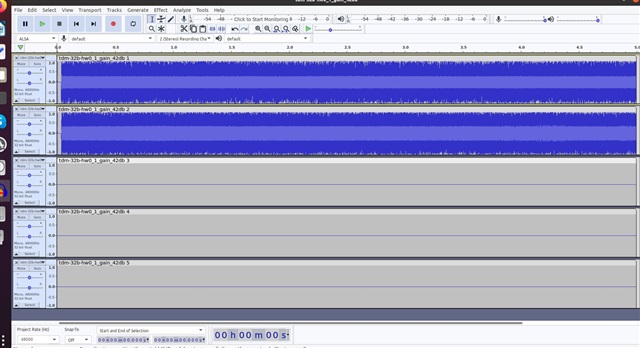
    After modifying the capacitor according to the recommended value and connecting the micbias vol, the channel gain adjustment becomes more obvious. There will be no signal loss just because the channel gain is adjusted to above 7db. But something very strange happened. Both chips have left ch1 and ch2. There is sound recently, and other channels have no signal at all, as shown in the attached picture.

  • Hi Gareth,

    • Can you confirm the SDOUT is configured for in TDM mode and ASI output is set for 6 channels with correct slots? 
      • The device may be in I2S mode or if your recording through audacity you may be limited to two channels at a time.
    • Also can you confirm clock signals and provide your updated register dump?

    Regards,

  • Hi Daveon

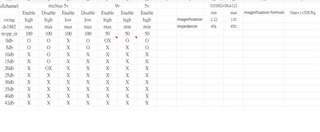
    Reconfirm. The customer accidentally set ASI_FORMAT to i2s. It has been corrected to TDM mode. After changing back to TDM, when adjusting the channel gain, there will be a situation where the random channel cannot record sound after exceeding 20db. If the dB continues to be adjusted upward, it will happen that all channels cannot record sound. There are records in the Execl file. The changing values ​​include MICbias Enable/Disable, Highswing/Lowswing, 0db-42db, Please refer to the attachment,

    supplement

    1. 20db refers to the five regs 0x3d 0x42 0x47 0x4c 0x51 in Register Summary Table Page=0x00

    2. Vpp measures 1.1v

    3. The single end is connected to the INx_P of pcm6260

    Thank you

    pcm6260_tdm_test.zip

  • Hi Gareth,

    Your input signal is 1.1Vpp ≅ 0.38Vrms ≅ -14.4dB. Applying a gain greater than 14.4dB will clip the input signal in low swing mode. Also the dc-common mode of the signal determined from your micbias connection must be less than 4.2V differential and 2.1V single ended. When in low swing mode please ensure these conditions aren't exceeded.

    For high-swing mode this DC common mode voltage should be 7.1V if the goal is to provide a full-scale signal. Below are more conditions that need to be met for high swing mode:

    The customer may need to increase MICBIAS level to support high swing mode.

    Regards,

  • Hi Daveon

    Try using a signal generator to replace the role of the microphone and output 100mv 500hz to produce the following table After increasing the micbias to 9V, the receiving channel becomes worse, and even 0db will cause problems.

    If the signal is 0.1v, what is the appropriate bias value?

  • Hi Gareth,

    Apologies but can you reattach the schematic. Input configurations are also explained in section 8.3.3 of the d/s

    DC Coupled Input:

    Line inputs (from a signal generator) can be fed directly into INx, the common mode voltage difference must be 0V. MICBIAS is not needed here.

    ECM microphone inputs require biasing with typically half impedance of the mic pulled up to MICBIAS and half impedance referenced to GND. The common mode voltage difference must fit within guidelines explained in section 8.3.3 of the datasheet.

    AC Coupled input:

    Since DC voltage is removed from the signal the input pins must be biased to the common mode value. Below is chart for recommended values in this configuration, but in an actual use case the resistor values are dependent on the input swing and micbias value.

    ######

    To troubleshoot with the signal generator, generate a full scale input signal and validate a full scale output. Reduce the input signal then validate gain applied by the PGA.

    Regards,

  • Hi Daveon

    The schematic diagram and layout are as attached.

    Signal>INA121+DS1882 Amplification>PCM6260

    The question is as follows

    1. They have problems with 0~20db recording under Micbias 5v ~9v and high swing.

    2.There will be noise when the MIC is connected to the motherboard. Could you help check whether the layout needs to be adjusted?

    am8mp01.pdfAMMIC.pdfAM8MP01-02-08.brdAMMIC01-02-01.brd

  • Hi Gareth,

    Looking at the schematic again, here are my comments:

    • Change the capacitance on the output of micbias from 0.1uF to 1uF
    • Based on the capacitor at the output of INA121, your input configuration is actually AC-coupled single-ended. Figure 40 of the datasheet should work to allow you to use the PGA or DVOL controller
      • Resistor calculator: https://www.ti.com/lit/zip/sbac263 
      • I suggest having the front-end amplifiers reviewed by our op-amp experts.
      • Also, please ensure the signal at the output of the two preamps are clean and the expected signal. Please take an oscilloscope capture of the input signal at the pin of PCM6260 and share if possible
    • High swing mode in single ended configuration is up to 5Vrms in single ended configuration, MICBIAS also needs to be 9V here to provide sufficient headroom.

    Gareth, I have reached out offline to setup a call if necessary with me and an additional ADC expert to help you close out this issue. Please implement the notes and let me know if a call is needed for clarification.

    Kind regards,

  • Hi Daveon

    Adjusting the "ground capacitance" and "ground capacitance" of INxP and INxM will help the resistance of MICBIAS. Currently, when adjusting the channel Gain, the recorded signals can be received. Thank you for your help. The rest is the frequency multiplication interference between each channel