Hello,
My customer would like to know how to configure JESD204B Frame Format for LMFSHd = 82380 on the GUI.
Please show how to do that step by step.
Best regards,
K.Hirano
This thread has been locked.
If you have a related question, please click the "Ask a related question" button in the top right corner. The newly created question will be automatically linked to this question.
Hello,
My customer would like to know how to configure JESD204B Frame Format for LMFSHd = 82380 on the GUI.
Please show how to do that step by step.
Best regards,
K.Hirano
Hirano-san,
Attached is a GUI example setup. This is not Wideband-DUC mode. This mode requires two clock sources that are synchronized to each other. The other document explains the Frame Format.
Regards,
Jim
DAC38RF82__Fs_1600_real_12_bit__823.pptxJESD204B - 82380 Frame format.pptx
Jim,
Thank you for your responses.
My customer would like to use the Wideband-DUC mode.
In this case, how they can configure JESD204B Frame Format for LMFSHd = 82380 on the GUI?
Best regards,
K.Hirano
Jim,
Thank you very much for providing the slides.
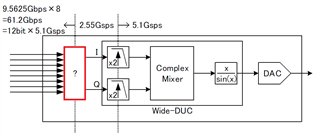
But, my customer would still like to know how to set the portion framed in red below, between SerDes input and I/Q data streams
Could you provide some instructions, please?

Best regards,
K.Hirano
Hirano-san,
See if the attached document helps. The user will send 4 lanes of real data to DUC 1 (I data) and 4 lanes of real data to DUC 2 (Q data). The lanes are swapped on the DAC38RF82EVM GUI setting since they are routed this way on the PCB.
Regards,
Jim
Jim,
Do you mean my customer should use the setting on page #1 of the slides?
Best regards,
K.Hitano