This thread has been locked.

If you have a related question, please click the "Ask a related question" button in the top right corner. The newly created question will be automatically linked to this question.

AFE4404EVM: Software issue download does not work

Part Number: AFE4404EVM
Other Parts Discussed in Thread: AFE4404

Hello, when trying to follow the instructions for this and download the software none of the links work to get functional software it says its missing files but does not offer to download them. 

  • Hello John,

    What error messages are you seeing?

    Make sure you are navigating to this page, clicking "Download Options" and then clicking the zip file to download.

    Window after "Download Options" is clicked which shows the link to the zip file

    Regards,

    Payton

  • Yes I did that, then on my device it said I needed additional software from here for it to work? https://lumen.ni.com/nicif/US/header_login/content.xhtml?du=https://www.ni.com/en/support/downloads/software-products/download/packaged.labview.585712.html

    Then that software did not work either. My goal is to plug the device into my windows laptop and take readings, just raw data from the PPG is fine nothing fancy needed I can analyze myself.

  • Hello John,

    Could you try following the instructions from this post and letting me know your results?

     AFE4404EVM: GUI Error. Unable to locate the LabVIEW Run-Time Engine. 

    Please make sure that you are installing a version of the LabView Run-Time engine that is compatible with the 2014 version -- some more updated versions may not be compatible with the GUI.

    Regards,

    Payton

  • I followed those steps but LabVIEW is requiring a very expensive subscription in order to download their legacy software. This was not at all advertised on your website when I purchased this device.

    Do I need this additional software in order to use my device? My goal is to take PPG readings, then access a raw data file on my windows device. I do not need any graphical software to view the raw data results.

    Please advise on a solution that avoids this costly additional expense.

  • Hello, any updates on this? If the device does not work without additional paid software I would like to return it for a full refund since this was not advertised.

  • Hello John,

    Apologies for the delay; I was out-of-office.

    While most of the LabView software requires a license to run, the LabView runtime engine is free to download, including the legacy runtime engines. Could you try downloading the runtime engine from this link below?

    https://www.ni.com/en/support/downloads/software-products/download.labview-runtime.html?srsltid=AfmBOoq9QWbQ09_1_4638c3ANXxHAD5hDhLETaJGA8tXeoXefjsCwi-W#359539

    Regards,

    Payton

  • Okay so great news, that link you shared over worked and I was able to get the device connected and running. Apologies for the harsh tone last time, was a bit behind on a deadline and am very happy to have your product working as intended.

    My next question, I tried looking in the documentation but wasn't clear on how I can adjust the sampling rate of the device? Seems like its defaulted to between 50 and 100 hertz but the documentation on the device page said it could capture up to 1000 hertz? Where in the TI GUI can I adjust this setting? thanks again!

  • Hi John,

    It's all good! I understand how stressful those deadlines can be.

    To adjust the PRF of the device, you will need to adjust the register setting PRPCT, which will control the period of a single PRF cycle. You can adjust PRPCT directly in the register settings ("Device Configuration/Low Level Configuration"), or you can adjust the Pulse Repetition Frequency in "Device Configuration/Timing Controls."

    The "Timing Controls" window of the AFE4404EVM GUI. The "Pulse Repetition Frequency" input window is underlined with red with an arrow pointing to it in order to highlight its location

    Regards,

    Payton

  • Okay that worked great, I noticed the default time of measurement switched when I adjusted to 500Hz. A few questions on this:

    1) If I keep pressing the "capture" button will this data be combined into a single file when I press "save" or do I need to save each session?
    2) Saving generated 5 different CSV/excel files, which one would be best to measure the "values" generated from the PPG sensor during sesssion?

    Happy to hop on a call if needed to talk through high level my use case of your device, thanks again for your support on this, its been very helpful!

  • Hello John,

    1) You should save each session individually. A new session will overwrite the previous data.

    2) I would use either the "Device_Codes" (for raw ADC codes) or "Device_Volts" (for the ADC codes converted into volts)

    Regards,

    Payton

  • Thanks for the clarification, I've got one last question then should be all set here. When I moved up to 500Hz the session default time was very short, is there a way to set this to run for at least a few minutes? 

    Or is this a limitation of the device and the only way to get a longer set of data would be to save multiple sessions as you mentioned above?

  • Hello John,

    Make sure that your "Capture" mode is set to "Continuous," which will allow you to perform longer captures.

    Regards,

    Payton

  • Okay that worked great, was easily able to get the 5 minute window samples I wanted. The goal of my research is to use the PPG to essentially capture the heartbeat shape from the PPG data.

    Currently the 100hz data is very noisy. I took the measurement from my finger and tried to reduce ambient light levels. 

    Are there any suggestions your team has for this use case?

  • Hello John,

    The settings for each use case will depend on the specifics of your setup and application; you will have to fine-tune those elements on your own.

    Some suggestions:

    • Make sure that you are subtracting the ambient signal from the LED signal. In addition to removing the ambient light, this will also help remove any noise common to both signals
    • Make sure your setup is somewhere that is relatively less likely to pick up on external noise if possible
    • Check for power-line noise (50Hz/60Hz) and filter it out if necessary
    • Consider experimenting with your system's gain and the current cancellation DACs to try to maximize the utilization of your system's dynamic range, especially if you do not need to preserve the DC component of the signal

    Regards,

    Payton

  • Hello, so I've tried about every combination of settings and set ups to avoid light exposure I can think of and I am still not seeing anything resembling the clear and clean PPG signal advertised in the documentation.

    Is it possible the device I received is defective? If unlikely, can we please schedule a call to talk through my setup and see what is incorrect?

  • Hello John,

    1. What do your most optimized PPG settings look like? Can you include a picture?
    2. Are you following the procedure laid out in section 2.4 of the AFE4404 development guide, with special focus on Step #4: Test Setup?

    Regards,

    Payton

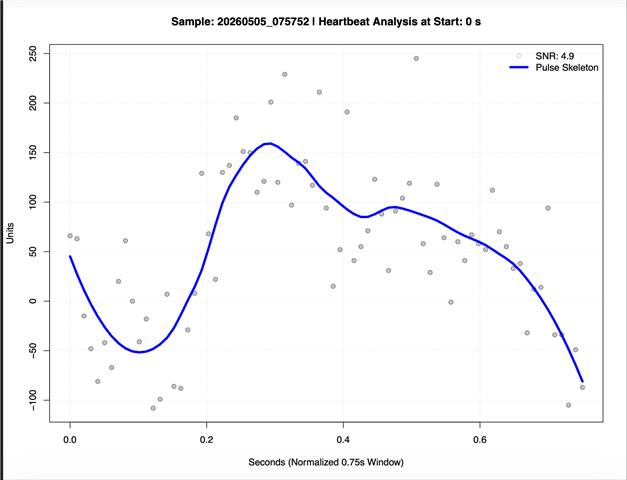
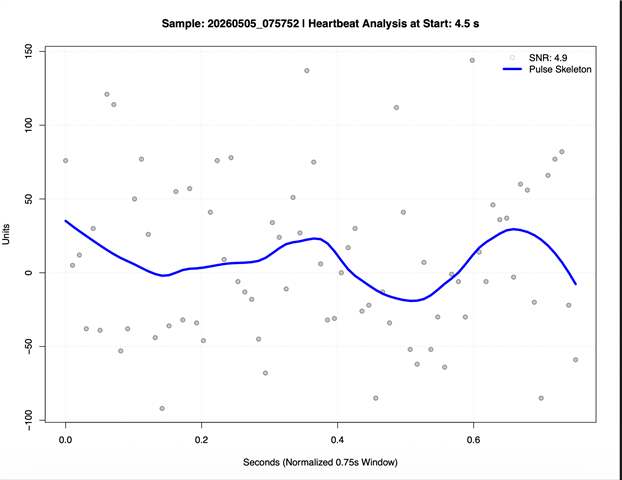
  • Hello, thanks for all the help on this I greatly appreciate it. Here are a few random samples of the best visuals data I've achieved so far. I used 100hz (default sampling rate), tried TIA_GAIN of 500, 250, 100, and 50, TIA_CF at 25 (max), I also turned LED 2 and LED 3 to 0 to focus on getting LED 1 correct.

    My plan was to max out LED 1 then use the OFFDAC options to downshift the signal to increase the height of the PPG waves, but at 100hz sampling rate I am not able to saturate the sensor completely. The below samples were taken when my heart rate was around 80bpm, so with the sample window each should look relatively like a single heart beat.

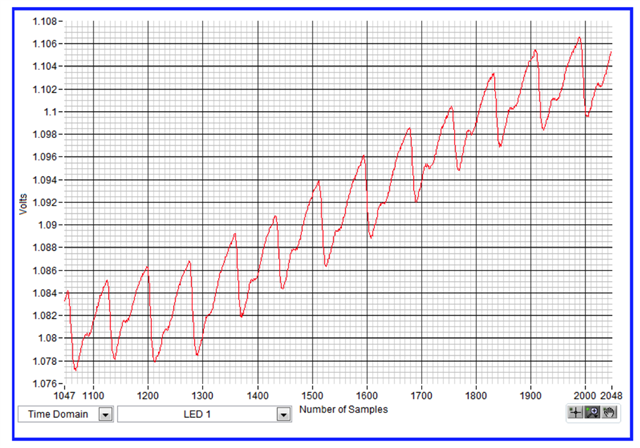
    I've attempted measurements on both the wrist as all as my finger tip and gotten similar results as below regardless of which setting combination I've used. I've included the 3rd image below as the sample from the documentation I am hoping to get something close to looking like, and yes followed section 2.4 in detail.

  • Is there anyway we can schedule a zoom/meets/etc call where I can screen share? Feel like that would resolve this much faster. Thanks.

  • Hello John,

    Let me follow up via email.

    Regards,

    Payton