Part Number: ADC3669EVM
Other Parts Discussed in Thread: TSWDC155EVM,
Part Number: ADC3669EVM
Other Parts Discussed in Thread: TSWDC155EVM,
This seems to be a duplicate thread: ADC3669EVM: Debug procedure for ADC3669EVM
Please resolve there.
Regards,
Mike Emanuel
Dear Mr.Emanuel,
Thank you for your message.
I could not open the web link. I click the link, the web page said "Unfortunately, the page you've requested no longer exists. Please use the search form above to locate the information you're interested in." Could you check if the web link is correct one, please ?
I was able to find the several LEDs to turn on and the FPGA is now being recognized after changing several resistor values. However, I am still unable to capture any data.
One difference I noticed compared to the procedure described in the ADC3669EVM User Guide is that when I open HSDC, the figure in the User Guide shows "FT2UW79X-TSW1418" under Select Board, whereas in my case nothing is displayed there.

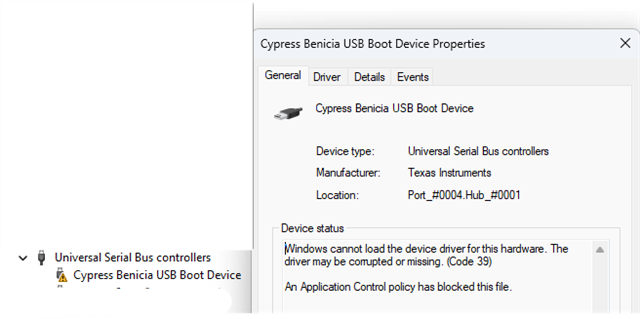
For reference, Device Manager shows "Cypress Benicia USB Boot Device". When I open its Properties, the following error message is displayed:
Windows cannot load the device driver for this hardware. The driver may be corrupted or missing. (Code 39)
An Application Control policy has blocked this file.
I am not sure whether this error is related to the data capture issue, but I wanted to share this information in case it helps with troubleshooting.

Best regards,
Hi,
Someone in TI reported the same problem. I will post the statement here:
A few days ago I brought up the ADC3669-DC EVM with the TSWDC155EVM for the first time and was able to get a capture. Have you verified the clock is correct and/or it is filtered correctly? Are you inputting the correct tone to the EVM and/or filtering that properly if using a filter? Please go through the steps again, I verified them today.
Have you checked the path to make sure it is correct? Is everything exactly as in the User Guide?
Regards,
Mike Emanuel