This thread has been locked.

If you have a related question, please click the "Ask a related question" button in the top right corner. The newly created question will be automatically linked to this question.

USB Bulk Driver for ADS127L01EVM on Windows 10 x64?

Other Parts Discussed in Thread: ADS127L01EVM, ADS127L01

Hi,

Where do I find drivers for the ADS127L01EVM that will work on Windows 10 64 Bit?

I have tried BulkUsb_driver_install_x64-v1.0.0.0.msi as found in the drivers folder after installing the EVM software. This fails and rolls back. 

I have tried manually installing the .inf files.

  • boot_usb.inf - this install OK
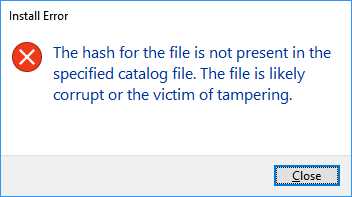
  • usb_dev_bulk.inf - FAILS to install. The error reported by Windows is as follows

[Window Title]
Install Error

[Main Instruction]
The hash for the file is not present in the specified catalog file. The file is likely corrupt or the victim of tampering.


[Close]

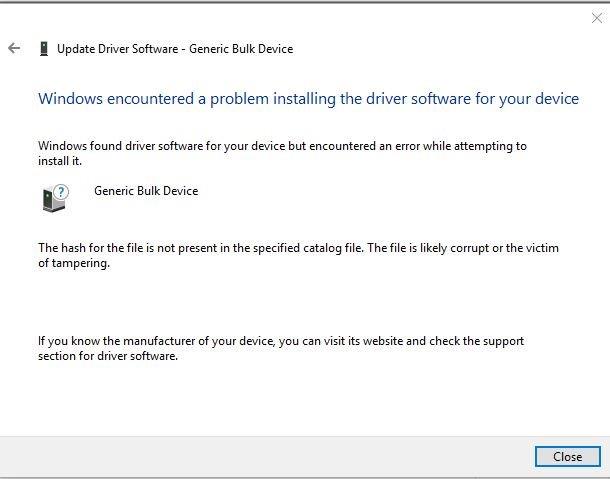
Also tried install from Device Manager. It says it can find the driver in the folder, but complains about it being corrupt. 

I have tried this on two Windows 10 PCs.

I also tried in a Windows 7 Virtual Machine (Virtual Box). The driver installed with warnings about not being signed. But the EVM software struggles to communicate with the boards. I assume there is some problem in the way the VM is re-routing the USB to the virtual machine. 

Please advise where I can get an updated driver for the EVM that will work install on a 64 bit Windows 10 machine. 

Thank you for your help. 

Richard

  • Hi Richard,

    Thanks for your interest in the ADS127L01!

    I have not yet seen this issue with Windows 10 PCs. Can you try re-posting the error message images?

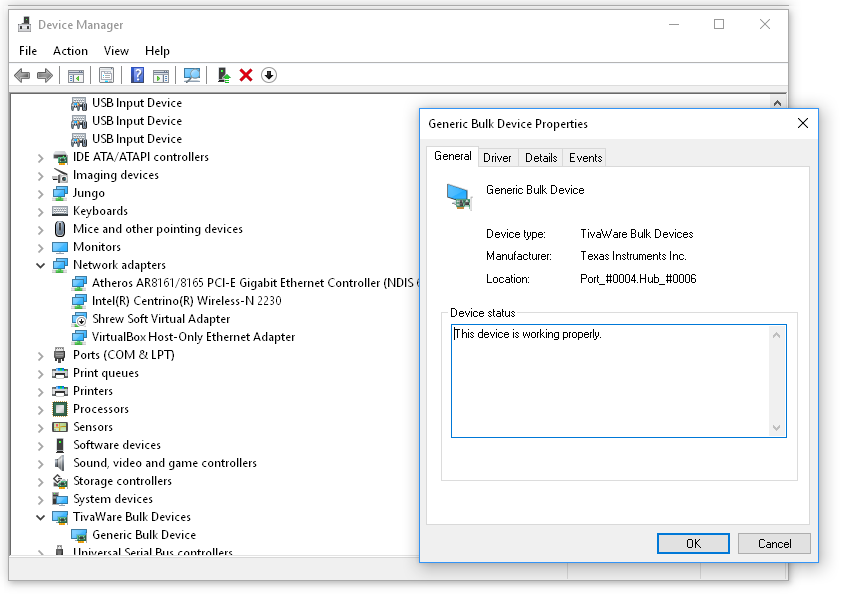
    For the Windows 7 virtual machine, does the Device Manager list the EVM as TivaWare Bulk Devices -> Generic Bulk Device? You mentioned that it appears to connect, but struggles to communicate with the GUI . Is it able to load and refresh the register map?

    I'll see if I find a Windows 10 PC to test this on and replicate the issue.

    Best Regards,

  • Hi,

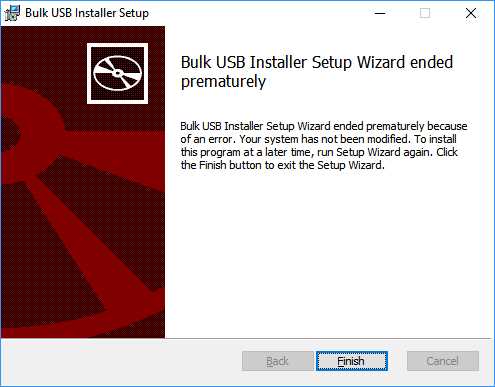
    With no driver installed, I try BulkUsb_driver_install_x64-v1.0.0.0.msi, stepping through the wizard, it ends with this error message and winds back the install

    If I then try to manually install the inf

    Regarding the Win7 VM. Yes, it is listed as the TivaWave Bulk Device. Windows thinks is installed OK and operating correctly.

    On running the application the first time it crashed, then on second run it started and appeared to connect, but it did not display the registers.

    Running the app in the Win7 will sometimes crash. Above screen shot achieved after a reboot of the host, and only plugging in the USB withthe focus inside the VM and not having presented the USB before launching the VM.

    Note when installing on Win 7, there were warnings about the driver not being signed. From searching the web, the errors reported by Win 10 install attempts, also appear to be related to the driver not being signed correctly.

    Your help to resolve this is greatly appreciated.

    Kind regards,

    Richard

  • there are several discussions on the forum related to TivaWare USB drivers not signed and problems with Win 10.
    e.g. e2e.ti.com/.../534238

    Is the correct driver info in the installer?

    Is there an updated USB Bulk driver installer I can try?

    Richard
  • When doing manual install of boot_usb.inf, it is successful. Windows dialog says "The operation completed successfully".

    It appears the problem is specifically with usb_dev_bulk.inf

    I can double click usb_dev_bulk_amd64.cat and it displays "Security Catalog Information" This security catalog is valid.

    Right-click and Install on the usb_dev_bulk.inf leads to the error display in an earlier post and the driver is not installed.
  • Hi Richard,

    I was able to reproduce the issue an a Windows 10 PC. The EVM originally enumerated under "Other Devices" -> Generic Bulk Device." Upon pointing to the correct driver folder, I received the received the following error message:

    As you may have found, this is a known security feature in Windows OS to check for driver publisher signatures called "Driver Signature Enforcement." There are a number of forums out there on how to disable this, including this one:

    http://www.drivethelife.com/windows-drivers/how-to-disable-driver-signature-enforcement-on-windows-10-8-7-xp-vista.html.


    I tried the first option ("through Troubleshoot") under Part 3 and it seems to have worked just fine. After disabling Driver Signature Enforcement and restarting my PC, I plugged the EVM back in and pointed to the driver folder again through Device Manager. Everything works as expected.

    My only concern with this approach is that your PC may be more susceptible to malicious software while this feature is disabled (of course, you should only be downloading/installing from places you trust ;) ). TI cannot assume any responsibility if you choose to try this.

    Regarding the TivaWare USB driver updates, I am not familiar with the changes or their impact on our EVM. Perhaps you can give this a try first, then resort to the link I provided if you need to.

    Please let us know if either option works for you.

    Best Regards,

  • Hi

    The regular usb driver in the EVM software installs OK. It must be signed correctly. 

    It appears to only be the bulk driver that is not signed in a way Windows 10 is happy with. (.cat file appears to be OK.)

    Given you can replicate the problem, why not fix it properly by getting the bulk driver signed? That would reduce the "noise" level in the forums and expecting potential customers to switch off security on their PCs.

    Richard

  • Hi Richard,

    I completely agree with you. Right now, the folks in the Tiva group are working to address this issue. I work in the data converters product line, so for now I'm just as constrained as you are. One of my colleagues has replied to the thread that you shared earlier regarding the release of TivaWare 2.1.3 USB Drivers. We'll continue to monitor their progress and update our EVM installers with the new drivers as soon as they are released.

    Sorry for the inconvenience this has caused you. Please let me know if you need anything else to get the ADS127L01EVM up and running.

    Best Regards,

  • Hi,

    The EVM group should ask the TivaWare group to resign the current driver as I assume you don't need new functionality that may be in 2.1.3 USB. That will also involve testing the EVM with the updated USB drivers further delaying things ("next TivaWare release which is expected 1Q'17.") They just need to resign the existing driver. Should be simple enough as it has been done correctly with the other USB driver included in the EVM.

    Richard

    PS: I am a little concerned about  "Again - this was an oversight on our part and will be corrected in the coming weeks with an update to the EVM."  in thread 

    Regarding ADS1230 REF Low Pass Filter

    e2e.ti.com/.../125919

  • Hi Richard,

    I feel your frustration and let me assure you that we are actively working to resolve this issue.  However, this is not as simple as it would seem.

    As far as the E2E reference and response, there is nothing in the post you are referring to that is remotely close to the quote you made.  So we have no idea what in particular you are referring to or how this pertains to the driver for Tiva.

    Best regards,

    Bob B

  • Hi,

    I disabled driver signature checks in Win10. The USB bulk driver installed.

    What should be displayed in the TI test application after it connects to the EVAL board? How do I record a measurement... 

    Screen shot showing driver installed. 

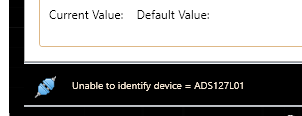
    When I run the eval software not that initially it displays the following message in lower left corner during start up ....


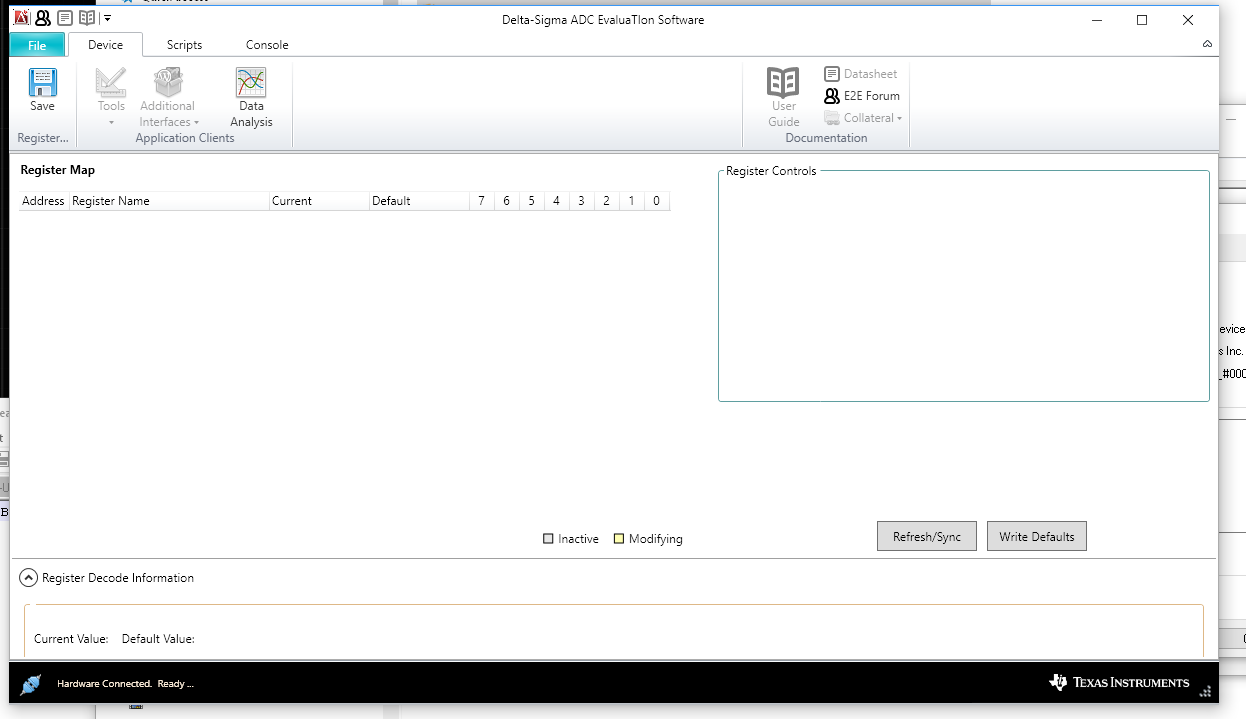
    but then changes to "Hardware Connected. Ready.

    But no register data displayed? Is it working as expected? something else I need to do?

    Thanks 

    Richard

  • Hi Richard,

    The fact that the GUI updated to show the screen above and reads "Hardware Connected. Ready..." indicates that the firmware is running properly and communicating with the evaluation software. If the Register Map is simply not loading, make sure that the GUI is pointed to the correct folder where the ADS127L01 Device Package files are saved, such as "C:\...\Documents\DSEvalSW\Devices\ADS127L01." You can verify this in the GUI under File->Options->User Directory.

    Best Regards,

  • Hi Ryan,

    I re-installed the package for ADS127L01.

    The User folder is defined as "C:\Users\Richard\Documents\DSEvalSW".

    The GUI will display 8 registers if I unplug the EVM,from USB, plug it in and start the software (most of the time.)

    I assumed I could press "Data Analysis" and then press "Collect Data" to get some sample data?

    Lower left status line says "Starting data collection" briefly, then returns to "Connected to main app. Ready".

    No data is displayed in any of the tabs (Data Inspector, Time Domain, nor Histogram).

    I see in the Console window it says "Client went away".... that sounds bad

     .

    I must power cycle the EVM before the GUI will display the 8 register values. It's as if the FW crashes?

    What do I do next to get this evm to capture some data?

    Richard

  • Hi Richard,

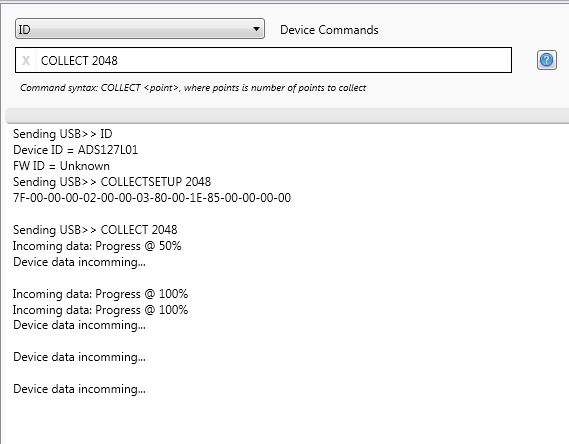
    The software can hang up if no data is received following the COLLECT <n> command. The COLLECT <n> command can be issued from the Data Analysis window or from the Console directly, both do the same thing. When data is collected, it is shared simultaneously to all opened Data Analysis windows and can be viewed through any of the available tools (i.e. scope, histogram, etc.). The message "Client went away!" simply indicates that you closed a Data Analysis window, but it's not a problem (opening a new one will display the same data you previously collected).

    When you issue this command, the log screen on the Console should display something like the image below:

    If data there is no data sent to the GUI, please try the following:

    1. Unplug the EVM and close the GUI (Data Analysis windows too).
    2. Plug in the EVM and configure the jumpers/switches per the Default Settings in the User Guide.
    3. Probe the /DRDY pin to ensure that the device is converting and outputting data.
    4. Start the GUI.
    5. Refresh the Register Map and verify that the register contents update with the correct settings.
    6. Issue the COLLECT <n> command from the Console or Data Analysis window.

    Let me know whether you are able to collect data after this or if any of the above steps failed for you.

    Best Regards,

  • Hi Ryan,

    Thanks. Its working now.

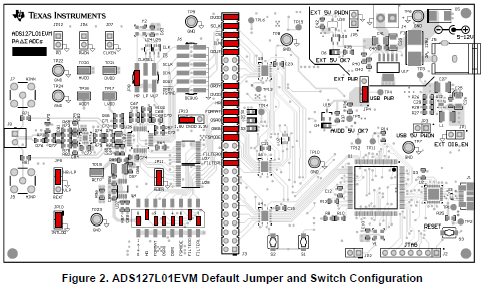
    I re-checked the jumpers and found I had overlooked the DVDD selection jumper (was open circuit).
    Setting that to the default 1.8V clearly made all the difference :-)

    For the benefit of other readers, the reference diagram from the user guide.

    Data analysis shows ENOB of 18.2 bits with the inputs open or shorted. 

    Thanks for the help.

    Kind regards,

    Richard

  • Hi Ryan,

    with your previous suggestion:

    "To achieve ~1kSPS, you would configure the device in Very-Low-Power Mode and use the Low-Latency filter with the highest oversampling ratio available, 2048. The -3dB bandwidth of the digital filter would be limited to < 1kHz, where the device can achieve >21.5 bits effective resolution. "

    Data analysis reports ENOB of 21.4 which is fine.

    Thanks again for your help.
    Richard
  • Hi Richard,

    I'm glad you've finally got things working well. :)

    Please let us know if you have any other questions about using the ADS127L01 or the ADS127L01EVM.

    Best Regards,
  • Hi Ryan,

    What is the longest sequence of data I can collect using the evaluation software?
    Is it 64000 samples?

    I am looking for the easiest way to collect 30 to 40 seconds of samples. Is there sample software I can use to communicate with the EVM and have it record an arbitrary length of samples?

    Richard
  • Hi Richard,

    That is correct. The max number of samples you can collect is 64000.

    Unfortunately we do not have any sample code that can collect and log a larger number of points than that.

    Regards,
  • Hi Ryan,

    With EVM set to HR=Low-power mode, OSR set to WB=256/ll=2048, Filter Sinc5/sinc and JP8 set VLP (4 MHz), should the sample rate be just under 1000 sps?

    When I save the data in Analysis Engine, the headers are as follows:

    [Channels]
    Channel Name ADC0
    # of Bits 24
    Data Rate (Hz) 976.500
    ADC Clock (Hz) 4000000.00
    Gain (V/V) 1.000
    Vref (V) 2.500
    FSR (V) 5.000
    Mid-scale (V) 0.000
    Data Format Decimal

    If I ask for 64000 samples, it should take 64000/976.5 seconds or 65 seconds?

    Appears to take a little over 30 seconds judging by timing of the text output to the console.

    Richard
  • Hi Richard,

    It looks like you've found a bug. The software is reporting the data rate as CLK/OSR with an extra "/2" for some reason if it detects that the HR pin is low (i.e. Low-Power Mode). This is not correct. The data rate in your configuration should be 4MHz/2048 = 1.953kSPS. You can confirm this by measuring the period between /DRDY pulses on an oscilloscope. 64k samples would then take ~33s as you noticed.

    The HR pin setting and the REXT resistor value (selected via JP9) set the bias current used by the ADS127L01 and have no effect on the output data rate. The easy way around this is to leave the HR pin high for now so that the header in the text file reads the correct data rate. Alternatively, you could edit the text file yourself, but I see this as being even more cumbersome for multiple data collections.

    I'll make sure this is noted to be fixed in the next update. Sorry for the confusion.

    Best Regards,

  • Hi,

    I also have the same problem about installing TivaWare Generic Bulk Device on Windows 10.  

    My Windows 10 is 64bit version 1703 or Creators Update.

    I try all the same as Richard do but still cannot install the driver, additionally, the device manager of Generic Bulk Device item showed Device not migrated (in events tab). I inform this problem to TI support and they point me to this forum.

    Finally I use the same last method as Richard said to Disable Device Driver Signing in Windows 10 which I perform the option 2 from this post www.technipages.com/enable-disable-device-driver-signing and successfully install driver on Windows 10 now.  

    For virtual machine, I've tried Windows 7 on VMWare and everything work fine unless the main software hang and close if I click "Collect Data" button repeatedly and quickly on the Data Analysis application window when the Data Analysis app is not ready to connect to the main app.

    This automation error (between main app and data analysis app) on Virtual Machine is acceptable for me be because of lack of performance and I even try to install in real Window 7 Machine and everything work fine.

    Suwatchai