This thread has been locked.

If you have a related question, please click the "Ask a related question" button in the top right corner. The newly created question will be automatically linked to this question.

DS90UB913A-Q1: Interface with DS90UB960-Q1

Part Number: DS90UB913A-Q1
Other Parts Discussed in Thread: DS90UB960-Q1,

Hi,

I am trying to add support for OV10640 over FPD III Link interface with DS90UB960-Q1 Deserialiser and DS90UB913A-Q1 Serialiser. After SerDes Configuration, I am not able to communicate to camera sensor.

           -  GPO2 of Serialiser DS90UB913 is connected to XCLK pin of Camera sensor

           - GPO1 of Serialiser DS90UB913 is connected to reset pin of camera sensor.

Please see the below configuration for SerDes

Deserialiser DS90UB960-Q1 register configuration
{
{0x0C, 0x0F, 0x02},
{0x0F, 0xFF, 0x02},
{0x1F, 0x03, 0x02},
{0x20, 0x00, 0x02},
{0x32, 0x01, 0x02},
{0x21, 0x03, 0x02},
{0x33, 0x03, 0x02},
{0x4C, 0x01, 0x02},
{0x58, 0x58, 0x02},
{0x5C, 0xB0, 0x02},
{0x5D, 0x60, 0x02},
{0x65, 0x64, 0x02},
{0x7C, 0x01, 0x02},
{0x6D, 0x7D, 0x02},
{0xD5, 0xF0, 0x02},
{0xB9, 0x18, 0x02},
};

Serialiser DS90UB913A-Q1 register configuration
{
{0x01, 0x20, 0x02},
{0x03, 0xC1, 0x02},
{0x05, 0x10, 0x02},
{0x0E, 0x39, 0x02},
{0x0D, 0x11, 0x02}
};

Please review the settings

  • Hi Mayur,

    By "not being able to communicate with your Camera Sensor", does that mean that you are unable to receive video data from the SER to DES? Or that there is video data, but no signal is coming out of GPO2 and GPO1 on the 913A?

    Could you check register 0x4D in the 960 to see if the LOCK bit is set? This would mean that the DES is properly receiving serial data from the SER.

    If the LOCK bit is not set, then could you also perform the following checks to make sure that the 960 and 913A are configured properly:

    1. Make sure the 960 is configured to RAW mode. In your register settings, you've set the 960 to RAW12 LF Mode.
      1. 960 reg 0x6D[1:0] = 01 // RAW12 LF Mode
    2. Check register 0x58 for the correct Back Channel frequency
      1. 960 reg 0x58[2:0] = 000 // 2.5 Mbps for RAW Mode
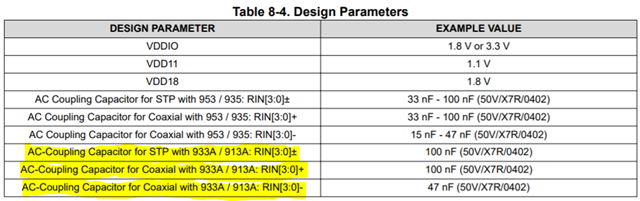
    3. Check to make sure the correct AC Coupling caps are used at RIN
    4. Make sure a 2G PoC circuit is used, if you plan on sending power over COAX.

    Best,

    Justin Phan

  • Hi Justin,

    By "not being able to communicate with your Camera Sensor" means I2C read and write are failing for camera sensor.

    Could you check register 0x4D in the 960 to see if the LOCK bit is set?

    - LOCK bit is set in Deserialiser 960. I am able to get data from serialiser

    • Make sure the 960 is configured to RAW mode. In your register settings, you've set the 960 to RAW12 LF Mode.
      1. 960 reg 0x6D[1:0] = 01 // RAW12 LF Mode
    • Check register 0x58 for the correct Back Channel frequency
      1. 960 reg 0x58[2:0] = 000 // 2.5 Mbps for RAW Mode
    • Check to make sure the correct AC Coupling caps are used at RIN

    - 960 is configured in RAW12 Low frequency mode

    - In 960 Back channel frequency is configured as 2.5 Mbps

    - AC coupling caps are used correctly according to the datasheet

  • Hi Mayur,

    Thank you for the clarification. 

    Correct me if I am wrong, but your setup should look something like: SoC -> 960 (DES) -> 913A (SER) -> OV10640 (Image Sensor)

    And you want your SoC to be able to send I2C read/write messages to the Image Sensor.

    For this, you need to configure your 960 to enable I2C Remote communication:

    1. In register 0x4C, you need to select the Rx Port for messaging.
      1. 0x4C[5:4] = 00 // Select a single RX Port for readback
      2. 0x4C[3:0] = xx // Select which RX Ports to enable I2C writes
    2. Check register 0x5B to see if you are able to see the 7-bit I2C address of the selected RX Port's serializer.
      1. If 0x4C[5:4] = 00, then you should see the 7-bit address of the serializer connected to RX Port 0 in register 0x5B.
    3. In register 0x58, you need to enable I2C_PASS_THROUGH
      1. 0x58[6] = 1
    4. Setup the SlaveID/SlaveAlias registers (registers 0x5D - 0x6C)
      1. Set the SlaveID to be the 7-bit address of your Image Sensor
      2. Set the associated-numbered SlaveAlias to be any unique address.
      3. Write to the SlaveAlias, then the I2C message will be remapped to the SlaveID.

    You can also refer to this short training video to review how I2C works on FPD-Link SER/DES devices: https://training.ti.com/infotainment-ivi-back-channel-basics?context=1134310-1139225-1134308

    Best,

    Justin Phan

  • Hi Justin,

    Yes you are correct, setup looks like SoC -> Des(960) -> 913(SER) -> OV10640 (Camera Sensor)

    In register 0x4C, you need to select the Rx Port for messaging.
    1. 0x4C[5:4] = 00 // Select a single RX Port for readback
    2. 0x4C[3:0] = xx // Select which RX Ports to enable I2C writes

    Deserialiser register 0x4C is configured as 0x01 and sensor is connected to port 0

    Check register 0x5B to see if you are able to see the 7-bit I2C address of the selected RX Port's serializer.
    1. If 0x4C[5:4] = 00, then you should see the 7-bit address of the serializer connected to RX Port 0 in register 0x5B.

    I have read 0x5B register and its reading 0xB0 (ie 7-bit address of Serialiser)

    In register 0x58, you need to enable I2C_PASS_THROUGH
    1. 0x58[6] = 1

    Deserialiser register 0x58 is configured to 0x58

    Setup the SlaveID/SlaveAlias registers (registers 0x5D - 0x6C)
    1. Set the SlaveID to be the 7-bit address of your Image Sensor
    2. Set the associated-numbered SlaveAlias to be any unique address.
    3. Write to the SlaveAlias, then the I2C message will be remapped to the SlaveID.

    Slave ID of serialiser as well as Camera sensor has been setup in Deserialiser registers

  • Hi Mayur,

    I would like to ask if your SlaveID and SlaveAlias registers are set correctly. Could you confirm the following points?

    The Slave ID is the 7-bit I2C address of the camera sensor. If, for example, the camera's address = 0x24 = 0010 0100, then you need to perform a left-shift by 1 bit. So, the Slave ID will be equal to (0x24 << 1) = 0x48 = 0100 1000. 

    The Slave Alias can be the same as the Slave ID, as long as it doesn't conflict with other addresses on the bus.

    Best,

    Justin Phan

  • Hi Justin,

    Slave ID for camera sensor is 0x60(8 bit I2C address).

    So I am programming 0x60 in SlaveID register and 0x64 as SlaveAlias. As 0x60 is also the slave address of Deserialiser.

    After programming all the Deserialiser register, I have read back all the registers and I am able to read proper values.

  • Hi Mayur,

    Just to clarify, does this mean that your issue is resolved?

    Best,

    Justin Phan

  • Hi Justin,

    This issue is still not solved.

    In setup, SoC -> DES -> SER -> Image Sensor, I am able to communicate till serialiser but not able to do I2C communication for Image sensor.

    So I need a clarification on register configurations of Deserialiser and Serialiser, so that I2C communication for Image Sensor will work.

  • Hi Mayur,

    You mentioned that the physical 8-bit ID of the Image Sensor is 0x60 = 0110 0000. You would need to left-shift the Image Sensor's physical 8-bit address and store it in an appropriate SlaveID on the deserializer (reg 0x5D - 0x64). And then send the I2C message to the associated SlaveAlias.

    In the UB960, could you try setting the SlaveID0 = 0xC0 and the associated SlaveAlias0 to be any unique address on the I2C bus?

    0x60 = 0110 0000

    (0x60<<1) = 0xC0 = 1100 0000

    Best,

    Justin Phan

  • Hi Justin,

    I tried with SlaveID0 and SlaveAlias0 programmed to 0xC0. But still I2C operations on Image sensor is failed.

  • Hi Mayur,

    So, you've tried setting SlaveID0 and SlaveAlias0 programmed to 0xC0. But you still can't read/write to the remote camera. I would like to ask for more information on the following points:

    1. Is your camera connected to the same SCL and SDA bus as the 913A, with the proper pull-up resistor values of 1kOhm - 4.7kOhm to VDDIO?
    2. In your setup, are you using a total of four UB913A serializers connected to a single UB960 deserializer? And are the same OV10640 sensors connected to each serializer?
    3. Do all of the connected camera sensors have the same I2C address?

    Best,

    Justin Phan

  • Hi Justin,

    • Is your camera connected to the same SCL and SDA bus as the 913A, with the proper pull-up resistor values of 1kOhm - 4.7kOhm to VDDIO?

                 Yes, camera and 913A is connected to same SCL and SDA bus with pullup of 3.3kOhm to VDDIO 1.8V

    • In your setup, are you using a total of four UB913A serializers connected to a single UB960 deserializer? And are the same OV10640 sensors connected to each serializer?

                 I am using only one UB913A serializer connected to port 0 of UB960 deserializer and the same OV10640 is connected to serializer

    • Do all of the connected camera sensors have the same I2C address?

                 Its only 1 camera sensor with I2C address 0x60

  • Hi Mayur,

    Since you made all the previous configurations on the 960 and set SlaveAlias0 and SlaveID0 to be 0xC0, then you should be able to send I2C commands to the remote camera on the serializer side. 

    Can you try to probe the SCL and SDA bus on the 913A, to see if you get a response after sending the I2C command?

    Best,

    Justin Phan