This thread has been locked.

If you have a related question, please click the "Ask a related question" button in the top right corner. The newly created question will be automatically linked to this question.

DP83TD510E: Source Code for the DP83TD510E-EVM

Part Number: DP83TD510E
Other Parts Discussed in Thread: USB-2-MDIO, , MSP430F5529,

Hi,

I was hoping to find the source code for the MSP430F5529 that's on the DP83TD510E-EVM, as I'd like to modify the code to include the final steps for configuring the DP83822 on that board so it can be at the correct speed, without the need to manually set it from the USB-2-MDIO tool.

I'm sorry if such a thing already exists, I couldn't find it in my searching and for the application I'm experimenting with, continually configuring the PHY with the software tool after a power on is proving to be time consuming.

Cheers,

Alex Smith

  • I should have also mentioned I flashed the firmware that was described on the linked article, but it didn't appear to perform this final speed configuration test, at least when I attempted to confirm the registers contents with the USB-2_MDIO tool.

  • Hi Alex,

    The source code used in the MSP430F5529 can't be shared. Sorry for that!

    --
    Regards,
    Gokul.

  • Hi Gokul,

    That's unfortunate the source code cannot be provided.

    In relation to the matter I was wanting to get assistance with by having access to the source code; that being the need to change the speed of the DP83822 PHY after power up so the DP83TD510E-EVM is usable without user intervention, could you provide a suggestion about how to resolve this?

    I've tested the available firmware upgrades for the DP83TD510E-EVM available with the USB-2-MDIO tool and the referenced forum article, but none of them appear to resolve this matter of forcing the DP83822 to 10 Mbps after power up.

    Cheers,

    Alex.

  • Hi Alex,

    I reached out to our team whether forcing 10M speed on DP83822 is implemented in the MSP source code or not. I'll let you know as soon as I hear from them.

    --
    Regards,
    Gokul.

  • Hi Alex,

    I just verified this on the local EVM I have and it seems to be working.

    The DP83822 hardware is strapped to Auto-negotiation enable and Advertising only 10Base-Te Full Duplex. For the link-up to go through properly, Auto-negotiation should be enabled on the link partner of DP83822.
    Where is this DP83822 connected to?

    You mentioned that it seems to be working when programming 0x0000 = 0x0100 which is Auto-negotiation disable and Force 10Base-Te Full Duplex.
    I guess that Auto-negotiation is disabled on the link partner of DP83822. Can you please confirm this?

    --
    Regards,
    Gokul.

  • Hi Gokul,

    Thank you for your support in this matter, in response to your questions above:

    Where is this DP83822 connected to?
    The link partner of this EVM is the DP83D510E in the DP83T510E-EVM, which from what I can see has a limited set of control bit in the Standard MII control register.

    I guess that Auto-negotiation is disabled on the link partner of DP83822. Can you please confirm this?

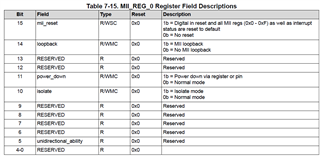
    You're correct, auto-negotiation is a "reserved" field in the MII Control Register of the  DP83D510E, and forced to a value of zero which I don't believe this device supports anyway.
    The DP83822 does have these control bits published in it's register.

    Image below is the IEEE definition of the bits on the register:

    Image below is the IEEE definition of the bits in this register in the DP83T510E:

    A good number of the bits on the DP83T510E are marked as reserved, as these are fixed in operation in this device from what I understand.

    Since the speed of the DPDP83T510E is fixed at 10Mbps, I believe in the DP83T510E-EVM the speed of the DP83822 needs to be matched to 10Mbps, to work correctly with the DPDP83T510Eas this is a step that's described in the User Guide for the EVM.

    Cheers,

    Alex

  • Hi Alex,

    From what I see in the my setup, we don't need to program anything on DP83822 to get the link working. Not sure why it is not working in your setup.

    To understand why you need to program DP83822 to get it working, I wanted to understand the following

    Where is this DP83822 connected to?
    The link partner of this EVM is the DP83D510E in the DP83T510E-EVM, which from what I can see has a limited set of control bit in the Standard MII control register.

    My question was more about the connection of RJ45 port (DP83822 part). Where is this RJ45 port of the EVM connected to?

    I guess that Auto-negotiation is disabled on the link partner of DP83822. Can you please confirm this?

    Here too I mean what is connected to RJ45 of DP83822. This has nothing to do with DP83TD510 at all.

    For eg: This is my setup during testing

    RJ45 of PC/latpop -> DP83822 of EVM1 (connected to RJ45) -> DP83TD510E of EVM1 -> DP83TD510E of EVM2 -> DP83822 of EVM2 -> PC2/laptop2

    --
    Regards,
    Gokul.

  • Hi Gokul,

    My apologies, based on the instructions for the EVM in the "Board Setup Out of Box", I wasn't aware that the set at the bottom to configure the DP83822 wasn't necessary.

    I have retested this morning and confirmed that you're correct, the boards do work just straight out of power up.

    My setup was Office Network -> DP83822 of EVM1 (connected to RJ45) -> DP83TD510E of EVM1 -> DP83TD510E of EVM2 -> DP83822 of EVM2 -> BeagleBone which worked fine.

    I know I tried this previously and found it only worked when I applied that setting change, but I did have a slightly different network switch when testing previously.

    Again, thanks for your assistance.

    Cheers,

    Alex.