This thread has been locked.

If you have a related question, please click the "Ask a related question" button in the top right corner. The newly created question will be automatically linked to this question.

DS90UB929-Q1EVM: EVM board not displaying image on display

Part Number: DS90UB929-Q1EVM
Other Parts Discussed in Thread: ALP

Hello!

I am currently using a TI DS90UB929-Q1EVM board to communicate with a display that is utilizing a 928 deserializer. However, I am not getting any output to display, the device is being recognized in the TI launchpad and on my PC but the communication does not seem to occur. I am wondering if this could be an issue with the serializer and deserializer and how I would be able to display an image. 

Thank you!

  • Hi Hamza,

    The comprehensive information you gave me is difficult to understand exactly the situation. Can you provide me more information?

    • Can you read the I2C address on the script properly?
    • Is it able to see that the LOCK LED on the EVM is high?
    • Please share the setup photo and the ALP information tab screenshot if it is possible.

    You can look at the 929 EVM user guide. (SNLU172) 1.7 Quick Start Guide would be helpful.

    Best,

    Josh

  • Hello Josh,

    My apologies for the confusing initial message I provided. Basically, what I am trying to do is output an image to an external display using the TI board. The board has the serializer which connects to the desializer of another board that is with the display. I was able to get a link for the partner board in the ALP software but I am not able to use any of the Pattern Generator functions to control the display. 

    As you can see I do have a connection between the partner board and the actual device. Along with that I am linked to the deserializer and the video source. I am wondering if there are certain settings I need to alter to allow for the Pattern Generation features to work. I have attached that screen capture below as well as a capture of the EVM board. 

    Thank for all the help!

    Hamza

  • Hi Hamza,

    Please check the steps below.

    1. Check EVM configuration and jumper are matched with user guide
    2. On pattern generator tab, make sure the timing source between external from HDMI source or internal 
    3. Click apply button after video control setting
    4. Check Enable pattern generator
    5. Check color bars or any option you want.
    6. Check PCLK on information tab for SER and DES are matching the sending PCLK.

    Best,

    Josh

  • Hello Josh,

    Thanks for the reply but I am still not getting any pattern on my display. I have having issues syncing the PCLK from my SER and DES as shown in the image below

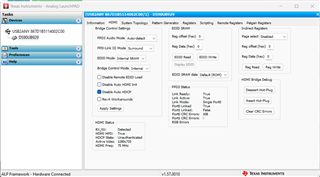
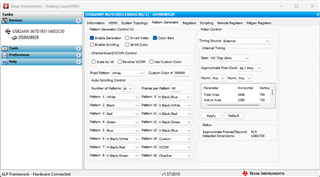
    I have also uploaded images of the HDMI and Pattern generation tab along with the register outputs. Please let me know if any more information is needed.


    [REGISTERS]
    Device = ALP Nano 1 - DS90UB929, Connector 1
    Comments = "Register Data"
    Date = 08/22/2023
    Time = 14:20:00
    Reg = 0,0x0000,0x18
    Reg = 0,0x0001,0x00
    Reg = 0,0x0003,0xDA
    Reg = 0,0x0004,0x80
    Reg = 0,0x0005,0x00
    Reg = 0,0x0006,0x58
    Reg = 0,0x0007,0xA0
    Reg = 0,0x0008,0xB0
    Reg = 0,0x0009,0x00
    Reg = 0,0x000A,0x6C
    Reg = 0,0x000B,0x00
    Reg = 0,0x000C,0x07
    Reg = 0,0x000D,0x20
    Reg = 0,0x000E,0x00
    Reg = 0,0x000F,0x00
    Reg = 0,0x0010,0x00
    Reg = 0,0x0011,0x00
    Reg = 0,0x0012,0x00
    Reg = 0,0x0013,0x88
    Reg = 0,0x0014,0x00
    Reg = 0,0x0015,0x01
    Reg = 0,0x0016,0xFE
    Reg = 0,0x0017,0x1E
    Reg = 0,0x0018,0x7F
    Reg = 0,0x0019,0x7F
    Reg = 0,0x001A,0x01
    Reg = 0,0x001B,0x00
    Reg = 0,0x001C,0x00
    Reg = 0,0x001D,0x00
    Reg = 0,0x001E,0x01
    Reg = 0,0x001F,0xF7
    Reg = 0,0x0020,0x03
    Reg = 0,0x0021,0x00
    Reg = 0,0x0022,0x25
    Reg = 0,0x0023,0x00
    Reg = 0,0x0024,0x00
    Reg = 0,0x0025,0x00
    Reg = 0,0x0026,0x00
    Reg = 0,0x0027,0x00
    Reg = 0,0x0028,0x01
    Reg = 0,0x0029,0x20
    Reg = 0,0x002A,0x20
    Reg = 0,0x002B,0xE0
    Reg = 0,0x002C,0x00
    Reg = 0,0x0030,0x00
    Reg = 0,0x0031,0x00
    Reg = 0,0x0032,0x00
    Reg = 0,0x0033,0x00
    Reg = 0,0x0034,0x00
    Reg = 0,0x0035,0x00
    Reg = 0,0x0036,0x00
    Reg = 0,0x0037,0x00
    Reg = 0,0x0038,0x00
    Reg = 0,0x0039,0x00
    Reg = 0,0x003A,0x00
    Reg = 0,0x003B,0x00
    Reg = 0,0x003C,0x00
    Reg = 0,0x003D,0x00
    Reg = 0,0x003E,0x00
    Reg = 0,0x003F,0x00
    Reg = 0,0x0040,0x14
    Reg = 0,0x0041,0x4E
    Reg = 0,0x0042,0x00
    Reg = 0,0x0043,0x00
    Reg = 0,0x0044,0x80
    Reg = 0,0x0045,0x00
    Reg = 0,0x0046,0x00
    Reg = 0,0x0047,0x00
    Reg = 0,0x0048,0x01
    Reg = 0,0x0049,0x68
    Reg = 0,0x004A,0x01
    Reg = 0,0x004B,0xD0
    Reg = 0,0x004C,0x02
    Reg = 0,0x004D,0x00
    Reg = 0,0x004E,0x00
    Reg = 0,0x004F,0x00
    Reg = 0,0x0050,0x97
    Reg = 0,0x0051,0xA1
    Reg = 0,0x0052,0x1E
    Reg = 0,0x0053,0x00
    Reg = 0,0x0054,0x08
    Reg = 0,0x0055,0x0C
    Reg = 0,0x0056,0x00
    Reg = 0,0x0057,0x00
    Reg = 0,0x0058,0x00
    Reg = 0,0x0059,0x00
    Reg = 0,0x005A,0xDD
    Reg = 0,0x005B,0x20
    Reg = 0,0x005C,0x02
    Reg = 0,0x005D,0x06
    Reg = 0,0x005E,0x44
    Reg = 0,0x005F,0x4B
    Reg = 0,0x0060,0x22
    Reg = 0,0x0061,0x02
    Reg = 0,0x0062,0x00
    Reg = 0,0x0064,0x15
    Reg = 0,0x0065,0x00
    Reg = 0,0x0066,0x0D
    Reg = 0,0x0067,0x16
    Reg = 0,0x0068,0x30
    Reg = 0,0x0069,0x0B
    Reg = 0,0x006A,0x00
    Reg = 0,0x006B,0x00
    Reg = 0,0x006C,0x00
    Reg = 0,0x0070,0x00
    Reg = 0,0x0071,0x00
    Reg = 0,0x0072,0x00
    Reg = 0,0x0073,0x00
    Reg = 0,0x0074,0x00
    Reg = 0,0x0075,0x00
    Reg = 0,0x0076,0x00
    Reg = 0,0x0077,0x00
    Reg = 0,0x0078,0x00
    Reg = 0,0x0079,0x00
    Reg = 0,0x007A,0x00
    Reg = 0,0x007B,0x00
    Reg = 0,0x007C,0x00
    Reg = 0,0x007D,0x00
    Reg = 0,0x0080,0x00
    Reg = 0,0x0081,0x00
    Reg = 0,0x0082,0x00
    Reg = 0,0x0083,0x00
    Reg = 0,0x0084,0x00
    Reg = 0,0x0090,0x00
    Reg = 0,0x0091,0x00
    Reg = 0,0x0092,0x00
    Reg = 0,0x0093,0x00
    Reg = 0,0x0094,0x00
    Reg = 0,0x0098,0x00
    Reg = 0,0x0099,0x00
    Reg = 0,0x009A,0x00
    Reg = 0,0x009B,0x00
    Reg = 0,0x009C,0x00
    Reg = 0,0x009D,0x00
    Reg = 0,0x009E,0x00
    Reg = 0,0x009F,0x00
    Reg = 0,0x00A0,0x00
    Reg = 0,0x00A1,0x00
    Reg = 0,0x00A2,0x00
    Reg = 0,0x00A3,0x00
    Reg = 0,0x00C0,0x05
    Reg = 0,0x00C1,0x00
    Reg = 0,0x00C2,0x88
    Reg = 0,0x00C3,0x00
    Reg = 0,0x00C4,0x68
    Reg = 0,0x00C5,0x00
    Reg = 0,0x00C6,0x00
    Reg = 0,0x00C7,0x40
    Reg = 0,0x00C8,0x40
    Reg = 0,0x00C9,0x00
    Reg = 0,0x00CA,0x00
    Reg = 0,0x00CB,0x00
    Reg = 0,0x00CC,0x00
    Reg = 0,0x00CE,0xFF
    Reg = 0,0x00D0,0x10
    Reg = 0,0x00D1,0x00
    Reg = 0,0x00D2,0x00
    Reg = 0,0x00D3,0x00
    Reg = 0,0x00E0,0x05
    Reg = 0,0x00E1,0x00
    Reg = 0,0x00E2,0x88
    Reg = 0,0x00E3,0x00
    Reg = 0,0x00E4,0x68
    Reg = 0,0x00E5,0x08
    Reg = 0,0x00E6,0x00
    Reg = 0,0x00E7,0x00
    Reg = 0,0x00F0,0x5F
    Reg = 0,0x00F1,0x55
    Reg = 0,0x00F2,0x42
    Reg = 0,0x00F3,0x39
    Reg = 0,0x00F4,0x32
    Reg = 0,0x00F5,0x39
    Reg = 0,0x00F6,0x00
    Reg = 0,0x00F8,0x00
    Reg = 0,0x00F9,0x00

    Thank you!

    Hamza

  • Hi Hamza, 

    Are you able to isolate away from the HDMI input and use internal PCLK/CLK generation instead of external clock? 

    Ideally, we can first start with 928 PatGen, verify the target timing and no system level display-side issues, then work back towards SER side by first doing SER PG internal CLK, then SER PG external CLK, then finally HDMI end to end. 

    Regards, 

    Logan

  • Hello Logan,

    Apologies for the delay in the response but I found a way to get the Pattern Generation feature working and it's able to display the color bars. What would be the next steps to get HDMI to work?  I've played around with some of the settings but have not been successful in getting HDMI to display anything. Are there certain settings that I would need to set in the HDMI tab?

    Thanks!

    Hamza

  • Hi Hamza,

    Could you clarify where you verified the PATGEN? (928 PATGEN, 929 PG internal CLK, or 929 PG external CLK)

    Best,

    Josh

  • Hey Josh,

    I used the 929 PatGen with internal CLK to display the color bars.

    Thanks,

    Hamza

  • Hi Hamza,

    Have you tried the PATGEN with external CLK?

    Best,

    Josh

  • Hello Josh,

    When I try PatGen with external clock nothing is generated. Are there certain settings I would need to alter in the HDMI tab settings to see an image? Also, when displaying a PatGen image from HDMI do I select the Enable Generator to be on?

    Thanks,

    Hamza

  • Hi Hamza, 

    To clarify, is it not working with Internal w/Ext. clock timing source or external timing source? If it is not working with external, please note that you need to check the source as PCLK, jitter, etc. as external timing is from HDMI source.

    Best,

    Josh

  • Hello Josh, 

    I have the pattern generation working but now am having issues with the HDMI resolution. I am using a display that has a custom resolution and have run an EDID script to try to use the internal SRAM to force this custom resolution. However, it keeps defaulting to the resolution of 1280x720, is there any other way to force my custom resolution onto the EVM?

    Thanks,

    Hamza

  • Hi Hamza, 

    929 has several ways of loading or overwriting EDID. Please refer to the following presentation for details on each. 

    The easiest way would be to programmatically override the EDID in SRAM. 

    Using EDID in FPD-Link Devices (3).pptx

    If you are using ALP tool, we can provide a script for EDID updating.

    Regards, 

    Logan

  • Hello Logan,

    Thank you for that resource! I am trying to get a resolution of 1280x640 on my display using ALP so a script would be perfect.

    Thank you,

    Hamza

  • Hi Hamza, 

    Can you provide the exact EDID file you are trying to load?

    Regards, 

    Logan

  • Hello Logan,

    Just for clarification, would you like my display specs or the script itself?

    Thanks,

    Hamza

  • Hi Hamza,

    Yes, I would need the underlying EDID file that you want uploaded (256 bytes), I can then create a script for it.

    Logan