This thread has been locked.

If you have a related question, please click the "Ask a related question" button in the top right corner. The newly created question will be automatically linked to this question.

DS90UH949-Q1EVM: Video generation without EDID

Part Number: DS90UH949-Q1EVM
Other Parts Discussed in Thread: ALP

Hello,

I have a 1920x720 display that is connected to a DS90UH948. By using the pattern generator on the 949, I am able to achieve a perfect image with the following settings:

Total Pixels: 2030 H, 731 V

Active Pixels: 1920 H, 720 V

Sync: 109 H, 10 V

Porch: 0 H, 0 V

However after plugging in HDMI, there is no image. Are there ways to internally change the registers to achieve an image? If there is no way on the 949 side, could I change registers on the 948 side to achieve an image?

  • Hello,

    If you are plugging HDMI as patgen is enabled it won't work. You need to power-down your Ser/Des and then power back up but don't run patgen. Then plug in your HDMI input to 949 it should automatically detect the HDMI input and output it on the display. If it's still not working, could you provide a register dump of the Ser and Des register map please. I would need to review it to see if anything abnormal is happening. 

    Regards,
    Fadi A.  

  • Hello, 

    I was able to achieve a correct image through changing some settings on the HDMI page. Patgen was not on. By unchecking the "disable auto HDCP" and changing the EDID SRAM dropdown to "TI 1080p 8ch", the correct image is showing up. Is there a way to change these settings through registers without the ALP? 

  • Hey Bruce,

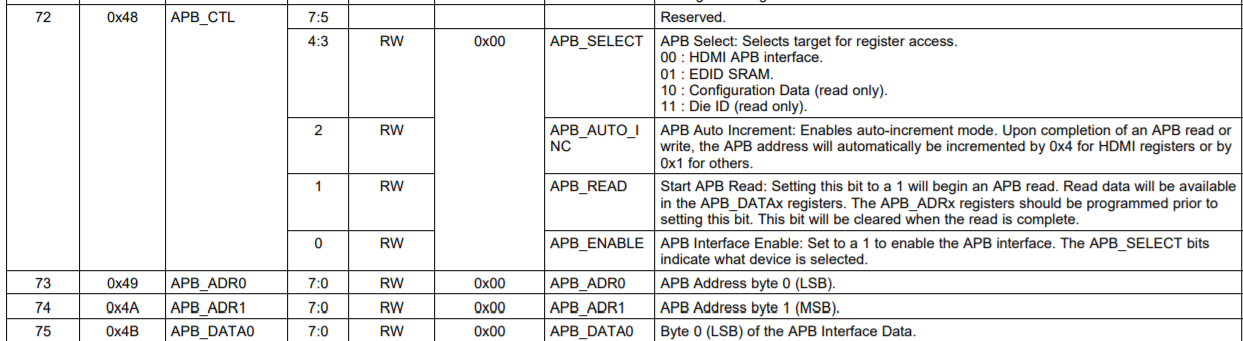
    The EDID SRAM can be programmed using registers 0x48-0x4B. You select the EDID SRAM space in APB_CTL:

    Then use reg 0x49 to select the EDID address 0x00-0xFF and write each byte value in 0x4B for all 256 bytes. You can use an EDID generator program such as AW EDID editor to create an EDID if you do not already have one.

    Here is some material on how to override EDID in 949 as well as an EDID script. 

    1715.949-929 Read-Write EDID.pdf

    # Script to load EDID using built-in ALP routines
    
    exEDID = [0x00,0xFF,0xFF,0xFF,0xFF,0xFF,0xFF,0x00,0x04,0x21,0x00,0x00,0x00,0x00,0x00,0x00,
    0x01,0x00,0x01,0x03,0x80,0x26,0x15,0x00,0x00,0x00,0x00,0x00,0x00,0x00,0x00,0x00,
    0x00,0x00,0x00,0x00,0x00,0x00,0x00,0x00,0x01,0x00,0x01,0x00,0x01,0x00,0x01,0x00,
    0x01,0x00,0x01,0x00,0x01,0x00,0x84,0x3A,0x80,0xB4,0x70,0x38,0x32,0x40,0x50,0x28,
    0x85,0x00,0x00,0x00,0x00,0x00,0x00,0x18,0x00,0x00,0x00,0x00,0x00,0x00,0x00,0x00,
    0x00,0x00,0x00,0x00,0x00,0x00,0x00,0x00,0x00,0x00,0x00,0x00,0x00,0x10,0x00,0x00,
    0x00,0x00,0x00,0x00,0x00,0x00,0x00,0x00,0x00,0x00,0x00,0x00,0x00,0x00,0x00,0x10,
    0x00,0x00,0x00,0x00,0x00,0x00,0x00,0x00,0x00,0x00,0x00,0x00,0x00,0x00,0x00,0xC8,
    0x00,0x00,0x00,0x00,0x00,0x00,0x00,0x00,0x00,0x00,0x00,0x00,0x00,0x00,0x00,0x00,
    0x00,0x00,0x00,0x00,0x00,0x00,0x00,0x00,0x00,0x00,0x00,0x00,0x00,0x00,0x00,0x00,
    0x00,0x00,0x00,0x00,0x00,0x00,0x00,0x00,0x00,0x00,0x00,0x00,0x00,0x00,0x00,0x00,
    0x00,0x00,0x00,0x00,0x00,0x00,0x00,0x00,0x00,0x00,0x00,0x00,0x00,0x00,0x00,0x00,
    0x00,0x00,0x00,0x00,0x00,0x00,0x00,0x00,0x00,0x00,0x00,0x00,0x00,0x00,0x00,0x00,
    0x00,0x00,0x00,0x00,0x00,0x00,0x00,0x00,0x00,0x00,0x00,0x00,0x00,0x00,0x00,0x00,
    0x00,0x00,0x00,0x00,0x00,0x00,0x00,0x00,0x00,0x00,0x00,0x00,0x00,0x00,0x00,0x00,
    0x00,0x00,0x00,0x00,0x00,0x00,0x00,0x00,0x00,0x00,0x00,0x00,0x00,0x00,0x00,0x00]
    
    
    # Write to EDID (start offset, data, length)
    board.EDID_Write(0x0, exEDID, 256)
    
    # Readback EDID
    read_edid = board.EDID_Read(0x0, 256)
    print "EDID readback:"
    print read_edid

    Regards,
    Fadi A.

  • Hello,

    We are having trouble writing the EDID over I2C, even with the guide. Are there other registers that need to be changed before APB_CTL? Such as 0x4F, 0x50, or 0x54? Currently, we have register values:

    0x48: 0x01
    0x4F: 0x00

    0x50: 0x97

    0x54: 0x08

    We are currently writing EDID over I2C by setting register 0x48 to 0x0D. Then we write to 0x49, and write to 0x4B. Then we write all the data. Is this order correct? 

  • Hey Bruce,

    You don't need to change any other registers. All you need to do is set reg 0x48 to 0xD and then loop from 0 to 256 on reg 0x49 while writing 0x4B during each step of the loop. 

    I wrote a script for you that does that, you just need to run it and it should write the EDID for you. 

    # Script to load EDID
    serAddr =0x18
    
    exEDID = [0x00,0xFF,0xFF,0xFF,0xFF,0xFF,0xFF,0x00,0x04,0x21,0x00,0x00,0x00,0x00,0x00,0x00,
    0x01,0x00,0x01,0x03,0x80,0x26,0x15,0x00,0x00,0x00,0x00,0x00,0x00,0x00,0x00,0x00,
    0x00,0x00,0x00,0x00,0x00,0x00,0x00,0x00,0x01,0x00,0x01,0x00,0x01,0x00,0x01,0x00,
    0x01,0x00,0x01,0x00,0x01,0x00,0x84,0x3A,0x80,0xB4,0x70,0x38,0x32,0x40,0x50,0x28,
    0x85,0x00,0x00,0x00,0x00,0x00,0x00,0x18,0x00,0x00,0x00,0x00,0x00,0x00,0x00,0x00,
    0x00,0x00,0x00,0x00,0x00,0x00,0x00,0x00,0x00,0x00,0x00,0x00,0x00,0x10,0x00,0x00,
    0x00,0x00,0x00,0x00,0x00,0x00,0x00,0x00,0x00,0x00,0x00,0x00,0x00,0x00,0x00,0x10,
    0x00,0x00,0x00,0x00,0x00,0x00,0x00,0x00,0x00,0x00,0x00,0x00,0x00,0x00,0x00,0xC8,
    0x00,0x00,0x00,0x00,0x00,0x00,0x00,0x00,0x00,0x00,0x00,0x00,0x00,0x00,0x00,0x00,
    0x00,0x00,0x00,0x00,0x00,0x00,0x00,0x00,0x00,0x00,0x00,0x00,0x00,0x00,0x00,0x00,
    0x00,0x00,0x00,0x00,0x00,0x00,0x00,0x00,0x00,0x00,0x00,0x00,0x00,0x00,0x00,0x00,
    0x00,0x00,0x00,0x00,0x00,0x00,0x00,0x00,0x00,0x00,0x00,0x00,0x00,0x00,0x00,0x00,
    0x00,0x00,0x00,0x00,0x00,0x00,0x00,0x00,0x00,0x00,0x00,0x00,0x00,0x00,0x00,0x00,
    0x00,0x00,0x00,0x00,0x00,0x00,0x00,0x00,0x00,0x00,0x00,0x00,0x00,0x00,0x00,0x00,
    0x00,0x00,0x00,0x00,0x00,0x00,0x00,0x00,0x00,0x00,0x00,0x00,0x00,0x00,0x00,0x00,
    0x00,0x00,0x00,0x00,0x00,0x00,0x00,0x00,0x00,0x00,0x00,0x00,0x00,0x00,0x00,0x00]
    
    
    board.WriteI2C(serAddr,0x48,0xD)
    for x in range(0,256):
    	board.WriteI2C(serAddr,0x49,x)
    	board.WriteI2C(serAddr,0x4B,exEDID[x])
    

    I also made another script for you that would dump out the EDID values into an excel file - see highlighted excel file below that's how the EDID dump would look like after you run "readEDID_APB" script. 

    import time
    serAddr = 0x18
    device = "949"
    
    board.WriteI2C(serAddr,0x48,0xD)
    board.WriteI2C(serAddr,0x49,0x0)
    board.WriteI2C(serAddr,0x4A,0x0)
    
    dateTime = time.strftime("%Y%m%d-%H%M%S")
    csv_name = 'PageDump' + str(device) +'_'+  dateTime  + '.csv'
    f1=open(csv_name, 'w+')
    
    # HDMI APB Registers Dump for 929
    f1.write("EDID APB Registers\n")
    f1.write("Register Address, Register Value\n")
    for x in range(0,255):
        board.WriteI2C(serAddr, 0x48, 0xF)
        val = hex(x)
        f1.write(str(val)+",")
        byte0 = str(hex(board.ReadI2C(serAddr, 0x4B)))
        val = byte0[2:]
        f1.write(val + ",\n")
    f1.write("\r\n")
    print "EDID APB Done"
    
    f1.flush()
    f1.close()
    print "Complete"
    

    Regards,
    Fadi A.