This thread has been locked.

If you have a related question, please click the "Ask a related question" button in the top right corner. The newly created question will be automatically linked to this question.

DS320PR1601: The SMBus communicate issue for DS320PR1601

Part Number: DS320PR1601
Other Parts Discussed in Thread: USB2ANY,

Hi,

Our customer can't connect the DS320PR1601 by the L2((SMBus / I2C target control mode) in the network card, and they use the SigCon Architect to set the I2C for the EQ1,

But they feedback it con't search DS320PR1601 when they select the Apply;

The SigCon Architect is the lastest and download from website.

The schematic diagram is based on the EVM, so please advise how to solve this issue, thanks.

  • Hi Zhang,

    Thank you for reaching out regarding this issue. Please ensure that the SMBus slave addresses for the DS320PR1601 are set to the 'default' addresses (0x18, 0x19, 0x1A, 0x1B, 0x1C, 0x1D, 0x1E, 0x1F) in SigCon Architect using the 'Edit Address Pairs' button in the GUI.

    Could you please also include the schematic of the DS320PR1601 addressing straps so that I can double-check the strap levels?

    Best,
    David

  • Hi David,

    All the opearte is based on the GUI file and we can't search the DS320PR1601 from SigCon Architect;

    Please refer to the schematic and help to check if there are any error, thanks.

    lrnv9932_v1_0-0830-b.pdf

  • Hi Zhang,

    I have reviewed the customer's schematic for addressing configuration and agree that the addressing should be the same as the 'Default' addressing. Could you please provide a screenshot of the SigCon Architect GUI for DS320PR1601 from the Configuration Page so that I can observe what the customer is seeing?

    The following image shows the typical DS320PR1601 GUI addressing configuration.

    Best,
    David

  • Hi David,

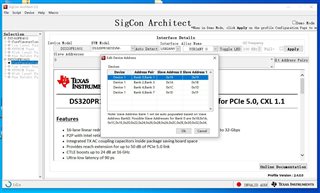
    Please refer below picture:

  • Hi Zhang,

    It appears that the 'Slave addresses' in the pop-up window you've shown match the expected SMBus addresses defined in the customer schematic. However, I notice that the 'Slave addresses' field in the GUI background shows '0' rather than 'Device 1 (address, address, ...).

    After you open the 'Edit Address Pairs' and select the 'OK' button, do the proper SMBus addresses populate the 'Slave Addresses' field of the Configuration Page? Please let me know if this works, or if you are still having trouble with the GUI.

    Best,
    David

  • Hi Zhang,

    Please let me know if I am able to help at all with this issue. I will mark as resolved for now as I have not received any reply.

    Best,
    David

  • Hi, David,

    We test the sigcon but we still has this issue for the I2C communication, so we have no idea how to solve this issue.

  • Hi Zhang,

    It appears that the PDx (Power Down) pins have been left floating for the device. Please pull these pins low to power on the device as specified in data sheet Table 8-1.

    Best,
    David

  • Hi David,

    The PDx has internal 1-MΩ weak pulldown resistor in the Table 8-1, need we to add the external pulldown configuration? Thanks.

  • Hi Zhang,

    I have run a quick test in our lab leaving all of the PDx pins floating and was still able to communicate to the device, so I would not say there is a need to add an external pull-down.

    Could you please provide clarity into the following questions:

    • When the DS320PR1601 is powered on, what data rate is the PCIe link established at?
      • If no PCIe link is established, could you please capture the observed waveform on the output of the TX of the device?
    • Please ensure that the USB2ANY adapter's I2C pins are connected to the correct SCL/SDA/GND pins of the DS320PR1601 SMBus header at JMP12 on the customer schematic.

    Could you please also try to re-install the DS320PR1601 GUI profile? I have not yet been able to re-create the observed issue with our DS320PR1601RSCEVM configured like the customer setup.

    Best,
    David

  • Hi Zhang,

    Any update on this case?

    Best,
    David

  • Hi David,

    The local TI FAE suggest customer add the MCU for the EQ1 configuration, and customer consider that it is very difficult to modify the design, I will communicate with customer if there are any new update, and thanks for your support.

  • Hi Zhang,

    Thanks for the update. If desired, the customer can use an external I2C controller to modify the EQ settings over I2C/SMBus, if desired.

    Could you please confirm if the previous SMBus issue was resolved? If so, I will mark this inquiry as resolved.

    Best,
    David

  • Hi David,

    We don't solved the SMbus issue, it is also thanks for your kindly support, we will test again and create the thread when we have the other issue, please close this thread, thanks.