This thread has been locked.

If you have a related question, please click the "Ask a related question" button in the top right corner. The newly created question will be automatically linked to this question.

DS90UB925Q-Q1: Required clarification on I2C configuration

Part Number: DS90UB925Q-Q1


Tool/software:

Dear Team 

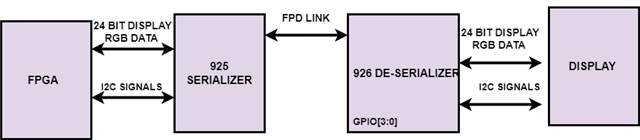
Here I have attached the block diagram of our project ,

Serializer MPN# :DS90UB925Q

De-Serializer MPN#: DS90UB926Q

queries' are 

1.BY USING FPGA I2C, WILL I ABLE TO CONTROL THE DISPLAY CONNECTED TO I2C ON the DE-SERAILSER

2.BY USING FPGA I2C ,WILL I ABLE TO CONTROL THE GPIO OF DE-SERIALIZER,

GPIO'S are like 

*PIN1 :GPO_REG8 / I2S_CLK

*PIN 30 :I2S_WC / GPO_REG7

*PIN 45:2S_DA / GPO_REG6 OF De-serializer[DS90UB926Q] chip


Thanks,

Pooja Ak

  • Hi Pooja,

    1) Yes, you can communicate to the downstream display connected to the deserializer over I2C from your FPGA. What you'll need to do is program the serializer's I2C registers correctly so that your serializer knows the deserializer's I2C address, and the display's I2C address, as well as to pass through any I2C command that is not explicitly written for the serializer's I2C address.

    2) In the same way as your first question, you will be able to write to the deserializer over I2C. Once I2C communication has been established to the deserializer, you will be able to write to any of the deserializer's registers, allowing you to configure it's GPIOs.

    Please let me know if you have any additional questions.

    Best,

    Cameron C.

  • Hi Cameron C.

    Thank you so much for your support

    Thanks,

    Pooja Ak

  • Hi Cameron

    Hope your doing well

    *We have planned to use display connected to I2C on the De-Serailser .

    The resolution of the display   is 1280x720 but  we will use 960x720 for video 

    how to set the resolution at DSIPLAY side ?

    by using i2c OR ANY method is there to set the resoluton at Display 


    Thanks,

    Pooja Ak

  • Hi Pooja,

    This seems more like a display question rather than an FPD-Link device question. Have you been able to establish I2C communication to the display (remote device)? If you are having issues with enabling I2C and using it to communicate with remote devices then I can help with that, but otherwise you'd likely have to ask the display manufacturer how to program the display to accept a 960x720p video signal.

    Please let me know if you have any additional questions.

    Best,

    Cameron C.

  • Hi Cameron C

    My FPGA is giving 960x720 resolution video to the serializer, how do i configure the deserializer from the FPGA for accepting this video correctly and then converting to RGB, please let us specifically know which I2C  registers of the deserializer i have to configure from the FPGA.

    for your reference, I have attached the BD of our project. 

    Thanks ,

    Pooja Ak

  • Hi Pooja,

    Using the 926 is supposed to be plug-and-play, so it's programming process is simple. There is only one register for video output that you should need to program, register 0x2. If you set 0x2[7] = 1, you should just be able to send video to the DES and it will display it out of the RGB output.

    If you wish to use any of the deserializer's GPIOs, then you'll have to program those registers as well which can be found in the 926's datasheet.

    Additionally, if you want to talk to your display as a "remote device", then you will have to program your serializer's I2C registers correctly. Specifically, you will need to enable I2C pass through by setting 0x3[3] = 1, write your deserializer's address to 0x6, and write your display's I2C address to 0x7 and 0x8 (all in the serializer's registers)

    Please let me know if you have any additional questions.

    Best,

    Cameron C.

  • Hi Cameron C

    As I posted query earlier like 

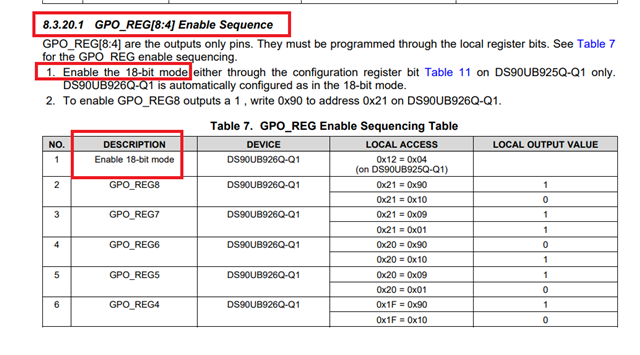
    we have planned to use 24Bit RGB data ,will I be able to use gpo_reg8,gpo_reg7,gpo_reg6 as a GPO ?

    here I have mentioned the image for your reference, requesting you to help us on this . 

    If I want to use  gpo_reg8,gpo_reg7,gpo_reg6 as a GPO then I cannot go with 24BIT RGB ? in this case only 18bit data works ?

    Thanks,

    Pooja Ak

  • Hi Pooja,

    If you are only interested in passing RGB data and not any I2S data, then I don't see a reason why you shouldn't be able to use GPO6, GPO7, and GPO8 while sending 24 bit RGB data. Those GPO pins are shared with I2S pins instead of video pins, so you shouldn't run into any issues there so long as you aren't passing any audio with the video data.

    Please let me know if you have any additional questions.

    Best,

    Cameron C.

  • Hi

    Cameron C

    As I marked in red block ,

    Why it's specifically mentioned to enable the  18 bit  RGB mode for the GPO enable sequence .

    It's quite confusing us 

    Please clarify me 

    Thanks,

    Pooja Ak

  • Hi Pooja,

    I will need to discuss with my team why that recommendation is there. It doesn't seem like there are any shared pins, so that table may be assuming that a user IS using I2S audio data. I will get back to you later today once I have an answer.

    Best,

    Cameron C.

  • Hi Pooja,

    I spoke with my team and came to the conclusion that yes, you must be in 18-bit RGB mode in order to utilize those GPO pins. The reason for this is not because of the shared pins like I believed before, but rather because of space constraints in the data frame being sent over the FPD-Link. In this case, some of the lower GPIO pins (0-4) get shared with video pins when the upper GPO pins are enabled. For this reason, you have to lower the amount of video data being sent from 24-bit to 18-bit in order to make space for the extra GPO data. All of this is to say, you were correct and you must use 18-bit RGB mode in order to enable those GPO pins.

    Please let me know if you have any additional questions.

    Best,

    Cameron C.