This thread has been locked.

If you have a related question, please click the "Ask a related question" button in the top right corner. The newly created question will be automatically linked to this question.

TUSB212: USB device cannot be identified

Part Number: TUSB212
Other Parts Discussed in Thread: TUSB211A, TUSB216

Tool/software:

Hi,

I am experiencing an issue where my USB device cannot be recognized.

I suspect that the problem is caused by the excessive trace length (18 inches) between the CPU and the TUSB212.

I have also tried adjusting the AC/DC boost level, but it did not seem to help.

Are there any other possible solutions to improve this issue? Additionally, do you have any recommendations on how to adjust the AC/DC boost level effectively?
  • Hi Kevin,

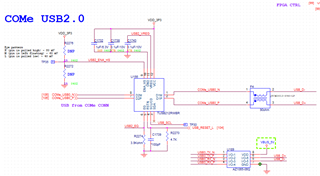
    I see that you have both a 100pF and a 4.7KOhm resistor pulling down the RSTN pin, as well as what looks like potentially a signal providing reset.

    • Is the RSTN pin being controlled externally? Is it pulling the pin high or low? The device is enabled when pulled high.
    • Are you ensuring that the RSTN pin stays low until VCC has reached a stable 3V?
    • Is there a signal on the USB2 line before the USB2 redriver is enabled? If so, the USB2 redriver will not function correctly.
    • We typically recommend only a 100nF pull-down on the RSTN pin to ensure proper functionality
    Are there any other possible solutions to improve this issue? Additionally, do you have any recommendations on how to adjust the AC/DC boost level effectively?

    I see you have a CMC on the USB2 lines. We typically recommend against this, as this can cause degradation to the signal integrity in a USB2 trace. It should only be used in a high-noise signal.

    Typically, we recommend having the EQ pin set to level 0/1 and DC_BOOST set to medium or low to ensure the signal is not over-compensated.

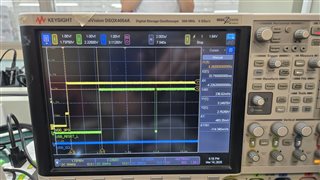
    Also, monitor the CD and ENA_HS pins to ensure the device is actually enabled. If either of these pins are low, the redriver is likely not enabled.

    Thanks,

    Ryan

  • Dear Ryan,

    Thanks for your reply.

    • Is the RSTN pin being controlled externally? Is it pulling the pin high or low? The device is enabled when pulled high.
    • Are you ensuring that the RSTN pin stays low until VCC has reached a stable 3V?
    • Is there a signal on the USB2 line before the USB2 redriver is enabled? If so, the USB2 redriver will not function correctly.
    • We typically recommend only a 100nF pull-down on the RSTN pin to ensure proper functionality

    1. We ensure the RSTN is pulled high after the stable VCC.

    2. Change the C1793 from 100pF to 100nF.

    3. Removed the CMC and shortened the USB2 lines.

    However, the CD and ENA_HS are kept low as well. Do you have any suggestions?

  • Hi Kevin,

    The DP/DM lines are connected underneath the redriver, correct? If these lines do not stay connected, then the USB2 lines and the redriver will both not work.

    Additionally, make sure no information is being sent from the USB2 lines until AFTER the redriver is enabled, or else the redriver will not enable.

    You could also try using other redrivers, like the TUSB211A or the TUSB216, which should be P2P with the TUSB212, and see if you see the same performance issues there.

    However, the CD and ENA_HS are kept low as well. Do you have any suggestions?

    It seems like the redriver is not seeing any USB2 signal or pull-up on the DP/DM lines, hence both pins being low. If either were present, the CD pin should at least be high.

    Thanks,

    Ryan