This thread has been locked.

If you have a related question, please click the "Ask a related question" button in the top right corner. The newly created question will be automatically linked to this question.

DP83869HM: DP83869HMRGZR

Part Number: DP83869HM

Tool/software:

Hi everyone, we have produced a prototype that implements the PHY  DP83869HM.
For testing we have connected two of them in a back-to-back SGMII configuration.
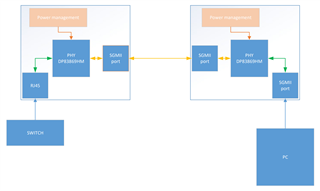
The SGMII link is shown below:


After powering up, everything seems to be normal. All voltages rails are ok.
The PHY seem to work. LED TX/RX blinking and Link up LED lit. 
However, the PC cannot detect any connection with the LAN network.

I am wondering if there is a mistake in the SGMII wiring or maybe it is a mistake in the bootstrapping.
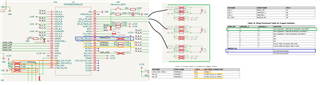
I have used the bootstrapping depicted here:

mirroring is disabled 

  • Hi David, 

    Could you send us your schematic so we can better review your strap configuration?

    Also, I noticed that one of the PHYs do SGMII to SGMII connection. However, DP83869HM does not support SGMII to SGMII bridge, but only supports either RGMII to SGMII or SGMII to RGMII. If your block diagram is correct, the system may not work as intended. 

    Best, 
    J

  • Hi J, Here is the relevant part of the schematics:

    If there were info required, I can send the complete design per email. =)
    Please let me know about any doubt.

    Related to the SGMII-to-SGMII connection:
    In this post "DP83869HM: Connect 2 PHY over SGMII - Interface forum - Interface - TI E2E support forums" I have asked about the topology. From the answer; I had understood that the SGMII back-to-back connection was possible. 

    Could you please verify it once more and let me know if I have wrongly understood it or if the first post was addressing an different application.

    Thank you for the time and best regards
    David

  • Hi David, 

    I apologize for the confusion. If the system is designed like the one you described in an earlier post with RJ45 connection to the PC, DP83869HM can support it. 

    I reviewed the schematic and it looks like the strapping configurations are correct. 

    Based on your LED indication, it seems like MDI Link is good. 
    However, the LED link up status does not indicate that SGMII link is good since SGMII link has its own auto-negotiation. 

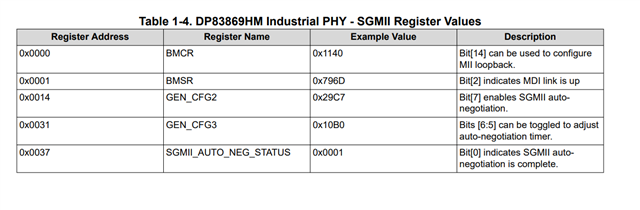
    Could you do a register dump of the registers mentioned below?

    These registers will enable us to know the status of SGMII link between the PHYs and if auto-negotiation is enabled for SGMII, which is an independent auto-negotiation process from the MDI link. 

    If the auto-negotiation is on, I would suggest to disable auto-negotiation by toggling 0x0014[7] to 0 and put SGMII into forced mode since this link is between two PHYs, not between a PHY and a MAC. Forced mode will make SGMII to follow the MDI speed and configuration so as long as the MDI configuration on either PHY is the same the SGMII should be able to link. 

    Please let me know. 

    Best,
    J


  • Hi J,
    I have already extracted the registers.

    0000: 1140
    0001: 796D
    0014: 29C7
    0031: 10B0
    0037: 0000

    After writing 0 to the register 0x0014 bit 7 the new value is 0014:2947
    However, I can still not communicate. Should I do it in both PHYs or only with one it should work?
    Thank you in advance!
    David

  • Hi David,

    I would suggest to force both PHYs since both PHYs cannot auto-negotiate with each other. Auto-negotiation feature for SGMII is meant for PHY and a MAC to connect. 

    Please let me know if that works.

    Best,

    J

  • I have set the 0x0014-register on both PHY to 2947. However, the communication still is not working.

  • Hi David,

    Okay, I am out of office currently and will be for the rest of the week, and I would like to discuss this case internally before I get back to you. In the meantime, could you please provide us a register dump of registers 0x00 to 0x1F for both PHYs for better analysis of this problem?

    Best,

    J

  • Hi J, here you are;
    PHY_1
    Register 0000 is: 1140
    Register 0001 is: 796D
    Register 0002 is: 2000
    Register 0003 is: A0F3
    Register 0004 is: 01E1
    Register 0005 is: C1E1
    Register 0006 is: 006D
    Register 0007 is: 2001
    Register 0008 is: 7801
    Register 0009 is: 0300
    Register 000A is: 0000
    Register 000B is: 0000
    Register 000C is: 0000
    Register 000D is: 401F
    Register 000E is: 0000
    Register 000F is: F000
    Register 0010 is: 5048
    Register 0011 is: 6F02
    Register 0012 is: 0000
    Register 0013 is: 0000
    Register 0014 is: 2947
    Register 0015 is: 0000
    Register 0016 is: 0000
    Register 0017 is: 0040
    Register 0018 is: 6150
    Register 0019 is: 4444
    Register 001A is: 0002
    Register 001B is: 0000
    Register 001C is: 0000
    Register 001D is: 0000
    Register 001E is: 0012
    Register 001F is: 0000


    PHY_2

    Register 0000 is: 1140
    Register 0001 is: 796D
    Register 0002 is: 2000
    Register 0003 is: A0F3
    Register 0004 is: 01E1
    Register 0005 is: 45E1
    Register 0006 is: 0067
    Register 0007 is: 2001
    Register 0008 is: 0000
    Register 0009 is: 0300
    Register 000A is: 0000
    Register 000B is: 0000
    Register 000C is: 0000
    Register 000D is: 401F
    Register 000E is: 0000
    Register 000F is: F000
    Register 0010 is: 5048
    Register 0011 is: 7C02
    Register 0012 is: 0000
    Register 0013 is: 1C00
    Register 0014 is: 2947
    Register 0015 is: 0000
    Register 0016 is: 0000
    Register 0017 is: 0040
    Register 0018 is: 6150
    Register 0019 is: 4444
    Register 001A is: 0002
    Register 001B is: 0000
    Register 001C is: 0000
    Register 001D is: 0000
    Register 001E is: 0012
    Register 001F is: 0000

    Thanks in advance for the support
    David

  • Hi David,

    Thank you. I will update you on Monday US time.

    Best,

    J

  • Hi David, 

    Thank you for the wait. Just to make sure, do you see the register 0x37[1] being high when SGMII auto-negotiation is disabled?

    Also, have you tried soft resetting the PHY (register 0x1F = 0x4000) after disabling the SGMII auto-negotiation?

    In addition, could you verify if SGMII connection has AC coupling capacitors (0.1uF)? Without the capacitor, it might impact the signal integrity.

    If possible, could you also probe SGMII data lines to see that signals are being transmitted and received properly?

    If there is SGMII signals being transmitted and received, I think we can try running one of the PHYs into the loopback mode to isolate the root cause. 

    Please let me know. 

    Best,
    J

  • Hi J, 
    Today I have re-checked the signals. We detected that one of the four SGMII signals was not having activity.
    My guess is that I damaged a via during soldering. Therefore the communication link was always the problem.
    Fortunately, the board is repaired and we have an stable communication with the SGMII back-to-back configuration.

    Thanks for the support. 
    David

  • Hi David, 

    Great to hear!

    Best,
    J

  • Hi J,
    We have now tried to integrate our prototype with a product from another company. And currently we are facing problems to have a connection between our devices.
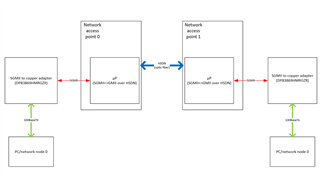
    The topology is the following:

    Before the integration with our prototype, some tests were performed:
    - The "SGMII<>copper" adapters were tested in a SGMII back-to-configuration. 
    - The "network access points" were tested also. However, they used a proprietary SGMII<>copper converter that implements a different PHY.

    Basically, when I connect all the equipment together I can not get any packets from PC0<>PC1 nor PC1<>PC0.
    By reading the register 0x37 of both PHYs, I always have seen 0x0. Therefore, I believe the problem is the SGMII link between the PHY and the microprocessor on the "network access point".

    Additionally, I want to mention that the microprocessor mounted on the "network access point", it is an FPGA which doesn't implement a MAC. Instead, it implements an SGMII<>GMII conversion and then it transmits the GMII-level ethernet packets via HSDN (optic fiber).

    As test, I have tried to disable the SGMII auto-negotion and also the MDI auto-negotiation but no combination has been successful to bring the SGMII links to work.
    Do you have experience with this type of topology or maybe some configurations to test further?

    Best regards,
    David


  • Hi David, 

    Great to hear you were able to solve the previous problem. 

    Even without a MAC, I have seen a valid SGMII connection happen. We have tested having SGMII connection back to back with DP83867EVM and copper side connect to two different PCs and we were able to ping even though I had to force the link up on the PC. 

    Could you verify that the two network access points have a link to each other?

    Also, could you force the link up between two PCs?

    Also, do you see the link status LED change when the copper is connected? Link status LED should go high regardless of the MAC connection to the FPGA. 

    Please let me know. 

    Best,
    J

  • Hi J, my comments are below:

    "Could you verify that the two network access points have a link to each other?"
    That part was theoretically tested and confirmed that it works from the vendor of the two network access points. They commissioned and performed sending/receiving of packages with their own SGMII<>copper adapter.
    After that verification, we mounted our SGMII<>Copper adapter (that mounts the DP83869HM) and we couldn't get the network working anymore.

    "Also, could you force the link up between two PCs?"
    Could you please explain me how to do that?

    "Also, do you see the link status LED change when the copper is connected? Link status LED should go high regardless of the MAC connection to the FPGA."
    When I connect the cable to the adapter I can see the link up LED lights up permanently. Also when I do a ping from the one PC to the other one. I can see the TX/RX LED blinks. However, I can not see any ping or the MAC address if a perform an ARP command on CMD.

    Best regards 
    David

  • Hi David, 

    Thank you for your feedback.

    "Also, could you force the link up between two PCs?"
    Could you please explain me how to do that?

    On Linux OS, I realized that even if the LED is ON, I found out that the OS doesn't detect the link. I checked with ethtool command on the ethernet port and had to force the link up using ethtool if the link was not detected. I have not used Windows to check the link so I am unsure if such option exists on Windows. 

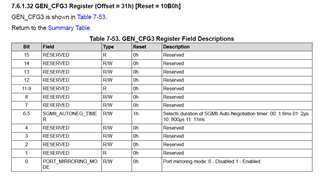
    Also, could you try enabling SGMII auto-negotiation again, and changing the SGMII auto-negotiation timer?


    This can be configured using the register 31h[6:5]. 


    In addition, did you see bit 1 of register 37h go high when there is no link? This bit is the acknowledge bit if new page for auto-negotiation was received from the MAC. I have seen that this bit is 1 on the first read and goes down to 0 after the first read regardless of the auto-negotiation status and if the new page is received on the PHY. 

    Please let me know if this works. 

    Best,
    J

  • I have set both PC0 and PC1 to 100 Mbps and Half-duplex.
    Then I set the register 0x31 to 0x10F0.
    Then I restart the SGMII link by setting 0x4000 to 0x001f.
    On both PHY 0x37 is always 0 and no ping from one to PC to another.

    I tried the same but with both PCs at 100Mbps and Full-Duplex.
    The situation is the same, always the register 0x37 is 0.

    I believe, the link at the MDI side is always working since I set one of the LEDs to light up when a 100BaseTX link is up using register 0x18.
    Regarding the register 0x37. It always is 0. I have tried to read it continuosly after power cycling and after a soft restart (using register 0x001f).
    It always is zero.

  • Hi David, 

    Thanks for confirmation. 

    Bit 1 of register 37h is indicator if the PHY received the new page for SGMII autonegotiation. It looks like the PHY hasn't received the new page for SGMII autonegotiation. Could you check if the microprocessor is sending the next page for autonegotiation?
    Please let me know. 


    Best,
    J

  • Hi J,
    We will conduct some test today with the support of the vendor of the "network access point".
    I will let you know after.
    Regards

    David

  • Hi J,

    The vendor of the "NAP" has modified their IP Core to manage the auto-negotiation of the SGMII link. 
    After that change the communication was achieved and stable. No extra configurations on the PHY (like AN off, or extra time in the SGMII AN) were required.

    Best regards
    David

  • Hi David, 

    Great to hear that you were able to get communication!
    Please let me know should any other issue arise. 

    Best,
    J