This thread has been locked.

If you have a related question, please click the "Ask a related question" button in the top right corner. The newly created question will be automatically linked to this question.

TCAN1145EVM: TCAN114x GUI connection failed

Part Number: TCAN1145EVM
Other Parts Discussed in Thread: USB2ANY

Tool/software:

Hi,

We have bought the TCAN1145EVM.
I followed the steps below, but the TCAN114x does not recognize the TCAN1145EVM.
Am I missing any steps?

1.Install browser extension
2.Download and install the TI Cloud Agent Application
3.Apply VBAT=VIO=VCC=5V
4.All connectors J1 to J10 are open
5.Connect the PC to the TCAN1145EVM using a mini USB cable
6.Start the TCAN114x
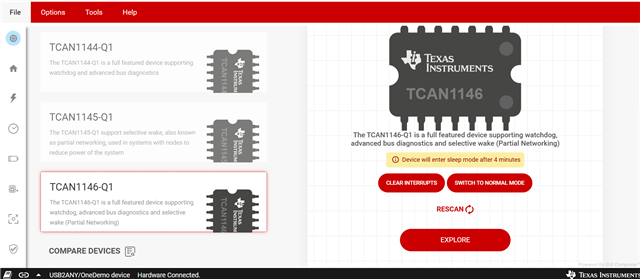
7."Hardware not Connected. Failed to connect." is displayed

Also, it seems that the Windows Device Manager does not recognize the TCAN1145EVM.
Is this normal?
I would be very grateful if you could provide a solution.

Thank you in advance.

Kawahara

  • Hi Kawahara-san,

    To use with GUI please check if S7 on the back side of EVM are in the "ON" position, especially the NCS, SDO, SDI, SCLK lines.

    Let me know if this works.

    Regards,

    Sean

  • Hi Sean-san,

    Thank you for your assistance.
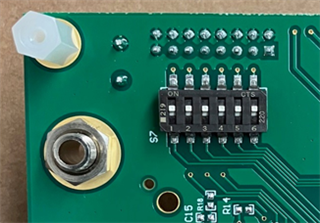
    The image below shows the current settings on the S7.

    I think all the settings are "ON", but is that wrong?
    I would like to confirm this for you.

    Regards,

    Kawahara

  • Hi Kawahara-san,

    Your setting looks correct, those switches are in the ON position.

    I tried to run on the GUI using my own TCAN1145EVM, it connected successfully. After I plugged in the usb cable, it should automatically detect the device.

    Were you able to use the online version of GUI? I think it might be due to the firmware version of USB2ANY on GUI not matched the board, on this online version you will be able to update to the latest version firmware.

    dev.ti.com/.../

    Please let me know if this helps.

    Regards,

    Sean

  • Hi Sean-san,

    Thanks to you, the problem has been solved.
    After replacing it with a spare evaluation board, we were able to confirm that it was working properly.
    It appears that the evaluation board was defective upon initial shipment.

    Regards,

    Kawahara