This thread has been locked.

If you have a related question, please click the "Ask a related question" button in the top right corner. The newly created question will be automatically linked to this question.

SN75LVPE5412: can't switch

Part Number: SN75LVPE5412

Tool/software:

Hi,

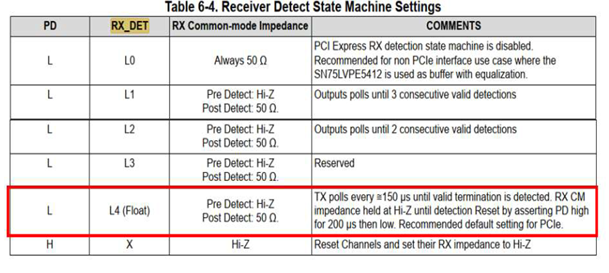
Regarding the SN75LVPE5412RUAR & SN75LVPE5421RUAR, the specification mentions the settings as shown in the attached figure.
We would like to consult about an issue we encountered. During PCIe SI measurements, we used a Keysight oscilloscope connected to a Gen5 fixture and found that the waveform could not be automatically switched, requiring manual switching.

  1. Could you confirm if this issue is related to the settings mentioned in the attached figure?
  2. When in Test Mode, is it necessary to change the RX_DET Pin to L0?

Thanks!

Jeff

  • Hi Jeff,

    Could you please provide some additional context regarding your statement of "found that the waveform could not be automatically switched, requiring manual switching."? I am not quite sure I understand what you mean by the waveform being switched here. Are you referring to toggling between TX Presets?

    Best,
    David

  • Hi David,

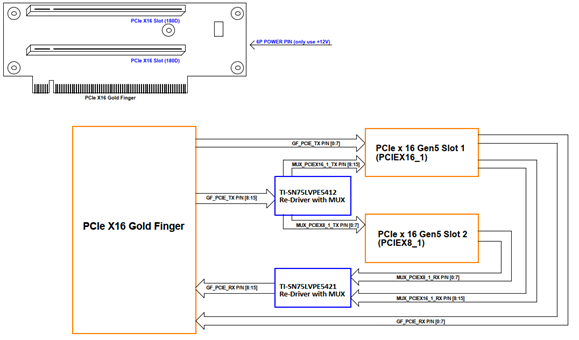
    This SI verification primarily focuses on the PCIe slot TX signal on the riser card.
    The PCIe block diagram is shown below:
    From the chipset through the MUX to the motherboard's PCIEX16_1, connected to an external riser card.
    Then, via the re-drivers SN75LVPE5412RUAR and SN75LVPE5421RUAR on the riser card,
    finally reaching the PCIe slot on the riser card as the endpoint.
    Thanks!
    Jeff
  • Hi Jeff,

    Thank you for sharing the block diagram of the system under test.

    For PCIe TX compliance tests, typically a set of TX Preset values are toggled through manually by the device TX which is providing the signal - for example, a root complex or endpoint device. These are typically triggered through PCIe REFCLK removal and subsequent re-application while the DUT is in compliance mode. Further details are outlined in the PCIe specification.

    In your test setup, are you able to properly see signals passing through the redriver when starting the compliance test? It is not clear to me if you are having an issue observing any signal output at all from the devices, if the issue is occurring when moving between Slot 1 and Slot 2, or if the problem is related to toggling through various TX Presets.

    Best,
    David

  • Hi Jeff,

    Any updates on this item?

    Best,
    David