This thread has been locked.

If you have a related question, please click the "Ask a related question" button in the top right corner. The newly created question will be automatically linked to this question.

TUSB320LAI: USB communication fail

Part Number: TUSB320LAI
Other Parts Discussed in Thread: TUSB320

Tool/software:

Dear TI Engineer,

We have a problem using TI CC controller (TUSB320LAIRWBR).


Our device is design to provide 5V/1A charging port to external device (e.g. smartphone). The problem our device connect to notebook USB-C port, CC controller detected a sink device connected. Our device switch on to provide power and the USB communication fail.

We test with 2 notebook, configuration shown below.
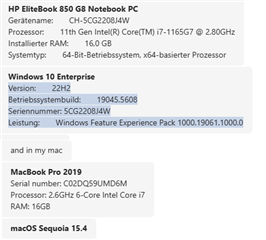
Do you have any suggestion  to solve this problem?

Thanks,

Kind Regards

  • HI Lumina,

    How is the TUSB320 configured? If it is meant to act as a DFP and provide power, then it will only configure as a DFP.

    Are you looking for the functionality to both act as a UFP and a DFP? If so, the TUSB320 needs to be set as a DRP.

    A schematic and block diagram would also be good to help understand the setup of your system.

    Thanks,

    Ryan

  • Hi Ryan,

    We configured the TUSB320 as DRP, and Try.SRC selected, it's fine when connect to the phone, the problem is when connects to a notebook with a USB-C-to-C cable, Windows prompt "adapter not enough power", and the USB blocked from data transfer...

    Thanks,

    Best Regards

  • Hi Lumina,

    Is your device meant to provide power to the notebook? Or is it meant to act as a UFP when connected to the notebook?

    My thoughts right now are that both your device and the notebook are set to a DRP role, and with your notebook set to Try.SRC, it is configuring at a DFP with the notebook, causing it to try and supply power, as well as possibly barring being able to transfer data. You can test this by changing from Try.SRC to Try.SNK and seeing if that allows USB data transfer.

    Thanks,

    Ryan

  • Hi Ryan,

    Our application is communicate to notebook (no power delivery) and charge smart phone when USB C connected.

    If we set to Try.SNK, can our product charge to smart phone when phone connected?

     What should we set to fulfill the application?

    Thanks,

    Kind Regards

  • Hi Lumina,

    If you want your device to connect to a notebook without send power to it, then yes, the TUSB320 would need to be set as a UFP/Sink when connected to the notebook, that way it does not try to supply power. If you want to be able to charge a smartphone when that is connected to your device, then your device needs to be setup as a DFP.

    So going by that, it sounds like you will need to be set as DRP. However, it also depends on the settings for the notebook and the smartphones being used. If both are also set to DRP, with neither of them using Try.SNK or Try.SRC, then it's hard to configure the TUSB320 in a way to where it will only be a UFP with a notebook and a DFP with a smartphone.

    DRP will have the TUSB320 toggle the CC lines until it finds a valid connection, regardless of whether its a DFP or UFP, with the Try.SNK and Try.SRC commands biasing that toggling towards a certain orientation. However, it does not guarantee it will be setup in one specific orientation. The only way that can be done is to set the device to either DFP or UFP. 

    So first, I would try to verify whether the notebook and the smartphone are both DRP, and if they use anything like Try.SNK or Try.SRC to bias their CC line connections. If they do not, then I believe the only thing that can be done is to manually switch the device between either DFP or UFP, or Try.SRC and Try.SNK, to match the type of connection you are looking for. Otherwise, when using DRP with Try.SNK or Try.SRC with another DRP connection, your device is likely to only configure as the Try.X command you have set.

    Thanks,

    Ryan