This thread has been locked.

If you have a related question, please click the "Ask a related question" button in the top right corner. The newly created question will be automatically linked to this question.

SN65DP159: SN75DP159 there no output video signals not work with 4K screen

Part Number: SN65DP159
Other Parts Discussed in Thread: TDP0604, TDP1204, TMDS1204, TDP158

Tool/software:

Hi
I am connecting from the DP++ connector directly to the component without 100NF series capacitors, could this affect the fact that I am unable to work with 4K screens, only with HDMI,
and if I connect via an HDMI connector that is connected to the component via series capacitors, in this case I am able to work with 4K screens
or is something else affecting it?

  • Hi,

    Can you please share your schematic for review? For interfacing DP++ to DP159, the DP159 input needs to be AC coupled.

    Thanks

    David

  • Thanks

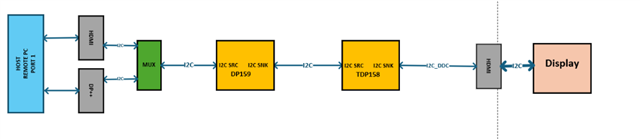
    See KVM CH1 from 4,

    Focus on the video part on the right side of the image. The second image is a continuation of the MUX and DEMUX that centralizes all the video channels to the HDMI connector output to the screen.

  • Hi

    I have attached the electronic consent from the previous contact.

    We add AC coupled 0.1uF also from DP connector to SN65DP159,

    And yet, with this connection, we can only work with a full HDMI screen, not at 4K 30HZ, nor at 4K 60HZ. 

    We hope for any help you can give us, that they can solve this problem for us.

  • Hi,

    Any chance you could attached the schematic as a .pdf instead the screen image? It is very hard to make out the net name among the the MUX and DEMUX. 

    Have you also had a chance to look at the eye at the HDMI receptacle? My concern with the MUX and DEMUX is that they will add more insertion loss which would degrade the overall HDMI signal quality. 

    Thanks

    David

  • Thanks
    I don't have a photo of the signal, but why from the same HOST if I connect via an HDMI connector, which goes through the same MUX DEMUX path, I can work with screens at 4K 60HZ, but if I connect from the same HOST a DP ++ connector connection that goes through the same MUX DEMUX path, I can only work with the screen at FULL HD frequencies and cannot work at frequencies of even 4K 30HZ.

  • Hi,

    With this DP++ source, does it require the read of the Adaptor ID? Some DP++ source may require the read of the Adaptor to discern between the support of HDMI or DVI output. TDP0604 does not support Adaptor ID, so if the DP++ source reads it, it will return all '0' which the DP++ source assumes DVI output, so max supported frequency is 165MHz. 

    Is it possible to disable this feature and force the DP++ source to output 4k@30Hz and 4k@60Hz?

    Thanks

    David

  • Thanks
    After we connected the resistors that connect the I2C controller to the DP159 component (R363, R364, R374, R375, R385, R386, R396, R397), the controller reads the Adaptor ID from DP159 and updates the HOST with the EDID as a code read from the screen,
    The ++DP works in 4K 30HZ mode and not 4K 60HZ, is this because the component only supports DisplayPort Dual-Mode Standard Version 1.1, or for another reason?
    Another question when connecting from the HOST via the HDMI connector, the connection to the screen is only 4K 60HZ 4:2:0, and not 4K 60HZ 4:4:4, is this a limitation of the component, and also the CLK that I measure in the 4K 60HZ connection is at a frequency of 340M and not at 594MHZ according to the standard,
    And if the reason for this is that the component does not support this frequency, is the component tmds1204 or tdp1204, does the CLK of 594MHZ and processed with the total configuration of 4K 60HZ 4:4:4.
    And how do these components support connection from the HOST via the DP++ connector?

  • Hi,

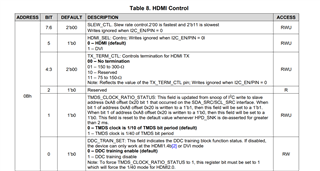
    Except the CVT format, DP159 can still support the 4k@60Hz 4:4:4 resolution. But for HDMI2.0, it is important that the DP159 TMDS_CLOCK_RATIO_STATUS bit is "1". If you are measuring the clk frequency at 340MHz, this points TMDS_CLOCK_RATIO_STATUS may not being set correctly. 

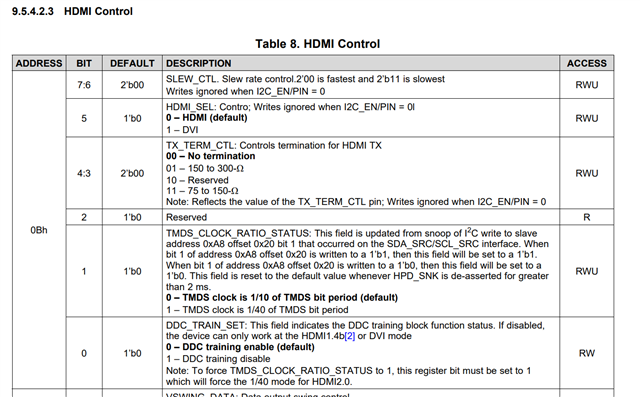
    As part of discovery, the source reads the sink’s E-EDID information to understand the sink’s capabilities. Part of this read is HDMI forum vendor specific data block (HF-VSDB) MAX_TMDS_Character_Rate byte to determine the data rate supported. Depending upon the value, the source will write to slave address 0xA8 offset 0x20 bit1, TMDS_CLOCK_RATIO_STATUS. The SNx5DP159 snoops this write to determine the TMDS clock ratio and thus sets its own TMDS_CLOCK_RATIO_STATUS bit accordingly. If a 1 is written, then the TMDS clock is 1/40 of TMDS bit period. If a 0 is written, then the TMDS clock is 1/10 of TMDS bit period. The SNx5DP159 will always default to 1/10 of TMDS bit period unless a 1 is written to address 0xA8 offset 0x20 bit 1. When HPD_SNK is de-asserted, this bit is reset to default values. If the source does not write this bit the SNx5DP159 will not be configured for TMDS clock 1/40 mode in support of HDMI2.0.

    If the bit is set, then you should see CLK frequency of 594/4 = ~148MHz.

    Thanks

    David

  • Thanks

    What about problems with the DP++ connector connection? We can only work in front of the screen at 4K 30HZ, and not at 4K 60HZ. Is this also related to the issue of configuring the CLK registers, or is it a different problem?

    ""After we connected the resistors that connect the I2C controller to the DP159 component (R363, R364, R374, R375, R385, R386, R396, R397), the controller reads the Adaptor ID from DP159 and updates the HOST with the EDID as a code read from the screen,
    The ++DP works in 4K 30HZ mode and not 4K 60HZ, is this because the component only supports DisplayPort Dual-Mode Standard Version 1.1, or for another reason?""

  • Hi,

    Looking at the schematic, you have the SCL_SRC and SDA_SRC connected to the level shifter. But for DP159, the DDC snooping is done at SCL_SNK and SDA_SNK. So without snooping, the DP159 will not automatically set the TMDS_CLK_RATIO_STATUS bit. You will have to change the snooping configuration to the SCL_SNK and SDA_SNK side.

    The ++DP works in 4K 30HZ mode and not 4K 60HZ, is this because the component only supports DisplayPort Dual-Mode Standard Version 1.1, or for another reason?""

    No, DP++ version 1.1 will support 4k@60Hz.

    Thanks

    David

  • To change the snooping configuration to the SCL_SNK and SDA_SNK side, can we configure the TMDS_CLK_RATIO_STATUS bit via SDA_SRC and SCL_SRC, or via SDA_CTL and SCL_CTL, and if so which registers to access?

  • Hi

    If you look at the electrical schematic, at the lower level before connecting to the connector and the screen, the video signals pass through TDP158 (U111, U112) components. Do these components also need configuration like DP159?

  • Hi,

    To change the snooping configuration to the SCL_SNK and SDA_SNK side, can we configure the TMDS_CLK_RATIO_STATUS bit via SDA_SRC and SCL_SRC, or via SDA_CTL and SCL_CTL, and if so which registers to access?

    You can use register 0x0B to configure the TMDS_CLK_RATIO_STATUS bit as shown below. The DP159 register is accessed through the SDA/SCL_CTL bus. To change the TMDS_CLK_RATIO_STATUS bit, you have to set the DDC_TRAIN_BIT first. 

    Thanks

    David

  • Hi,

    Yes, the TDP158 has to be configured similarly to DP159.

    Thanks

    David

  • Hi

    In a direct I2C connection for snooping, I connect a HOST input once via an HDMI connector to components that are connected back to back, DP159 is connected to TDP158 and then to the monitor via an HDMI connector.
    In this connection mode, the HOST and the monitor work at a speed of 4K 60HZ RGB.
    But if I connect a DP++ connection from the HOST via a DP connector in the same back to back connection between DP159 and TDP158 components and then to the monitor via an HDMI connector,
    In this connection mode, the HOST and the monitor work at a speed of 4K 30HZ RGB and not 4K 60HZ RGB.
    Is the reason because the components support DisplayPort Dual-Mode Standard
    Version 1.1, or for another reason, and if these components do not support it, are there other components that support DisplayPort Dual-Mode Standard
    Version 1.2.


    Attached is a block diagram of the connections I described here.BLOKER_KVM_HDMI & DP I2C connection_Architecture.pdf

  • Hi,

    When you say components that are connected back to back, are you referring to the DP159 or the MUX in the block diagram?

    Both the DP159 and DP158 do support signaling rates up to 6Gbps to allow for the highest resolutions of 4k 2k 60p 24 bits per pixel. 

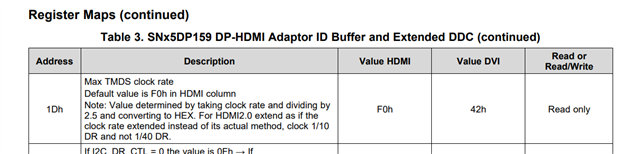
    But with the DP++ source, does it read the DP159 adaptor ID? The Max TMDS clock rate in the adaptor will indicate to the source that 4k@60Hz is supported.

    If the DP++ is reading the Adaptor ID, is there a way to disable it and force the DP++ to output 4k@60Hz resolution?

    Thanks

    David

  • Thanks

    1. The components are connected back to back without a multiplexer directly using wire connections, as in the attached block diagram.
    2. Yes, it reads the DP159 adaptor ID directly through the DP connector.
    3. Is there a way to make DP++ work in 4K 60HZ RGB mode at maximum speed, something that can be started or written to the DP159 and TDP158 components via I2C or any other way.
    4. According to what the DATASHEET says, the component supports DisplayPort Dual-Mode
    Version 1.1, according to this standard it only supports 4K 30HZ RGB, or is there something I don't understand and it only works at a rate of 5.4GBPS and not 6GBPS.

  • Hi,

    DP159 is a Type 2 DisplayPort Dual-Mode Cable Adaptor. The Type 2 adaptors can support DVI up to a 165MHz TMDS clock rate (the DVI spec limit) or HDMI up to a 300MHz TMDS clock rate. 

    With 4k@60Hz resolution, the TMDS clock rate is 1/40 of the data rate. The data rate for the 4k@60Hz resolution is 5.94Gbps, with 1/40 of the data rate, the clock rate or frequency is 148.5MHz, below the Type 2 DisplayPort Dual-Mode Cable Adaptor max of 300MHz clock rate. So DP158 and DP159, as a Type 2 DisplayPort Dual-Mode Cable Adaptor, will support HDMI2.0 4k@60Hz resolution. 

    For question #3, it is up to the DP++ source, not the DP158 or DP159, to send out the 4k@60Hz resolution if the source supports it. The only thing DP158 or DP159 will set is the TMDS_CLK_STATUS bit which has to be set to 1 for 4k@60Hz resolution. The DP158 or DP159 can set this bit automatically by snooping the DDC bus or the source can manually write to this bit when changing the resolution to 4k@60Hz. 

    If the source is correctly reading the Adaptor ID, then I would expect the source to send out the 4k@60Hz resolution. Can you check with the source vendor and see if the source supports 4k@60Hz and if it does, how to enable it?

    Thanks

    David

  • Thanks

    We’re having an issue with SN75DP159RSB where DP++ input doesn't initiate SCDC communication for HDMI 2.0 features.


    Setup:

    SN75DP159RSB in pin strap mode (HDMI selected, adaptive EQ). For security reasons, no monitor is connected to SNK side - instead we have a controller implementing I2C slave at 0xA8 to capture SCDC data that the redriver needs to snoop.

    HPD_SRC and HPD_SNK are pulled up to 3.3V.


    Problem:

    • HDMI input works perfectly - source initiates SCDC communication, 4K60 RGB works
    • DP++ input doesn't start any SCDC communication, maxes out at 4K30 RGB


    Questions:

    1. We suspect the issue might be related to Adaptor ID and Extended DDC reading from address 0x80. Could the DP++ source be reading this and determining it shouldn't use HDMI 2.0 features ?
    2. Is there a way to configure or override this behavior to force SCDC/HDMI 2.0 mode for DP++ inputs without connecting an actual monitor ?
    3. Can we verify that DisplayPort Dual-Mode Standard Version 1.1 is indeed type 2?

    4628.BLOKER_KVM_HDMI & DP I2C connection_Architecture.pdf

  • Hi,

    Below is part of the DP159 Adaptor ID

    The cable adaptor uses registers 0x00 to 0x0F to indicate whether the adaptor includes a HDMI or a DVI receptacle. Registers 0x00 to 0x0F will return 0x00h if the adaptor includes the DVI receptacle. 

    Register 0x10 indicates whether the cable adaptor is Type-1 or Type-2. For Type-1, reading register 0x10 will return 0x00h or 0xFFh. For Type-2, reading register 0x10 will return 0xA0h. 

    Can you probe and decode the I2C transaction on the DDC bus using an I2C analyzer? You should see 0x80 (Adaptor), 0xA0 (EDID), 0xA8 (SCDC), please note these are all 8-bit addressing. With 4k@60Hz, you should see the host set bit 1 of SCDC register 0x20 to "1".

    Thanks

    David 

  • Thanks

    We have a microcontroller with 2 I2C ports.

    • I2C1 is connected to the SRC side, implemented as master
    • I2C2 is connected to SNK side, implemented as slave listening to address 0xA8 (simulating SCDC)


    We were able to verify that register 0x10 of the Extended DDC (at address 0x80) is 0xA0.


    With software breakpoints, we were able to verify that the computer host set bit 1 of SCDC register 0x20 to "1" only when we use HDMI cable. If we use DP cable, the computer host does not try to access any SCDC register.


    We also know that with DP the computer host does read the HDMI Adaptor ID because we have 4K@30 resolution, otherwise it would be limited to Full HD resolution.


    Using an oscilloscope we got the same results as above.

  • Hi,

    It looks the issue is with the source that even though it reads the Adaptor ID and knowing DP159 can support HDMI2.0 4k@60Hz, it still does not output the 4k@60Hz since it never tries to write a "1" to bit 1 of the SCDC register 0x20. Any chance you can reach out to the source vendor and see how we can configure the source to output 4k@60Hz resolution?

    Thanks

    David

  • Thanks

    Attached the source vendor and see how we can configure the source to output 4k@60Hz resolution

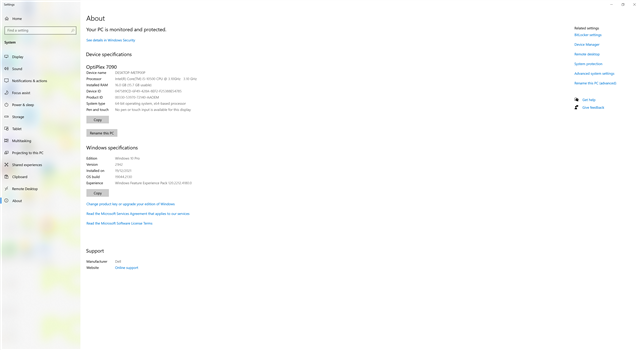
    Device specifications
    
    OptiPlex 7090
    Device name	DESKTOP-METP00P
    Processor	Intel(R) Core(TM) i5-10500 CPU @ 3.10GHz   3.10 GHz
    Installed RAM	16.0 GB (15.7 GB usable)
    Device ID	047589CD-6F49-428A-8EF2-F25388E54785
    Product ID	00330-53970-72140-AAOEM
    System type	64-bit operating system, x64-based processor
    Pen and touch	No pen or touch input is available for this display
    
    Windows specifications
    
    Edition	Windows 10 Pro
    Version	21H2
    Installed on	‎19/‎12/‎2021
    OS build	19044.2130
    Experience	Windows Feature Experience Pack 120.2212.4180.0
    

  • Hi,

    Can you reach out to Dell for support on the OptiPlex 7090? I am looking at the spec, and can't tell if it supports the 4k@60Hz resolution.

    Thanks

    David

  • Thanks

    The answer we received

    Yes, the Dell OptiPlex 7090 does support DP++ (DisplayPort++) dual-mode for 4K resolution at 60Hz with RGB color. It has a standard DisplayPort 1.4 port that supports HBR2 (High Bit Rate 2) and can handle 4K resolution at 60Hz with RGB color. Additionally, it may also have a Thunderbolt 4 port with DisplayPort Alt Mode, which can also support 4K 60Hz RGB. 

    We also connected the DP++ port, via a dongle that transfers between DP++ to HDMI, to a monitor that supports 4K 60HZ RGB and it worked without problems.
    We need your help to understand why, through two DP159 components that are connected back-to-back, as we described in the previous correspondence, it does not work in 4K 60HZ RGB, but only in 4K 30HZ RGB?

  • Hi,

    When you look at the Win Display Setting, do you see 4k@60Hz resolution shows up as the max supported resolution? If not, have you checked the EDID in your DDC EEPROM to make sure the EDID reports 4k@60Hz as one of the supported resolution?

    For both DP158 and DP159, I noticed their SDA_SNK and SCL_SNK are not connected to the DDC bus. In this case, for 4k@60Hz resolution, are you manually setting the HDMI_CLK_STATUS_RATIO bit to 1?

    Thanks

    David