This thread has been locked.

If you have a related question, please click the "Ask a related question" button in the top right corner. The newly created question will be automatically linked to this question.

DP83867CS: Help with using three PHY components connected to the same I2C MDIO lines

Part Number: DP83867CS

Tool/software:

Hello,

My team designed a board with three Ethernet connections, which means it includes three PHY components DP83867, all connected to the same MDIO lines but with different addresses (4, 8, 12).
In addition, the board has a processor running a linux operating system that communicates with the components on the board.
When the board is powered on, all three Ethernet ports communicate successfully, but after several hours of operation, one of the ports stops communicating and the operating system outputs the message:

[ 1047.865770] TI DP83867 ff0b0000.ethernet-ffffffff:04: Master/Slave resolution failed

After this happens, it is no longer possible to access the PHY via the MDIO lines.

Could you help us figure out how to prevent this issue?

Note – On the same board we designed, there is another processor with an linux operating system,with two PHY components are connected (i.e., two Ethernet ports) that share the same I2C MDIO line but have different addresses (4 ,8), and in that case we do not encounter this problem at all.

  • Hi, 

    Does the MDIO access come back if the PHY is reseted and is the PHY still detectable on Linux after this error happens?
    Also, how often does this happen?
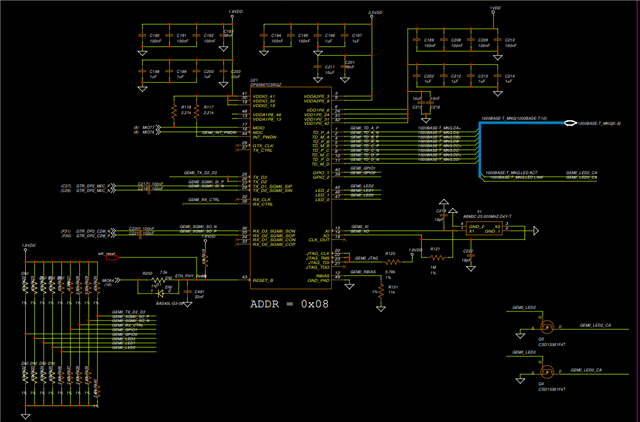
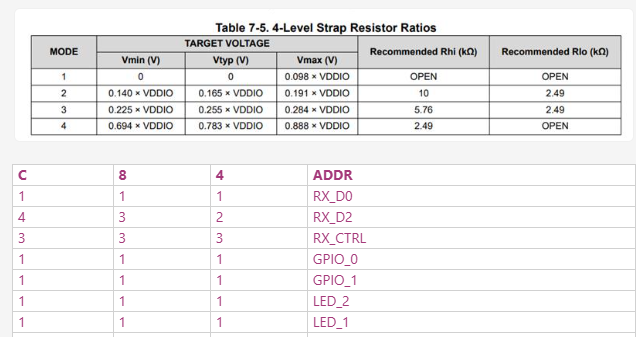
    Could you give us more detail about the PHY's strap configuration? 

    Best,
    J

  • Reset solves the problem,
    The problem recurs frequently (once a day).

  • Hi Shira, 
    Which PHY is dying? Also, is the problematic PHY detectable on Linux after the error statement?
    It seems like all the PHYs are in the same strap setting with only difference being the PHY address. 

    Is there any additional log on the Linux side? Could you also share the schematic so we can better take a look at this problem? 
    Currently, it seems like it could be power dip on one of the voltage rails causing the PHY to get stuck in a bad state. 

    When the PHY gets into the bad state, could you probe RBIAS pin and see if it is outputting 1V and could you check if there is clock going into XI pin when the PHY is in the bad state?

    Best,
    J

  • Hi,

    Which phy dying is not permanent, when the phy is dying linux can't communicate with the phy but with the other phys it does. 

    linux log -

    dmesg | grep eth0-
    [ 2.791714] macb ff0b0000.ethernet eth0: Cadence GEM rev 0x50070106 at 0xff0b0000 irq 60 (00:0a:35:16:c7:be)
    [ 10.100274] macb ff0b0000.ethernet eth0: PHY [ff0b0000.ethernet-ffffffff:0c] driver [TI DP83867] (irq=POLL)
    [ 10.100311] macb ff0b0000.ethernet eth0: configuring for phy/sgmii link mode
    [ 14.182864] macb ff0b0000.ethernet eth0: unable to generate target frequency: 125000000 Hz
    [ 14.184424] macb ff0b0000.ethernet eth0: Link is Up - 1Gbps/Full - flow control off
    [ 14.184466] IPv6: ADDRCONF(NETDEV_CHANGE): eth0: link becomes ready

    dmesg | grep eth1-
    [ 2.818679] macb ff0d0000.ethernet eth1: Cadence GEM rev 0x50070106 at 0xff0d0000 irq 61 (00:c1:be:33:00:17)
    [ 10.016515] macb ff0d0000.ethernet eth1: PHY [ff0b0000.ethernet-ffffffff:08] driver [TI DP83867] (irq=POLL)
    [ 10.016546] macb ff0d0000.ethernet eth1: configuring for phy/sgmii link mode
    [ 14.118845] macb ff0d0000.ethernet eth1: unable to generate target frequency: 125000000 Hz
    [ 14.120428] macb ff0d0000.ethernet eth1: Link is Up - 1Gbps/Full - flow control off
    [ 14.120471] IPv6: ADDRCONF(NETDEV_CHANGE): eth1: link becomes ready

    dmesg | grep eth2-
    [ 2.852286] macb ff0e0000.ethernet eth2: Cadence GEM rev 0x50070106 at 0xff0e0000 irq 62 (9e:3e:21:13:ea:5c)
    [ 9.992175] macb ff0e0000.ethernet eth2: Could not attach PHY (-19)

    schematic -

    all power rails are common to all phys so if there is problem in power source it will affect all the phys.
    I checked when the phy dying RBIAS= 1V, and there is clk in XI pin.

  • Hi Shira,

    To confirm, any of the three PHYs may die while they are in its operation?
    Also, could you send a better quality picture or file of the schematic? I cannot read the letters with the current quality. 

    I have some hypothesis as to why this could be happening:
    1. MDIO bus load is too high with three devices that setup/hold time specs are not met causing the PHY to be dropped from the Linux. For this, I would suggest switching MDIO pull up resistor to a lower resistance and see if this is causing it. You can possibly check this by using MSP430 Launchpad to communicate to the problematic PHY when the PHY is dropped from Linux and see if the PHY responds to the MSP430's MDIO read/writes. Please make sure that the Linux is not driving the MDIO bus when the MSP430 Launchpad is driving the bus. 
    2. Possible power dip. As you said they all share the same power rail, power dip can cause the PHY to be stuck in a bad state and not recover. This would be possible for any of the three PHYs to go into a bad state. Could you possibly try out putting the board on the oscilloscope and see if there ever is a power dip?

    Please let me know. 

    Best,
    J


  • Hi,
    We added a pullup resistor to the mdio line
    I'll update if that helps,thanks!

  • Hi Shira,

    Please keep me updated. Please note that MDIO line requires 1.5k to 2.2k pullup resistor by MDIO bus protocol.

    Best,
    J

  • Hi,
    Adding pullup resistors didn't help...
    Do you have any other ideas for a solution?
    link for schematic-
    There are 3 pictures of each ethernet connection with a different address
    https://imgur.com/a/XHzolxd

    Thanks

  • Hi Shira, 

    Have you tried driving the problematic PHY with different MDIO driver like MSP430 Launchpad?

    You can possibly check this by using MSP430 Launchpad to communicate to the problematic PHY when the PHY is dropped from Linux and see if the PHY responds to the MSP430's MDIO read/writes. Please make sure that the Linux is not driving the MDIO bus when the MSP430 Launchpad is driving the bus. 

    Also, have you checked if there are any power dips that can cause this?

    Best,
    J

  • Hi,
    I can't connect MSP430, because we used custom board and mdio lines connect to zynqMP (FPGA Xilinx) so i cant disconnect the lines and connect to another driver.
    We checked and there are not power dips.

  • Hi Shira,

    US office is closed for holiday 9/1. I will get back to you on 9/2 US time.

    Best,

    J

  • Hi Shira,
    Could you use phytool to read/write to the problematic PHY?

    I discussed this internally and it is very unfortunate that you cannot access MDIO bus. If you could make this happen somehow that would be very helpful in debugging. 
    If this is a loading issue on the bus, using 1.5kohm resistor on MDIO may solve the issue. You can also try to add 1.5kohm resistor on the MDC to ensure that there is a proper pull up. Could you also try that?

    Best,
    J

  • Hi,
    I’m using phytool, but when the port stops being in running state, it’s impossible to communicate with the port’s address (I can still talk to the other port addresses).
    We added the pull-up resistor, but the problem still occurs.

    Another thing we noticed is that the OS reports disconnections and is able to bring the port back up, until at some point it can no longer recover the port-
    dmesg | grep eth
    [ 0.000000] psci: probing for conduit method from DT.
    [ 1.335494] usbcore: registered new interface driver cdc_ether
    [ 2.786037] macb ff0b0000.ethernet: Not enabling partial store and forward
    [ 2.795820] macb ff0b0000.ethernet eth0: Cadence GEM rev 0x50070106 at 0xff0b0000 irq 60 (00:0a:35:16:c7:be)
    [ 2.806130] macb ff0d0000.ethernet: Not enabling partial store and forward
    [ 2.822881] macb ff0d0000.ethernet eth1: Cadence GEM rev 0x50070106 at 0xff0d0000 irq 61 (00:c1:be:33:00:17)
    [ 2.833332] macb ff0e0000.ethernet: Not enabling partial store and forward
    [ 2.850306] macb ff0e0000.ethernet eth2: Cadence GEM rev 0x50070106 at 0xff0e0000 irq 62 (00:c1:be:33:00:18)
    [ 10.979351] macb ff0d0000.ethernet eth1: PHY [ff0b0000.ethernet-ffffffff:08] driver [TI DP83867] (irq=POLL)
    [ 10.979390] macb ff0d0000.ethernet eth1: configuring for phy/sgmii link mode
    [ 10.980569] macb ff0d0000.ethernet: gem-ptp-timer ptp clock registered.
    [ 10.995575] macb ff0e0000.ethernet eth2: PHY [ff0b0000.ethernet-ffffffff:04] driver [TI DP83867] (irq=POLL)
    [ 10.995611] macb ff0e0000.ethernet eth2: configuring for phy/sgmii link mode
    [ 10.996753] macb ff0e0000.ethernet: gem-ptp-timer ptp clock registered.
    [ 11.095610] macb ff0b0000.ethernet eth0: PHY [ff0b0000.ethernet-ffffffff:0c] driver [TI DP83867] (irq=POLL)
    [ 11.095645] macb ff0b0000.ethernet eth0: configuring for phy/sgmii link mode
    [ 11.124201] macb ff0b0000.ethernet: gem-ptp-timer ptp clock registered.
    [ 13.031203] macb ff0e0000.ethernet eth2: unable to generate target frequency: 25000000 Hz
    [ 13.032779] macb ff0e0000.ethernet eth2: Link is Up - 100Mbps/Full - flow control off
    [ 13.032820] IPv6: ADDRCONF(NETDEV_CHANGE): eth2: link becomes ready
    [ 15.079071] macb ff0d0000.ethernet eth1: unable to generate target frequency: 125000000 Hz
    [ 15.080660] macb ff0d0000.ethernet eth1: Link is Up - 1Gbps/Full - flow control off
    [ 15.080700] IPv6: ADDRCONF(NETDEV_CHANGE): eth1: link becomes ready
    [ 15.174951] macb ff0b0000.ethernet eth0: unable to generate target frequency: 125000000 Hz
    [ 15.176538] macb ff0b0000.ethernet eth0: Link is Up - 1Gbps/Full - flow control off
    [ 15.176575] IPv6: ADDRCONF(NETDEV_CHANGE): eth0: link becomes ready
    [ 40.678987] macb ff0e0000.ethernet eth2: Link is Down
    [ 41.703114] macb ff0e0000.ethernet eth2: unable to generate target frequency: 25000000 Hz
    [ 41.703746] macb ff0e0000.ethernet eth2: Link is Up - 100Mbps/Full - flow control off
    [ 76.518923] macb ff0d0000.ethernet eth1: Link is Down
    [ 77.542987] macb ff0d0000.ethernet eth1: unable to generate target frequency: 125000000 Hz
    [ 77.543623] macb ff0d0000.ethernet eth1: Link is Up - 1Gbps/Full - flow control off
    [ 78.566858] macb ff0e0000.ethernet eth2: Link is Down
    [ 79.590967] macb ff0e0000.ethernet eth2: unable to generate target frequency: 25000000 Hz
    [ 79.591597] macb ff0e0000.ethernet eth2: Link is Up - 100Mbps/Full - flow control off
    [ 80.614869] macb ff0e0000.ethernet eth2: Link is Down
    [ 81.638933] macb ff0e0000.ethernet eth2: unable to generate target frequency: 25000000 Hz
    [ 81.639558] macb ff0e0000.ethernet eth2: Link is Up - 100Mbps/Full - flow control off
    [ 212.709758] macb ff0e0000.ethernet eth2: Link is Down
    [ 213.733744] macb ff0e0000.ethernet eth2: unable to generate target frequency: 25000000 Hz
    [ 213.734371] macb ff0e0000.ethernet eth2: Link is Up - 100Mbps/Full - flow control off
    [ 222.949702] macb ff0e0000.ethernet eth2: Link is Down
    [ 223.973812] macb ff0e0000.ethernet eth2: unable to generate target frequency: 25000000 Hz
    [ 223.974437] macb ff0e0000.ethernet eth2: Link is Up - 100Mbps/Full - flow control off
    [ 236.261565] macb ff0d0000.ethernet eth1: Link is Down
    [ 237.285864] macb ff0d0000.ethernet eth1: unable to generate target frequency: 125000000 Hz
    [ 237.286500] macb ff0d0000.ethernet eth1: Link is Up - 1Gbps/Full - flow control off
    [ 238.309522] macb ff0e0000.ethernet eth2: Link is Down
    [ 239.333782] macb ff0e0000.ethernet eth2: unable to generate target frequency: 25000000 Hz
    [ 239.334410] macb ff0e0000.ethernet eth2: Link is Up - 100Mbps/Full - flow control off
    [ 258.789508] macb ff0e0000.ethernet eth2: Link is Down
    [ 259.813553] macb ff0e0000.ethernet eth2: unable to generate target frequency: 25000000 Hz
    [ 259.814180] macb ff0e0000.ethernet eth2: Link is Up - 100Mbps/Full - flow control off
    [ 316.132579] macb ff0e0000.ethernet eth2: Link is Down
    [ 317.156648] macb ff0e0000.ethernet eth2: unable to generate target frequency: 25000000 Hz
    [ 317.157275] macb ff0e0000.ethernet eth2: Link is Up - 100Mbps/Full - flow control off
    [ 333.540312] macb ff0e0000.ethernet eth2: Link is Down
    [ 334.564426] macb ff0e0000.ethernet eth2: unable to generate target frequency: 25000000 Hz
    [ 334.565054] macb ff0e0000.ethernet eth2: Link is Up - 100Mbps/Full - flow control off
    [ 416.483587] macb ff0e0000.ethernet eth2: Link is Down
    [ 417.507706] macb ff0e0000.ethernet eth2: unable to generate target frequency: 25000000 Hz
    [ 417.508335] macb ff0e0000.ethernet eth2: Link is Up - 100Mbps/Full - flow control off
    [ 418.531616] macb ff0e0000.ethernet eth2: Link is Down
    [ 419.555685] macb ff0e0000.ethernet eth2: unable to generate target frequency: 25000000 Hz
    [ 419.556311] macb ff0e0000.ethernet eth2: Link is Up - 100Mbps/Full - flow control off
    [ 488.163099] macb ff0e0000.ethernet eth2: Link is Down
    [ 489.187242] macb ff0e0000.ethernet eth2: unable to generate target frequency: 25000000 Hz
    [ 489.187872] macb ff0e0000.ethernet eth2: Link is Up - 100Mbps/Full - flow control off
    [ 656.096891] macb ff0d0000.ethernet eth1: Link is Down
    [ 657.120965] macb ff0d0000.ethernet eth1: unable to generate target frequency: 125000000 Hz
    [ 657.121599] macb ff0d0000.ethernet eth1: Link is Up - 1Gbps/Full - flow control off
    [ 681.696600] macb ff0d0000.ethernet eth1: Link is Down
    [ 682.720673] macb ff0d0000.ethernet eth1: unable to generate target frequency: 125000000 Hz
    [ 682.721307] macb ff0d0000.ethernet eth1: Link is Up - 1Gbps/Full - flow control off
    [ 794.335486] macb ff0e0000.ethernet eth2: Link is Down
    [ 795.359602] macb ff0e0000.ethernet eth2: unable to generate target frequency: 25000000 Hz
    [ 795.360227] macb ff0e0000.ethernet eth2: Link is Up - 100Mbps/Full - flow control off
    [ 1002.205852] macb ff0e0000.ethernet eth2: Link is Down
    [ 1003.229990] macb ff0e0000.ethernet eth2: unable to generate target frequency: 25000000 Hz
    [ 1003.230619] macb ff0e0000.ethernet eth2: Link is Up - 100Mbps/Full - flow control off
    [ 1152.731751] macb ff0e0000.ethernet eth2: Link is Down
    [ 1153.755794] macb ff0e0000.ethernet eth2: unable to generate target frequency: 25000000 Hz
    [ 1153.756421] macb ff0e0000.ethernet eth2: Link is Up - 100Mbps/Full - flow control off
    [ 1880.788155] macb ff0e0000.ethernet eth2: Link is Down
    [ 1881.812271] macb ff0e0000.ethernet eth2: unable to generate target frequency: 25000000 Hz
    [ 1881.812900] macb ff0e0000.ethernet eth2: Link is Up - 100Mbps/Full - flow control off
    [ 2091.731235] macb ff0e0000.ethernet eth2: Link is Down
    [ 2092.755369] macb ff0e0000.ethernet eth2: unable to generate target frequency: 25000000 Hz
    [ 2092.755995] macb ff0e0000.ethernet eth2: Link is Up - 100Mbps/Full - flow control off
    [ 2249.429005] macb ff0e0000.ethernet eth2: Link is Down
    [ 2250.453165] macb ff0e0000.ethernet eth2: unable to generate target frequency: 25000000 Hz
    [ 2250.453793] macb ff0e0000.ethernet eth2: Link is Up - 100Mbps/Full - flow control off
    [ 2806.486934] macb ff0e0000.ethernet eth2: Link is Down

  • Hi Shira, 

    Could you probe to see if CLKOUT is producing any CLK when the PHY is in the problematic state? Also, it doesn't seem normal that the link is constantly going up and down. This doesn't seem like the MDC/MDIO issue. Is there any connection change happening when the link goes up and down on the OS? Also, is it always eth2 that gets dropped from the FPGA? I initially understood that any random PHY would get dropped from Linux but it looks like it is always eth2 causing an issue. 

    Lastly, if eth2 is disabled and then the board is put under the system, do other PHYs ever get dropped from Linux? If this is a MDIO/MDC load issue, this test should rule out MDC/MDIO issue and that there is something else going on in the PHY?

    Best,
    J

  • When eth2 isn't working/running, CLKOUT (of the PHY that dying) is still producing clk frequency 25MHz.

    We didn't change anything and didn't touch the cables during runtime (while the OS was printing the messages).

    We have several boards, and on each board a different ethernet port has the issue. I always sent the messages from a specific board where eth2 does not work properly.

    When I disabled eth2 on the OS, the OS did not print the disconnection messages.

    Therefore, the problem is indeed not related to an MDIO/MDC load issue.

    Could you suggest more ideas on where the problem might be?

  • Hi Shira, 

    Understood. Have you tried re-soldering the problematic PHY or the connector? I wonder if this could be a soldering issue because this is happening on several boards with each board a different port is having an issue. Based on the fact that the connection is keep going up and down, I wonder if soldering wasn't done properly. 

    Please let me know your thoughts. 

    Best,
    J