SN65DSI84-Q1: Please tell me what causes the output to cut off on the SN65DSI84-Q1.

Part Number: SN65DSI84-Q1
Other Parts Discussed in Thread: SN65DSI84

  1. Problem 1 : The LCD screen turns on normally, but then turns off and then turns on again when U12's 2Pin goes low.
  2. Problem 2 : 
    When I input 22.5MHz to a 37-inch LCD, the screen turns on (similar to Problem 1).
     When I input 45MHz to a 37-inch LCD, the screen doesn't turn on.
     
    3. signal sequence
    Raspberry Pi(DSI) => TI SN65DSI84-Q1 (LVDS) => 37Inch LCD
     
  • Hi Park,

    Problem 1 : The LCD screen turns on normally, but then turns off and then turns on again when U12's 2Pin goes low.

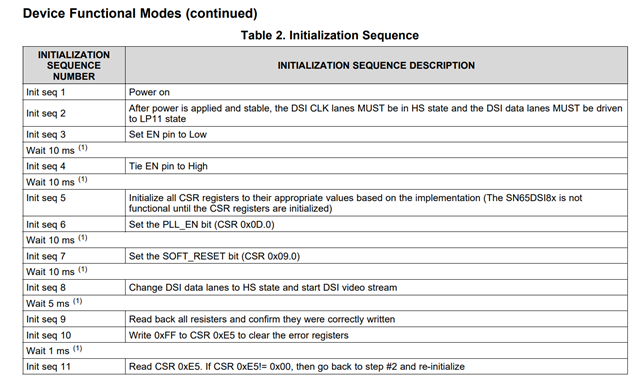
    The Pin 2 EN pin is used to enable/ disable the device. So this is expected that the device will reset/shutdown when EN is low. Please follow the initialization sequence shown in the datasheet "8.4.2 Initialization Sequence" section.

    Problem 2 : 
    When I input 22.5MHz to a 37-inch LCD, the screen turns on (similar to Problem 1).
     When I input 45MHz to a 37-inch LCD, the screen doesn't turn on.

    The device has to be programmed for the specific timings for each type of display. The device registers should be programmed for the specific DSI timings, display timings specifications and LVDS output specifications. 

    To generate the register writes, you can use the DSI tuner tool and you can find an example and download link here: RE: SN65DSI83: Support

    Please also check the 0xE5 register for any errors during startup.

    Best regards,
    Ikram

  • 8182.cm4s(Raspberry).pdf1.The LCD screen flickering issue has not been resolved yet. The LCD screen turns on normally, then turns off and then turns back on irregularly.

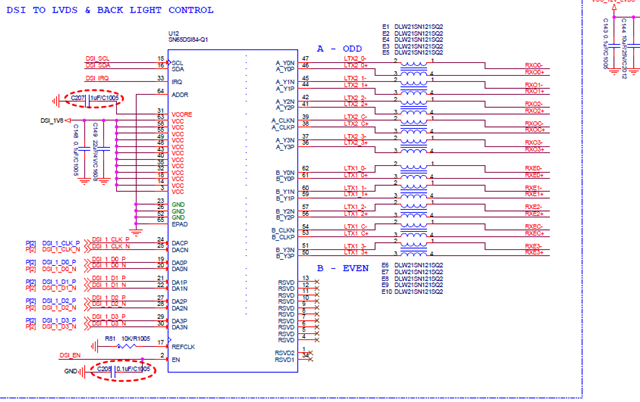
    To solve this problem, do I need to add a separate clock as shown in the attached circuit? Is there no way to solve it through programming?

    If possible, I'd like to achieve the fastest and most complete solution possible, without requiring any circuit changes.

    Raspberry Pi(CM4S / DSI) => TI SN65DSI84-Q1 (LVDS) => 37Inch LCD(1920 x 540 AUO)

     LCD_37IN_LVDS_30PIN_V1_20250908(Before).pdfLCD_37IN_LVDS_30PIN_V1_20250908(After).pdf8524.LCD_37IN_LVDS_30PIN_V1_20250908.pdf

  • Hi Park,

    When there is correct display output, is there video as expected with no flickering and correct image?

    Could you please read register 0xE5 to see which errors are reported.

    Also, for the second display are the PCLK frequency, and display timings added correctly by the SoC? What is the SoC setting?

    Best regards,
    Ikram

  • Hi Ikram
    1. The malfunction symptoms are as follows:
      1) After powering on, the screen turns on, then turns off (irregularly) and then turns back on.
      2) For gray-background screens, gray is displayed in a stepped pattern.

    2. I am currently testing using the attached circuit, "LCD_37IN_LVDS_30PIN_V1_20250908(Before).pdf."

       1) This circuit connects pin 17 (REFCLK) of the SN65SDI84-Q1 to GND with a 10kΩ resistor.

    3. I'm currently drawing the circuit diagram for "LCD_37IN_LVDS_30PIN_V1_20250908(After)".

       I'm planning to test this circuit by connecting an external REFCLK (OSC or Xtal) to pin 17 (REFCLK) of the SN65SDI84-Q1.

       The board configuration hasn't been completed yet. Please confirm that this circuit configuration is correct.

  • Hi IKram

    1. The value of register 0xE5 at the moment of blinking is 01.

    2. The set panel timing value is Dual Link, 45 MHz per channel.


    clock-frequency = <90000000> - Dual Link  45MHz/ SN65DSI84 38Pin-45MHz, 53Pin-45MHz)

    hactive = <1920>

    hsync-len = <40>

    hfront-porch = <200>

    hback-porch = <82>

    vactive = <540>

    vsync-len = <12>

    vfront-porch = <18>

    vback-porch = <12>

  • Hi Park,

    Please check that the 0xE5 register was cleared after initialization. Register 0xE5 shows PLL unlock, so there could be an issue with the DSI clock input.

    What rate is the DSI clock set at? Please check 0x12 register to read what frequency range it is set to. If it's a marginal rate, then setting 0x12 higher or lower could help get consistent PLL lock.

    Best regards,
    Ikram

  • Hi IKram

    1. I'd like to test this by adding Y2 (27MHz/Crystal) and U100 components. Please confirm that this circuit configuration is correct.

    0676.LCD_37IN_LVDS_30PIN_V1_20250908(After).pdf

  • Hi Park, please give me 1-2 days to check this and get back to you.

    Best regards,
    Ikram

  • Hi IKram

    I'm researching various solutions to fix the flickering issue. I'd like to get it resolved quickly.

    1. There's also a compatibility issue between the CM4S and SN65DSI on the Raspberry Pi forums, which is confusing.

    blackscreen when set 4-lane with ti-sn65dsi84(dsi2lvds bridge) - Raspberry Pi Forums

    I would like to get an accurate answer from TI..

  • Hi Park,

    The REFCLK components and schematic is similar to the EVM, so this should be okay to use the REFCLK as the LVDS source here. note that depending on how is is used, the CDCEL clock synthesizer might need to be programmed via I2C.

    You could also try using the DSI clock as source. What is the source DSI clock rate set to?

    Could you please read register 0xE5 to see which errors are reported.

    Could you also check this please. The error checking register will help to narrow down the cause of this issue.

    Best regards,
    Ikram

  • Hi IKram

    When the flicker occurs, the 0xE5 register is "01" as shown in the image below.

    Is there another register I need to check?

    Best regards,

  • Hi Park,

    Could you share what DSI clock frequency rate is used and the whether the register settings match those rates?

    How is the DSI input connected to the device? Could you share what type of cable or connections are used?

    Best regards,
    Ikram

  • Hi IKram

    1. As a result of checking the Register Map, the value of 0x12 (Field showing the DSI Clock frequency range) is 0x4B, which means 375 ≤ frequency<380 MHz.(AUO 

    2. The signal flow is as follows.

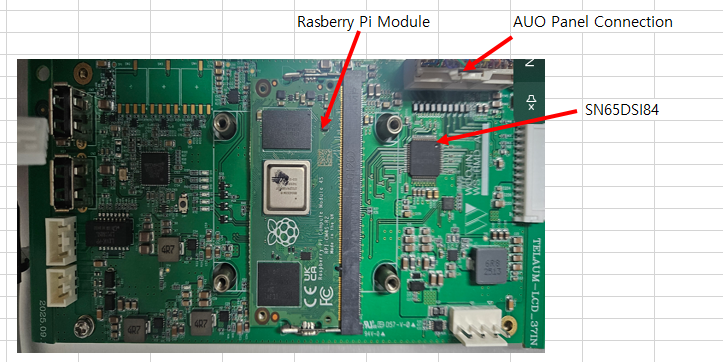
         (Connect the Raspberry Pi module using the 1473005-4 connector.)

         Raspberry Pi(CM4S) => SN65DSI84 => AUO 37Inch Panel(P370IVN022)

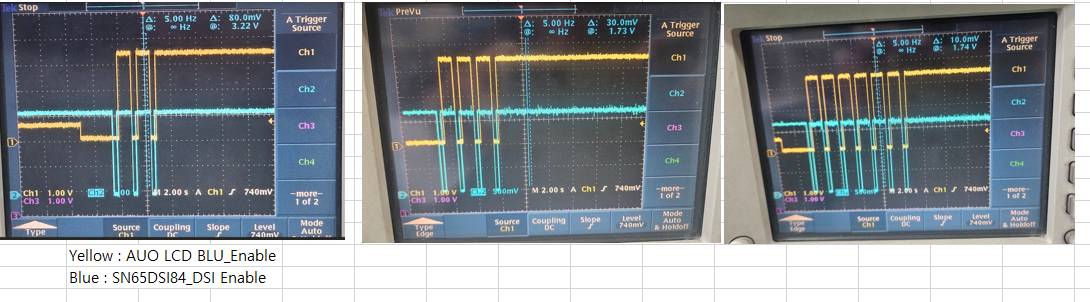
    3. The oscilloscope waveform at the moment when the flicker occurs is as follows.

    4. The waveform immediately after powering on the set is as follows.

    5. I'm attaching the circuit diagram I'm currently testing.

    8015.P370IVN022-specification-12050527.pdf0167.LCD_37IN_LVDS_30PIN_V1_20250908.pdf

  • Hi Park,

    Please check whether the system is following the datasheet initialization sequence: "8.4.2 Initialization Sequence"

    - the power rails should be high and stable before EN is applied to DSI84
    - the input DSI clock should be in HS state before the devices in enabled (EN)

    - the DSI should only be in HS state. Is this how the output is currently set up?


    Best regards,
    Ikram