This thread has been locked.

If you have a related question, please click the "Ask a related question" button in the top right corner. The newly created question will be automatically linked to this question.

DS280DF810: SigCon Architect cannot work in demo mode

Part Number: DS280DF810


Hi Expert,

I'm using SigCon Architect to generate a EEPROM file in demo mode.
After install the DS280DF810 Updater profile, the left columns are not avaiable as below.
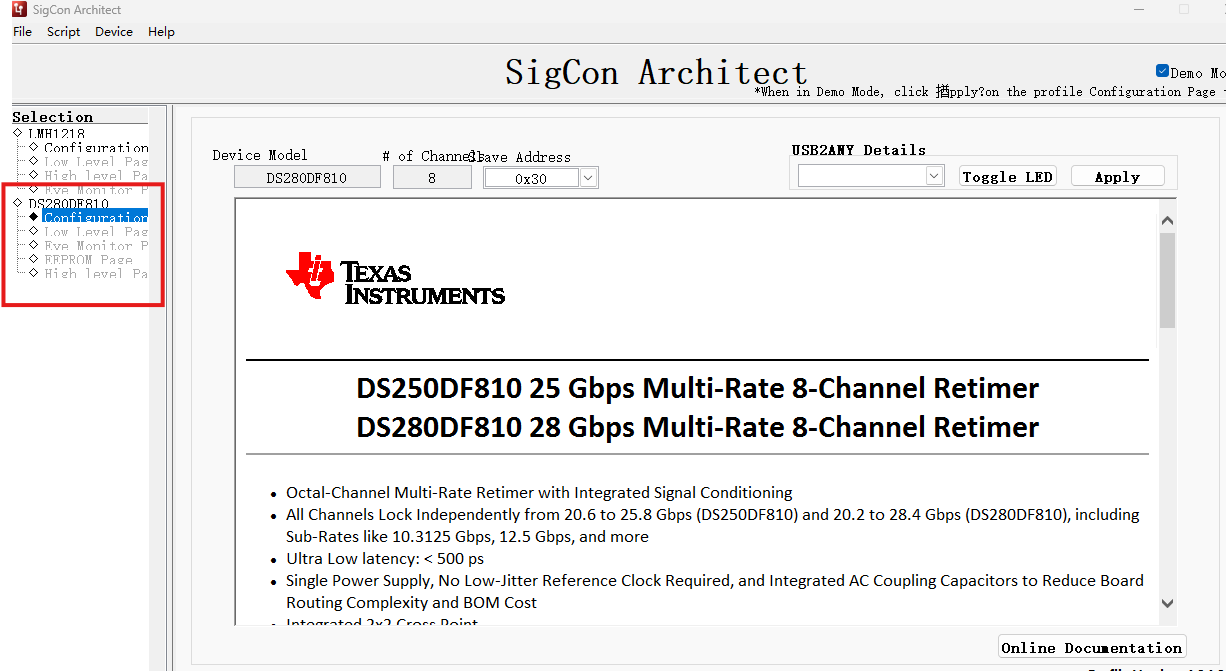
image.png

Also encountered below after Lanch Window.
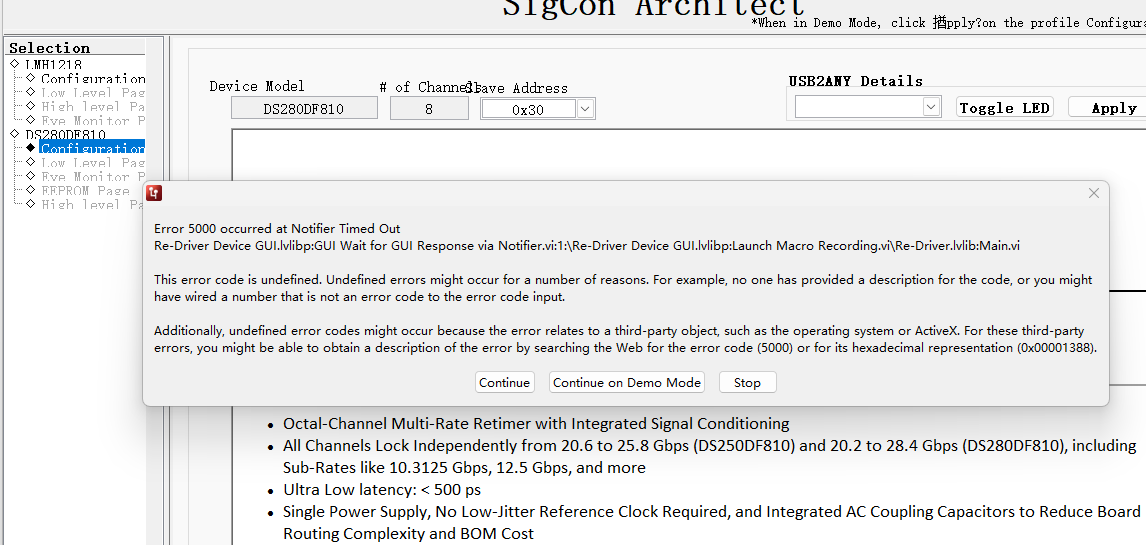
image.png


Question 1: how to fix above issue?
Question 2: I'd like to re-gerenate the eeprom file from our prevous eeprom file, how to import one exsit file and generate a new file?

I appreciate your great support!

Regards,
Zhao

  • Dear TI's AE,

    Before the issue fixed, one more thing about firmware.
    This is the first time we use TI's retimer, we would like to connect with 3 x 25G SFP+.
    Could you please provide a example firmware?


    Thanks,
    Zhao

  • Hi Zhao,

    I can check on the firmware. For the SigCon Demo Mode, are you seeing this error message after clicking the "Apply" button in the GUI? Also, could you please elaborate on generating the EEPROM file from the previous file? Are you trying to import a previous EEPROM hex file into SigCon Architect?

    Best regards,

    Greg

  • Hi Greg,

    Thanks for your reply.

    I just took the task few weeks ago, so I have no idea how to generate the file.
    After click "Apply" button, i can find those pages.
    Also I generated a EEPROM file.
    Could you please check it? The configuration is supported 3 x 25Gbps, the whole EEPROM size is 32KB,
    If you need more details, please let me know.

    Another question:

    It seems there are two ways to control the retimer. one is configured through EEPROM, the other is configured via SMBUS.
    Could you please give a example?

    Thanks again!


    BTW, I got "file type is not allowed" issue when uploading the my EEPROM file (hex format).
    So I dump the file info with "hexdump" and insert here as text.


    0000000 323a 3030 3030 3030 3730 3030 3130 3030
    0000010 3330 3033 3030 3330 3033 3030 3330 3033
    0000020 3030 3330 3033 3030 3030 3030 3030 3030
    0000030 3030 3030 3030 3030 3030 3030 3030 3030
    0000040 3030 3030 3030 3030 3930 0d34 3a0a 3032
    0000050 3030 3032 3030 3030 3030 3030 3030 3030
    0000060 3030 3030 3030 3030 3030 3030 3030 3030
    0000070 3030 3030 3030 3030 3030 3030 3030 3337
    0000080 3030 3630 3033 3132 4630 3030 3041 3446
    0000090 4436 3031 4432 3941 0a0d 323a 3030 3430
    00000a0 3030 4330 4539 3635 3030 3130 4135 4232
    00000b0 3142 3238 3241 3230 3133 4630 3743 3642
    00000c0 3030 3130 3441 3430 3030 3430 3530 3830
    00000d0 3930 4330 4430 4430 4431 4435 4538 4641
    00000e0 4637 3844 0d45 3a0a 3032 3030 3036 3030
    00000f0 4545 4645 4646 3030 3030 3030 3030 3030
    0000100 3433 3234 3038 3030 3030 3530 3132 3433
    0000110 3834 3331 3941 3030 4631 4639 3146 3232
    0000120 3834 3343 3030 3039 4630 3030 3030 3030
    0000130 3544 0a0d 323a 3030 3830 3030 3030 3030
    0000140 3030 3030 3030 3030 3030 3030 3030 3030
    *
    0000170 3030 3030 3030 3030 3030 3030 3630 0d30
    0000180 3a0a 3032 3030 3041 3030 3030 3030 3030
    0000190 3030 3030 3030 3030 3030 3030 3030 3030
    *
    00001c0 3030 3030 3030 3030 3030 3034 0a0d 323a
    00001d0 3030 4330 3030 3030 3030 3030 3030 3030
    00001e0 3030 3030 3030 3030 3030 3030 3030 3030
    *
    0000210 3030 3030 3030 3230 0d30 3a0a 3032 3030
    0000220 3045 3030 3030 3030 3030 3030 3030 3030
    0000230 3030 3030 3030 3030 3030 3030 3030 3030
    *
    0000260 3030 3030 3030 0a0d 323a 3030 3031 3030
    0000270 3030 3030 3030 3030 3030 3030 3030 3030
    *
    00002b0 4430 0d46 3a0a 3032 3130 3032 3030 3030
    00002c0 3030 3030 3030 3030 3030 3030 3030 3030
    *
    00002f0 3030 3030 3030 3030 3030 3030 3030 4642
    0000300 0a0d 323a 3030 3431 3030 3030 3030 3030
    0000310 3030 3030 3030 3030 3030 3030 3030 3030
    *
    0000340 3030 3030 3030 3030 3030 3930 0d46 3a0a
    0000350 3032 3130 3036 3030 3030 3030 3030 3030
    0000360 3030 3030 3030 3030 3030 3030 3030 3030
    *
    0000390 3030 3030 3030 3030 4637 0a0d 323a 3030
    00003a0 3831 3030 3030 3030 3030 3030 3030 3030
    00003b0 3030 3030 3030 3030 3030 3030 3030 3030
    *
    00003e0 3030 3030 3530 0d46 3a0a 3032 3130 3041
    00003f0 3030 3030 3030 3030 3030 3030 3030 3030
    *
    0000430 3030 4633 0a0d 323a 3030 4331 3030 3030
    0000440 3030 3030 3030 3030 3030 3030 3030 3030
    *
    0000470 3030 3030 3030 3030 3030 3030 3030 3130
    0000480 0d46 3a0a 3032 3130 3045 3030 3030 3030
    0000490 3030 3030 3030 3030 3030 3030 3030 3030
    *
    00004c0 3030 3030 3030 3030 3030 3030 4646 0a0d
    00004d0 323a 3030 3032 3030 3030 3030 3030 3030
    00004e0 3030 3030 3030 3030 3030 3030 3030 3030
    *
    0000510 3030 3030 3030 3030 4430 0d45 3a0a 3032
    0000520 3230 3032 3030 3030 3030 3030 3030 3030
    0000530 3030 3030 3030 3030 3030 3030 3030 3030
    *
    0000560 3030 3030 3030 4542 0a0d 323a 3030 3432
    0000570 3030 3030 3030 3030 3030 3030 3030 3030
    *
    00005b0 3030 3930 0d45 3a0a 3032 3230 3036 3030
    00005c0 3030 3030 3030 3030 3030 3030 3030 3030
    *
    0000600 4537 0a0d 323a 3030 3832 3030 3030 3030
    0000610 3030 3030 3030 3030 3030 3030 3030 3030
    *
    0000640 3030 3030 3030 3030 3030 3030 3530 0d45
    0000650 3a0a 3032 3230 3041 3030 3030 3030 3030
    0000660 3030 3030 3030 3030 3030 3030 3030 3030
    *
    0000690 3030 3030 3030 3030 3030 4533 0a0d 323a
    00006a0 3030 4332 3030 3030 3030 3030 3030 3030
    00006b0 3030 3030 3030 3030 3030 3030 3030 3030
    *
    00006e0 3030 3030 3030 3130 0d45 3a0a 3032 3230
    00006f0 3045 3030 3030 3030 3030 3030 3030 3030
    0000700 3030 3030 3030 3030 3030 3030 3030 3030
    *
    0000730 3030 3030 4546 0a0d 323a 3030 3033 3030
    0000740 3030 3030 3030 3030 3030 3030 3030 3030
    *
    0000780 4430 0d44 3a0a 3032 3330 3032 3030 3030
    0000790 3030 3030 3030 3030 3030 3030 3030 3030
    *
    00007c0 3030 3030 3030 3030 3030 3030 3030 4442
    00007d0 0a0d 323a 3030 3433 3030 3030 3030 3030
    00007e0 3030 3030 3030 3030 3030 3030 3030 3030
    *
    0000810 3030 3030 3030 3030 3030 3930 0d44 3a0a
    0000820 3032 3330 3036 3030 3030 3030 3030 3030
    0000830 3030 3030 3030 3030 3030 3030 3030 3030
    *
    0000860 3030 3030 3030 3030 4437 0a0d 323a 3030
    0000870 3833 3030 3030 3030 3030 3030 3030 3030
    0000880 3030 3030 3030 3030 3030 3030 3030 3030
    *
    00008b0 3030 3030 3530 0d44 3a0a 3032 3330 3041
    00008c0 3030 3030 3030 3030 3030 3030 3030 3030
    *
    0000900 3030 4433 0a0d 323a 3030 4333 3030 3030
    0000910 3030 3030 3030 3030 3030 3030 3030 3030
    *
    0000940 3030 3030 3030 3030 3030 3030 3030 3130
    0000950 0d44 3a0a 3032 3330 3045 3030 3030 3030
    0000960 3030 3030 3030 3030 3030 3030 3030 3030
    *
    0000990 3030 3030 3030 3030 3030 3030 4446 0a0d
    00009a0 323a 3030 3034 3030 3030 3030 3030 3030
    00009b0 3030 3030 3030 3030 3030 3030 3030 3030
    *
    00009e0 3030 3030 3030 3030 4430 0d43 3a0a 3032
    00009f0 3430 3032 3030 3030 3030 3030 3030 3030
    0000a00 3030 3030 3030 3030 3030 3030 3030 3030
    *
    0000a30 3030 3030 3030 4342 0a0d 323a 3030 3434
    0000a40 3030 3030 3030 3030 3030 3030 3030 3030
    *
    0000a80 3030 3930 0d43 3a0a 3032 3430 3036 3030
    0000a90 3030 3030 3030 3030 3030 3030 3030 3030
    *
    0000ad0 4337 0a0d 323a 3030 3834 3030 3030 3030
    0000ae0 3030 3030 3030 3030 3030 3030 3030 3030
    *
    0000b10 3030 3030 3030 3030 3030 3030 3530 0d43
    0000b20 3a0a 3032 3430 3041 3030 3030 3030 3030
    0000b30 3030 3030 3030 3030 3030 3030 3030 3030
    *
    0000b60 3030 3030 3030 3030 3030 4333 0a0d 323a
    0000b70 3030 4334 3030 3030 3030 3030 3030 3030
    0000b80 3030 3030 3030 3030 3030 3030 3030 3030
    *
    0000bb0 3030 3030 3030 3130 0d43 3a0a 3032 3430
    0000bc0 3045 3030 3030 3030 3030 3030 3030 3030
    0000bd0 3030 3030 3030 3030 3030 3030 3030 3030
    *
    0000c00 3030 3030 4346 0a0d 323a 3030 3035 3030
    0000c10 3030 3030 3030 3030 3030 3030 3030 3030
    *
    0000c50 4430 0d42 3a0a 3032 3530 3032 3030 3030
    0000c60 3030 3030 3030 3030 3030 3030 3030 3030
    *
    0000c90 3030 3030 3030 3030 3030 3030 3030 4242
    0000ca0 0a0d 323a 3030 3435 3030 3030 3030 3030
    0000cb0 3030 3030 3030 3030 3030 3030 3030 3030
    *
    0000ce0 3030 3030 3030 3030 3030 3930 0d42 3a0a
    0000cf0 3032 3530 3036 3030 3030 3030 3030 3030
    0000d00 3030 3030 3030 3030 3030 3030 3030 3030
    *
    0000d30 3030 3030 3030 3030 4237 0a0d 323a 3030
    0000d40 3835 3030 3030 3030 3030 3030 3030 3030
    0000d50 3030 3030 3030 3030 3030 3030 3030 3030
    *
    0000d80 3030 3030 3530 0d42 3a0a 3032 3530 3041
    0000d90 3030 3030 3030 3030 3030 3030 3030 3030
    *
    0000dd0 3030 4233 0a0d 323a 3030 4335 3030 3030
    0000de0 3030 3030 3030 3030 3030 3030 3030 3030
    *
    0000e10 3030 3030 3030 3030 3030 3030 3030 3130
    0000e20 0d42 3a0a 3032 3530 3045 3030 3030 3030
    0000e30 3030 3030 3030 3030 3030 3030 3030 3030
    *
    0000e60 3030 3030 3030 3030 3030 3030 4246 0a0d
    0000e70 323a 3030 3036 3030 3030 3030 3030 3030
    0000e80 3030 3030 3030 3030 3030 3030 3030 3030
    *
    0000eb0 3030 3030 3030 3030 4430 0d41 3a0a 3032
    0000ec0 3630 3032 3030 3030 3030 3030 3030 3030
    0000ed0 3030 3030 3030 3030 3030 3030 3030 3030
    *
    0000f00 3030 3030 3030 4142 0a0d 323a 3030 3436
    0000f10 3030 3030 3030 3030 3030 3030 3030 3030
    *
    0000f50 3030 3930 0d41 3a0a 3032 3630 3036 3030
    0000f60 3030 3030 3030 3030 3030 3030 3030 3030
    *
    0000fa0 4137 0a0d 323a 3030 3836 3030 3030 3030
    0000fb0 3030 3030 3030 3030 3030 3030 3030 3030
    *
    0000fe0 3030 3030 3030 3030 3030 3030 3530 0d41
    0000ff0 3a0a 3032 3630 3041 3030 3030 3030 3030
    0001000 3030 3030 3030 3030 3030 3030 3030 3030
    *
    0001030 3030 3030 3030 3030 3030 4133 0a0d 323a
    0001040 3030 4336 3030 3030 3030 3030 3030 3030
    0001050 3030 3030 3030 3030 3030 3030 3030 3030
    *
    0001080 3030 3030 3030 3130 0d41 3a0a 3032 3630
    0001090 3045 3030 3030 3030 3030 3030 3030 3030
    00010a0 3030 3030 3030 3030 3030 3030 3030 3030
    *
    00010d0 3030 3030 4146 0a0d 323a 3030 3037 3030
    00010e0 3030 3030 3030 3030 3030 3030 3030 3030
    *
    0001120 4430 0d39 3a0a 3032 3730 3032 3030 3030
    0001130 3030 3030 3030 3030 3030 3030 3030 3030
    *
    0001160 3030 3030 3030 3030 3030 3030 3030 3942
    0001170 0a0d 323a 3030 3437 3030 3030 3030 3030
    0001180 3030 3030 3030 3030 3030 3030 3030 3030
    *
    00011b0 3030 3030 3030 3030 3030 3930 0d39 3a0a
    00011c0 3032 3730 3036 3030 3030 3030 3030 3030
    00011d0 3030 3030 3030 3030 3030 3030 3030 3030
    *
    0001200 3030 3030 3030 3030 3937 0a0d 323a 3030
    0001210 3837 3030 3030 3030 3030 3030 3030 3030
    0001220 3030 3030 3030 3030 3030 3030 3030 3030
    *
    0001250 3030 3030 3530 0d39 3a0a 3032 3730 3041
    0001260 3030 3030 3030 3030 3030 3030 3030 3030
    *
    00012a0 3030 3933 0a0d 323a 3030 4337 3030 3030
    00012b0 3030 3030 3030 3030 3030 3030 3030 3030
    *
    00012e0 3030 3030 3030 3030 3030 3030 3030 3130
    00012f0 0d39 3a0a 3032 3730 3045 3030 3030 3030
    0001300 3030 3030 3030 3030 3030 3030 3030 3030
    *
    0001330 3030 3030 3030 3030 3030 3030 3946 0a0d
    0001340 303a 3030 3030 3030 4631 0d46 000a     
    000134d
    

    Regards,

    Zhao

  • Hi Zhao,

    Yes, I can look over the EEPROM. You are correct, the device can be programmed with SMBus or configured using an external EEPROM. Details about these configuration options can be accessed using the device Programmer's Guide. This document can be requested on the product page, here:

    I also want to note that for the DS280DF810, the EEPROM cannot be flashed to the device directly through the SigCon Archtiect GUI. The EEPROM can be applied to the device using Flash Center or something comparable.

    Best regards,

    Greg

  • Hi Greg,

    Thanks for your comments.

    We have to configure through the external EEPROM due to the hardware design.

    For flash the EEPROM, we will program those silicon before SMT using a common SOP EEPROM programmer.

    If there is any issue about my hex file. Appreciate your comments.

    Regards,

    Zhao

  • Hi Zhao,

    Thanks for the clarification. What are the configurations you intend to do with the EEPROM, is it just connect with 3 x 25G SFP+?  Also, could you maybe add the original EEPROM to a .zip file and attach it? That may be easier for me to look over.

    Best regards,

    Greg

  • Hi Greg,

    Thanks again for you reply!

    I found the save eeprom file is not my want.

    For example:
    1. I enabled 6 channels (0/1/2 for Egress, 3/4/5 for Ingress) after click "Write Registers" as below

    2. When i click the button of "Write to EEPROM file" as tmp.hex, and then restart SigCon and load the tmp.hex.


    3. Check it in "low level page", got below message box

    even i chose "yes" or "no", there is only one channel had been selected in "low level page" .

    Regarding above, I'm not sure my EEPROM file is available or no.
    So please allow me summarize my configuration here:

    1. Channel 0/1/2 for Egress, Channel 3/4/5 for Ingress.
    2. the channel rate is 25 Gbps.
    3. It seems "ADPAT_MODE[1]" is better choice? 

    Could you please give the detailed steps to generate EEPROM file with my configurations?

    Regards,

    Zhao

  • Addition info:

    After some trials, I found the when write to EEPROM file using the SigCon, it only write one channel, not all channels which wanted.
    I used 6 channels, but only one channel can be written each time.

    How to generate the file for all channel one time?

    Thanks,

    Zhao

  • Hi Zhao,

    Please see Section 5 of The Programmer's Guide for several common device configurations. When you follow the steps in this section, are you able to write to all channels at once? Also, please see this section:

    Best regards,

    Greg

  • Hi Greg,

    Thank you for your patient reply.

    My steps are following:

    1. Changed the global register FC to FF (Enabled all channels)
    2. As you mentioned above, select broadcast mode for all channels in global register FF to 0x3.

    After completed above steps, once i switched to EEPROM Page and switch back the Low level Page, the configuration will be lost...

    Thanks,

    Zhao

  • BTW, Maybe I can mark the question to resolved and ask a new question to get one EEPROM file?

  • Hi Zhao,

    I see, thanks for explaining. I will try to do this on my end and will let you know if I am running into similar problems. Yes, if you could create a new question that would be better for my team's tracking system. Thank you!

    Best regards,

    Greg

  • That's great! I will raise a new question.

    Thanks for you support.

    Regards,

    Zhao