DS160PT801: Can't link device

Part Number: DS160PT801


Hi,

Currently, the I2C on the EVM board is able to detect the EFOCU8B Re-timer,
but the device behind the Re-timer cannot be detected.

At the moment, both Re-timer power rails (1.17 V and 1.8 V) are present,
and both REFCLK IN and OUT have 100 MHz.
We are not sure where it is getting stuck, so please help check and debug.

Current setup:

  1. The motherboard PCIe x16 slot is bifurcated into four x4 links and set to Gen3.

  2. The EFOCU8B OCULINK (J1) is connected to two M.2 SSDs.

  3. The Re-timer is configured as two ×4 links.

Attached are the latest schematics:
SPK_EFOCU8B_V01_1023_SCH_lock.zip 

Attached register dump:
EFOCU8B_20251128_1426.hex(Since can't upload .hex file to E2E, I have modified .hex to .txt)

EFOCU8B_20251128_1426.txt 

Thanks!

Jeff


  • Hi Jeff,

    Can you try the attached EEPROM file, this is a default file used for x4.

    DS160PT801_4x4.zip

    Regards,

    Undrea

  • Hi Undrea,

    Programming the HEX file fails (other HEX files fail as well).


    REFCLK_OUT+ (Y19) and REFCLK_OUT– (V19) are connected to the downstream device, but these two pins currently have no clock output, and the reference board does not have it either.

    The spec states that the Re-Timer firmware needs to be enabled.
    The current Re-Timer firmware requirements are as follows:

    1. Address: 0x28

    2. PCIe bandwidth: one x8

    3. REFCLK OUT Enable

  • Hi Undrea,

    Currently, modifying the configuration allows REFCLK_OUT+ (Y19) and REFCLK_OUT– (V19) to output a clock.
    However, after making these changes, how do we save them into the HEX file?
    We saved the configuration to a file, but after the board is powered off, REFCLK_OUT+ (Y19) and REFCLK_OUT– (V19) no longer output a clock.

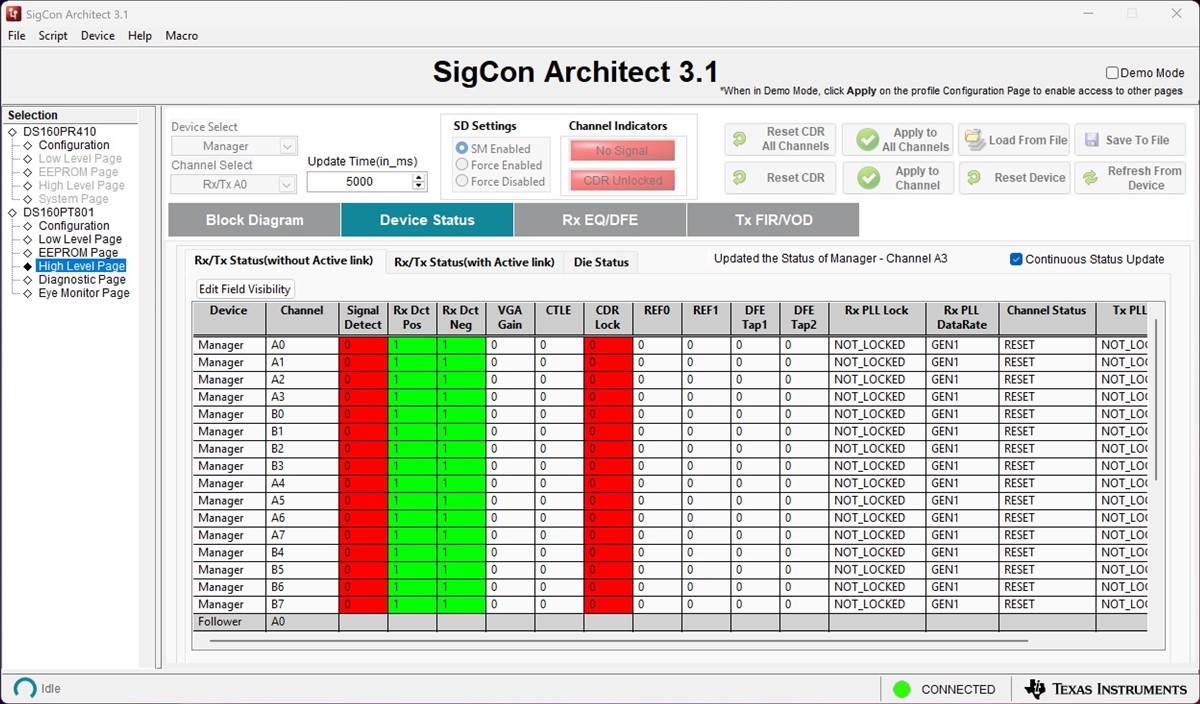
    The M.2 SSD is detected after the Re-Timer, but only at Gen1 speed, and there are many red “Signal Detect” errors.

    Jeff

  • Hi Undrea,

    Any suggestion for this issue? thanks!

    Jeff

  • Hi Undrea,

    The device connection is fine now.

    1.But we have tried to follow the "DS160PT801 EEPROM Configuration Guide" to flash new setting from sigcon GUI to EEPROM always fail.

    We have check EEPRPM WP pin is connect GND.

    Now we use "Write Register Button" tried to write register data to EEPROM. But seems EEPROM data table have no changes.

    We also tried to "Write to EEPROM Hex Button", But the .hex we generated seems very strange.

    Do you have any other EEPROM Write guide or SOP can share to us?

    2. And another question is DS160PT801 have any auto detction function?

    Is DS160PT801 possible to auto detction end device to set to x2/x4/x8?

    3. How to correspond below Die0/1 channel with GUI chennel and DS160PT801 pinout?

    Thank!

    Jeff

  • Hi Jeff,

    I'm trying to locate a EEPROM guide for this device(I don't believe it exists), I may need to get this from a similar device EVM User's guide.

    There is no autodetect feature to configure the number of lanes for this retimer.

    Regards,

    Undrea

  • Hi Undrea,

    Now we have can modify most of register setting into EEPROM.

    But only two register value we can't modify.

    We set the high level page "Bifurcation Options" to 2x4, this setting we have check modified low level page register value 0xF2/0xF3.

    And we write 0xF2/0xF3 value change to EEPROM check it modified before PC reboot.

    But after PC reboot, seems is change back to default.

    Do you have any idea?

    Or this two register needs other step to correct flash to EEPROM?

    And please hlep us check above question 3.

    3. How to correspond below Die0/1 channel with GUI chennel and DS160PT801 pinout?

    Thanks!

    Jeff

  • Hi Jeff,

    We were able to duplicate the issue in configuring the EEPROM to set the lane width.  The EEPROM load only loads the share registers and not the global registers.  The global registers(Setting the width) can be written via SMBus but not EEPROM, I'm also trying to verify this internally.

    Lane width setting is latched via pin-strapping of the WIDTH pin(Setting to level 1 - 10k to GND).

    Regarding the mapping, DIE0 is the Manager and DIE 1 is the Follower in the GUI.

    On the EVM, the routing is as follows:

    PCIe Lane[3:0] = Die1 (U2)

    PCIe Lanes [7:4] = Die 0 (U2)

    PCIe Lanes [8:11] = Die 1 (U3)

    PCIe Lanes [15:12] = Die 0 (U3)

    Regards,

    Undrea

  • Hi Undrea,

    We still have two questions.

    1. is it able to set as bypass mode from GUI? Or there is another way to set as bypass by hardware?
      We would like to confirm whether our design is correct or not before the retimer problems are solved.
    2. Is it able to set PCIe from x8 to x4/x4?

    Thanks!

    Jeff

  • Hi Jeff,

    1. There is no bypass mode available.  The retimer is always active.

    2. Yes, the device supports x4 configuration. WIDTH pin = Level 1

  • Hi Undrea,

    Got it, thanks!

    Jeff

  • Hi Undrea,

    Regarding BY mode:
    We would like to compare the behavior of the Re-Timer in two conditions:

    1. with signal enhancement and noise filtering enabled, and

    2. without signal enhancement and without noise filtering.

    Is there a way to configure the Re-Timer so that it operates without signal enhancement and without noise filtering?

    Also, regarding the previous question: since modifying the bifurcation setting through the GUI is not possible, how can this configuration be saved into the EEPROM?

    We were able to duplicate the issue in configuring the EEPROM to set the lane width.  The EEPROM load only loads the share registers and not the global registers.  The global registers(Setting the width) can be written via SMBus but not EEPROM, I'm also trying to verify this internally.

    Thanks!

    Jeff

  • Hi Jeff,

    There's no setting to disable the signal conditioning in the retimer.  The retimer has automatic adaptive equalization which selects the best gain settings for the channel.

    Regarding the link-width, there may be a solution to program via eeprom, I am investigating this and will provide an update today(Will provide an EEPROM image to test).

  • Hi Jeff, please see attached EEPROM image for x4 configuration. I confirmed this is working as expected.

    In the GUI, please follow this sequence to load:

    1. Load From Hex File

    2. Write to EEPROM

    3. Read from EEPROM

    Now the registers should be updated, and the same EEPROM configuration should be read after power cycle.

    https://e2e.ti.com/cfs-file/__key/communityserver-discussions-components-files/138/DS160PT801_5F00_4x4x4x4.hex

    Regards,

    Undrea