


Part Number: SN65DSI83-Q1
Hi
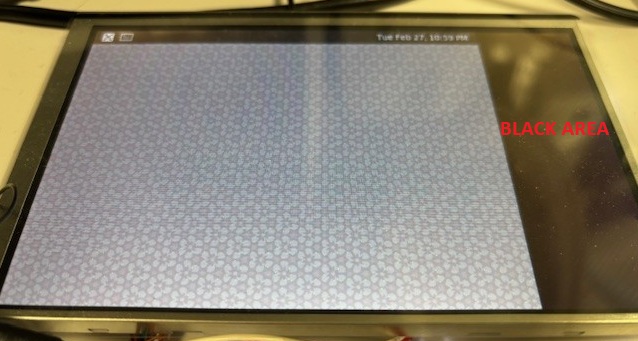
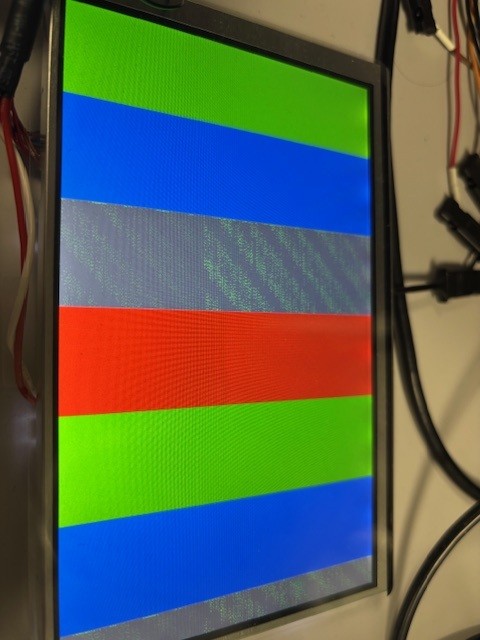
The Screen is showing application almost correct, but an area of around 20% of the display to the right is black. I have verified all the register settings and if I turn on the test pattern, which is filling the entire screen, I see the colors green, blue and red correct, but the white is more a grey'ish color, with green random dots (see picture).
I have measured the DSI clock to be 151MHz and the LVDS clock to 30MHz. The latter is too low according to the specifications of the display, where the typical value of the display should be 33.3MHz. The LVDS bridge is set to devide the LVDS clock by 5 (reg. 0x0B - 0x20), so the two clocks seem to align. I have defined the clock for the panel in the Device Tree Source (dts), though it seems more to be an "information" to the linux kernel rather than a setting passed on to the DSI module of the iMX7ULP processor. How do I set the frequency of the DSI module correct in the linux-kernel/device-tree-source?
By changing the CHA_SYNC_DELAY (register 0x28 and 0x29) to 0x0120 (respecting that the number is split into low and high) I can reduce the size of the black area to the shown 20% but I cannot remove the black area entirely.
How do I remove the black aerea (which settings to change)?
What can cause the green random dots in the grey/white area?
Regards Henrik
