This thread has been locked.

If you have a related question, please click the "Ask a related question" button in the top right corner. The newly created question will be automatically linked to this question.

TXS0104E: Spikes appearing on B-side pins in SPI Application

Part Number: TXS0104E

I have implemented this four-channel level translator on numerous designs since 2017.  It always worked until recently, and even now it only fails on one variation of the application it is used on - in some cases.  The circuit simply translates the four SPI lines from a microcontroller from 3.3.V to 1.8V to match the levels of an imaging sensor SPI port.  There is a FET that is driven from the Chip Select signal that inverts that signal and drives the Enable OE pin of the TXS0104.  Chip Sel LOW = OE High, so that OE always follows CS and maintains a high impedance buffer on the shared SPI bus signals.

SPI_Buffer.png

I am now seeing large voltage spikes (~1.2V) on the B-side inputs.  The frequency is ~700KHz.  They are only present when the input signals are low.  When the spikes show up on the CS line they are high enough to drive the inverting FET, which in turn disables the OE pin momentarily.  Then the cycle repeats.  Sometimes the first cycle is clean, sometimes all four are noisey. CS = Yellow OE = Green
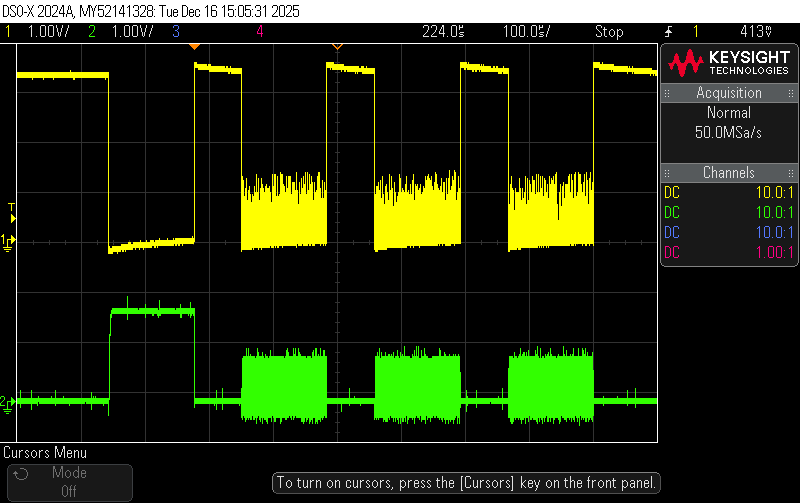
scope_3.png

Zoomed in the signal looks like this:
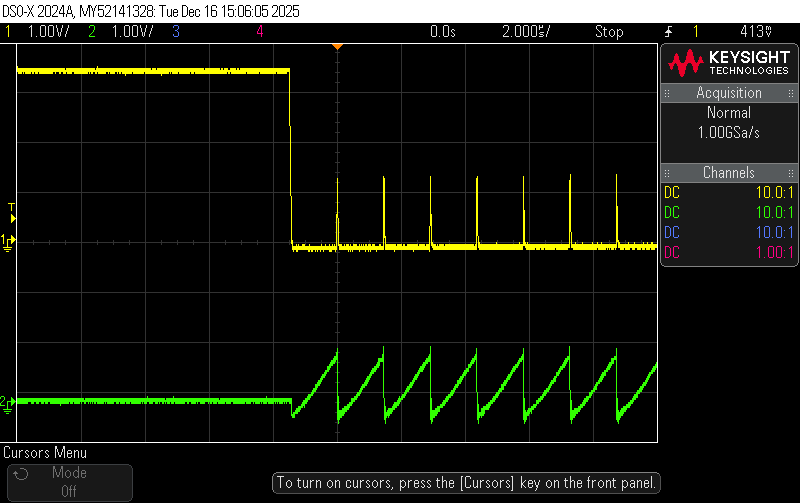
scope_4.png

If I hold the OE pin at ground, disabling the device, there are no spikes on any input signals.  

If I hold the A4 (CS Out) pin at ground there are no spikes on the input signals.

My hunch is that the A4 pin is turning on and pulling the output high through the internal pull-up before the device has a chance to pull it low to match to input level.  This in turn sets off a repeating process. 

I replaced one device on one board with a device that was about 4 years old.  It worked fine.  I had six other boards sent back and the TXS0104 replaced.  All six still do this.

The question is:  WHY?!  


  • Hi Ralph,

    It seems that the input condition is causing the internal one shots to trigger and result in the output having a false logic high state and leading to the glitch. Do you have a waveform of the input signal probed at the TXS0104E input side with OE pin? What is the output Cload condition on A-side? 

    Regard,

    Jack

  • Hi Jack,  

    The waveforms I provided are both showing the input (B-side) waveforms.  The green trace is the OE pin.  These were captured with no load connected to the A-side pins - therefore only trace capacitance on a very short (<1mm) trace to a high-speed connector.  The normal load is the SPI ports of a SONY CMOS imager.  To be clear though, the device acts exactly the same whether or not the load is connected.  I have since replaced one of the suspect devices with an older chip I harvested from another board.  That chip works fine in the same circuit.

    Regards,

    Ralph

  • We originally had a batch of these PCBAs that were populated with TXS0104 chips marked with "TI 4C8" (see photo).  Those boards failed.  They were returned to our contract manufacturer who replaced them with chips marked "TI 588".  I also received additional production boards with "TI 588" devices. So far, 100% of our boards with "TI 588" devices have failed.  The same batch of boards with "TI 588" ICs also included some boards produced with "TI 29K" devices.  100% of the "TI 29K" devices work.  These parts were obviously made at different foundries, based on the font used in the laser engraving.  The two "bad" ICs have similar marking fonts, while the good IC has a completely different font.  Maybe this is a clue? 

  • Hi Ralph,

    Thank you for the additional details on the observations- on the devices with marking TI 29K is this spike also visible, and at a lower voltage? Or is it only a DC state signal? Can this spike be observed only on B4/A4 or the other channels as well? It would be helpful to zoom in only on the input edge when EN= LOW so I can fully grasp the input signal condition (i.e such transition rates, monotonicity) that is inputted into the device and causing the "spike" associated with the TI 588 devices. 

    If you believe that this is a quality concern with specific part marking/ lot, it would be helpful to open a FA analysis through the customer support center: www.ti.com/.../customer-returns.html

  • Hello Jack, sorry for the delayed reply, the holidays have that affect!  To answer your first questions:

    - The TI 29K devices do not produce the spike at all and therefore function as they have always functioned for years.

    - On failing devices, the "spikes" are visible on all input pins, but since the B4 pin is part of the OE circuit it has the most detrimental effect.

    - The second scope image I shared shows the zoomed in signals.  Green is the EN pin. To be clear, the problem is not coming from the input signals, it is due to something happening internal to the device.

    - Yes, I have a concern with specific markings and lots, but I think the issue may be a foundry issue since I have different date/lot codes that have this issue, all of which have similar fonts used for the engraving.  Or they are counterfeit parts, even though our contract manufacturer sourced them from Digikey and/or Mouser.  I have already asked about this possibility through a different TI support ticket and was essentially brushed off.  I have asked our CM to provide me with chips they are removing in yet another attempt to find a lot that works similar to the TI 29K devices.  I can send them to TI for "FA analysis" but I've already provided enough information for TI to look at the markings and date codes and see if there is anything suspicious - so far, they refuse to acknowledge whether those markings and codes are even valid or not. 

  • Hi Ralph,

    Let me get back to you tomorrow. I am still looking into this. 

    Regards,

    Jack

  • There seems to be a correlation between the last character of the TI code and whether these parts work properly.  Any devices that have a "K" at the end of the code will work and have worked.  Looking a very old boards and recent ones we have always used parts with the "K".  We recently started getting devices with an "8" in that position.  Those devices do not work properly.  Maybe this means something to someone.  

  • Hi Ralph, 

    Thank you for providing the additional details. I have reached out to you via email offline to continue this discussion further.

    Thanks,

    Jack