SN65DSI86: software issue

Part Number: SN65DSI86
Other Parts Discussed in Thread: TEST2

Hi Team,

we currently have a project using Ti_SN65DSI86 DSI to eDP bridge,

if we want to connect to an external DP monitor, do we need to disable ASSR?

in addition, we using kernel version 6.12.34. the original driver has some issue during initial and is unable to attach to the DSI host~ 

we would like to inquire whether the driver requirement or implementation differ when using external DP monitor? could you provide or recommend a compatible Linux driver for an external DP monitor setup?

  • Hi Tommy,

    if we want to connect to an external DP monitor, do we need to disable ASSR?

    I am assuming this DP monitor will not use the ASSR display authentication required for an eDP panel, in which case the SN65DSI86 is enabled for ASSR authentication by default. 

    In the software configuration, the standard DP Scrambler Seed can be selected by setting register 0x5A = 0x04, then later to 0x5A = 0x0C.

    The overrides to ASSR can only happen if page 7 is set to 1, the code below shows these changes from the original recommended sequence:

    <aardvark>
    <configure i2c="1" spi="1" gpio="0" tpower="1" pullups="0" /> 
    <i2c_bitrate khz="100" /> 
    ======REFCLK 27MHz ====== 
    <i2c_write addr="0x2D" count="1" radix="16">0A 06</i2c_write> /> 
    ======Single 4 DSI lanes====== 
    <i2c_write addr="0x2D" count="1" radix="16">10 26</i2c_write> /> 
    ======DSIA CLK FREQ 445MHz====== 
    <i2c_write addr="0x2D" count="1" radix="16">12 59</i2c_write> /> 
    
    ======Enable TI Test Registers====== 
    <i2c_write addr="0x2D" count="1" radix="16">FF 07</i2c_write> /> 
    
    ======ASSR Control Override====== 
    <i2c_write addr="0x2D" count="1" radix="16">16 01</i2c_write> /> 
    
    ======Disable TI Test Registers====== 
    <i2c_write addr="0x2D" count="1" radix="16">FF 00</i2c_write> /> 
    
    ======enhanced framing and ASSR to Standard DP====== 
    <i2c_write addr="0x2D" count="1" radix="16">5A 04</i2c_write> /> 
    ======2 DP lanes no SSC====== 
    <i2c_write addr="0x2D" count="1" radix="16">93 20</i2c_write> /> 
    ======HBR (2.7Gbps)====== 
    <i2c_write addr="0x2D" count="1" radix="16">94 80</i2c_write> /> 
    ======PLL ENABLE====== 
    <i2c_write addr="0x2D" count="1" radix="16">0D 01</i2c_write> <sleep ms="10" /> 
    ======Verify PLL is locked====== 
    <i2c_write addr="0x2D" count="0" radix="16">0A</i2c_write> /> 
    <i2c_read addr="0x2D" count="2" radix="16">00</i2c_read> <sleep ms="10" /> 
    ======POST-Cursor2 0dB ====== 
    <i2c_write addr="0x2D" count="1" radix="16">95 00</i2c_write> /> 
    ======Semi-Auto TRAIN ====== 
    <i2c_write addr="0x2D" count="1" radix="16">96 0A</i2c_write> <sleep ms="20" /> 
    ======Verify Training was successful====== 
    <i2c_write addr="0x2D" count="0" radix="16">96</i2c_write> /> 
    <i2c_read addr="0x2D" count="1" radix="16">00</i2c_read> <sleep ms="10" /> 
    =====CHA_ACTIVE_LINE_LENGTH is 1920 ======= 
    <i2c_write addr="0x2D" count="2" radix="16">20 80 07</i2c_write> /> 
    =====CHA_VERTICAL_DISPLAY_SIZE is 1080 ======= 
    <i2c_write addr="0x2D" count="2" radix="16">24 38 04</i2c_write> /> 
    =====CHA_HSYNC_PULSE_WIDTH is 44 positive ======= 
    <i2c_write addr="0x2D" count="2" radix="16">2C 2C 00</i2c_write> /> 
    =====CHA_VSYNC_PULSE_WIDTH is 5 positive======= 
    <i2c_write addr="0x2D" count="2" radix="16">30 05 80</i2c_write> /> 
    =====CHA_HORIZONTAL_BACK_PORCH is 148======= 
    <i2c_write addr="0x2D" count="1" radix="16">34 94</i2c_write> /> 
    =====CHA_VERTICAL_BACK_PORCH is 36======= 
    <i2c_write addr="0x2D" count="1" radix="16">36 24</i2c_write> /> 
    =====CHA_HORIZONTAL_FRONT_PORCH is 88======= 
    <i2c_write addr="0x2D" count="1" radix="16">38 58</i2c_write> /> 
    =====CHA_VERTICAL_FRONT_PORCH is 4======= 
    <i2c_write addr="0x2D" count="1" radix="16">3A 04</i2c_write> /> 
    ======DP- 24bpp====== 
    <i2c_write addr="0x2D" count="1" radix="16">5B 00</i2c_write> /> 
    =====COLOR BAR disabled======= 
    <i2c_write addr="0x2D" count="1" radix="16">3C 00</i2c_write> /> 
    ======enhanced framing, ASSR to Standard DP, and Vstream enable====== 
    <i2c_write addr="0x2D" count="1" radix="16">5A 0C</i2c_write> /> 
    </aardvark>

    This removes the ASSR enabling of the sink, as well as setting the SN65DSI86 device to default DP scrambler seed.

    Please see this thread regarding driver considerations and programming for the SN65DSI86:

    (1) SN65DSI86: sn65dsi86 and mipi dsi connection error - Interface forum - Interface - TI E2E support forums

    Let me know if you have any further questions.

    Best,

    Miguel

  • Hi Miguel,

    got it, thanks for you great support.

  • Happy to help!

    Closing this thread for now, please let me know if you have any other questions or concerns.

    Best,

    Miguel

  • Hi Miguel,

    okay,

    one more quesiotn..

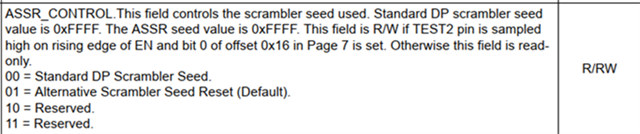
    the datasheet, ASSR_CONTROL is only read/ write when TEST2 is pulled high- is that correct?

    if there is a need to modify ASSR_CONTROL, does TEST2 need to be pulled high?

    thanks for you help and learn from you.

  • Hi Tommy,

    if there is a need to modify ASSR_CONTROL, does TEST2 need to be pulled high?

    Good question, this is true, it needs to sample in TEST2 in order to become read/write. The code blow satisfies the other half of the AND requirement, then 0x5A[1:0] may be modified.

    ======Enable TI Test Registers====== 
    <i2c_write addr="0x2D" count="1" radix="16">FF 07</i2c_write> /> 
    
    ======ASSR Control Override====== 
    <i2c_write addr="0x2D" count="1" radix="16">16 01</i2c_write> /> 
    
    ======Disable TI Test Registers====== 
    <i2c_write addr="0x2D" count="1" radix="16">FF 00</i2c_write> /> 

    Please let me know if you have any further questions.

    Best,

    Miguel