This thread has been locked.

If you have a related question, please click the "Ask a related question" button in the top right corner. The newly created question will be automatically linked to this question.

DS250DF810: How to improve RX EYE opening

Part Number: DS250DF810

We met a bit error issue with the DS250DF810 and QSFP28 optical module. During debugging, we found that one of the lanes had an eye diagram problem.

The insertion loss from the optical module to the retimer RX on this lane was about 6 dB. After optimizing the process as the table below, CDR can lock, but the HEO  was only 0.187500 UI, and the VEO was only 90.6 mV.

Do you have other suggestion to improve RX eye? 

step

instruction

register

Init value

Setting

value

mask

result

1

Select channel 6

0xFC

0x00


0x40


0xFF


0x40


2

Enables SMBUS access to the

channels specified in Reg_0xFC

0xFF

0x20

0x01

0xFF


0x01

3

Enable continuous DFE adaption

0x7F

0x29

0x10

0x10

0x39

4

enable DFE override

0x23

0x40

0x40

0x40

0x40

5

enable DFE(DFE_PD=0), enable DFE taps 3-5

0x1E

0xE9


0x02

0x0A

0xE3

6

enable CTLE override

0x2D

0x30

0x08

0x08

0x38

7

Setting CTLE boost value to 0x00

0x03

0x00

0x00

0xFF

0x00

8

Setting VGA low-gain mode

0x8e

0x00

0x00

0xFF

0x00

9

Setting EQ high-gain mode and disable CTLE limiting output mode

0x13

0xb0

0xb0

0xFF

0xb0

10

Reduce CTLE bias current, to reduce the applied boost

0x1a

0x58

0x50

0x08

0x50

11

Set DFE tap 1 polarity to 0, DFE tap weight to 2

0x12

0x83

0x02

0xFF

0x02

12

Puts the CDR into RESET

0x0A

0x00

0x0C

0x0C

0x0C

13

Releases the CDR from reset

0x0A

0x0C

0x00

0x0C

0x00


  • Hi MINGKUN,

    Apologies for the delay.

    Often a small eye opening in a low insertion loss case (6 dB) can be a sign of over-equalization.  How does the insertion loss on this lane compare to other lanes?  Here are a few suggestions you could try:

    • Some optical modules will add some TX equalization.  Please disable any TX equalization from the optical module.
    • Have you tried using DFE adaptation, such as in Adapt Mode 2?  This might help compensate for channel non-idealities.
    • If reducing the CTLE bias current, we also sometimes recommend enabling the limiting mode.  I'd recommend trying this.
    • Have you tried different VGA / EQ gain settings?

    Thanks,

    Drew

  • Hi Drew,

    Thanks for your reply. 6 dB insertion loss is the longest lane. Other shorter lanes eye seem better than this.

    • During testing, we have already turned off the TX EQ of the optical module. We have also tried adjusting the TX EQ of the optical module, and found that the eye diagram improves but not good at all. 
    • By the way, we have already set the DFE to MODE 2.
    • At step 10, we had already reduced the CTLE bias current, resulting in some improvement but not much.
    • We have tried setting VGA GAIN and EQ GAIN to 0 or 1. When both are set to 0, the eye height improves, but the eye width remains unchanged.

    Are there any other methods to improve the eye diagram besides the above?

  • Hi MINGKUN,

    • In addition to reducing CTLE bias current (step 10), have you tried enabling CTLE limiting mode (ch_reg_0x13[2] = 1)?
    • I'm assuming you have already tested with adapt mode 2 without the CTLE override.  Is this correct?  What was the result of this?

    Thanks,

    Drew

  • Hi Drew,

    With your suggestions, we have change these registers and check eye diagram.

    • We set register 0x13 to 0xb4 (EQ high DC gain mode + CTLE limiting mode), but the eye diagram showed no change obviously.

    • We set register 0x23 to 0x00 to enable DFE override, but the eye diagram also no change.

    By the way, we reset the retimer's CDR via register 0x0a after each configuration modification. So all the settings should take effect.

    Thanks

  • Hi Drew,

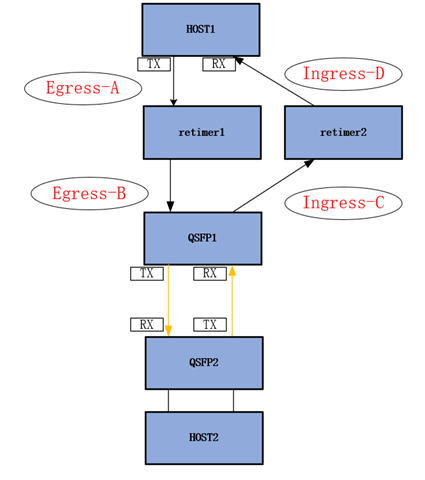
    Note that the eye diagram on our Ingress-C side is poor.

    Thanks