TUSB321AI: TUSB321AI || DFP mode not working

Part Number: TUSB321AI
Other Parts Discussed in Thread: TUSB321, HD3SS3212, HD3SS3220

Dear TI Support,

We have developed a custom board, and for the charging section we are using the TUSB321AIRWBR part.

The part number is TUSB321AIRWBR. Our application uses a custom board connected to a mobile phone, where we require simultaneous charging and data communication between the mobile device and the custom board.

We have configured the IC in DFP mode, but the issue still persists. for your reference schametic section attached.

Issue:- When I connect the phone to the custom board, the phone is not detected, and even though the load switch is enabled for mobile charging, the phone does not charge. 

Please suggest where the issue might be.
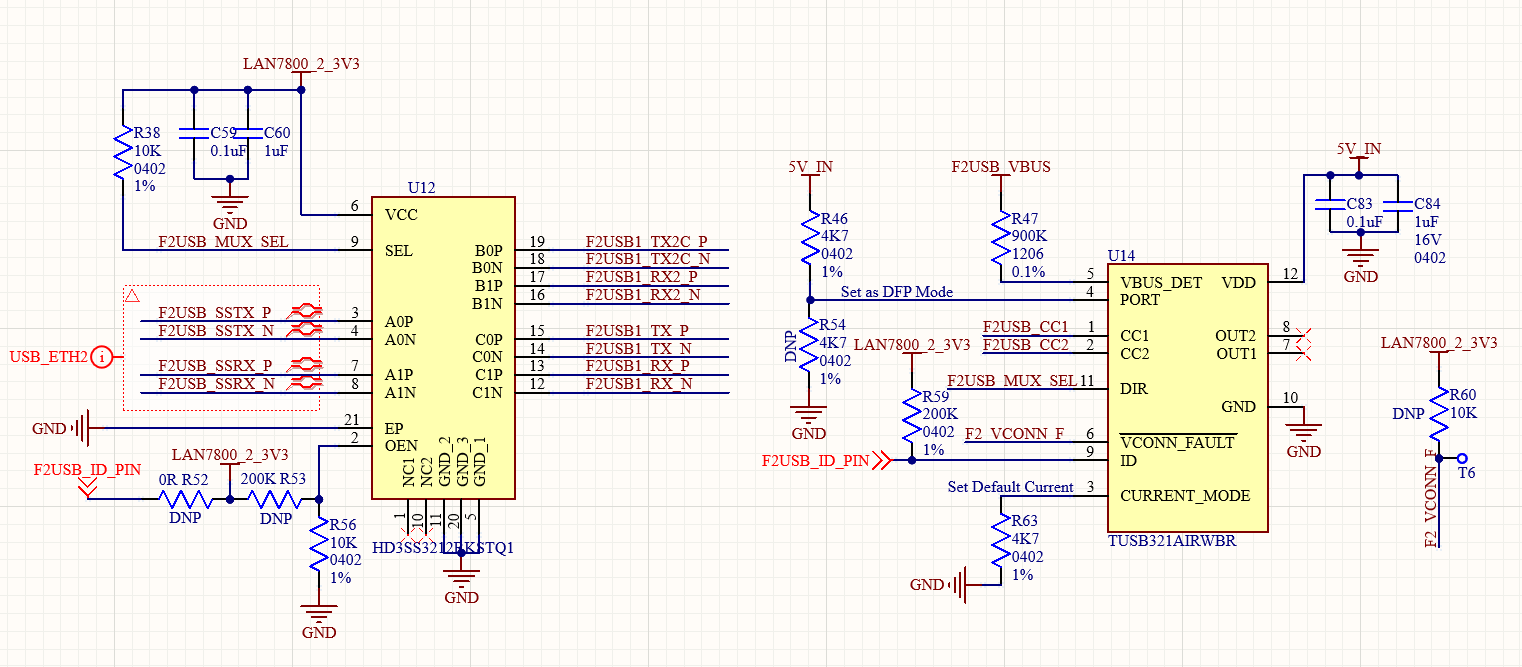
image.png


Thanks and regards,

Jai Kishan

  • Hi,

    Can you share waveforms of CC1, CC2, ID, and VBUS from one capture? I would like to see the order of events.

  • Hello Vishesh,

    I have captured and attached the wave form of CC1, CC2, ID PIN and VBUS.

    Ch 1. Yellow line:- Vbus

    Ch 2. Sky blue Line:- ID PIN

    Ch 3. Magent Line :- CC1

    Ch 4. Blue Line:- CC2

    Below attchement 1:- when phone is not connected to custom board.

    Below attchement 1:- when phone is connected to custom board.

    Below attchement 2:- We have capture below event when phone dettached from custom board. 

    Below attchement 3:- We have capture below event when phone attached from custom board. 

    Vbus is not getting high.

    Thanks and regards,

    Jai Kishan

    +91 7737779900

  • Hi,

    Thanks for the waveforms.

    Ch 1. Yellow line:- Vbus

    Ch 2. Sky blue Line:- ID PIN

    Ch 3. Magent Line :- CC1

    Ch 4. Blue Line:- CC2

    Below attchement 1:- when phone is not connected to custom board.

    CC1 and CC2 is held high when nothing is connected (this is correct)

    ID pin is high meaning nothing is connected (this is correct)

    Vbus is low (this is correct)

    Below attchement 1:- when phone is connected to custom board.

    Once connection has taken place both CC1 and CC2 go low. The slight DC voltage seen on CC2 shows the phone is connected in the flip orientation. (this is correct)

    ID pin is pulled low (this is correct)

    Vbus remains low (this is incorrect). When the ID pin is pulled low, this should be a trigger for the Vbus switch. How is the Vbus switch being controlled in your implementation?

    Below attchement 2:- We have capture below event when phone dettached from custom board. 

    CC1 and CC2 both revert to high once disconnection has taken place (this is correct)

    ID pin goes back to high after disconnect (this is correct)

    Vbus should go from high to low (this is incorrect)

    Below attchement 3:- We have capture below event when phone attached from custom board. 

    CC1 goes from high to low, but CC2 remains low. This is not expected behavior. Both CC1 and CC2 should go from high to low.

    ID pin goes from high to low. (this is correct)

    Vbus stays low. (This is not corrrect)

    Vbus is not getting high.

    Based off of the waveforms shared I see that the ID pin is toggling correctly. This means that part is correctly detecting that a connection takes place. Can you confirm how ID pin routed in your system? This pin should be a trigger that enables Vbus, but it seems Vbus is not being enabled. The trigger is operating correctly, but the switch is not. 

  • Hi Vishesh,

    Thank you for the clarification.

    In our custom board, the load switch was not getting enabled, which is why VBUS was not going high. We have now updated the controller firmware, and VBUS is getting enabled when the phone is plugged into the custom board.

    Now we have two quetions:

    1. When we connect the phone to the custom board, the phone displays the message “Check your charger connection.”

    2. The phone data connection is not established between the phone and the custom PCB. 

    Could you clarify these points.

    Thnaks and regards,

    Jai Kishan

  • Hi,

    1. When we connect the phone to the custom board, the phone displays the message “Check your charger connection.”

    I'm not sure exactly what you cause this. Can you try replacing the cable as shown? If not it could be due to the power advertisement. Currently the PCB is advertising 5V 500mA on Vbus. This may be much slower charging speed than what the phone is expecting, this could possibly cause this image to trigger.

    2. The phone data connection is not established between the phone and the custom PCB. 

    Do you mean no connection at all? Both USB2 and USB3 connections are not enumerating?

    If nothing is enumerating please probe the inputs and outputs of the MUX to see if signals are propagating correctly.

  • Hi Vishesh,

    1. We changed the cable, but the same issue is still occurring. We had set the default current earlier; now we will set the current to 1.5 A and share the results.

    2. The USB 3.0 connection enumerates when the supply to the TUSB321AI IC is disconnected. However, when power is applied to the TUSB321AI, the USB ports do not enumerate and the device only shows charging with the message “Check your charger connection.” Charging and USB port enumeration are not working simultaneously.

    3 I would like to confirm whether this IC supports simultaneous data transfer and charging.
    If it does, please help us understand why this issue is occurring in our setup.
    If it does not support this functionality, please suggest an alternative IC that would be suitable for our application.

    Our application:- Our application requirement is that USB port should enumerate, and we should be able to enable or disable phone charging using a load switch whenever required and we don't need fast charing support we need simple(900mA 5V at USB3.0)

    I hope this clearly explains our requirement and what exactly we are trying to achieve.

    Thanks and regards,

    Jai Kishan

  • Hi,

    2. The USB 3.0 connection enumerates when the supply to the TUSB321AI IC is disconnected. However, when power is applied to the TUSB321AI, the USB ports do not enumerate and the device only shows charging with the message “Check your charger connection.” Charging and USB port enumeration are not working simultaneously.

    Can you share a full schematic of your system?

    The CC lines are not terminated, so enumeration should not happen. Most likely the flip logic is incorrect in this case.

    Please use the following test procedure:

    1) With the TUSB321 powered down can you test both orientation of the USB Type-C cable?

    2) Power the TUSB321 and probe the DIR pin. See the status of DIR in the normal and flipped orientations.

    3) Use a continuity tester to see if the MUX is being routed correctly. If SEL = 0, then the common signals should be connected to port A. If SEL =1, then the common signal should be routed to port B. 

    4) Make sure the DIR polarity of TUSB321 matches the desired routing of HD3SS3212

    3 I would like to confirm whether this IC supports simultaneous data transfer and charging.
    If it does, please help us understand why this issue is occurring in our setup.
    If it does not support this functionality, please suggest an alternative IC that would be suitable for our application.

    It may be easier to use the HD3SS3220 which incorporates the TUSB321 and HD3SS3212 into a single package.