This thread has been locked.

If you have a related question, please click the "Ask a related question" button in the top right corner. The newly created question will be automatically linked to this question.

AM625: Compatibility with TP-Link switches on boards using TI AM62X and DP83867 PHY

Part Number: AM625

Hello.

I'm developing on an AM62x and DP83867 PHY board, and I'd like to ask for advice regarding an intermittent link flap issue.

The issue doesn't occur at 100Mbps, but it does occur intermittently at 1Gbps.

From what I've experienced, this issue seems to occur when connected to a TP-Link switch.
(TL-SG1024D)

I've disabled all of the following DP83867 registers:
Fast Link Down cfg Disabled.
Robust Auto-MDIX Disabled.
SPEED_OPT_EN Disabled.

This issue doesn't occur with Netgear/IPtime switches.

What else should I try?

My development environment is as follows: Debian GNU/Linux 12
Linux version 5.10.168-01697-g501ba3235e01-dirty

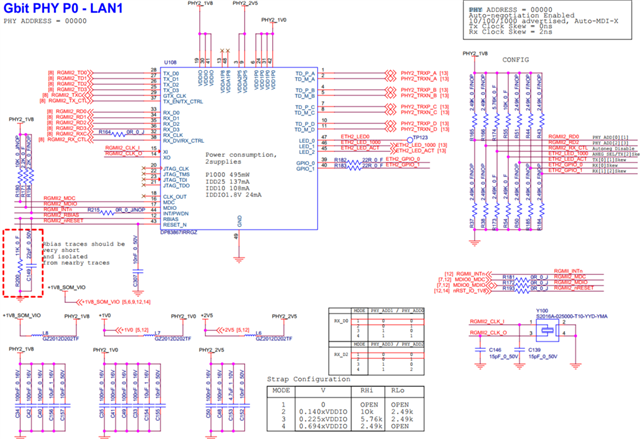
  • The phy circuit diagram is as follows.

    dts is as follows.

    The internal delay of the TX/RX has been set to the optimal value.

    However, there is still an issue with TP-Link.

  • Hi, 

    Could please explain more of what you are experiencing concerning Link flap issue? Do you have a console log that might show the issue?

    Best Regards,

    Schuyler

  • Hi
    Thank you for your reply.

    There are no specific logs.

    The application detects link events every second.

    ioctl(socId, SIOCGIFFLAGS, &if_req);
    (if_req.ifr_flags & IFF_UP) && (if_req.ifr_flags & IFF_RUNNING);

    During traffic testing, intermittent link down/up events are detected only on the TP-Link switch.

    Is there an additional register I need to configure?

  • Hi,

    To my knowledge there is not a register setup to be able to handle a specific link partner. At the moment I am not sure what to suggest to look since at as this is an external device being connected. Also to confirm what you are referring to as a link flap is a link loss/detect cycle event?

    If the link is detected as down by the drivers there should be some messages on the console indicating link loss, link detected etc. The utility dmesg could be used to look for those messages. The code snippet could be doing the same thing but it would be good to see if these conditions are being reported by the MAC driver. 

    The only suggestions I have for the moment is to check if this switch is behaving the same way with other link partners. I would suggest to compare if the switch has some different configuration that the other ones such as power etc. Try a different cable to make sure there isn't an issue here. 

    Best Regards,

    Schuyler 

  • Thank you for your reply.

    I tested with a different cable, but the results remain the same.

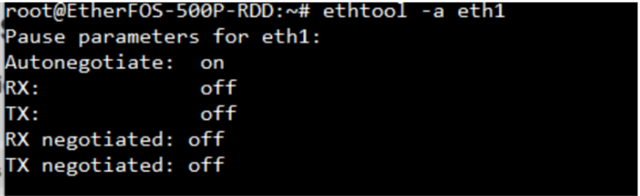
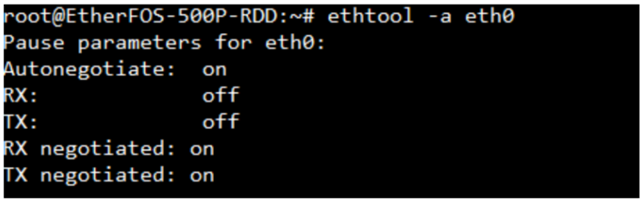
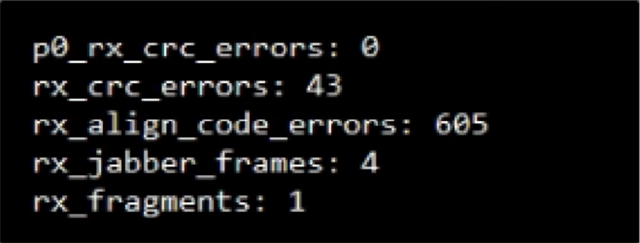
    When checking with ethtool, the following differences appear.

    When connected to a Netgear switch

    When connecting to a TP-Link switch

    I'm experiencing these differences. Can you give me some advice?

    I look forward to your reply.

    Thank you.

  • Hi,

    Thank you for the console log captures. One question I have is the -a option on ethtool, what are you looking for? 

    The -S option has interesting information here. I will assume that you are only seeing this rx errors with the tp-link switch and not the other switches. If that is true then I would look for other ports on the tp-link switch to see if you see the same errors. I would also connect the switch to a Linux PC or some other Linux platform that you can use ethtool to look for these same errors. 

    What the errors mean is that the AM625 is receiving bad frames at the MAC interface.  It could be switch going bad or something perhaps on the analog side of the PHY. 

    Please attach (not cut and paste) the dmesg log, I would like to see if there are link loss messages.

    Best Regards,

    Schuyler