This thread has been locked.

If you have a related question, please click the "Ask a related question" button in the top right corner. The newly created question will be automatically linked to this question.

DP83822I: DP83822I EtherCAT Communication Issue and Schematic Review

Part Number: DP83822I

Dear TI Support Team,

We are currently using the DP83822I PHY for EtherCAT communication in our custom hardware design. However, we are facing an issue where communication is not being established successfully.

At present, only LED D9 is glowing, and we are unable to establish EtherCAT communication with the master. We request your support in reviewing our schematic and advising whether there are any incorrect connections or configuration issues on our side.

Additionally, we would like to highlight one design detail: the LINK LED is connected directly to the PHY, and we have not routed the LINK signal to the MCU. Could this affect EtherCAT communication or link detection functionality?

Kindly review and suggest if any modifications are required in the hardware connections or configuration settings.

We appreciate your support and look forward to your guidance.
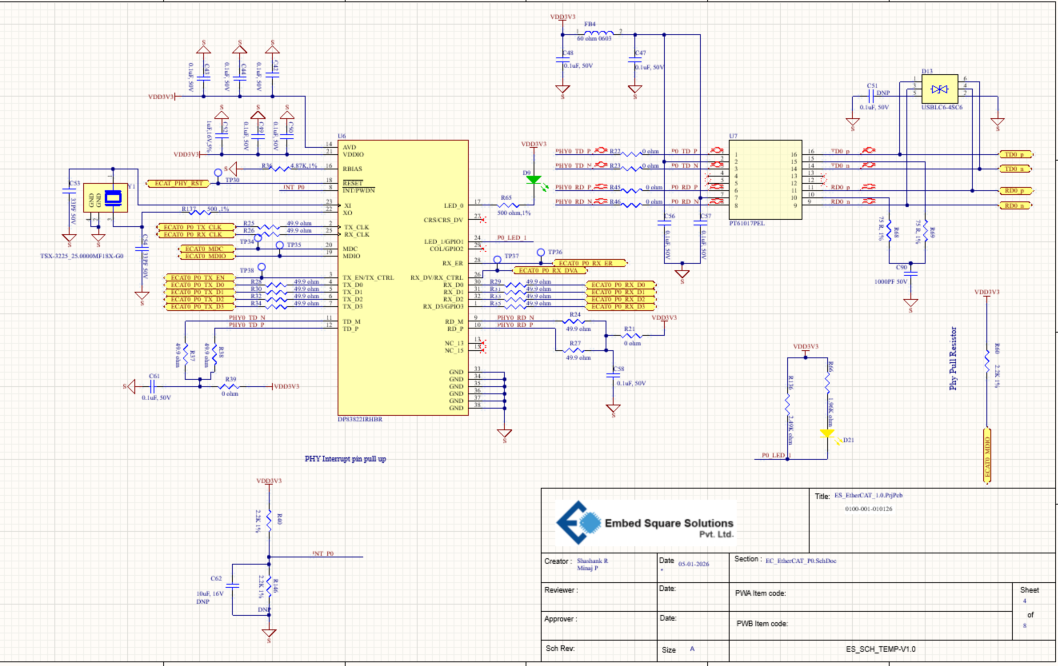
PHY.png

  • Hi Chetan,

    the LINK LED is connected directly to the PHY, and we have not routed the LINK signal to the MCU. Could this affect EtherCAT communication or link detection functionality?

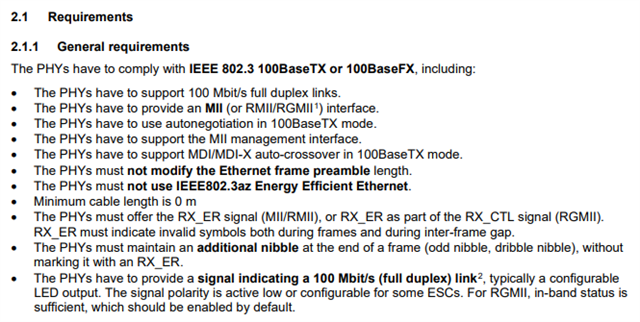
    Yes, my understanding is that EtherCAT requires a link signal to be sent to the ESC to detect the link appropriately. Please see the last bullet point in Beckhoff's EtherCAT PHY selection Guide:

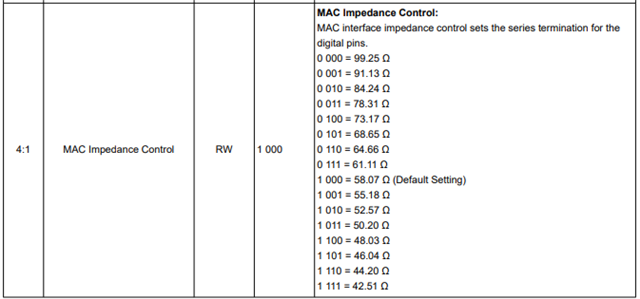
    Furthermore I have one comment on the schematic. DP83822 has integrated MII RX terminations set by the MAC impedance control register (below), so external terminations are not necessary. You may want to try replacing these external 49.9ohm resistors with 0-ohms on the MII RX lines if you suspect an issue with the MII communication.

    I'd check that the link is being detected appropriately on the ESC first. If the link is detected and you are still seeing communication issues, the following resources should be used to narrow down where the problem is occuring:

    DP83822 Schematic checklist

    DP83822 Troubleshooting Guide

    Best,

    Shane