This thread has been locked.

If you have a related question, please click the "Ask a related question" button in the top right corner. The newly created question will be automatically linked to this question.

SN75LVPE5421: EQ adjust

Part Number: SN75LVPE5421

Hi,

We are currently utilizing the SN75LVPE5421RUAR for our PCIe Gen5 Riser card. However, we have encountered an issue where the Intel IoMT RX eye diagram is failing to open. Could you please assist in reviewing the attached schematic (SCH) and board (Brd) files, and provide recommended EQ settings?

I will pass schematic and layout via privacy message, please add me to friend. Thanks!

Supplementary Information:

  • Platform: Intel Raptor Lake (Compatible with PCH 600/700 series, Gen 12-14).

  • PCIe Source: PEG x16 to x8*2.

  • Mainboard Layout Length:

W:S:S1 ( surface layer)

W:S:S1 ( Inner layer)
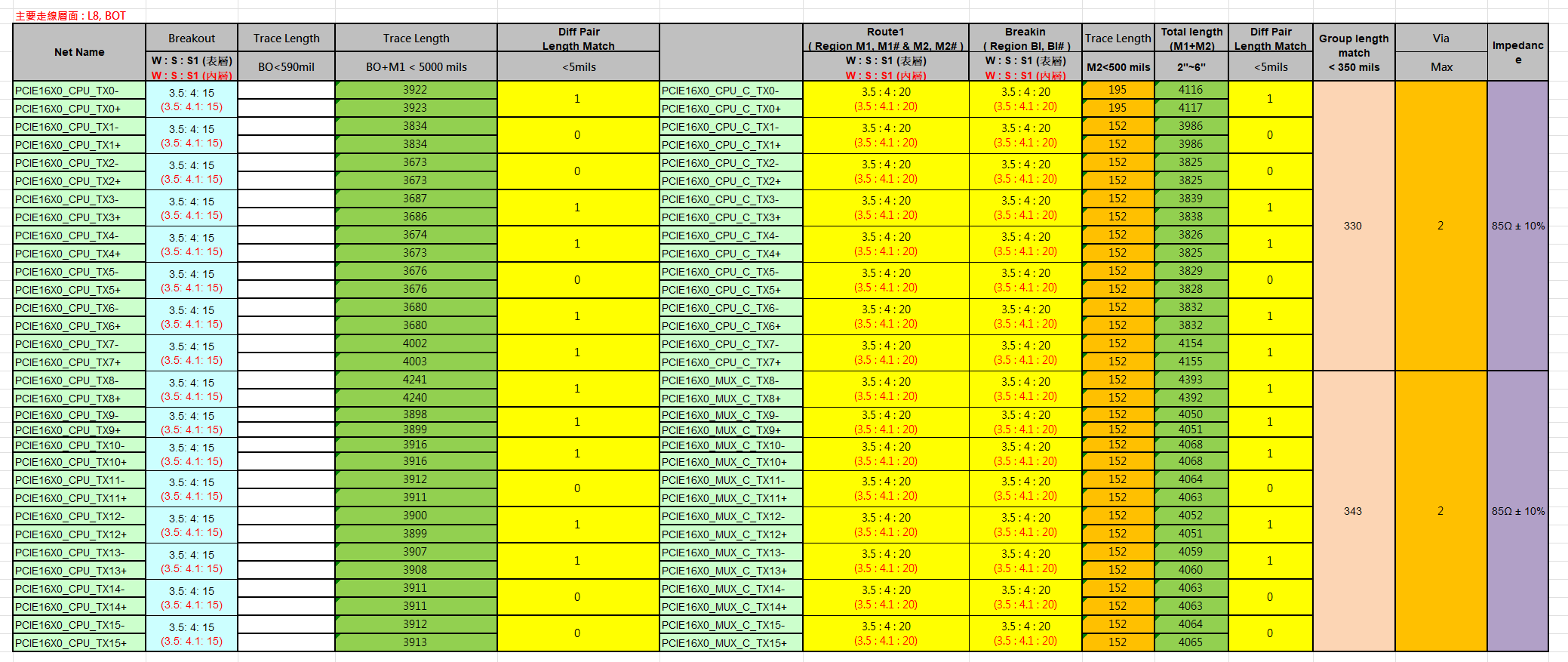
MB length.png

Jeff

  • Hi Jeff,

    I have added you as a friend. Please send me schematic and layout. 

    Which lanes fail IOMT eye margin? Do some lanes pass and others fail? What EQ settings have you already tried?

    Our general advice is for all lanes, start at EQ0 and step one by one until the majority of lanes are passing eye opening test. Then individually tune the failing lanes. Have you tried this already?

    Best,

    Charles