This thread has been locked.

If you have a related question, please click the "Ask a related question" button in the top right corner. The newly created question will be automatically linked to this question.

DP83826E: Issue in communication using DP83826E PHY with our custom board

Part Number: DP83826E

We have created a custom board using the DP83826E PHY. The device tree (DTB) is configured with the correct PHY address, and physical link detection is working. However, we are still unable to communicate over Ethernet. We are unable to send or receive data, and SSH over Ethernet is also not working on Linux. I have configured the PHY for enhancement mode with RMII . I am including logs for your review.

LINUX LOGS
 
dmesg | grep PHY
[   11.624521] am-cpsw-nuss 8000000.ethernet eth1: PHY [8000f00.mdio:04] driver [TI DP83826C] (irq=POLL)
[   11.700356] am-cpsw-nuss 8000000.ethernet eth0: PHY [8000f00.mdio:00] driver [TI DP83826C] (irq=POLL)
 
 dmesg | grep cpsw
[    1.358695] am-cpsw-nuss 8000000.ethernet: initializing am cpsw nuss version 0x6BA01103, cpsw version 0x6BA81103 Ports: 3 quirks:00000006
[    1.371745] am-cpsw-nuss 8000000.ethernet: Use random MAC address
[    1.378013] am-cpsw-nuss 8000000.ethernet: initialized cpsw ale version 1.5
[    1.385143] am-cpsw-nuss 8000000.ethernet: ALE Table size 512
[    1.391945] am-cpsw-nuss 8000000.ethernet: CPTS ver 0x4e8a010c, freq:500000000, add_val:1 pps:0
[    1.402377] am-cpsw-nuss 8000000.ethernet: set new flow-id-base 19
[   11.624521] am-cpsw-nuss 8000000.ethernet eth1: PHY [8000f00.mdio:04] driver [TI DP83826C] (irq=POLL)
[   11.634102] am-cpsw-nuss 8000000.ethernet eth1: configuring for phy/rmii link mode
[   11.700356] am-cpsw-nuss 8000000.ethernet eth0: PHY [8000f00.mdio:00] driver [TI DP83826C] (irq=POLL)
[   11.709910] am-cpsw-nuss 8000000.ethernet eth0: configuring for phy/rmii link mode
[   78.197099] am-cpsw-nuss 8000000.ethernet eth1: Link is Up - 100Mbps/Full - flow control rx/tx
 
dmesg | grep mdio
[    0.781567] mdio_bus fixed-0: GPIO lookup for consumer reset
[    0.781595] mdio_bus fixed-0: using lookup tables for GPIO lookup
[    0.781602] mdio_bus fixed-0: No GPIO consumer reset found
[    1.302969] davinci_mdio 8000f00.mdio: Configuring MDIO in manual mode
[    1.309906] mdio_bus 8000f00.mdio: GPIO lookup for consumer reset
[    1.309914] mdio_bus 8000f00.mdio: using device tree for GPIO lookup
[    1.309927] of_get_named_gpiod_flags: can't parse 'reset-gpios' property of node '/bus@f0000/ethernet@8000000/mdio@f00[0]'
[    1.309948] of_get_named_gpiod_flags: can't parse 'reset-gpio' property of node '/bus@f0000/ethernet@8000000/mdio@f00[0]'
[    1.309964] mdio_bus 8000f00.mdio: using lookup tables for GPIO lookup
[    1.309979] mdio_bus 8000f00.mdio: No GPIO consumer reset found
[    1.349434] davinci_mdio 8000f00.mdio: davinci mdio revision 9.7, bus freq 1000000
[    1.358003] mdio_bus 8000f00.mdio:00: GPIO lookup for consumer reset
[    1.358016] mdio_bus 8000f00.mdio:00: using device tree for GPIO lookup
[    1.358029] of_get_named_gpiod_flags: can't parse 'reset-gpios' property of node '/bus@f0000/ethernet@8000000/mdio@f00/ethernet-phy@0[0]'
[    1.358067] mdio_bus 8000f00.mdio:00: No GPIO consumer reset found
[    1.455279] davinci_mdio 8000f00.mdio: Configuring MDIO in manual mode
[    1.462183] mdio_bus 8000f00.mdio: GPIO lookup for consumer reset
[    1.469295] mdio_bus 8000f00.mdio: using device tree for GPIO lookup
[    1.469306] of_get_named_gpiod_flags: can't parse 'reset-gpios' property of node '/bus@f0000/ethernet@8000000/mdio@f00[0]'
[    1.469321] of_get_named_gpiod_flags: can't parse 'reset-gpio' property of node '/bus@f0000/ethernet@8000000/mdio@f00[0]'
[    1.469336] mdio_bus 8000f00.mdio: using lookup tables for GPIO lookup
[    1.469342] mdio_bus 8000f00.mdio: No GPIO consumer reset found
[    1.505441] davinci_mdio 8000f00.mdio: davinci mdio revision 9.7, bus freq 1000000
[    1.514122] mdio_bus 8000f00.mdio:00: GPIO lookup for consumer reset
[    1.514136] mdio_bus 8000f00.mdio:00: using device tree for GPIO lookup
[    1.514156] of_get_named_gpiod_flags: can't parse 'reset-gpios' property of node '/bus@f0000/ethernet@8000000/mdio@f00/ethernet-phy@0[0]'
[    1.514199] of_get_named_gpiod_flags: parsed 'reset-gpio' property of node '/bus@f0000/ethernet@8000000/mdio@f00/ethernet-phy@0[0]' - status (0)
[    1.619589] mdio_bus 8000f00.mdio:04: GPIO lookup for consumer reset
[    1.619609] mdio_bus 8000f00.mdio:04: using device tree for GPIO lookup
[    1.619626] of_get_named_gpiod_flags: can't parse 'reset-gpios' property of node '/bus@f0000/ethernet@8000000/mdio@f00/ethernet-phy@4[0]'
[    1.619670] of_get_named_gpiod_flags: parsed 'reset-gpio' property of node '/bus@f0000/ethernet@8000000/mdio@f00/ethernet-phy@4[0]' - status (0)
[    1.718229] davinci_mdio 8000f00.mdio: phy[0]: device 8000f00.mdio:00, driver TI DP83826C
[    1.726505] davinci_mdio 8000f00.mdio: phy[4]: device 8000f00.mdio:04, driver TI DP83826C
[   11.624521] am-cpsw-nuss 8000000.ethernet eth1: PHY [8000f00.mdio:04] driver [TI DP83826C] (irq=POLL)
[   11.700356] am-cpsw-nuss 8000000.ethernet eth0: PHY [8000f00.mdio:00] driver [TI DP83826C] (irq=POLL)
 
U-BOOT LOGS
 
=> mdio list
ethernet@8000000port@1:
0 - Generic PHY <--> ethernet@8000000port@1
=> mii info
PHY 0x00: OUI = 0x80028, Model = 0x13, Rev = 0x01,  10baseT, HDX
PHY 0x04: OUI = 0x80028, Model = 0x13, Rev = 0x01, 100baseT, FDX
  • Hi Gaurav,

    Its good that physical link detection is working. Just to confirm, are you able to access registers through your software? It seems like the software reports a link up so you may be getting register access but I want to be sure.

    Have you performed any loopback testing? If the PHY can respond to registers, but data is not getting through the PHY, a good step to try is MII loopback. This is described in our DP83826 troubleshooting guide.

    Best,

    Shane

  • Hi Gaurav,

    In addition to Shane's suggestions, could you please share the procedure for testing communication? Do ethtool and ifconfig report the expected link and speed status, with static IP used for ping between link partners?

    Thank you,
    Evan

  • Hi Shane, 
    Yes, I am able to access the registers through my software and read their status.

    [ 3962.713300] am-cpsw-nuss 8000000.ethernet eth1: Link is Up - 100Mbps/Full - flow control rx/tx
    [ 3967.823727] am-cpsw-nuss 8000000.ethernet eth1: Link is Down
    
    
    ethtool eth1
    Settings for eth1:
            Supported ports: [ TP    MII ]
            Supported link modes:   10baseT/Half 10baseT/Full
                                    100baseT/Half 100baseT/Full
            Supported pause frame use: Symmetric
            Supports auto-negotiation: Yes
            Supported FEC modes: Not reported
            Advertised link modes:  10baseT/Half 10baseT/Full
                                    100baseT/Half 100baseT/Full
            Advertised pause frame use: Symmetric
            Advertised auto-negotiation: Yes
            Advertised FEC modes: Not reported
            Link partner advertised link modes:  10baseT/Half 10baseT/Full
                                                 100baseT/Half 100baseT/Full
            Link partner advertised pause frame use: Symmetric Receive-only
            Link partner advertised auto-negotiation: Yes
            Link partner advertised FEC modes: Not reported
            Speed: 100Mb/s
            Duplex: Full
            Auto-negotiation: on
            Port: Twisted Pair
            PHYAD: 4
            Transceiver: external
            MDI-X: Unknown
            Supports Wake-on: gs
            Wake-on: d
            SecureOn password: 00:00:00:00:00:00
            Current message level: 0x000020f7 (8439)
                                   drv probe link ifdown ifup rx_err tx_err hw
            Link detected: yes
    

    RegtisterValues PHY4 (connected) PHY4 (Disconnected PHY0 (Disconnected) PHY0 (Connected)
    phytoolreadeth0/4/0x0 0x3100 0x3100 0x3100 0x3100
    phytoolreadeth0/4/0x1 0x786d 0x7849 0x786d 0x786d
    phytoolreadeth0/4/0x2 0x2000 0x2000 0x2000 0x2000
    phytoolreadeth0/4/0x3 0xa131 0xa131 0xa131 0xa131
    ~phytoolreadeth0/4/0x4 0x05e1 0x05e1 0x05e1 0x05e1
    ~phytoolreadeth0/4/0x5 0xcde1 0x0 0x0 0xcde1
    ~phytoolreadeth0/4/0xa 0x0100 0x0100 0x0100 0x0100
    ~phytoolreadeth0/4/0xb 0x0 0x0 0x0 0x0
    ~phytoolreadeth0/4/0x10 0x4715 0x4812 0x4002 0x4715
    ~phytoolreadeth0/4/0x11 0x0108 0x0108 0x0108 0x0108
    ~phytoolreadeth0/4/0x14 0x0 0x0 0x0 0x0
    ~phytoolreadeth0/4/0x15 0x0 0x0 0x0 0x0
    ~phytoolreadeth0/4/0x17 0x0049 0x0049 0x0041 0x0049
    ~phytoolreadeth0/4/0x19 0xfc04 0xc004 0xc000 0xfc00

    I have assigned static IP addresses and checked the loopback by pinging  the same IP. The logs are attached below.

    ifconfig
    eth0      Link encap:Ethernet  HWaddr ------present----
              inet addr:192.168.30.122  Bcast:192.168.30.255  Mask:255.255.255.0
              inet6 addr: fe80::6670:60ff:feff:f338/64 Scope:Link
              UP BROADCAST RUNNING MULTICAST  MTU:1500  Metric:1
              RX packets:0 errors:0 dropped:0 overruns:0 frame:0
              TX packets:510 errors:0 dropped:0 overruns:0 carrier:0
              collisions:0 txqueuelen:1000
              RX bytes:0 (0.0 B)  TX bytes:24824 (24.2 KiB)
    
    eth1      Link encap:Ethernet  HWaddr ----present----
              inet addr:192.168.31.122  Bcast:192.168.31.255  Mask:255.255.255.0
              inet6 addr: fe80::648a:5eff:fe9f:aa85/64 Scope:Link
              UP BROADCAST RUNNING MULTICAST  MTU:1500  Metric:1
              RX packets:0 errors:0 dropped:0 overruns:0 frame:0
              TX packets:91 errors:0 dropped:0 overruns:0 carrier:0
              collisions:0 txqueuelen:1000
              RX bytes:0 (0.0 B)  TX bytes:9126 (8.9 KiB)
    
    lo        Link encap:Local Loopback
              inet addr:127.0.0.1  Mask:255.0.0.0
              inet6 addr: ::1/128 Scope:Host
              UP LOOPBACK RUNNING  MTU:65536  Metric:1
              RX packets:1749 errors:0 dropped:0 overruns:0 frame:0
              TX packets:1749 errors:0 dropped:0 overruns:0 carrier:0
              collisions:0 txqueuelen:1000
              RX bytes:153468 (149.8 KiB)  TX bytes:153468 (149.8 KiB)
    
    root@ ping 192.168.30.122
    PING 192.168.30.122 (192.168.30.122): 56 data bytes
    64 bytes from 192.168.30.122: seq=0 ttl=64 time=0.247 ms
    64 bytes from 192.168.30.122: seq=1 ttl=64 time=0.526 ms
    
    # ping 192.168.31.122
    PING 192.168.31.122 (192.168.31.122): 56 data bytes
    64 bytes from 192.168.31.122: seq=0 ttl=64 time=0.248 ms
    64 bytes from 192.168.31.122: seq=1 ttl=64 time=0.528 ms


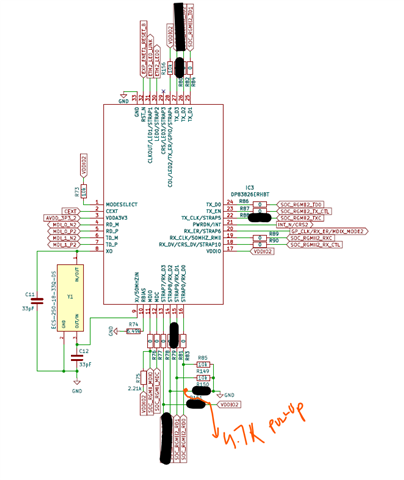
    Since I have connected the PHY for working in Enhancement mode with RMII this is my hardware layout .

    Please consider the black marked part as DNP .
     

  • Yes ethtool and ifconfig report the expected link and speed status. Although ethtool is reporting RX errors.


    ethtool -S eth1
    NIC statistics:
         p0_rx_good_frames: 654
         p0_rx_broadcast_frames: 494
         p0_rx_multicast_frames: 160
         p0_rx_crc_errors: 0
         p0_rx_oversized_frames: 0
         p0_rx_undersized_frames: 0
         p0_ale_drop: 0
         p0_ale_overrun_drop: 0
         p0_rx_octets: 48764
         p0_tx_good_frames: 0
         p0_tx_broadcast_frames: 0
         p0_tx_multicast_frames: 0
         p0_tx_octets: 0
         p0_tx_64B_frames: 514
         p0_tx_65_to_127B_frames: 106
         p0_tx_128_to_255B_frames: 34
         p0_tx_256_to_511B_frames: 0
         p0_tx_512_to_1023B_frames: 0
         p0_tx_1024B_frames: 0
         p0_net_octets: 48764
         p0_rx_bottom_fifo_drop: 0
         p0_rx_port_mask_drop: 0
         p0_rx_top_fifo_drop: 0
         p0_ale_rate_limit_drop: 0
         p0_ale_vid_ingress_drop: 0
         p0_ale_da_eq_sa_drop: 0
         p0_ale_block_drop: 0
         p0_ale_secure_drop: 0
         p0_ale_auth_drop: 0
         p0_ale_unknown_ucast: 0
         p0_ale_unknown_ucast_bytes: 0
         p0_ale_unknown_mcast: 0
         p0_ale_unknown_mcast_bytes: 0
         p0_ale_unknown_bcast: 0
         p0_ale_unknown_bcast_bytes: 0
         p0_ale_pol_match: 0
         p0_ale_pol_match_red: 0
         p0_ale_pol_match_yellow: 0
         p0_ale_mcast_sa_drop: 0
         p0_ale_dual_vlan_drop: 0
         p0_ale_len_err_drop: 0
         p0_ale_ip_next_hdr_drop: 0
         p0_ale_ipv4_frag_drop: 0
         p0_tx_mem_protect_err: 0
         p0_tx_pri0: 0
         p0_tx_pri1: 0
         p0_tx_pri2: 0
         p0_tx_pri3: 0
         p0_tx_pri4: 0
         p0_tx_pri5: 0
         p0_tx_pri6: 0
         p0_tx_pri7: 0
         p0_tx_pri0_bcnt: 0
         p0_tx_pri1_bcnt: 0
         p0_tx_pri2_bcnt: 0
         p0_tx_pri3_bcnt: 0
         p0_tx_pri4_bcnt: 0
         p0_tx_pri5_bcnt: 0
         p0_tx_pri6_bcnt: 0
         p0_tx_pri7_bcnt: 0
         p0_tx_pri0_drop: 0
         p0_tx_pri1_drop: 0
         p0_tx_pri2_drop: 0
         p0_tx_pri3_drop: 0
         p0_tx_pri4_drop: 0
         p0_tx_pri5_drop: 0
         p0_tx_pri6_drop: 0
         p0_tx_pri7_drop: 0
         p0_tx_pri0_drop_bcnt: 0
         p0_tx_pri1_drop_bcnt: 0
         p0_tx_pri2_drop_bcnt: 0
         p0_tx_pri3_drop_bcnt: 0
         p0_tx_pri4_drop_bcnt: 0
         p0_tx_pri5_drop_bcnt: 0
         p0_tx_pri6_drop_bcnt: 0
         p0_tx_pri7_drop_bcnt: 0
         rx_good_frames: 0
         rx_broadcast_frames: 0
         rx_multicast_frames: 0
         rx_pause_frames: 0
         rx_crc_errors: 0
         rx_align_code_errors: 0
         rx_oversized_frames: 0
         rx_jabber_frames: 0
         rx_undersized_frames: 0
         rx_fragments: 0
         ale_drop: 0
         ale_overrun_drop: 0
         rx_octets: 0
         tx_good_frames: 113
         tx_broadcast_frames: 0
         tx_multicast_frames: 113
         tx_pause_frames: 0
         tx_deferred_frames: 0
         tx_collision_frames: 0
         tx_single_coll_frames: 0
         tx_mult_coll_frames: 0
         tx_excessive_collisions: 0
         tx_late_collisions: 0
         rx_ipg_error: 0
         tx_carrier_sense_errors: 0
         tx_octets: 11558
         tx_64B_frames: 16
         tx_65_to_127B_frames: 77
         tx_128_to_255B_frames: 20
         tx_256_to_511B_frames: 0
         tx_512_to_1023B_frames: 0
         tx_1024B_frames: 0
         net_octets: 11558
         rx_bottom_fifo_drop: 0
         rx_port_mask_drop: 0
         rx_top_fifo_drop: 0
         ale_rate_limit_drop: 0
         ale_vid_ingress_drop: 0
         ale_da_eq_sa_drop: 0
         ale_block_drop: 0
         ale_secure_drop: 0
         ale_auth_drop: 0
         ale_unknown_ucast: 0
         ale_unknown_ucast_bytes: 0
         ale_unknown_mcast: 0
         ale_unknown_mcast_bytes: 0
         ale_unknown_bcast: 0
         ale_unknown_bcast_bytes: 0
         ale_pol_match: 0
         ale_pol_match_red: 0
         ale_pol_match_yellow: 0
         ale_mcast_sa_drop: 0
         ale_dual_vlan_drop: 0
         ale_len_err_drop: 0
         ale_ip_next_hdr_drop: 0
         ale_ipv4_frag_drop: 0
         iet_rx_assembly_err: 0
         iet_rx_assembly_ok: 0
         iet_rx_smd_err: 0
         iet_rx_frag: 0
         iet_tx_hold: 0
         iet_tx_frag: 0
         tx_mem_protect_err: 0
         tx_pri0: 113
         tx_pri1: 0
         tx_pri2: 0
         tx_pri3: 0
         tx_pri4: 0
         tx_pri5: 0
         tx_pri6: 0
         tx_pri7: 0
         tx_pri0_bcnt: 11558
         tx_pri1_bcnt: 0
         tx_pri2_bcnt: 0
         tx_pri3_bcnt: 0
         tx_pri4_bcnt: 0
         tx_pri5_bcnt: 0
         tx_pri6_bcnt: 0
         tx_pri7_bcnt: 0
         tx_pri0_drop: 0
         tx_pri1_drop: 0
         tx_pri2_drop: 0
         tx_pri3_drop: 0
         tx_pri4_drop: 0
         tx_pri5_drop: 0
         tx_pri6_drop: 0
         tx_pri7_drop: 0
         tx_pri0_drop_bcnt: 0
         tx_pri1_drop_bcnt: 0
         tx_pri2_drop_bcnt: 0
         tx_pri3_drop_bcnt: 0
         tx_pri4_drop_bcnt: 0
         tx_pri5_drop_bcnt: 0
         tx_pri6_drop_bcnt: 0
         tx_pri7_drop_bcnt: 0


    Regards

    Gaurav

  • Hi Gaurav,

    Thank you for sharing the detailed logs. This could be an IP routing issue, addresses 192.168.30.122 and 192.168.31.122 share the same subnet with distinct IP address in the mask range.

    Could you please try setting these static IPs with same subnet mask 255.255.255.0 :

    eth0 to 192.168.30.122
    eth1 to 192.168.30.123

    Does ping work in this case?

    Thank you,
    Evan

  • Hi Evan, 
    We tried that it is not working .

    Regards
    Gaurav

  • Hi Gaurav,

    Thanks for confirming. In the ethtool log, I see incrementing values for "rx_good_frames" and "tx_good_frames". This suggests link is healthy with packet transfer over MDI and MAC, but some routing issue is preventing ping acknowledgment.

    Are both PHYs connected to the same host, and is this topology required in your system? If possible, please try ping with unique {Host+PHY} endpoints.

    Appnote reference for debug: https://www.ti.com/lit/an/spradj8/spradj8.pdf

    Thank you,
    Evan