This thread has been locked.

If you have a related question, please click the "Ask a related question" button in the top right corner. The newly created question will be automatically linked to this question.

SN65DSI83-Q1: Display panel flickering with sn65dsi83 + external clock source

Part Number: SN65DSI83-Q1
Other Parts Discussed in Thread: SN65DSI83,

Hello everyone,

We are using SN65DSI83 to convert DSI signal (produces by cm4) to LVDS signal for our display panel. We use 75 MHz external clock source to produce the lvds signal from the DSI. The problem is that with this setup we get vertical jumping/flickering ocassionally on the display panel - about every couple of seconds, not periodical.

We also tried to source the clock from the DSI signal, but we have had similar issue where the screen would sometimes start jumping where the device started (about 25 % of our devices show this behaviour in 1 - 2 % of the starts - pointing possibly to a hardware problem). We tried to solve this by using external clock.

We have tried the following:
sn65dsi83 test pattern displays correctly without jumping
different timing values in linux kernel - did help, but have not solved problem completely.
matching the pixel clock and the lvds clock to the external clock (75mhz) - did not help.

Technial specs:
chip: ti-sn65dsi83-Q1
DSI signal source: raspberrypi compute module 4
3 dsi lanes
display: AM-1280800WGTZQW-00H - lvds input frequency needs to be between 70.0 - 76.6 MHz
linux kernel version 5.15.40.

current panel timing settings:

.clock = 75000,
.hdisplay = 1280,
.hsync_start = 1280 + 80,
.hsync_end = 1280 + 80 + 32,
.htotal = 1440,
.vdisplay = 800,
.vsync_start = 800 + 20, 
.vsync_end = 800 + 20 + 6,
.vtotal = 835,
.flags = DRM_MODE_FLAG_PHSYNC | DRM_MODE_FLAG_PVSYNC,

sn65dsi83 register dump:
0x00: 0x35
0x01: 0x38
0x02: 0x49
0x03: 0x53
0x04: 0x44
0x05: 0x20
0x06: 0x20
0x07: 0x20
0x09: 0x00
0x0a: 0x84
0x0b: 0x00
0x0d: 0x01
0x10: 0x2e
0x11: 0xcc
0x12: 0x3c
0x18: 0x18
0x19: 0x4c
0x1a: 0x03
0x1b: 0x20
0x20: 0x00
0x21: 0x05
0x24: 0x20
0x25: 0x03
0x28: 0x40
0x29: 0x00
0x2c: 0x28
0x2d: 0x00
0x30: 0x0a
0x31: 0x00
0x34: 0x3c
0x36: 0x00
0x38: 0x50
0x3a: 0x1e
0x3c: 0x00
0x3d: 0x00
0xe0: 0x01
0xe1: 0xfd
0xe5: 0x00

Is using the external clock like this viable approach? If yes is there anything wrong with our approach?

Thanks,
Vojtech Bubela

  • Hi Vojtech,

    The timings set from the DSI source SoC should match the panel timings. Are the resolution and timings set from the SoC exactly matching the active and blanking periods and clock rates? 

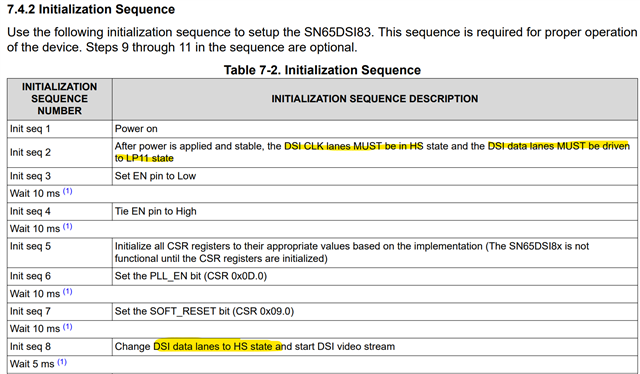
    Please check whether the datasheet initialization sequence is followed. The init sequence has requirements for power-up, setting enable, register configs, and DSI clock and data lane states. Please ensure that the DSI clock source is always in HS state.

    When the issue occurs, does the flickering happen during run-time, randomly while system is running, or does it occur after power-up and continue flickering?

    Best regards,
    Ikram

  • Hello Ikram,

    We used the resolution, timings and clock rate defined by the panel but the issues still occured. The current timings configuration is a result of our testing.

    The initialization sequence is done as described in the datasheet. We will measure the DSI clock source to make sure it is in HS state.

    The flickering always happens right from power up and continues while the system is running.

    When the external refclk is used the issue occurs on every boot. When the DSI clock is used then it happens in about 2 % of restarts and it can be fixed or caused by toggling the PLL_EN bit (reg 0x0D).

    Thanks for reply,
    Vojtech

  • Hi Vojtech,

    Since the issue is happening after power-up and initialization, it's likely related to the init. sequence. 

    Please make sure that the DSI clock is always in HS state, and data lanes are in LP11 at the start, then changed to HS state as shown in the init sequence. Also note the resets and delays required.


    The REFCLK causing flickering could be related to a mismatch between the pixel clock rates of the DSI not matching the rate of the REFCLK. When setting these, please make sure the REFCLK multiplier, or DSI clock divider are set accordingly to meet the LVDS clock frequency. You can refer to this resolution guide for this: [FAQ] SN65DSI84: SN65DSI83, SN65DSI84, and SN65DSI85 resolution guide

    Best regards,
    Ikram

  • Hello Ikram,

    I will go over the initialization sequence again and measure the DSI clock lanes. 

    As for the REFCLK, we use 3 DSI lanes, the DSI clock is running at 300 mhz, this divided by 4 gives us 75mhz which is also our targeted lvds frequency as our panel supports 70 - 76.6 mhz.

    Thanks
    Vojtech

  • Thank you Vojtech, please let us know if there are any further questions or updates for this setup.

    Best regards,
    Ikram

  • Hello Ikram,

    As far as we can tell we follow the initialization sequence for the chip correctly.
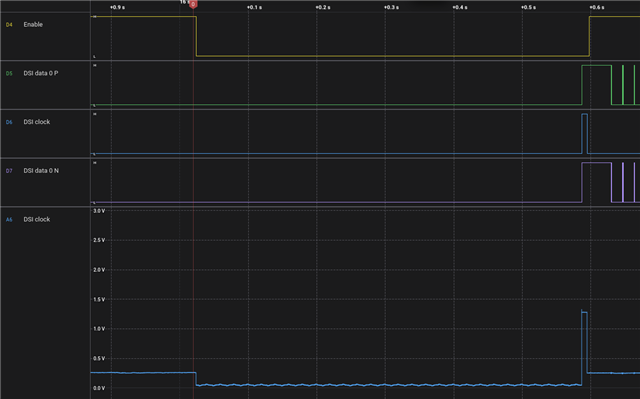
    We have also measured the Enable, DSI clock and one DSI data lane (N + P) during boot that resulted in a flickering screen (which turned black within 5 seconds). 

    This looks identicall to boot sequence which results in working display.

    Apart from trying to measure all DSI data lanes at once we are not sure how to progress with this further.

    Thanks,
    Vojtech.

  • Hi Vojtech,

    It looks like the DSI clock is not in HS state. There should be continuous clocking on the DSI clock input. Here we only see a pulse before EN is set.

    The DSI clock should be in HS state and data lanes should be in LP state before EN is set. 

    An example of the waveforms is shared here: [FAQ] SN65DSI84: No display output with SN65DSI83, SN65DSI84, SN65DSI85

    Best regards,
    Ikram

  • Hi Ikram,

    The device used to measure the signals did not display the DSI CLOCK properly, see the following picture captured with another device:

    The DSI CLOCK and DSI DATA are brought to 0 for about 800 ms before the events on the picture, before that the DSI data is in LP11 and DSI DATA is in HS mode. This is different from the picture you shared. However when the enable is brought up the DSI CLOCK and DSI DATA should be in a correct state.

    Thanks,
    Vojtech.

  • Hi Vojtech, please give me 1-2 days to look further into this issue.

  • Hi Vojtech,

    If test pattern with both external reference clock and DSI clock shows no issue, then there is likely an issue either with

    • DSI data lanes: such as SI issue, DSI packet not being in the correct states, or timing mismatch
    • Initialization sequence issue: delays and resets not being set as shown in datasheet

    In the initialization sequence you will notice that DSI data lanes are switched from LP11 to HS state, with DSI stream started AFTER the register initialization and resets. Please check whether this is followed.


    Best regards,
    Ikram

  • Hello Vojtech and  Ikram, 

    Interestingly, we are facing the same issue. The specs of our system are:

    - 1280 x 800 LVDS panel @ 72 MHz
    - SN65DSI83-Q1 converter IC (4 data lanes + clock lane)
    - Qualcomm-based SOC, kernel 4.19

    We are using a clock derived from the MIPI D-PHY and are seeing an approximately 25% failure rate.

    The issue manifests as a flickering screen in about 1–5% of power-on cycles. It never appeared after the boot (during operation).

    This is strangely familiar to your issue. I am confident that we are correctly following the initialization sequence and that the PCB layout is correct.

    After so much time spent debugging the issue, we will probably be looking for an alternative panel with an MIPI interface. 

    If (or better to say when) you find the solution, please write it here. 

    Best regards, 

    Miha

  • Hi Miha, 

    From our understanding the DSI clock or REFCLK is likely not causing the issue if test pattern is always working. The issue it could be related to the DSI data timings or steps in initialization such as the the PLL and soft resets. There are delays, and then afterwards the DSI data lanes are set to output and DSI data being sent in HS mode could cause an issue during startup.

    Additionally, there may issues with DSI data input skew or similar hardware/layout concerns. The SoC can also be checked by changing the DSI modes, and whether issue follows a particular DSI non-burst or burst mode, with or without sync pulses. 

    Another test could be to use the video restart sequence shared in the datasheet and checking if the issue clears after restarting.

    Please let us know whether the restart sequence or changing the DSI modes resolved the issue.

    Best regards,
    Ikram

  • Hello Ikram,

    I will check the highlighted points.

    Thanks.

  • Hi Vojtech, thank you. Let us know when there are new findings.

    Best regards,
    Ikram