A related question is a question created from another question. When the related question is created, it will be automatically linked to the original question.
If you have a related question, please click the "Ask a related question" button in the top right corner. The newly created question will be automatically linked to this question.
DP83869HM: How to distinguish between Link up and Cable insertion
Unfortunately, there is no way to distinguish between the link up and cable insertion using the register that I know of. However, I will check in with the team to see if I have missed anything and get back to you.
Thank you for your support. Here is additional information.
After the system boots, the system needs to wait for a certain amount of time after the initialization is complete to establish a link. However, depending on the state of the peer device, the time to establish the link varies greatly, making it difficult to set the time-out. The competitor's PHY used before supports a method to detect if the cable was plugged in (details are still under confirming). I think the same method can be done with TDR for the DP83869HM. Please let me know if there is any other way that works.
TDR would only work in certain scenario. During TDR, the PHY sends out a pulse to the Ethernet cable and measures the returning reflected pulse to see how long the cable is and see if there is open/short on the cable. Because the PHY sends out a pulse, it is crucial that there is absolutely no activity on the Ethernet cable (not just packet transmission but also autonegotiation pulses) and for the analysis algorithm to work perfectly, the link partner PHY must have a termination on its MDI pins but no activity.
In DP83869, this is only true when auto-negotiation is disabled in 1G mode. And we would not know how the link partner PHY would show termination but not have any activity.
I have asked internally for ideas so I will get back to you with any update.
Would it be possible to check for the link after the worst case time and see if the link is up? I can try to think of more ideas but so far this is the best workaround we can offer at the moment.
Thank you for your thought. Other Gigabit PHY probably has a bit to detect the link partner's FLP.
Let's summarize what the customer wants to do.
1. Multiple Ethernet devices are connected to the system of DP83869HM. 2. As soon as the system starts up, check the link up with each Ethernet device. 3. Monitor the FLP detection bit periodically until the link-up is complete, and if there is no FLP, skip the wait of that port to shorten the boot time. 4. If the FLP detection bit is 1 but does not link up, wait until it times out.
It takes time to wait for all ports to time out, so it is shortened by the FLP detection bit. Customer wants to do the same with the DP83869HM.
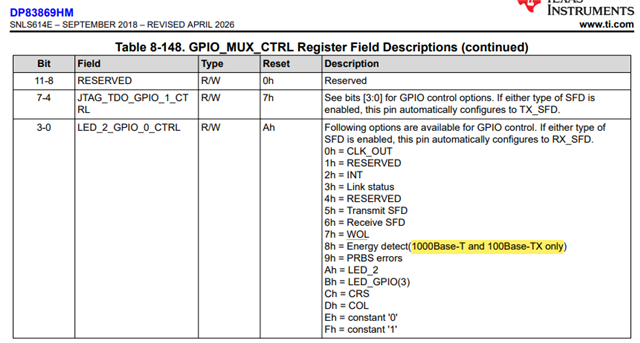
1. Since MDI is full-duplex, I think TDR can be used even if the link partner is running. How do you think? 2. Can the Energy detect feature be used for this purpose? If it can do that, don't we support 10Mbps?
TDR requires a quiet line so this will not be possible. Regarding energy detect, I can check with design, but as this is an older product, it may take a week or two for design to get back. Please comment if this is acceptable or not.
I am not aware of any competition PHY with this ability to detect FLP but not converge on linkup to give intermediate status of if the application needs more time. Typically, since linkup at most is around 3s, this has been acceptable in past applications to provide a wait time of 3s post powerup of PHY and then check link. If link is not reached, then corrective actions can be had.
Is 3s post PHY power-up unacceptable to customer and they are trying to reduce? To what level of duration?
As an update, I did test out the energy detect feature with long cabling (~ >130m to push limits on cable reach, since shorter cabling is nearly guarantee to link in my lab). I did see energy detect LED go high prior to linkup in conditions where linkup was intermittent due to longer cabling, so I do think this is promising. However, setting nearly 180m of cabling caused no link up and no LEDs (even the Energy Detect LED).
I think this option could be viable for your customer's application so long as they validate it with their use cases. This is not a mechanical detection of the cable to the RJ-45, so there could be cases where the cable is completely plugged in, but due to severe attenuation, even the LED would not light up.
Please also let me know customer response to 3s wait time as alternative approach.
As energy detect was toggling even before the link lights came on, this should be more speed agnostic. However, I am unaware of the history as to why this was restricted to 100/1G and this device is a bit older so such support is limited. Has customer looked to test in their setup?
Customer does not test it yet. Based on our answer, the software engineer will implement the software. Do you mean that the energy detect was still available for 10M mode with your bench test?
Since this is used to detect cable detection prior to any sort of link up, there is no "link speed" per say since auto-negotiation would not have converged yet.
Before closing this inquiry, please let me confirm below.
1. The Energy detect should not reply on the speed but we are not sure why the datasheet says that the energy detect is supported only for 100M and 1000M
2. The energy detection cannot be checked by the status register. Only GPIO is supported.