


Part Number: SN65DSI86
Other Parts Discussed in Thread: AM67A
Hi,
We developed a custom AM67A-based board using the SN65DSI86.
I am opening this issue separately because there is already another issue related to our setup, but that one mixes both the SoC-side and the eDP bridge-side problems. In this issue, I would like to focus only on the SN65DSI86 / eDP bridge side.
Other related issue: https://e2e.ti.com/support/processors-group/processors/f/processors-forum/1624732/am67a-how-does-the-edp-bridge-use-with-am67a
Configuration
- SoC: AM67A
- eDP bridge: SN65DSI86
- REFCLK: 26 MHz
- Display: 1920x1080@60 DisplayPort monitor
Problem summary
I could not get display output when using the SN65DSI86 through the Linux driver, so I decided to first verify the bridge independently of the driver by using the internal color bar test pattern.
A color bar test script was shared in the forum. I verified that script on the TI J722S EVM, and the color bar appears correctly on the monitor there.
After that, I repeated similar steps on our custom board, initially without using the Linux driver.
What I observed
- The SN65DSI86 appears on the expected I2C bus addresses.
- The device registers are readable over I2C.
- HPD behavior correct. I monitored register 0x5C while unplugging and plugging the DP cable.
- We also measured the HPD voltage, and it is about 1.6 V when the DP cable is plugged in.
- However, when I run the same verified color bar test script on our custom board, I do not get any image on the monitor.
- I also dumped the SN65DSI86 registers after running the color bar test script.
$ i2cdump -y 4 0x2d
No size specified (using byte-data access)
     0  1  2  3  4  5  6  7  8  9  a  b  c  d  e  f    0123456789abcdef
00: 36 38 49 53 44 20 20 20 02 00 84 00 00 01 00 00    68ISD   ?.?..?..
10: 26 00 00 00 00 00 00 00 00 00 00 00 00 00 00 00    &...............
20: 00 04 00 00 58 02 00 00 00 00 00 00 80 80 00 00    .?..X?......??..
30: 04 80 00 00 28 00 09 00 28 00 01 00 10 00 00 00    ??..(.?.(.?.?...
40: 01 00 00 00 80 00 d0 04 66 02 a8 00 0d 00 80 80    ?...?.??f??.?.??
50: 04 80 00 04 58 02 00 00 40 e4 0c 01 11 00 20 00    ??.?X?..@????. .
60: a0 60 a4 00 00 00 00 00 00 00 00 00 00 00 00 00    ?`?.............
70: 00 00 00 00 00 01 02 00 80 00 00 00 00 00 00 00    .....??.?.......
80: 00 00 00 00 00 00 00 00 00 1f 7c f0 c1 07 1f 7c    .........?|????|
90: f0 c1 07 10 80 00 00 04 01 00 00 00 00 00 00 00    ?????..??.......
a0: 01 ff ff 00 00 00 00 00 00 00 00 00 00 00 00 00    ?...............
b0: 04 78 ac ac 08 6c 9c 9c 0c 5c 5c 5c 0c 0c 0c 0c    ?x???l???\\\????
c0: 3f 3f 0f 00 00 00 00 00 00 00 00 00 00 00 00 00    ???.............
d0: 00 00 00 00 00 00 00 00 00 00 00 00 00 00 00 00    ................
e0: 00 00 00 00 00 00 00 00 00 00 00 00 00 00 00 00    ................
f0: 00 00 00 00 08 00 00 00 02 00 00 00 00 00 00 00    ....?...?.......
Because 0xF4 register AUX_RPLY_TOUT bit set, it is related failed aux communication.
To investigate this, an EDID request over AUX script was written and verified on the TI J722S EVM. On the J722S EVM, we also measured the AUX channel pins with an oscilloscope and could see both the AUX requests and the corresponding responses.
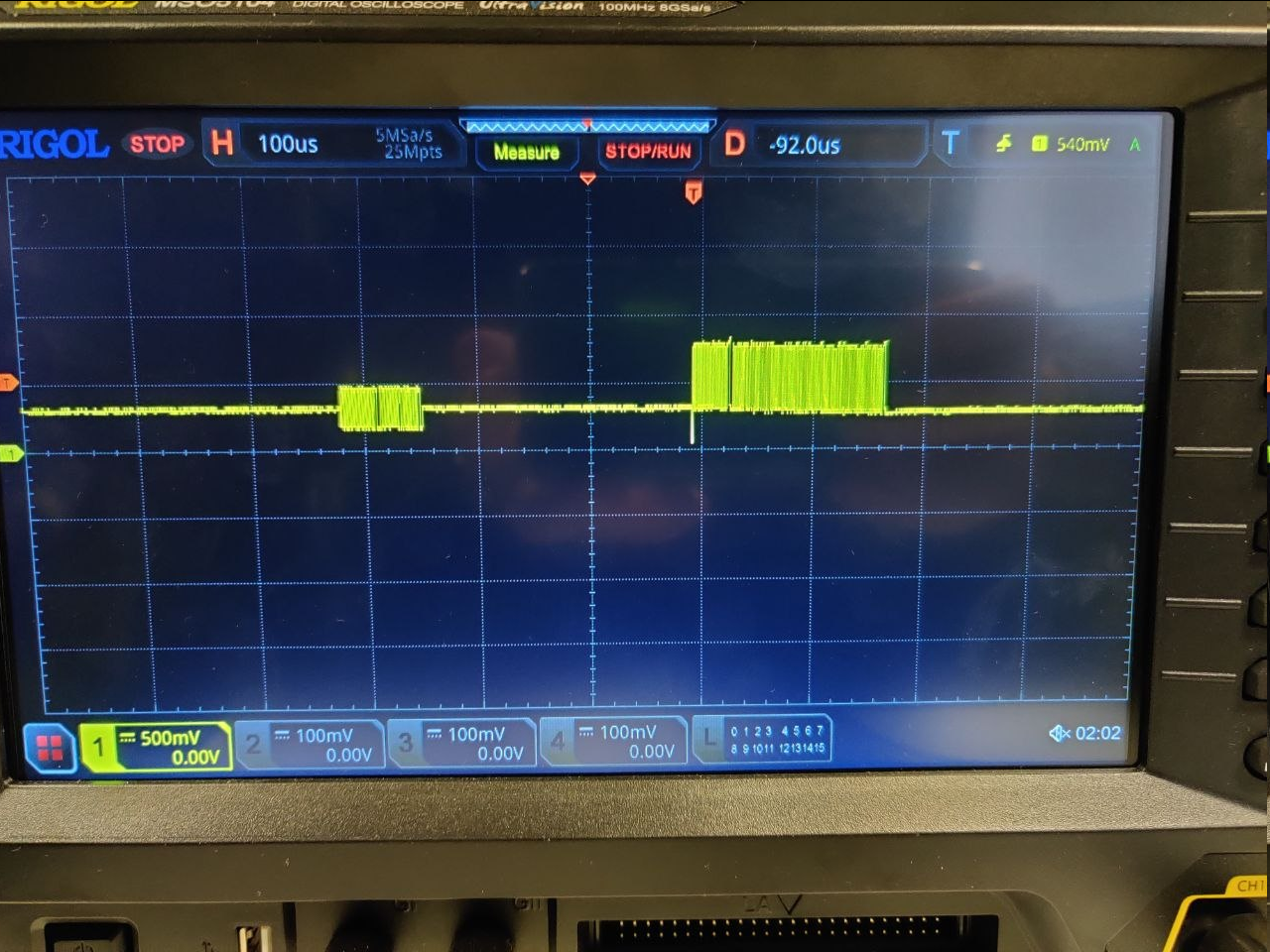
On our custom board, however, we can see AUX request activity, but we do not see any AUX response from the monitor side.
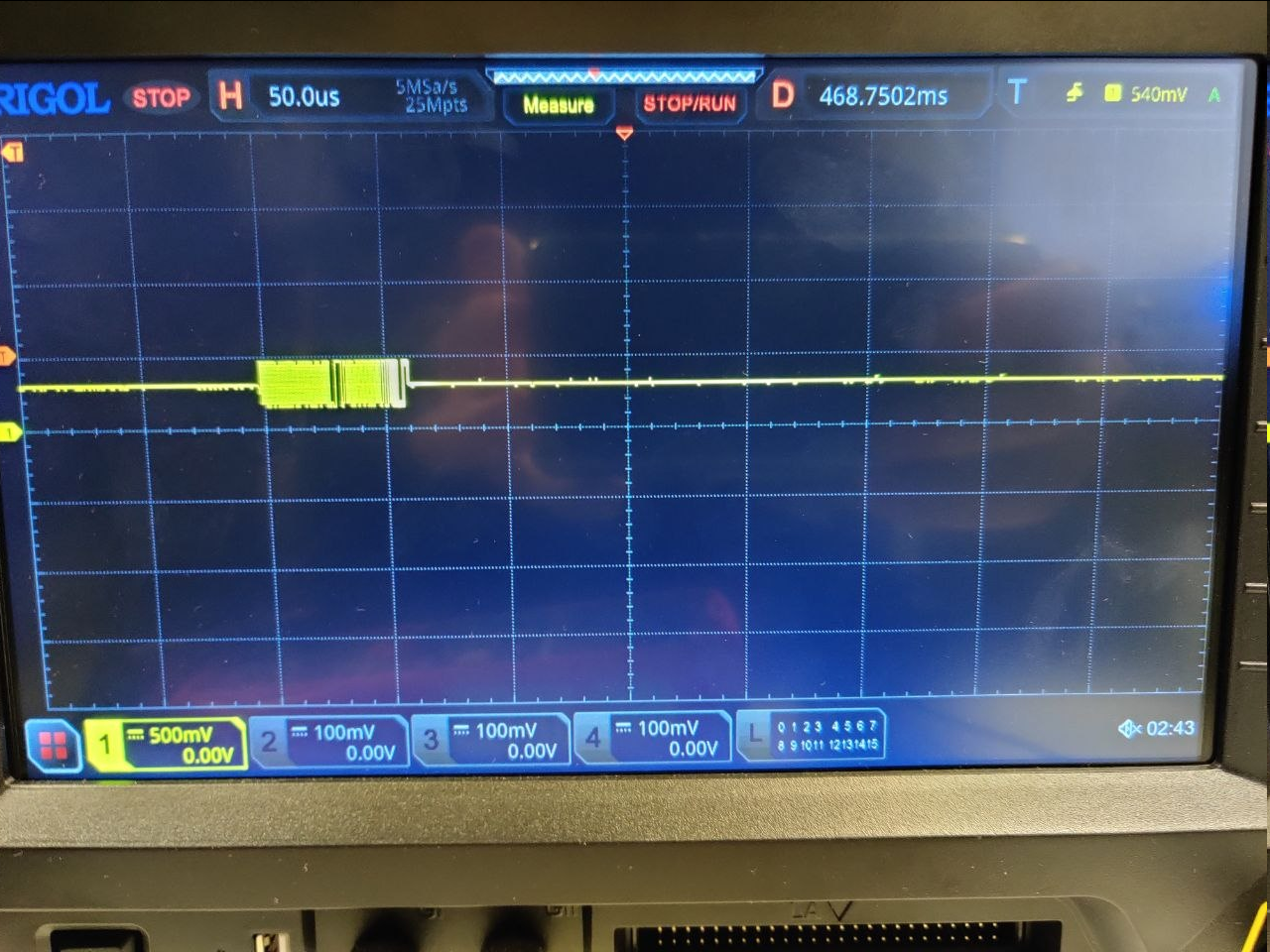
Consequences requests with no response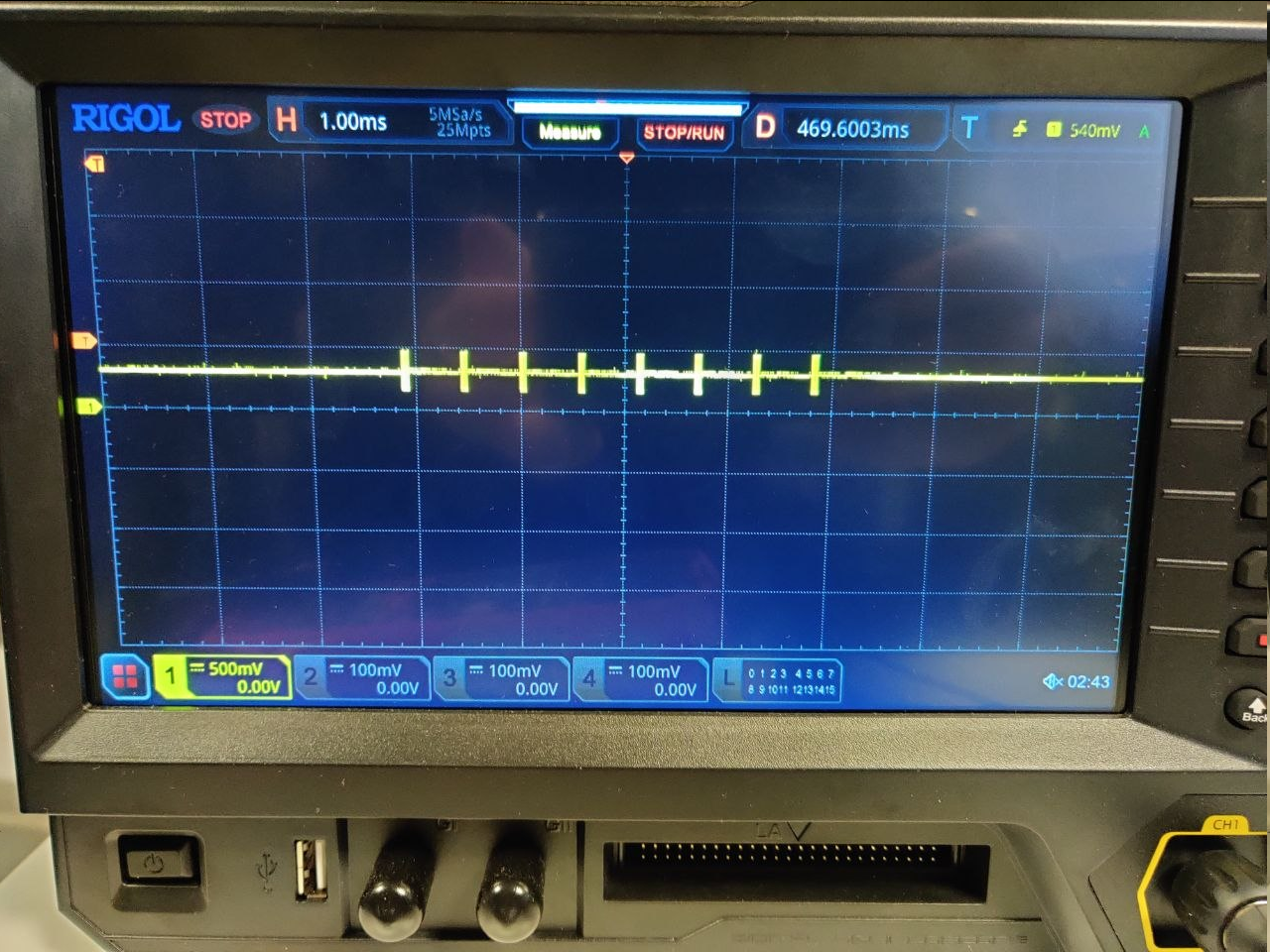
Could you please help analyze the I2C dump?
1. After the bridge sends an AUX communication request, what should happen next?
2. What are the possible reasons for an AUX communication failure?
Color Bar Test Script:
#!/usr/bin/env bash
set -euo pipefail

BUS=3
ADDR=0x2c
FORCE=

sleep_ms() {
    local ms="$1"
    sleep "$(awk "BEGIN { printf \"%.3f\", $ms/1000 }")"
}

write1() {
    local reg="$1"
    local val="$2"
    echo "WRITE1  reg=${reg} val=${val}"
    i2cset ${FORCE} -y "${BUS}" "${ADDR}" "${reg}" "${val}"
}

write2() {
    local reg="$1"
    local val1="$2"
    local val2="$3"
    echo "WRITE2  reg=${reg} vals=${val1} ${val2}"
    i2cset ${FORCE} -y "${BUS}" "${ADDR}" "${reg}" "${val1}" "${val2}" i
}

set_ptr() {
    local reg="$1"
    echo "PTR     reg=${reg}"
    i2cset ${FORCE} -y "${BUS}" "${ADDR}" "${reg}"
}

read1() {
    local reg="$1"
    echo "READ1   reg=${reg}"
    i2cget ${FORCE} -y "${BUS}" "${ADDR}" "${reg}"
}

# Sequential byte reads using repeated i2cget from reg, reg+1, ...
readn() {
    local start_reg="$1"
    local count="$2"
    local reg dec i
    dec=$((start_reg))
    echo "READN   start_reg=$(printf '0x%02X' "${dec}") count=${count}"
    for ((i=0; i<count; i++)); do
        reg=$((dec + i))
        printf "  [%02X] = " "${reg}"
        i2cget ${FORCE} -y "${BUS}" "${ADDR}" "$(printf '0x%02X' "${reg}")"
    done
}

echo "Starting SN65DSI86 sequence on /dev/i2c-${BUS}, addr ${ADDR}"

write1 0x5C 0x01
sleep_ms 10

write1 0xFF 0x07
sleep_ms 10

echo "====== DUMP CFR ======"
#set_ptr 0x16
sleep_ms 10

echo "====== Read ======"
read1 0x16
sleep_ms 10

write1 0x16 0x01
sleep_ms 10

# set_ptr 0x16
sleep_ms 10

echo "====== Read ======"
readn 0x16 2
sleep_ms 10

write1 0xFF 0x00
sleep_ms 10

echo "====== Single 4 DSI lanes ======"
write1 0x10 0x26
sleep_ms 10

echo "====== DSI CLK FREQ ======"
# set_ptr 0x12
sleep_ms 10
readn 0x12 2
sleep_ms 10

echo "====== enhanced framing ======"
write1 0x5A 0x04
sleep_ms 10

echo "====== ADDR 0x93 CFR ======"
# set_ptr 0x93
sleep_ms 10

echo "====== Read ======"
readn 0x93 6
sleep_ms 10

echo "====== Pre0dB 1 lanes no SSC ======"
write1 0x93 0x10
sleep_ms 10

echo "====== L0mV RBR ======"
write1 0x94 0x80
sleep_ms 10

echo "====== POST2 0dB ======"
write1 0x95 0x00
sleep_ms 10

echo "====== PLL ENABLE ======"
write1 0x0D 0x01
sleep_ms 10
# set_ptr 0x0A
sleep_ms 10
readn 0x0A 2
sleep_ms 10

echo "====== Semi-Auto TRAIN ======"
write1 0x96 0x0A
sleep_ms 20

echo "====== ADDR 0x96 CFR ======"
# set_ptr 0x96
sleep_ms 20

echo "====== Read ======"
read1 0x96
sleep_ms 10

echo "===== CHA_ACTIVE_LINE_LENGTH ======="
write2 0x20 0x00 0x04
sleep_ms 10

echo "===== CHA_VERTICAL_DISPLAY_SIZE ======="
write2 0x24 0x58 0x02
sleep_ms 10

echo "===== CHA_SYNC_DELAY ======="
write2 0x28 0x00 0x00
sleep_ms 10

echo "===== CHA_HSYNC_PULSE_WIDTH ======="
write2 0x2C 0x80 0x80
sleep_ms 10

echo "===== CHA_VSYNC_PULSE_WIDTH ======="
write2 0x30 0x04 0x80
sleep_ms 10

echo "===== CHA_HORIZONTAL_BACK_PORCH ======="
write1 0x34 0x28
sleep_ms 10

echo "===== CHA_VERTICAL_BACK_PORCH ======="
write1 0x36 0x09
sleep_ms 10

echo "===== CHA_HORIZONTAL_FRONT_PORCH ======="
write1 0x38 0x28
sleep_ms 10

echo "===== CHA_VERTICAL_FRONT_PORCH ======="
write1 0x3A 0x01
sleep_ms 10

echo "===== DP_18BPP_EN ======="
write1 0x5B 0x01
sleep_ms 100

echo "===== COLOR BAR ======="
write1 0x3C 0x10
sleep_ms 100

echo "====== enhanced framing and Vstream enable ======"
write1 0x5A 0x0C
sleep_ms 100

echo "====== DUMP CFR ======"
# set_ptr 0x20
sleep_ms 10

echo "====== Read ======"
readn 0x20 32
sleep_ms 10

echo "Sequence completed."
EDID Read Script (I2C over AUX)
#!/usr/bin/env bash
set -euo pipefail

BUS=3
ADDR=0x2c
FORCE=

# ---------------------------------
# SN65DSI86 AUX / IRQ register map
# ---------------------------------

REG_AUX_WDATA0=0x64

REG_AUX_ADDR_19_16=0x74
REG_AUX_ADDR_15_8=0x75
REG_AUX_ADDR_7_0=0x76
REG_AUX_LENGTH=0x77
REG_AUX_CMD_SEND=0x78
REG_AUX_RDATA0=0x79

REG_IRQ_EN=0xE0
REG_AUX_IRQ_EN=0xE5
REG_AUX_IRQ_STATUS=0xF4

# 0x78 bits
SHIFT_AUX_CMD=4
MASK_AUX_CMD=0xF0
BIT_SEND=0x01

# 0xE0 bits
BIT_IRQ_EN=0x01

# 0xE5 bits
BIT_SEND_INT_EN=0x01

# 0xF4 bits
BIT_I2C_DEFR=0x80
BIT_NAT_I2C_FAIL=0x40
BIT_AUX_SHORT=0x20
BIT_AUX_DEFR=0x10
BIT_AUX_RPLY_TOUT=0x08
BIT_SEND_INT=0x01

BIT_AUX_ERR_MASK=$((BIT_NAT_I2C_FAIL | BIT_AUX_SHORT | BIT_AUX_DEFR | BIT_AUX_RPLY_TOUT | BIT_I2C_DEFR))

EDID_TOTAL_SIZE=128
POLL_DELAY_SEC=0.01
POLL_RETRIES=200
OUTFILE="edid.bin"

log() {
    echo "[INFO] $*"
}

err() {
    echo "[ERR ] $*" >&2
}

write_reg() {
    local reg="$1"
    local val="$2"
    printf '[WR  ] reg=0x%02x val=0x%02x\n' "$reg" "$val"
    i2cset ${FORCE} -y "${BUS}" "${ADDR}" "$reg" "$val"
}

read_reg() {
    local reg="$1"
    i2cget ${FORCE} -y "${BUS}" "${ADDR}" "$reg"
}

read_reg_num() {
    local reg="$1"
    local v
    v="$(read_reg "$reg")"
    printf '%d\n' "$((v))"
}

set_bits() {
    local reg="$1"
    local mask="$2"
    local cur new
    cur="$(read_reg_num "$reg")"
    new=$(( (cur | mask) & 0xff ))
    write_reg "$reg" "$new"
}

clear_bits() {
    local reg="$1"
    local mask="$2"
    local cur new
    cur="$(read_reg_num "$reg")"
    new=$(( cur & ~mask & 0xff ))
    write_reg "$reg" "$new"
}

write_aux_cmd() {
    local cmd="$1"
    local cur new
    cur="$(read_reg_num "$REG_AUX_CMD_SEND")"
    new=$(( (cur & ~MASK_AUX_CMD) | ((cmd & 0x0f) << SHIFT_AUX_CMD) ))
    write_reg "$REG_AUX_CMD_SEND" "$new"
}

enable_irq_mode() {
    # Optional, only if you want the IRQ-based flow enabled exactly as datasheet says
    set_bits "$REG_IRQ_EN" "$BIT_IRQ_EN"
    set_bits "$REG_AUX_IRQ_EN" "$BIT_SEND_INT_EN"
}

check_aux_error_flags() {
    local st
    st="$(read_reg_num "$REG_AUX_IRQ_STATUS")"

    if (( (st & BIT_AUX_ERR_MASK) != 0 )); then
        err "AUX error flags set: status=$(printf '0x%02x' "$st")"
        return 1
    fi
    return 0
}

clear_send_int_flag() {
    # 0xF4 is RCU, so clear by writing 1 to the flag bit
    write_reg "$REG_AUX_IRQ_STATUS" "$BIT_SEND_INT"
}

wait_send_done() {
    local i val
    for ((i=0; i<POLL_RETRIES; i++)); do
        val="$(read_reg_num "$REG_AUX_CMD_SEND")"
        if (( (val & BIT_SEND) == 0 )); then
            return 0
        fi
        sleep "$POLL_DELAY_SEC"
    done

    err "Timeout waiting SEND bit to clear"
    return 1
}

send_aux_request() {
    set_bits "$REG_AUX_CMD_SEND" "$BIT_SEND"
    wait_send_done
    check_aux_error_flags || return 1

    # Clear SEND_INT if it was raised
    clear_send_int_flag
}

program_aux_common() {
    local cmd="$1"
    local addr_lo="$2"
    local length="$3"

    # For I2C-over-AUX transactions datasheet says upper address bytes must be zero
    write_reg "$REG_AUX_ADDR_19_16" 0x00
    write_reg "$REG_AUX_ADDR_15_8"  0x00
    write_reg "$REG_AUX_ADDR_7_0"   "$addr_lo"
    write_reg "$REG_AUX_LENGTH"     "$length"
    write_aux_cmd "$cmd"
}

aux_i2c_write_mot1() {
    local addr_lo="$1"
    local length="$2"
    local wdata0="${3:-}"

    program_aux_common 0x04 "$addr_lo" "$length"

    if [[ -n "$wdata0" ]]; then
        write_reg "$REG_AUX_WDATA0" "$wdata0"
    fi

    send_aux_request
}

aux_i2c_read_mot1() {
    local addr_lo="$1"
    local length="$2"

    program_aux_common 0x05 "$addr_lo" "$length"
    send_aux_request
}

aux_i2c_read_mot0() {
    local addr_lo="$1"
    local length="$2"

    program_aux_common 0x01 "$addr_lo" "$length"
    send_aux_request
}

read_aux_data_block() {
    local count="$1"
    local i reg val
    for ((i=0; i<count; i++)); do
        reg=$(( REG_AUX_RDATA0 + i ))
        val="$(read_reg_num "$reg")"
        printf '\\x%02x' "$val"
    done
}

main() {
    : > "$OUTFILE"
    log "Starting SN65DSI86 indirect EDID read"
    log "Output file: $OUTFILE"

    # Optional: enable IRQ path if you want exact datasheet IRQ behavior
    enable_irq_mode

    # reset AUX status bits
    write_reg "$REG_AUX_IRQ_STATUS" 0xF9

    # Step 1..4
    aux_i2c_write_mot1 0x50 0x00

    # Step 5..8 : write EDID offset 0x00
    aux_i2c_write_mot1 0x50 0x01 0x00

    # Step 9..12
    aux_i2c_read_mot1 0x50 0x00

    # Step 13..17 : repeated 16-byte reads
    local offset=0
    local chunk=16
    local remaining

    while (( offset < EDID_TOTAL_SIZE )); do
        remaining=$(( EDID_TOTAL_SIZE - offset ))
        if (( remaining < 16 )); then
            chunk=$remaining
        else
            chunk=16
        fi

        aux_i2c_read_mot1 0x50 "$chunk"
        read_aux_data_block "$chunk" >> "$OUTFILE"

        offset=$(( offset + chunk ))
        log "Read ${offset}/${EDID_TOTAL_SIZE} bytes"
    done

    # Step 18..22 : final read with MOT=0
    aux_i2c_read_mot0 0x50 0x00

    log "EDID read finished"

    if command -v hexdump >/dev/null 2>&1; then
        hexdump -C "$OUTFILE"
    fi
}

main "$@"