DP83822EVM: DP83822EVM setup questions

Part Number: DP83822EVM

Hi team,

My customer is testing on DP83822EVM and they have several questions and need your help as below.

  1. Customers' system will not use TXCLK, 25M clk is provided by Ethernet Controller. According to EVM user guide, it shows that "need to connect a MAC interface to J13 and J14". With customers' needs, how could customers connect?

2. what kind of cables are used to connect TX_EN and TXD0-TXD3? What's the length? How to ensure a trace? (same question for thr Signal on J14).

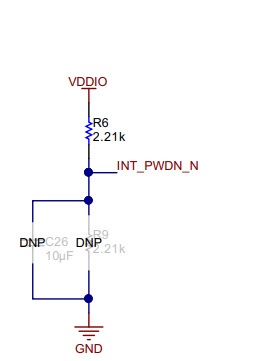
3. Is INT/PWDN_N powered from EVM board? And smae connection requirements to question 2.
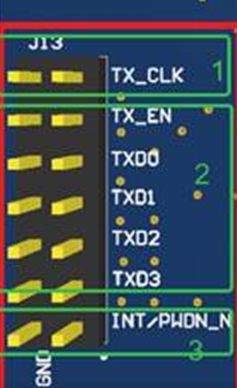
 image.png

4. In the user guide, it shows can using external power and can use internal power, is it referring to choosing one of these?
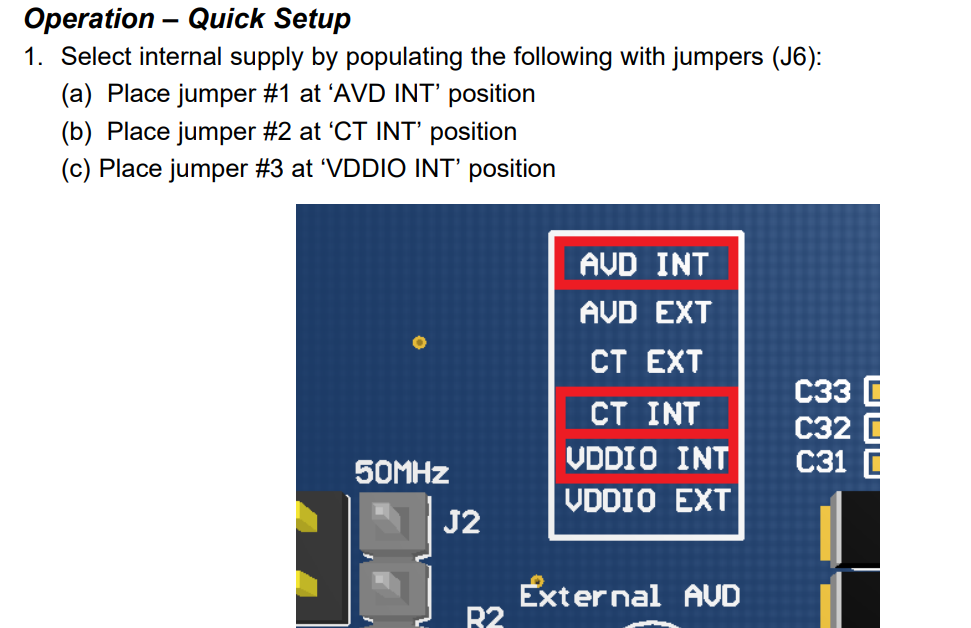
image.png

image.png

Thanks.

Joyce

  • Joyce

    Please see below for my inserted response

    1. Customers' system will not use TXCLK, 25M clk is provided by Ethernet Controller. According to EVM user guide, it shows that "need to connect a MAC interface to J13 and J14". With customers' needs, how could customers connect?

    Do they plan to use the MAC interface in MII, RMII, or RGMII?

    For MII, the PHY needs to provide the 25-MHz reference clock for 100-Mbps speed and a 2.5-MHz reference clock for 10-Mbps speed.

    For RMII, the TX_CLK is not used.

    For RGMII, the clock is sourced from the MAC layer to the PHY. When operating at 100-Mbps speed, this clock must be 25-MHz. When operating at 10-Mbps speed, this clock must be 2.5-MHz.

    2. what kind of cables are used to connect TX_EN and TXD0-TXD3? What's the length? How to ensure a trace? (same question for thr Signal on J14).

    The DP83822EVM is used to validate the DP83822 PHY functionality. We have not characterized the EVM Mac interface with any particular cables. They may use jumper or flat ribbon cables and keep the cable as short as possible. But again, we have not characterized the Mac interface with a particular cable to guarantee the functionality.  

    3. Is INT/PWDN_N powered from EVM board? And smae connection requirements to question 2.

    The default function of this pin is power down. When this pin is configured for a power down function, an active low signal on this pin places the device in power-down mode. On the EVM, it has a 2.2k pullup resistor to VDDIO as shown below.

    4. In the user guide, it shows can using external power and can use internal power, is it referring to choosing one of these?
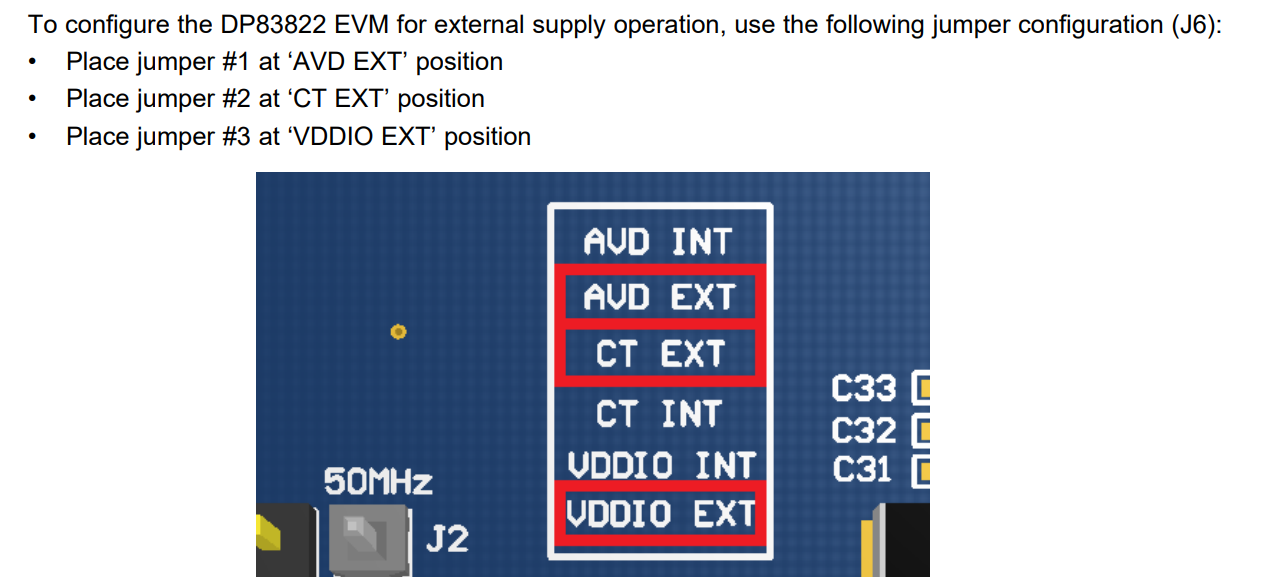
    This is correct.

    Thanks

    David

  • Hi David,

    Thanks for your reply. Customers met eye test issue and we push them do eye tests on EVM to check external setup. Customers still have two points want to double check with you:

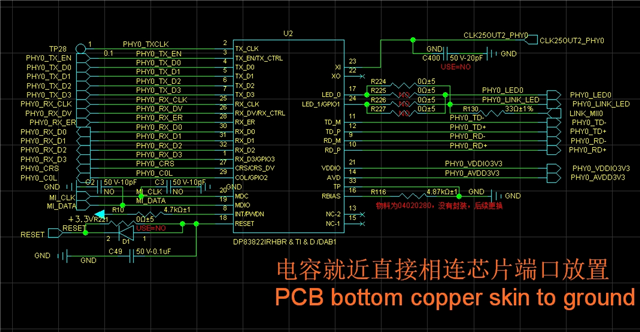
    1. Below is the schematic from customers. They are using MII, but in their system, the clock is not to TXCLK. The 25M clock is provided from Ethernet controller, and then connect to X1 pin of DP83822, X0 is floating, as follows:

    So, in such design, how could customers connect to K13 and J14 on EVM for eye tests?

    1. Customers' system will not use TXCLK, 25M clk is provided by Ethernet Controller. According to EVM user guide, it shows that "need to connect a MAC interface to J13 and J14". With customers' needs, how could customers connect?

    4. Customers' concern is that in the EVM user guide.

    If customers use internal supply, so they need to do place actions at "AVD INT" "CT INT""VDDIO INT".

    If they use external power, they need to do place actions at "AVD EXT" "CT EXT""VDDIO EXT".

    Is my understandings right? My customers want to double confirm with you about this. Thanks.

    Joyce

  • Joyce

    You don't need a MAC to perform the PHY eye test. DP83822 itself supports the eye test, please see this app note, https://www.ti.com/lit/an/snla266b/snla266b.pdf on how to run the Ethernet compliance testing with DP83822. 

     ***

    If customers use internal supply, so they need to do place actions at "AVD INT" "CT INT""VDDIO INT". -> Correct, and board is powered by a 5-V supply to either the USB micro A/B connector (J5) or V+1 turret and populate jumpers on J6. 

    If they use external power, they need to do place actions at "AVD EXT" "CT EXT""VDDIO EXT". -> Correct

    Connect 5-V supply to either the USB micro A/B connector (J5) or V+1 turret and populate jumpers on J6

    Thanks

    David

  • Hi David,

    I have shared this document to customers but customers are confused that if not need a mac, what other boards are needed for eye tests? In the document, there are 3pcs boards needed, what are the other two boards?

    You don't need a MAC to perform the PHY eye test. DP83822 itself supports the eye test, please see this app note, https://www.ti.com/lit/an/snla266b/snla266b.pdf on how to run the Ethernet compliance testing with DP83822. 

    Do it mean that if customers currently don't have other two board and need to do the eye tests, how could customers connect to K13 and J14 on EVM for eye tests?

    Could you kindly help provide all EVM setup or actions customers need to do based on their system design for eye tests?

    1. Below is the schematic from customers. They are using MII, but in their system, the clock is not to TXCLK. The 25M clock is provided from Ethernet controller, and then connect to X1 pin of DP83822, X0 is floating, as follows:

    So, in such design, how could customers connect to K13 and J14 on EVM for eye tests?

    Thanks.

    Joyce

  • Joyce

    The board that being highlighted in the red box is the Gigabit Ethernet Compliance Test Fixture, both Tektronix and Keysight make it. The purpose is to break out the MDI signal for the compliance testing. Here is the link to the Tektronix compliance testing page, https://www.tek.com/en/datasheet/10base-t-100base-tx-1000base-t-ethernet-application 

    The PHY provides the necessary pattern for the compliance. For the eye test, this will be the 100BASE-TX Compliance Testing, and below is the script to run the 100BASE-TX Compliance Testing.

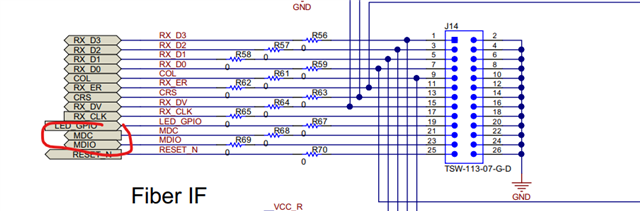
    To run the above script, you don't need to connect a MAC to the DP83822. They just need to use the DP83822 SMI (MDIO and MDC) to access the DP83822 registers. Below is the MDIO and MDC location on the DP83822EVM.

    Do they have the ability to use the MDIO and MDC to access the DP83822 registers? If not, we may need to give them a MSP430 EVM to read/write the DP83822 registers.

    Thanks

    David