This thread has been locked.

If you have a related question, please click the "Ask a related question" button in the top right corner. The newly created question will be automatically linked to this question.

DS90UB954-Q1: Cannot start Analog LaunchPAD with USB2ANY connected

Part Number: DS90UB954-Q1
Other Parts Discussed in Thread: ALP, USB2ANY, , DS90UB9722-Q1

Hi!

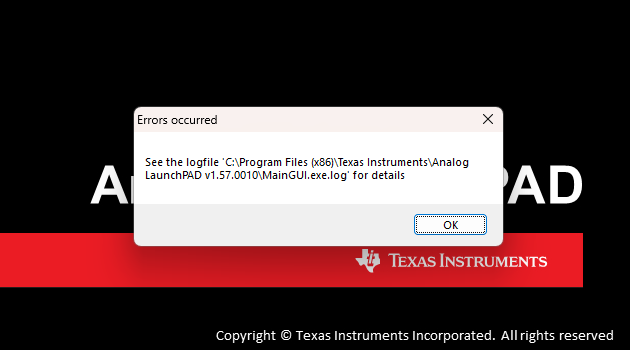
I'm experiencing problems when attempting to use Analog LaunchPad together with USB2ANY. The USB2ANY is the HPA665-001 model. When  I start ALP with the USB2ANY connected, I get an error message (see image). I am however able to get it to go into a demo mode if I start it without USB2ANY connected. This setup worked before and stopped working when I tried to install the ALP-profile_update. Since then I have attempted:

  • uinstalling ALPF + reinstalling
  • uninstalling both ALPF & ALP_profile_update + reinstalling them
  • Rebooting PC (Windows 11 btw)
  • updateing the firmware on the USB2ANY device.
  • Installing everything on a different computer -> it works.

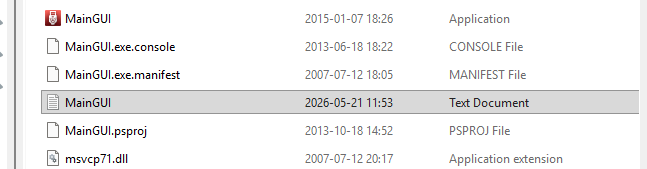
The .MainGUI.exe.log file is not visible in the referenced folder, only a MainGUI.txt which I appended here: MainGUI.log  The other image also shows what I see in .../Analog LaunchPad v.157.0010/....
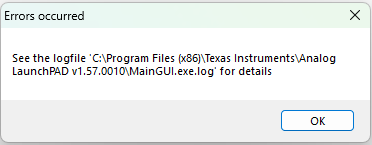
ALP error message.pngALP inside folder.png

A sidenote: I'm able to access the ALP GUI like normal, with everything working the first time after a fresh installation, but not afterwards. When closing it down and restarting it, it behaves like described above. 

I'm not sure what has gone wrong here.. I suspect something has gone wrong during an installation process. I would appreciate any help! 

  • Hi Jonathan,

    Just to clarify, when you do this setup on another computer, you have no issues correct? That is, after the first launch you still have no problems?

    If this is just happening on one computer, then this seems like a driver conflict of some sort. Since you are using the DS90UB954-Q1, this should be a default profile in the base installation of ALP, using the installer 'ALPF_setup_v_1_57_0010.exe'.

    I would recommend to completely delete the 'Analog LaunchPAD v1.57.0010' folder located within Program Files (x86) > Texas Instruments first, then just only run the base installer of ALP. This should have the profile you need and by deleting the folder completely then re-installing the base should help to narrow down possible issues not dealing with the profile updater.

    Best,

    Ethan Woods

  • Hi Ethan,

    thanks for the reply.

    Yes exactly, I have managed to install the same exact installation files on other PCs and gotten it to work problem-free after the first launch. 

    I'm currently testing DS90UB954-Q1 (included among the default profile) but also DS90UB9722-Q1 which I'm using these driver files for. To get the driver working I was supposed to put a 'sparam-script' folder to C:\ti\fpdlink\spar and add the driver profile to C:\Program Files (x86)\Texas Instruments\Analog LaunchPAD v1.57.0010\Profiles + install the ALP_PROFILE_UPDATE_v14_setup_v_1_57_0010. The launch issues come from the base installer only but the first time I started getting issues was when I wanted to add the new profile so I could test DS90UB9722-Q1. The first time I tried installing ALP_PROFILE_UPDATE_v14_setup_v_1_57_0010 I got this message which I found strange but maybe its normal? I get it everytime I try to install it after having installed the base ALP and just press yes.

    I have already tried deleting the Analog LaunchPAD folder you mentioned and gotten the same result as before. I have also looked for several other "remnants" from previous installations such as ALP related stuff in C: \ ti \ ...  and in other hidden folders before re-installing the ALP. It all yielded the same result. Do you have any idea what I could try next?


    Thank you and Best Regards,

    Jonathan

  • Hi Jonathan,

    The pop-up you see where it says that files already exist is normal, you should just press yes and continue.

    I make a mistake in my last reply, the 'ALP_PROFILE_UPDATE_v14_setup_v_1_57_0010.exe' is needed for the base profiles as this update covers them.

    I am unsure of the 'sparam-script' folder you are mentioning, since I have never had to manually install it. Testing it myself, this folder is installed when using the 97xx profile update. Before using the 97xx devices in ALP, have you gotten the profile installer from your local FAE? To use the 9722 on ALP, you need to have the 'ALP_97XXPROFILE_UPDATE_v06.exe' installer from the 9702 folder in CDDS.

    For the next step, I would try to delete all folders, including the ti\fpdlink\spar folder. Then only install the base ALP installer, 'ALPF_setup_v_1_57_0010.exe' alongside the two profile updaters needed for using the 954 and 9722. That is, the base updater 'ALP_PROFILE_UPDATE_v14_setup_v_1_57_0010.exe' and the 97xx profile updater 'ALP_97XXPROFILE_UPDATE_v06.exe'. Doing this has worked for me numerous times on both my laptop and the lab pc, even after uninstalling and instantly reinstalling.

    Unfortunately, I am unable to replicate this problem you are seeing as I am always having good installation and no issues running it after. Since it is local to one device, it leads me to believe there is some sort of installation conflict you are running into that is not visible on the surface or some sort of USB2ANY SDK/Driver issue.

    BR,

    Ethan Woods